IModelListViewBlazor.VirtualScrollingEnabled Property
Specifies whether virtual scrolling is enabled in the List Editor. When enabled, the editor loads records as the user scrolls the page (instead of traditional pagination).
Namespace: DevExpress.ExpressApp.Blazor.SystemModule
Assembly: DevExpress.ExpressApp.Blazor.v26.1.dll
NuGet Package: DevExpress.ExpressApp.Blazor
Declaration
[ModelBrowsable(typeof(IModelListViewBlazorVirtualScrollingVisibilityCalculator))]
bool VirtualScrollingEnabled { get; set; }Property Value
| Type | Description |
|---|---|
| Boolean |
|
Remarks
To enable or disable virtual scrolling in an individual List View, do the following:
- Open the Model Editor for the SolutionName.Blazor.Server\Model.xafml file.
- Navigate to the required List View node: SolutionName | Views | SolutionName.Module.BusinessObjects | ClassName | ClassName_ListView.
- Specify the
VirtualScrollingEnabledproperty.
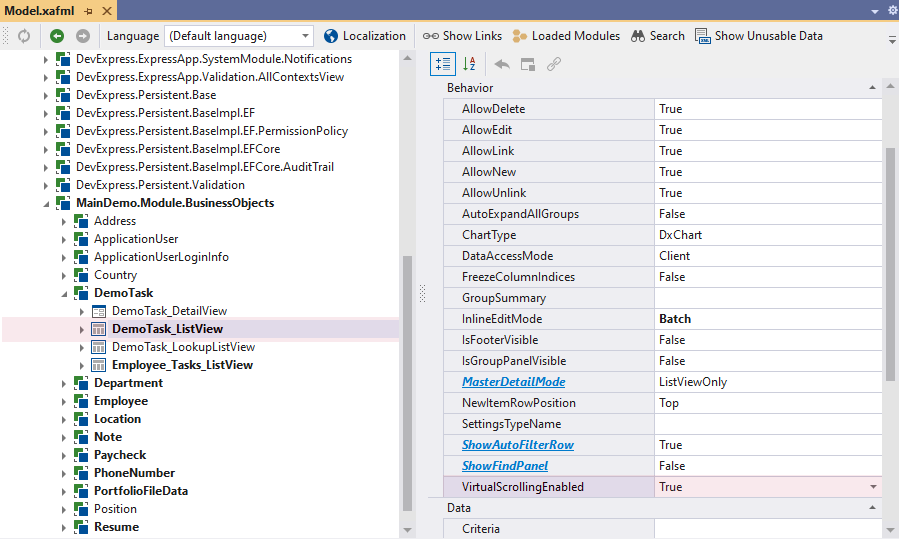
To control virtual scrolling globally, use the IModelOptionsBlazor.VirtualScrollingEnabled property.
See Also