PivotGridControl.UseLegacyFilterPanel Property
Gets or sets whether to use the legacy filter panel.
Namespace: DevExpress.Xpf.PivotGrid
Assembly: DevExpress.Xpf.PivotGrid.v20.2.dll
NuGet Packages: DevExpress.WindowsDesktop.Wpf.PivotGrid, DevExpress.Wpf.PivotGrid
Declaration
Property Value
| Type | Default | Description |
|---|---|---|
| Nullable<Boolean> | false | true, to use the legacy filter panel (Prefilter Panel); otherwise, false. |
Remarks
The new Filter Panel highlights individual field names, field values, and date-time functions to increase the filter expression’s readability.
The legacy Filter Panel displays a filter string.
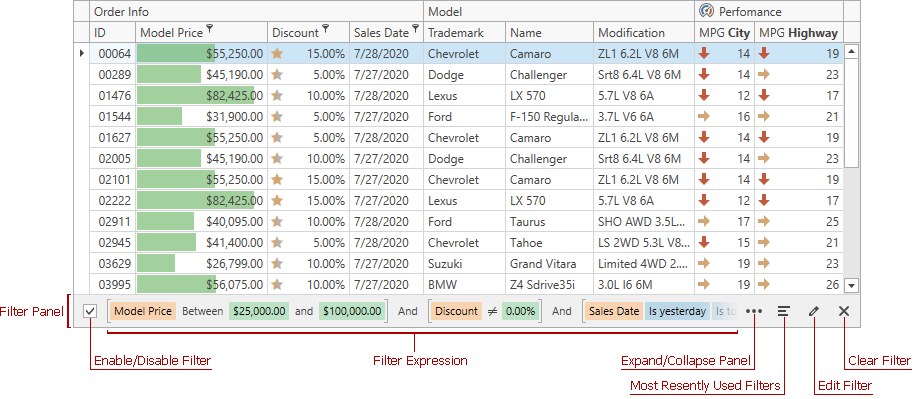
The new Filter Panel.
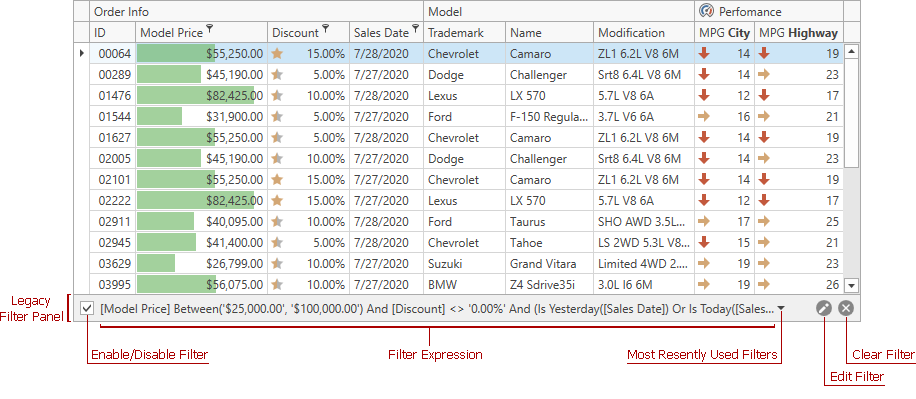
The legacy Filter Panel.
To use the legacy Filter Panel:
- For a specific PivotGridControl, set the
PivotGridControl.UseLegacyFilterPanelproperty to true. - For all controls (PivotGridControl, GridControl, and TreeListControl) in the project, set the CompatibilitySettings.UseLegacyFilterPanel property to true.
See Also