ConnectorShape.StartShapeSiteIndex Property
Gets or sets the index of the connection point on the start shape to which the connector is attached.
Namespace: DevExpress.Docs.Presentation
Assembly: DevExpress.Docs.Presentation.v26.1.dll
NuGet Package: DevExpress.Docs.Presentation
Declaration
Property Value
| Type | Description |
|---|---|
| Int32 | A zero-based index. |
Remarks
The index starts with the top side (0) and increases counterclockwise. Use the shape.Type.Geometry.ConnectionSites.Count property to obtain the number of connection sites for the current shape.
Example
The following code snippet adds a connector between two shapes:
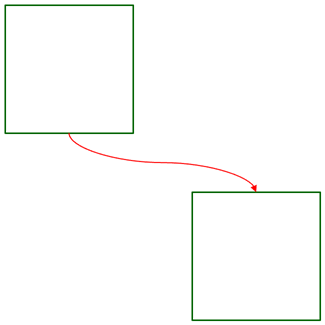
using DevExpress.Docs.Presentation;
using System.Drawing;

namespace PresentationApiSample;

public class Program {
    public static void Main(string[] _) {
        //...

        Shape shape1 = new Shape(ShapeType.Rectangle);
        shape1.Outline = new OutlineStyle { Fill = new SolidFill(Color.DarkGreen), Width = 8 };
        shape1.X = 30;
        shape1.Y = 30;
        shape1.Width = 800;
        shape1.Height = 800;
        slide.Shapes.Add(shape1);

        Shape shape2 = new Shape(ShapeType.Rectangle);
        shape2.Outline = new OutlineStyle { Fill = new SolidFill(Color.DarkGreen), Width = 8 };
        shape2.X = 1200;
        shape2.Y = 1200;
        shape2.Width = 800;
        shape2.Height = 800;
        slide.Shapes.Add(shape2);

        ConnectorShape connector = new ConnectorShape();
        connector.StartShape = shape1;
        connector.EndShape = shape2;
        connector.StartShapeSiteIndex = 2;
        connector.EndShapeSiteIndex = 0;
        connector.Type = ConnectorShapeType.Curved;

        connector.Outline = new LineStyle {
            Fill = new SolidFill(Color.Red),
            Width = 6,
            EndArrowType = ArrowType.TriangleArrow,
            EndLength = ArrowSize.Large,
            EndWidth = ArrowSize.Large
        };
        slide.Shapes.Add(connector);
    }
}
See Also