Bind Blazor Pivot Table to Data
- 8 minutes to read
The DevExpress Blazor Pivot Table supports multiple data-binding approaches optimized for different scenarios:
| In-Memory Data Binding | Server Mode Data Sources | |
|---|---|---|
| Dataset Size | Small/average datasets | Large datasets (500,000+ records) |
| Supported Render Modes | Auto, Server, or WebAssembly | Auto or Server |
| On-Demand Data Loading | All records are stored in memory | Data is loaded in small portions on demand |
| Data Operations Executed By | The Pivot Table component | An underlying ORM service |
Refer to the following sections for additional information.
In-Memory Data Binding
You can bind the Pivot Table component directly to a data collection:
- Assign a C# variable to the Data property.
- Populate this variable with data in the OnInitialized/OnInitializedAsync lifecycle method. The following data types are supported:
- IListSource
- IEnumerable<T>, including ICollection<T> and List<T>
- Add fields to the component. For additional information, refer to the following article: Data Presentation Basics - Fields.
In this data binding mode, the Pivot Table stores all data records in memory and executes all data processing operations in the Blazor application. This increases memory consumption and can affect performance when the dataset is large. In Blazor Server apps, use a Server Mode data source to improve performance.
Bind to an In-Memory Collection
The following code snippet binds the Pivot Table to a sales info list:
@rendermode InteractiveServer

<DxPivotTable Data="SalesData">
    <Fields>
        <DxPivotTableField Field="@nameof(Sales.SaleInfo.Region)"
                           Area="@PivotTableArea.Row"
                           AreaIndex="0" />
        <DxPivotTableField Field="@nameof(Sales.SaleInfo.Country)"
                           Area="@PivotTableArea.Row"
                           SortOrder="@PivotTableSortOrder.Descending"
                           AreaIndex="1" />
        <DxPivotTableField Field="@nameof(Sales.SaleInfo.Date)"
                           GroupInterval="@PivotTableGroupInterval.DateYear"
                           Area="@PivotTableArea.Column"
                           AreaIndex="0"
                           Caption="Year" />
        <DxPivotTableField Field="@nameof(Sales.SaleInfo.Date)"
                           GroupInterval="@PivotTableGroupInterval.DateQuarter"
                           Area="@PivotTableArea.Column"
                           AreaIndex="1"
                           Caption="Quarter" />
        <DxPivotTableField Field="@nameof(Sales.SaleInfo.Amount)"
                           SortOrder="@PivotTableSortOrder.Ascending"
                           Area="@PivotTableArea.Data"
                           SummaryType="@PivotTableSummaryType.Sum" />
    </Fields>
</DxPivotTable>

@code {
    IEnumerable<Sales.SaleInfo> SalesData;
    protected override async Task OnInitializedAsync() {
        SalesData = await Sales.GetSalesAsync();
    }
}

Bind to a Database
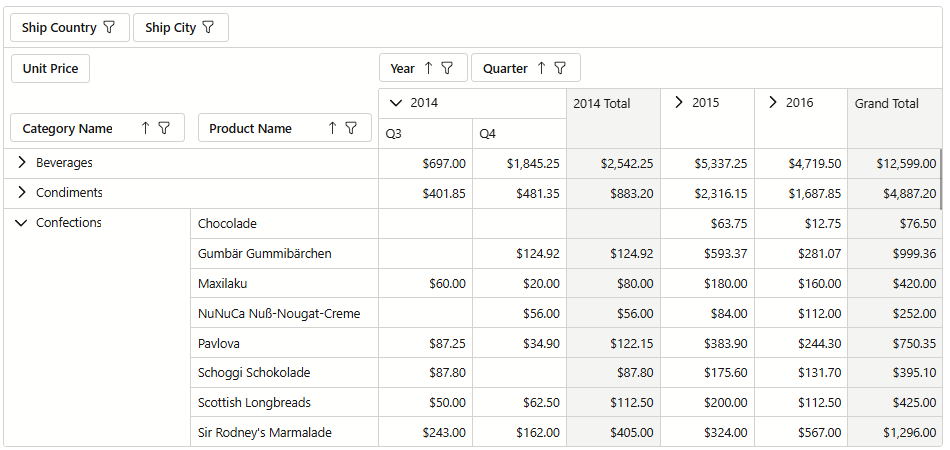
You can load data from a remote data source and bind it to the Pivot Table. The following example uses Entity Framework Core to populate the component with data:
@inject IDbContextFactory<NorthwindContext> NorthwindContextFactory
@implements IDisposable
@using DevExpress.Blazor.PivotTable

<DxPivotTable Data="Data">
    <Fields>
        <DxPivotTableField Field="CategoryName"
                           Area="@PivotTableArea.Row" />
        <DxPivotTableField Field="ProductName"
                           Area="@PivotTableArea.Row" />
        <DxPivotTableField Field="OrderDate"
                           Area="@PivotTableArea.Column"
                           GroupInterval="@PivotTableGroupInterval.DateYear"
                           Caption="Year" />
        <DxPivotTableField Field="OrderDate"
                           Area="@PivotTableArea.Column"
                           GroupInterval="@PivotTableGroupInterval.DateQuarter"
                           Caption="Quarter">
            <ValueTemplate>
                <span>@($"Q{context.Text}")</span>
            </ValueTemplate>
        </DxPivotTableField>
        <DxPivotTableField Field="UnitPrice"
                           Area="@PivotTableArea.Data"
                           SummaryType="@PivotTableSummaryType.Sum" />
        <DxPivotTableField Field="ShipCountry"
                           Area="@PivotTableArea.Filter" />
        <DxPivotTableField Field="ShipCity"
                           Area="@PivotTableArea.Filter" />
    </Fields>
</DxPivotTable>

@code {
    NorthwindContext Northwind { get; set; }
    IEnumerable<object> Data { get; set; }

    protected override async Task OnInitializedAsync() {
        Northwind = NorthwindContextFactory.CreateDbContext();

        var products = await Northwind.Products.ToListAsync();
        var categories = await Northwind.Categories.ToListAsync();
        var orders = await Northwind.Orders.ToListAsync();
        var orderDetails = await Northwind.OrderDetails.ToListAsync();

        Data = (from c in categories
                      join p in products on c.CategoryId equals p.CategoryId
                      join od in orderDetails on p.ProductId equals od.ProductId
                      select new {
                          CategoryName = c.CategoryName,
                          ProductName = p.ProductName,
                          UnitPrice = p.UnitPrice,
                          OrderDate = od.Order.OrderDate,
                          ShipCountry = od.Order.ShipCountry,
                          ShipCity = od.Order.ShipCity
                      })
              .ToList();
    }

    public void Dispose() {
        Northwind?.Dispose();
    }
}
Server Mode Data Sources
In Blazor Server applications, you can bind the DevExpress Blazor Pivot Table component to the following Server Mode data sources:
| Data Source | Underlying Framework |
|---|---|
| EntityServerModeSource | Entity Framework |
| LinqServerModeSource | LINQ to SQL |
Both data sources are designed to work with large data collections. They implement advanced data management algorithms that differ from in-memory data binding in two key areas:
- Data is loaded in small chunks on demand.
- Data shaping operations are delegated to an underlying ORM service (such as EF Core or DevExpress XPO).
Server Mode data sources can reduce load time, optimize client-side memory consumption, and improve component responsiveness and usability.
How to Use Server Mode
Follow these steps to use a Server Mode data source with the Pivot Table:
- Add a reference to the
DevExpress.Data.Linqnamespace. - Create an EntityServerModeSource or LinqServerModeSource instance. Assign a key field name to the instance’s
KeyExpressionproperty. Use theQueryableSourceproperty to define the queryable data source. - Assign the data source instance to DxPivotTable.Data.
- Add fields to the Pivot Table. For additional information, refer to the following article: Data Presentation Basics - Fields.
- Implement the IDisposable interface on the Razor page (use the @implements directive). Within the page’s Dispose method, check the data source instance for
nulland dispose of it.
Bind to Data Using Entity Framework
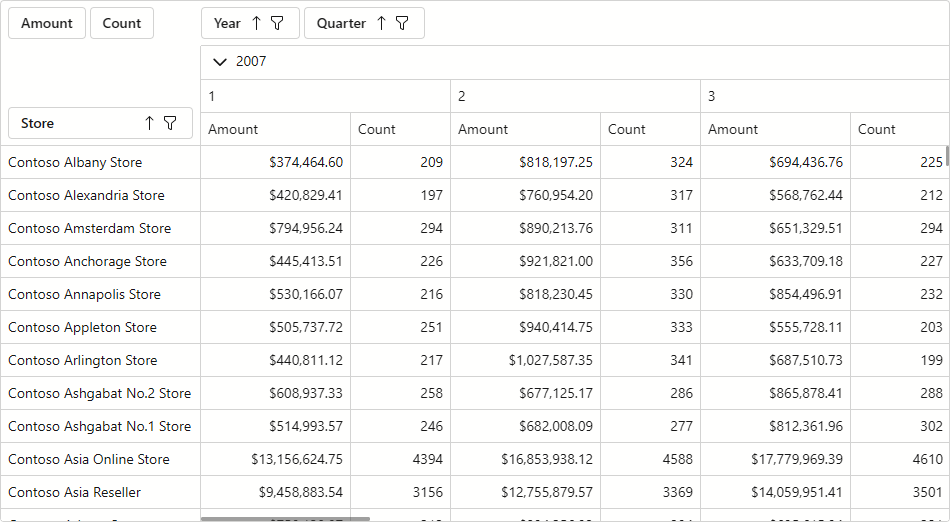
The following example binds the Pivot Table to an EntityServerModeSource:
@using DevExpress.Data.Linq
@inherits OwningComponentBase
@implements IDisposable
@inject Microsoft.Extensions.Configuration.IConfiguration Configuration

<DxPivotTable Data="@EntityServerModeSource"
              VirtualScrollingEnabled="true"
              FilterHeaderAreaDisplayMode="PivotTableFilterHeaderAreaDisplayMode.Never">
    <Fields>
        <DxPivotTableField Field="@nameof(Sale.StoreName)" Caption="Store" Area="PivotTableArea.Row"/>
        <DxPivotTableField Field="@nameof(Sale.Year)" Caption="Year" Area="PivotTableArea.Column"/>
        <DxPivotTableField Field="@nameof(Sale.Quarter)" Caption="Quarter" Area="PivotTableArea.Column" />
        <DxPivotTableField Field="@nameof(Sale.SalesAmount)" Caption="Amount" Area="PivotTableArea.Data" SummaryType="PivotTableSummaryType.Sum" Width="150" />
        <DxPivotTableField Field="@nameof(Sale.Id)" Caption="Count" Area="PivotTableArea.Data" SummaryType="PivotTableSummaryType.Count" />
    </Fields>
</DxPivotTable>
@code {
    IContosoRetailDataProvider ContosoRetailDataProvider { get; set; }
    ContosoRetailDataService ContosoRetailDataService { get; set; }

    EntityServerModeSource EntityServerModeSource;

    protected override void OnInitialized() {
        // Refer to https://docs.microsoft.com/dotnet/api/microsoft.aspnetcore.components.owningcomponentbase
        ContosoRetailDataProvider = ScopedServices.GetRequiredService<IContosoRetailDataProvider>();
        ContosoRetailDataService = ScopedServices.GetRequiredService<ContosoRetailDataService>();

        var connectionString = ConnectionStringUtils.GetPivotTableLargeDataConnectionString(Configuration);
        if(string.IsNullOrEmpty(connectionString)) return;

        EntityServerModeSource = new EntityServerModeSource();
        EntityServerModeSource.KeyExpression = "Id";
        EntityServerModeSource.QueryableSource = ContosoRetailDataService.GetSales();
    }

    public void Dispose() {
        EntityServerModeSource?.Dispose();
    }
}
Limitations
Note the following limitations when using Server Mode data sources:
- These data sources do not work in Blazor WebAssembly applications.
- A Server Mode data source loads data asynchronously in small portions (instead of the entire dataset). To ensure correct data operations, call WaitForDataLoadAsync before methods that read/modify Pivot Table data (GetFields) or change the component state (CollapseAllColumns, LoadLayout, SetFilterCriteria, etc).