Get Started with Blazor Pivot Table
- 5 minutes to read
This topic describes how to create a new project or configure an existing project to use a DevExpress Pivot Table component.
Video Tutorial
AI Skills
DevExpress AI Skills help your AI assistant generate code that uses Pivot Table API in accordance with DevExpress best practices:
Create a New Project (DevExpress Template Kit)
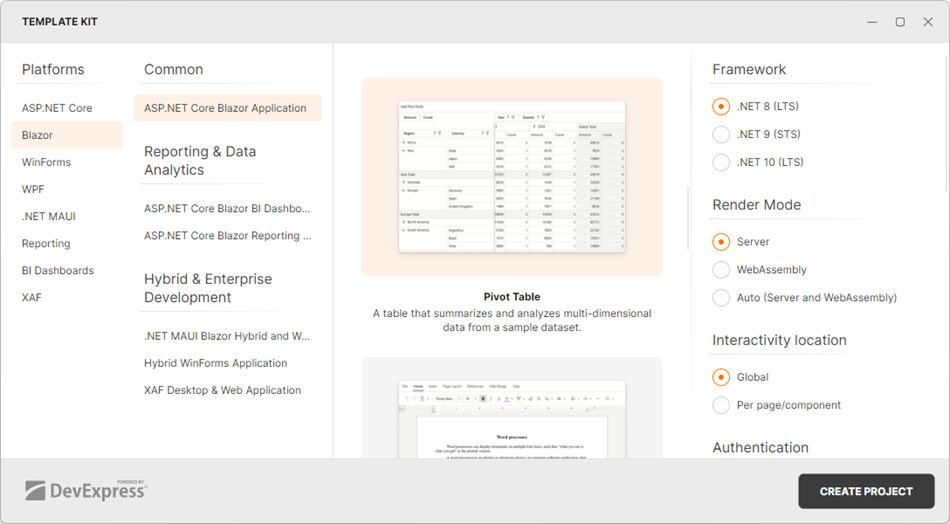
- Use the DevExpress Template Kit to create a Blazor application.
- In the Add views to the application, choose the Pivot Table group and select the Pivot Table tile to create a sample page with the DevExpress Blazor Pivot Table component.
The Template Kit will automatically register component packages, add required static resources, and populate mock data.
Configure an Existing Project
Follow the steps below to incorporate a Pivot Table into an existing Blazor app.
1. Register Common DevExpress Resources
Create an application as described in the following topic: Get Started With DevExpress Components for Blazor.
2. Register Pivot Table Resources
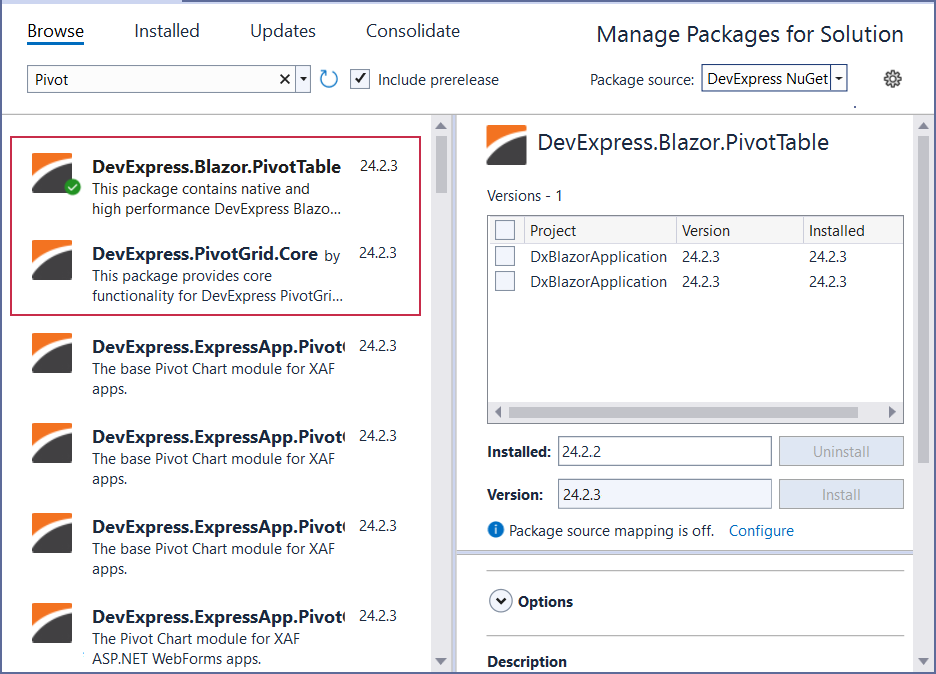
Install the DevExpress.Blazor.PivotTable and DevExpress.PivotGrid.Core NuGet packages.
Select Tools → NuGet Package Manager → Manage NuGet Packages for Solution.
In the invoked dialog, open the Browse tab, select the DevExpress package source, and install the DevExpress.Blazor.PivotTable and DevExpress.PivotGrid.Core NuGet packages.
The DevExpress package is automatically added as a package source to your NuGet configuration files if you use the DevExpress .NET Product Installer.
Register the DevExpress.Blazor.PivotTable namespace in the Components/Imports.razor file:
@using DevExpress.Blazor.PivotTable
Add a Pivot Table Component
Follow the steps below:
- Add the following markup to a
.razorfile:<DxPivotTable>…</DxPivotTable>. - Enable interactive render mode. Refer to Static Render Mode Specifics.
- Bind the component to data.
- Configure the component as your needs dictate. For additional information, refer to Data Presentation Basics.
@rendermode InteractiveServer

<DxPivotTable Data="SalesData">
    <Fields>
        <DxPivotTableField Field="@nameof(Sales.SaleInfo.Region)"
                           Area="@PivotTableArea.Row"
                           AreaIndex="0" />
        <DxPivotTableField Field="@nameof(Sales.SaleInfo.Country)"
                           Area="@PivotTableArea.Row"
                           SortOrder="@PivotTableSortOrder.Descending"
                           AreaIndex="1" />
        <DxPivotTableField Field="@nameof(Sales.SaleInfo.Date)"
                           GroupInterval="@PivotTableGroupInterval.DateYear"
                           Area="@PivotTableArea.Column"
                           AreaIndex="0"
                           Caption="Year" />
        <DxPivotTableField Field="@nameof(Sales.SaleInfo.Date)"
                           GroupInterval="@PivotTableGroupInterval.DateQuarter"
                           Area="@PivotTableArea.Column"
                           AreaIndex="1"
                           Caption="Quarter" />
        <DxPivotTableField Field="@nameof(Sales.SaleInfo.Amount)"
                           SortOrder="@PivotTableSortOrder.Ascending"
                           Area="@PivotTableArea.Data"
                           SummaryType="@PivotTableSummaryType.Sum" />
    </Fields>
</DxPivotTable>

@code {
    IEnumerable<Sales.SaleInfo> SalesData;
    protected override async Task OnInitializedAsync() {
        SalesData = await Sales.GetSalesAsync();
    }
}
Run the application to see the result:
