Search Box in Blazor TreeList
- 32 minutes to read
Set the ShowSearchBox property to true to add a search box to the TreeList. It searches all visible columns, filters rows, and highlights matches. Searches are case-insensitive.
@inject EmployeeTaskService EmployeeTaskService

<DxTreeList Data="TreeListData"
            KeyFieldName="Id"
            ParentKeyFieldName="ParentId"
            ShowSearchBox="true">
    <Columns>
        <DxTreeListDataColumn FieldName="Name" Caption="Task" />
        <DxTreeListDataColumn FieldName="EmployeeName" />
        <DxTreeListDataColumn FieldName="StartDate" />
        <DxTreeListDataColumn FieldName="DueDate" />
    </Columns>
</DxTreeList>

@code {
    List<EmployeeTask> TreeListData { get; set; }

    protected override void OnInitialized() {
        TreeListData = EmployeeTaskService.GenerateData();
    }
}
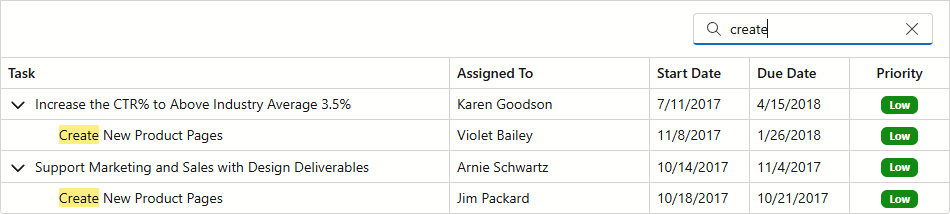
You can customize the following search box settings:
- SearchBoxInputDelay
- Specifies the delay between the last typed character in the search box and the search update.
- SearchBoxNullText
- Specifies the prompt text displayed in the search box when it is empty.
Users can press Ctrl + F to focus the search box.
Tree Filter Modes
The FilterTreeMode property specifies whether the TreeList component displays child or parent nodes for rows that meet search criteria. Available modes include:
EntireBranchThe TreeList displays a node that meets the search criteria and all its parent and child nodes, even if they do not meet that criteria.

NodesThe TreeList ignores parent-child relationships and displays all nodes that meet the search criteria at one level. This mode improves overall performance when the TreeList is bound to a large remote data source.

ParentBranchThe TreeList displays a node that meets the search criteria and all its parent nodes, even if they do not meet that criteria.

When FilterTreeMode is set to Auto (default), the filter tree mode depends on the bound data source. When bound to the GridDevExtremeDataSource, the TreeList component uses Nodes mode to improve performance. In other data binding scenarios, ParentBranch mode is used.
The following example switches the TreeList component to EntireBranch mode:
@inject SpaceObjectDataProvider SpaceObjectDataProvider
<DxTreeList Data="TreeListData"
ChildrenFieldName="Satellites"
FilterTreeMode="TreeListFilterTreeMode.EntireBranch">
<Columns>
<DxTreeListDataColumn FieldName="Name" />
<DxTreeListDataColumn FieldName="TypeOfObject" Caption="Type" />
<DxTreeListDataColumn FieldName="Mass10pow21kg" Caption="Mass, kg" DisplayFormat="N2">
<HeaderCaptionTemplate>Mass, 10<sup>21</sup> × kg</HeaderCaptionTemplate>
</DxTreeListDataColumn>
<DxTreeListDataColumn FieldName="MeanRadiusInKM" Caption="Radius, km" DisplayFormat="N2">
<HeaderCaptionTemplate>Radius, km</HeaderCaptionTemplate>
</DxTreeListDataColumn>
</Columns>
</DxTreeList>
@code {
object TreeListData { get; set; }
protected override async Task OnInitializedAsync() {
TreeListData = SpaceObjectDataProvider.GenerateData();
}
}
Search Text Parse Mode
If the search text contains multiple words, they can be treated as one condition or separate conditions. Use the SearchTextParseMode property to define how the TreeList handles search words:
GroupWordsByAndThe TreeList searches for a row containing all the words from the search query (in any order).
Search Text Filter Condition Result anna canadaannaANDcanadafinds every Anna,Annabelle, andHannafromCanadaGroupWordsByOrThe TreeList searches for a row containing any word from the search query.
Search Text Filter Condition Result anna canadaannaORcanadafinds every Anna,Annabelle, andHanna, and every person fromCanadaExactMatchThe TreeList searches for an exact matching phrase.
Search Text Filter Condition Result anna canadaanna canadafinds every Anna CanadaandHanna Canada
Search Syntax
A search text string can include special characters that allow users to create complex criteria. These characters are ignored in ExactMatch parse mode.
Group Operator for an Individual Criterion
+criterionIn
GroupWordsByOrparse mode, precede a criterion with the plus sign to use the AND operator. Other criteria are combined by the OR operator.Search Text Sample Description Result Samples maria anna +anderscontains either mariaoranna, and must containandersMaria Anderson,Annabelle Anders?criterion1 ?criterion2- In
GroupWordsByAndparse mode, precede criteria with the question mark to group them by the OR logical operator. Other criteria are combined by the AND operator.Search Text Sample Description Result Samples ?maria ?anna anderscontains either mariaoranna, and must containandersMaria Anderson,Annabelle Anders
Specify a Column for a Criterion
The TreeList component seeks the search text in every visible data column (unless a column’s SearchEnabled property is set to false).
column:criterionPrecede a search string with the column’s caption plus a colon character to search against a specific column.
You can use the initial characters of the caption to search against the first column whose caption starts with the specified substring. To search against a column whose caption contains space characters, specify the column’s display caption in quotation marks.
Search Text Sample Description Result Samples cont:mariacontains mariain a column whose caption starts withcontMaria,Maria Anders"contact name":mariacontains mariain a column whose caption starts withcontact nameMaria,Maria Anders
If the specified column is not found, the TreeList seeks the search text in every visible data column.
Criterion With Spaces
"word1 word2"To search for a string that contains a space character, enclose this string in quotation marks.
Search Text Sample Description Result Samples "maria anders"contains maria andersMaria Anders
Logical Not
-criterionPrecede a criterion with the minus sign to exclude records that match this criterion from the result.
Search Text Sample Description Result Samples maria -anderscontains mariabut notandersMaria Lopes
Comparison Operators
The TreeList component uses the Contains operator to build search criteria. You can specify the following comparison operators for an individual criterion:
^criterion- Precede a criterion with the caret sign to display records that start with the specified criterion.
=criterionPrecede a criterion with the equals sign to display records that match the specified criterion.
Search Text Sample Description Result Samples ^annastarts with annaAnnabelle Anders=anaequal to anaAna
Wildcard Masks
~criterionPrecede a condition with the tilde sign to use the following wildcard masks in a criterion:
%to substitute zero or more characters._to substitute a single character.
Search Text Sample Description Result Samples ~an%ostarts with anand ends withoAna Trujillo~%anystarts with any symbol(s) and ends with anyGermany~_ran%starts with any symbol, then ran, and ends with any symbol(s)Francisco Chang,France
Limitations and Specifics
- When bound to a GridDevExtremeDataSource, the TreeList searches and filters data by cell values (instead of display text).
- When bound to a GridDevExtremeDataSource, wildcard masks are unsupported.
- In on demand data loading mode, a search operation forces the component to load all data.
The search engine does not highlight cell content defined with DataColumnCellDisplayTemplate and CellDisplayTemplate properties. Use a template’s HighlightedDisplayText option to add text that can be highlighted:
<CellDisplayTemplate>
    @{
        var employeeTask = (EmployeeTask)context.DataItem;
        var displayText = TreeListRenderHelper.EmployeeTaskPriorityToString(employeeTask) + " priority";
        var badgeClass = employeeTask.Priority switch {
            -1 => "bg-success",
            0 => "bg-info",
            1 => "bg-warning",
            _ => throw new ArgumentException()
        };
    }
    <span class="badge @badgeClass display-text" title="@displayText">@context.HighlightedDisplayText</span>
</CellDisplayTemplate>
Related API
This section lists search-related API members.
| TreeList API member | Type | Description |
|---|---|---|
| SearchBoxInputDelay | Property | Specifies the delay between the last typed character in the search box and the search update. |
| SearchBoxNullText | Property | Specifies the prompt text displayed in the search box when it is empty. |
| SearchBoxTemplate | Property | Specifies a template for the search box. |
| SearchText | Property | Specifies the text that the TreeList uses to filter and highlight data. |
| SearchTextParseMode | Property | Specify how the TreeList searches for a match if the query contains multiple words. |
| ShowSearchBox | Property | Specifies whether the TreeList displays the search box. |
| SearchTextChanged | Event | Fires when the search text changes. |
| Column API member | Type | Description |
|---|---|---|
| SearchEnabled | Property | Specifies whether the TreeList can search text in cells of the current column. |
Task-Based Examples
This section contains code samples that demonstrate search functionality.
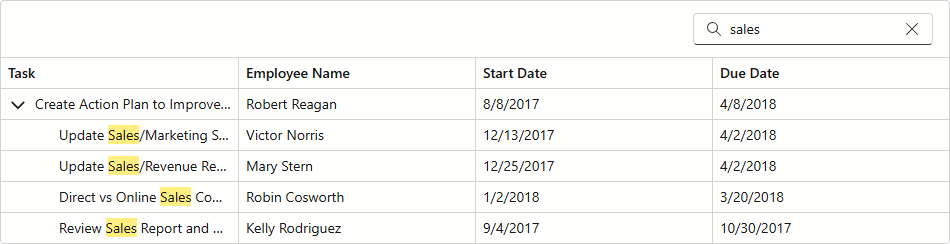
Set Initial Search Criteria
Use the SearchText property to set an initial search string:
@inject EmployeeTaskService EmployeeTaskService

<DxTreeList Data="TreeListData"
            KeyFieldName="Id"
            ParentKeyFieldName="ParentId"
            ShowSearchBox="true"
            SearchText="sales">
    <Columns>
        <DxTreeListDataColumn FieldName="Name" Caption="Task" />
        <DxTreeListDataColumn FieldName="EmployeeName" />
        <DxTreeListDataColumn FieldName="StartDate" />
        <DxTreeListDataColumn FieldName="DueDate" />
    </Columns>
</DxTreeList>

@code {
    List<EmployeeTask> TreeListData { get; set; }

    protected override void OnInitialized() {
        TreeListData = EmployeeTaskService.GenerateData();
    }
}
React to Search Text Changes
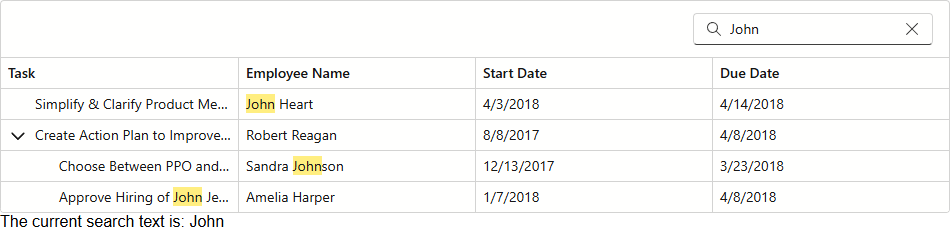
Handle the SearchTextChanged event to create a custom response to search text changes:
@inject EmployeeTaskService EmployeeTaskService

<DxTreeList Data="TreeListData"
            KeyFieldName="Id"
            ParentKeyFieldName="ParentId"
            ShowSearchBox="true"
            SearchText="@searchText"
            SearchTextChanged="OnSearchTextChanged">
    <Columns>
        <DxTreeListDataColumn FieldName="Name" Caption="Task" />
        <DxTreeListDataColumn FieldName="EmployeeName" />
        <DxTreeListDataColumn FieldName="StartDate" />
        <DxTreeListDataColumn FieldName="DueDate" />
    </Columns>
</DxTreeList>
<text>@SearchTextInfo</text>

@code {
    List<EmployeeTask> TreeListData { get; set; }
    string searchText { get; set; }
    string SearchTextInfo { get; set; }

    void OnSearchTextChanged(string newSearchText) {
        SearchTextInfo = "The current search text is: " + newSearchText;
    }
    protected override void OnInitialized() {
        TreeListData = EmployeeTaskService.GenerateData();
    }
}
Exclude Specific Columns from Search Operations
The TreeList component searches in all visible data columns. Set a column’s SearchEnabled property to false to exclude this column from search operations. The following example allows users to search for a task name only:
@inject EmployeeTaskService EmployeeTaskService

<DxTreeList Data="TreeListData"
            KeyFieldName="Id"
            ParentKeyFieldName="ParentId"
            ShowSearchBox="true"
            SearchBoxNullText="Search for a task...">
    <Columns>
        <DxTreeListDataColumn FieldName="Name" Caption="Task" />
        <DxTreeListDataColumn FieldName="EmployeeName" SearchEnabled="false" />
        <DxTreeListDataColumn FieldName="StartDate" SearchEnabled="false" />
        <DxTreeListDataColumn FieldName="DueDate" SearchEnabled="false" />
    </Columns>
</DxTreeList>

@code {
    List<EmployeeTask> TreeListData { get; set; }

    protected override void OnInitialized() {
        TreeListData = EmployeeTaskService.GenerateData();
    }
}

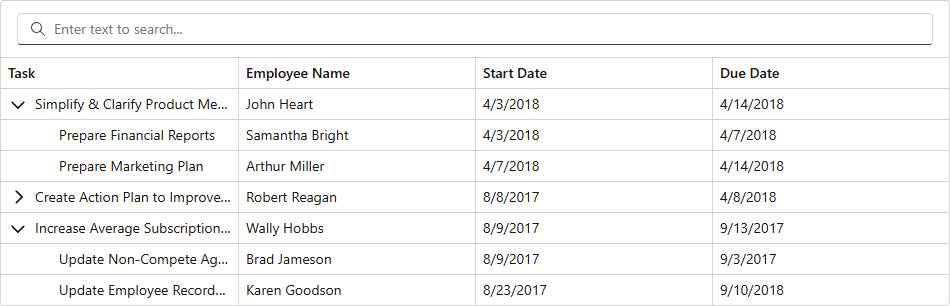
Customize Search Box Appearance
Handle the CustomizeElement event to style the search box. Compare the event argument’s ElementType property with the TreeListElementType.SearchBoxContainer value to determine whether the processed element is the search box:
@inject EmployeeTaskService EmployeeTaskService

<DxTreeList Data="TreeListData"
            KeyFieldName="Id"
            ParentKeyFieldName="ParentId"
            ShowSearchBox="true"
            CustomizeElement="TreeList_CustomizeElement" >
    <Columns>
        <DxTreeListDataColumn FieldName="Name" Caption="Task" />
        <DxTreeListDataColumn FieldName="EmployeeName" SearchEnabled="false" />
        <DxTreeListDataColumn FieldName="StartDate" SearchEnabled="false" />
        <DxTreeListDataColumn FieldName="DueDate" SearchEnabled="false" />
    </Columns>
</DxTreeList>

@code {
    List<EmployeeTask> TreeListData { get; set; }

    protected override void OnInitialized() {
        TreeListData = EmployeeTaskService.GenerateData();
    }
    void TreeList_CustomizeElement(TreeListCustomizeElementEventArgs e) {
        if (e.ElementType == TreeListElementType.SearchBoxContainer) {
            e.Style = "Width: 100%";
        }
    }
}
Implement a Custom Search Box Editor
The SearchBoxTemplate property allows you to use a custom editor as a search box. The following code snippet uses the DxDateEdit<T> component to search for dates in the TreeList:
@inject EmployeeTaskService EmployeeTaskService

<DxTreeList Data="TreeListData"
            KeyFieldName="Id"
            ParentKeyFieldName="ParentId"
            ShowSearchBox="true">
    <Columns>
        <DxTreeListDataColumn FieldName="Name" Caption="Task" SearchEnabled="false" />
        <DxTreeListDataColumn FieldName="EmployeeName" SearchEnabled="false" />
        <DxTreeListDataColumn FieldName="StartDate"  />
        <DxTreeListDataColumn FieldName="DueDate" />
    </Columns>
    <SearchBoxTemplate>
        <DxDateEdit NullText="Search for a date..."
                    Date="GetDateEditValue(context.SearchText)"
                    DateChanged="(DateOnly? v) => context.SearchText = v.ToString()"
                    ClearButtonDisplayMode="DataEditorClearButtonDisplayMode.Auto" />
    </SearchBoxTemplate>
</DxTreeList>

@code {
    List<EmployeeTask> TreeListData { get; set; }

    protected override void OnInitialized() {
        TreeListData = EmployeeTaskService.GenerateData();
    }
    DateOnly? GetDateEditValue(string searchText) {
        if (string.IsNullOrEmpty(searchText))
            return null;
        return DateOnly.FromDateTime(Convert.ToDateTime(searchText));
    }
}

Implement an External Search Box
The following code snippet uses the SearchText property to implement an external search editor for the TreeList:
@inject EmployeeTaskService EmployeeTaskService

<div>
    <DxSearchBox @bind-Text="@TreeListSearchText"aria-label="Search" />
</div>
<DxTreeList Data="TreeListData"
            KeyFieldName="Id"
            ParentKeyFieldName="ParentId"
            SearchText="@TreeListSearchText">
    <Columns>
        <DxTreeListDataColumn FieldName="Name" Caption="Task" />
        <DxTreeListDataColumn FieldName="EmployeeName" />
        <DxTreeListDataColumn FieldName="StartDate" />
        <DxTreeListDataColumn FieldName="DueDate" />
    </Columns>
</DxTreeList>

@code {
    List<EmployeeTask> TreeListData { get; set; }
    string TreeListSearchText { get; set; }

    protected override void OnInitialized() {
        TreeListData = EmployeeTaskService.GenerateData();
    }
}
