IModelListViewBlazor.VirtualScrollingEnabled Property
Specifies whether virtual scrolling is enabled in DxGridListEditor. When enabled, the List Editor loads records as the user scrolls (instead of traditional pagination).
Namespace: DevExpress.ExpressApp.Blazor.SystemModule
Assembly: DevExpress.ExpressApp.Blazor.v25.1.dll
NuGet Package: DevExpress.ExpressApp.Blazor
Declaration
[ModelBrowsable(typeof(IModelListViewBlazorVirtualScrollingVisibilityCalculator))]
bool VirtualScrollingEnabled { get; set; }Property Value
| Type | Description |
|---|---|
| Boolean |
|
Remarks
To disable virtual scrolling in an individual List View, open Model Editor for your ASP.NET Core Blazor application, navigate to the List View, and specify false for the VirtualScrollingEnabled property:
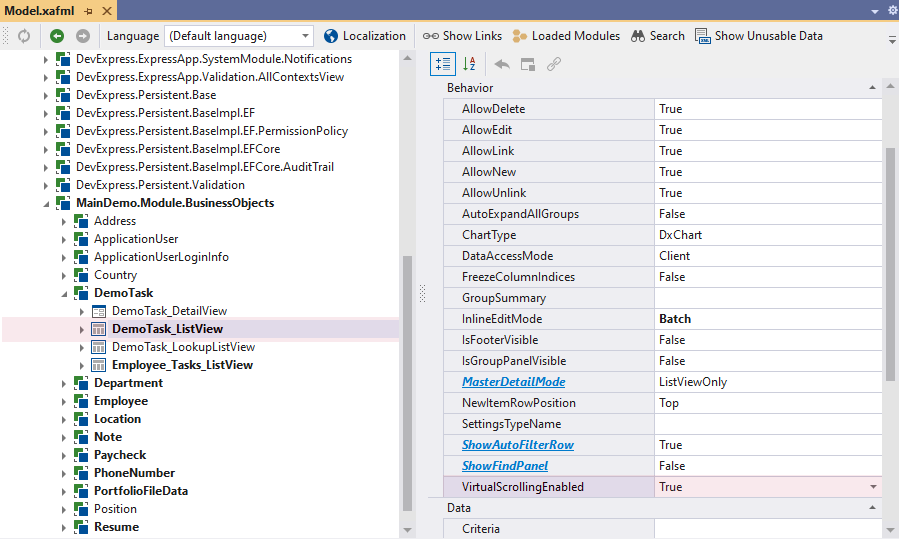
To disable virtual scrolling globally, use the IModelOptionsBlazor.VirtualScrollingEnabled property.
See Also