DevExpress .NET Reports for Web and Desktop
- 9 minutes to read
DevExpress Reports is a comprehensive embedded reporting platform for web and desktop applications. It enables developers to create, modify, convert, print, and export reports directly within their .NET applications without external tools or services.
The reporting platform fits enterprise-scale applications and cloud-ready architectures, and supports server-side and client-side rendering. Our SkiaSharp-based drawing engine ensures consistent document rendering and Excel, Word, and PDF output regardless of the target deployment platform.
System & Environment Requirements
| Category | Supported Technologies |
|---|---|
| Framework | .NET 8, .NET 9, .NET 10 .NET Framework 4.6.2+ |
| IDE | Microsoft Visual Studio 2019 / 2022 / 2026 Visual Studio Code (VS Code) JetBrains Rider |
| Operating System | Windows, Linux, macOS |
| Hosting Environment | Microsoft Azure, Amazon Web Services (AWS): App Service, Docker Containers, Functions |
Refer to the following help topic for platform-specific information: System Requirements.
Supported Platforms
DevExpress Reports supports the following platforms. Select a link in the table to see platform-specific documentation and getting started guides.
Desktop | Web (ASP.NET) | Web (JavaScript) |
AI-assisted Development
Use the following AI-coding assistant extensions to develop applications with DevExpress Reports more efficiently:
- DevExpress MCP Server
- Connects GitHub Copilot and other AI assistants to DevExpress documentation for accurate code generation without leaving the IDE.
- DevExpress AI Skills
- Provides reusable AI skills for report generation and modification at runtime, in Visual Studio and JetBrains Rider Report Designers, and for integration of reporting components in ASP.NET Core and Blazor applications.
- Custom Copilot Agent
- A custom GitHub Copilot agent for report development in Visual Studio and JetBrains Rider Report Designers.
Supported Databases and Data Source Types
DevExpress Reports supports all major datasource providers. You can also bind a report to XML data or any data object that implements IList, IList<T>, and IEnumerable<T> interfaces.
-
MS SQL Server, MySQL, SQLite, PostgreSQL, Oracle, Firebird, MS Access, Google BigQuery, Teradata, Amazon Redshift, etc.
- Standard .NET Data Providers
- Microsoft Excel Workbook and CSV
- MongoDB
- JSON
- XML
- Entity Framework
- DevExpress XPO – ORM Library
- Data Federation (DevExpress Data Library)
What’s Inside
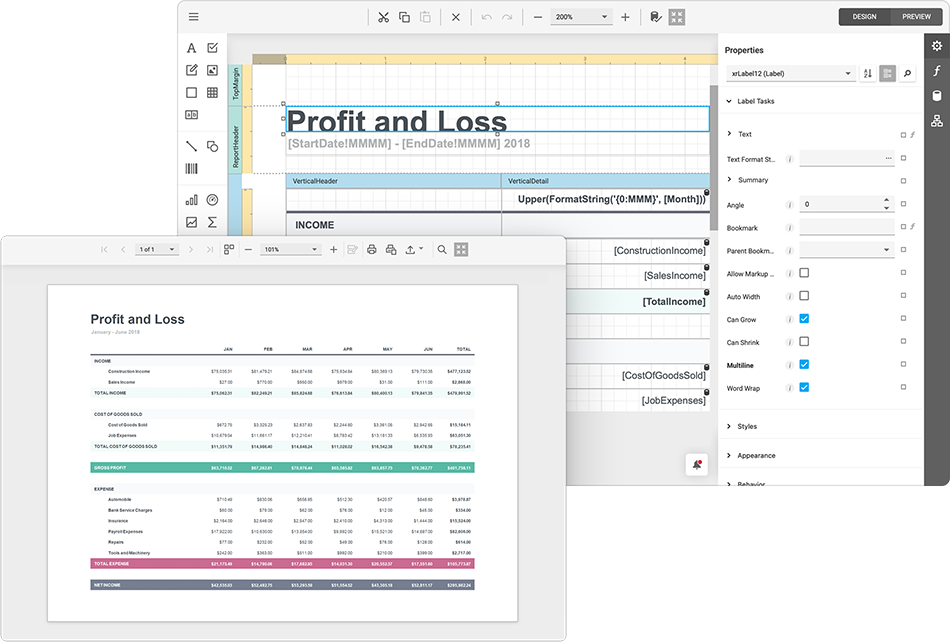
DevExpress Reports includes a complete set of design-time and runtime components that cover the full reporting lifecycle. The platform provides IDE-integrated report designers, end-user report designers, and document viewers for desktop and web applications. All components share a unified reporting engine and produce consistent output regardless of target framework or UI technology.
IDE-integrated Report Designers
DevExpress Reports ships with IDE-integrated report designers that allow developers to create, edit, and preview reports directly within their preferred development environment:
- Microsoft Visual Studio
- Microsoft Visual Studio Code
- JetBrains Rider

Report Designers support design-time data binding, expressions, scripting, parameters, and conditional formatting, and include guided report and data source wizards. Integrated AI-assisted features increase productivity during report creation.
Read the following help topics for additional information:
- Report Designer for Visual Studio
- Report Designer for Visual Studio Code
- Report Designer for JetBrains Rider
End-User Report Designers
DevExpress Reports includes a fully customizable and embeddable End-User Report Designer that allows users to create and modify reports at runtime, with functionality comparable to the IDE Report Designer. Users have access to most report design tools, including layout configuration, data binding, expressions, parameters, scripting, conditional formatting, and interactive preview.
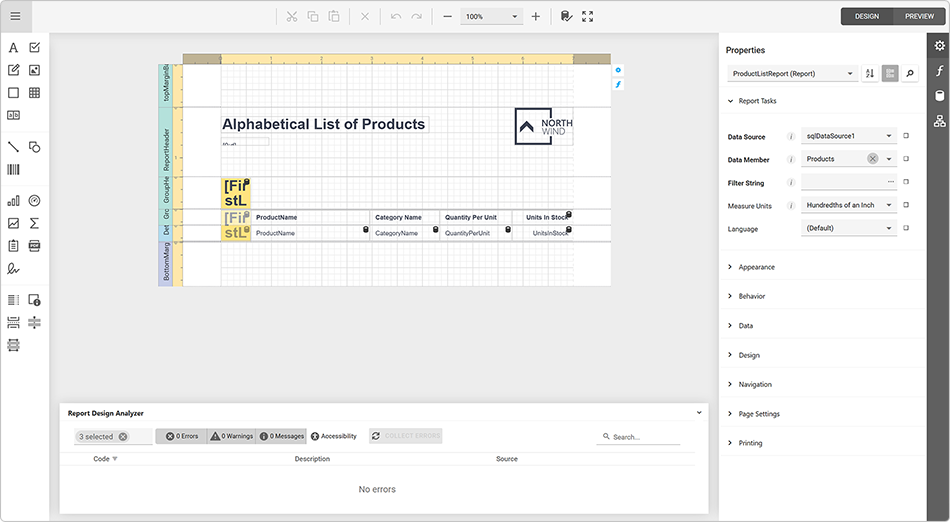
Refer to the following help topics for additional information:
- Web End-User Report Designer (ASP.NET, Blazor, Angular, React, Vue)
- WinForms End-User Report Designer
- WPF End-User Report Designer
- Create an End-User Report Designer
Document Viewers (Print Preview)
Document viewers enable users to preview, navigate, print, and export reports. Document viewer capabilities include interactive sorting, parameterized filtering, and drill-down navigation that allow users to explore large and complex documents. Viewers support bookmarks, document maps, and tables of contents to simplify report navigation.
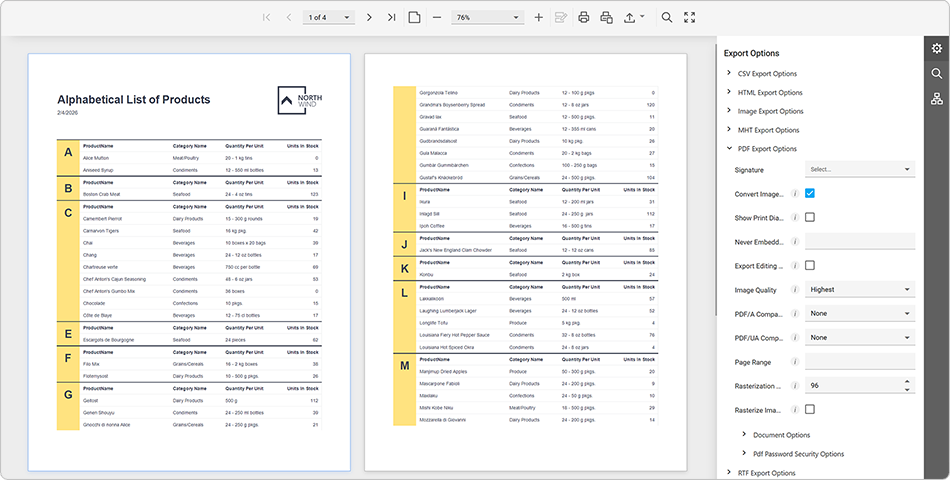
- Web, JavaScript-based Document Viewer (ASP.NET, Blazor, Angular, React, Vue)
- Native Report Viewer for Blazor
- WinForms Document Viewer (Print Preview)
- WPF Document Viewer
- Create a Document Viewer and Print Preview Form
Report Controls and UI Elements
DevExpress Reports includes over 20 built-in report controls and UI elements to help you deliver interactive and data-rich reports (charts, cross-tabs and pivot tables, subreports, shapes, barcodes, table of contents, etc.). Report controls are basic building blocks that you can drop onto report bands, bind to data fields, and customize based on your preferences.
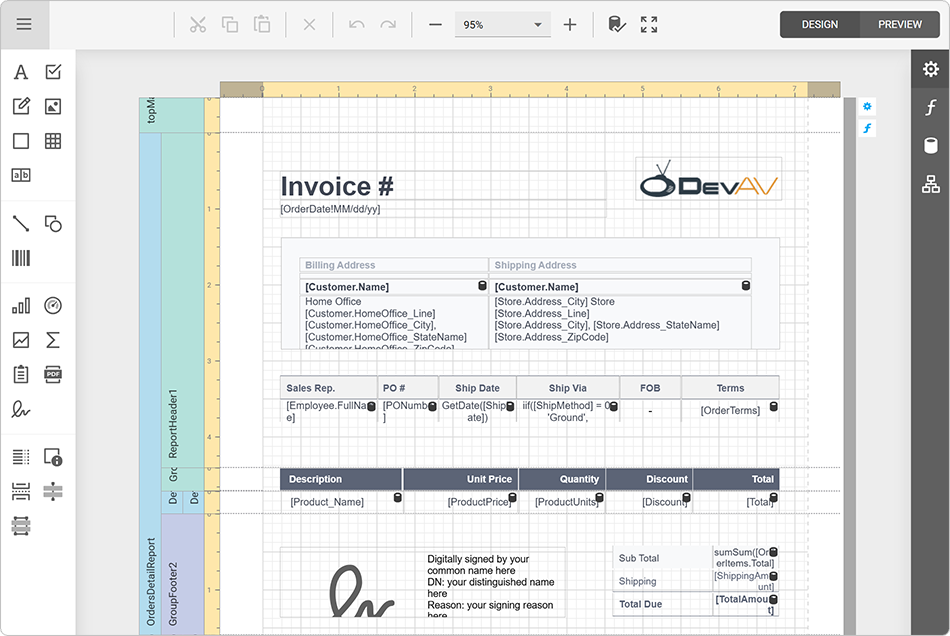
Refer to the following help topic for additional information: Report Controls.
Report Types
From simple tabular, letter, and invoice reports to advanced master-detail, drill-down, and cross-tab reports, DevExpress Reports supports a wide range of report types.
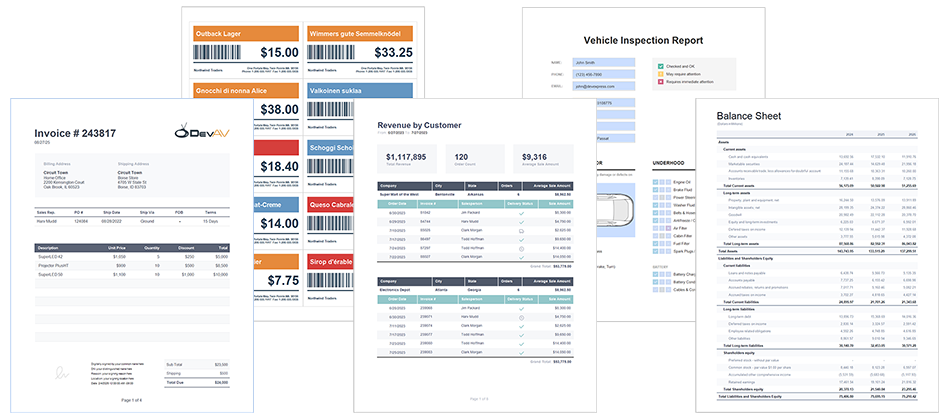
Refer to the following help topic for additional information: Report Types.
Getting Started
Follow IDE-specific guides to create your first report:
- Create a Report in Microsoft Visual Studio
- Create a Report in JetBrains Rider
- Create a Report from A to Z
- Create Different Report Types (Step-by-Step Guides)
YouTube Tutorials
Watch our step-by-step video tutorials to quickly get started with DevExpress Reports. These tutorial videos walk you through report creation, customization, preview, and integration across supported platforms.
Project Templates
Use our cross-IDE Project Template Kit to create reports in minutes. The Template Kit provides a unified project creation experience across Microsoft Visual Studio, Visual Studio Code, and JetBrains Rider.

Project templates target .NET 8+ (C#) and generate ready-to-run applications with pre-configured Report Viewers and/or End-User Report Designers. Generated projects include sample reports, data bindings, and recommended infrastructure (such as report storage and document caching).
The Template Kit supports desktop, web, and full-stack scenarios (WinForms, WPF, ASP.NET Core, Blazor, Angular, React) and can be used both from the IDE UI and the command line.
Refer to the following help topic for additional information: Cross-IDE Template Kit (Windows, macOS).
Demos
You can run desktop and web demos locally from the Windows Start menu or from the DevExpress menu in Visual Studio after installation.
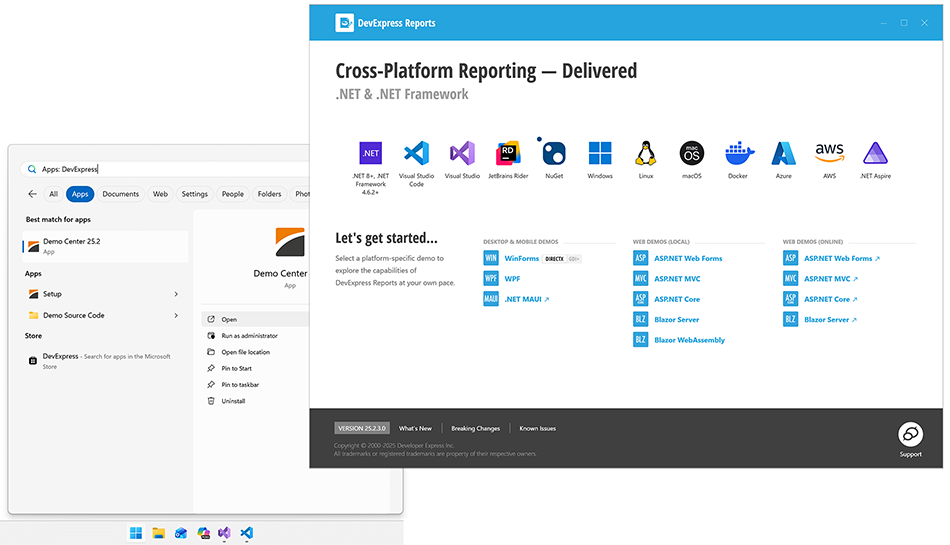
Online Demos:
- ASP.NET Core Reporting Demos
- Blazor Reporting Demos
- ASP.NET Web Forms Reporting Demos
- ASP.NET MVC Reporting Demos
Read the following topic for detailed information: DevExpress Report Demo Apps.
Reporting Features
- Support for Major Data Providers
- Simplified Migration (Convert Third-Party Reports to DevExpress Reports)
- Printing and Export (PDF, DOCX, RTF, XLS, XLSX, TXT, MHT, CSV, HTML, SVG/Bitmap)
- Report Parameters
- Dynamic Report Filters
- Data Shaping & Analysis
- Appearance Customization
- Report Localization
- Cloud Integration
- .NET Aspire Integration
- Flexible Deployment Options
- Accessibility Compliance (WCAG 2.2 AA and Section 508)
AI-powered Extensions
DevExpress Reports includes the following AI-powered features:
- AI-powered Localization
- Instantly translate all localizable report properties/strings to a different language.
- AI-powered Inline Translation
- Translate report content directly within the Document Viewer (Preview). Users can export or print the translated document without additional processing.
- Text Summarization
- Summarize/condense report content and highlight key information instantly.
- AI-generated Test Data
- Preview reports with AI-generated test data before connecting to a live source.
- Prompt-to-Expression
- Transform text descriptions into data binding expressions and filter criteria.
- Prompt-to-Report
- Generate a report based on a natural language prompt.
- AI-powered Report Modification
- Create or modify report layout/elements using AI Assistant-powered chat (available for .NET 8+ projects).
Refer to the following help topic for additional information: AI-powered Extensions for DevExpress Reporting.
Try DevExpress Reports in Your Project
DevExpress Reports offers flexible licensing options so that you can choose the model that best fits your project scope and platform requirements.
Free 30-Day Trial
Download our .NET & JavaScript Unified Component Installer to start your fully-functional, free 30-day trial today.
Licensing and Pricing Information
DevExpress .NET Reports is included in the following DevExpress subscriptions. Choose a subscription that aligns with your development needs.
- Standalone DevExpress Reports Subscription
- A focused option for teams that need reporting functionality only. Learn more
- Multi-Platform DevExpress Subscriptions
The following DevExpress subscriptions include .NET Reports along with a comprehensive collection of UI components, data visualization tools, layout controls, and productivity features for .NET and JavaScript platforms:
- Platform-Specific DevExpress Subscriptions
-
See the following help topic for additional information: Platform-Specific Subscriptions.
What’s New in v26.1 (Release Notes)
New features include:
- .NET 10 & Visual Studio 2026 Support
- Design Reports in JetBrains Rider
- New Project and Item Templates
- DateOnly and TimeOnly Support
- New AI-powered Report Extensions
- And more
Refer to the following help topic for the complete list of new features: v26.1 Release Notes.
Tip
Visit our website to explore new features/capabilities available across the entire DevExpress product line: What’s New in our Latest Update.
Frequently Asked Questions
Can I display/print third-party reports?
We offer a free conversion tool for Crystal Reports, MS Access Reports, RDLC (SQL Server Reporting Services), and ActiveReports. Learn more at: GitHub – DevExpress Reports Converter.
Can I create reports if I work on Linux or macOS?
Yes, use our Visual Studio Code Report Designer extension for this purpose.
Can I use DevExpress Reports in my Angular, React, or Vue application?
Yes, if your application uses .NET or .NET Core on the backend. Our Web Document Viewer and Web Report Designer components are implemented using HTML/JS and can be integrated into any JavaScript-based Reporting application. We also offer Document Viewer and Report Designer wrappers for Angular. Of course, DevExpress Reports can also be used in any .NET or .NET Core powered application.
I have a web application but my framework is not on the list. What integration options are available to me?
Our reporting tools (the GUI) can be integrated into any application designed to render HTML and interpret JS code. For example, a PHP Leravel app that integrates a WebView. However, report document generation itself can only happen using a .NET backend.
Can I customize the UI of DevExpress Report Viewer and Report Designer components?
Yes. DevExpress Reports offers extensive customization capabilities. You can create custom report controls, introduce new expression functions, customize report and data source wizards. To customize the UI of our Viewer and Designer components (dock panels, toolbars, parameter editors) in your application code or use editors, grid controls, and other components separately, you need an active subscription for the corresponding platform.
Do my customers need to purchase a separate license to create and edit reports?
No. Your customers do not need to purchase a license if they use the DevExpress End-User Report Designer as a part of your software. The End-User Report Designer is a royalty-free cross-platform component. Please refer to our license agreement for more information: https://www.devexpress.com/support/eulas/
Troubleshooting and Best Practices
- Visual Studio Report Designer: Troubleshooting
- Web Reporting: Troubleshooting
- Memory Usage Best Practices