Customize the Report Viewer Tab Panel
- 3 minutes to read
Use the following Report Viewer API to customize the Tab Panel appearance:
- The OnCustomizeTabs event
- Handle this event to access Report Viewer tabs and add a custom tab.
- The TabPanelModel property
- Use this property to access Tab Panel settings. Use members of the TabPanelModel class to access tabs and their settings.
- TabPanelWidth, TabPanelMinWidth, and TabPanelMaxWidth properties
- Use these properties to specify the default, minimum, and maximum width of the Tab Panel.
Tip
Use DevExpress AI Skills to integrate, configure, and customize reporting components in Blazor applications with your preferred AI coding assistant, such as GitHub Copilot or Claude Code.
Hide Tabs in Tab Panel
Use the Report Viewer’s TabPanelModel property to access the tab collection. Set the tab’s Visible property to false to hide the tab.
The following code sample hides all tabs in the Tab Panel. If all tabs are hidden, the Report Viewer does not display the panel:

@page "/tabpanel/"

@using DevExpress.Blazor.Reporting
@using DevExpress.XtraReports.UI
@using BlazorCustomization.PredefinedReports
@using DevExpress.Blazor.Reporting.Models

<div @ref="viewerComponent" style="width: 100%; height: 1000px;">
    <DxReportViewer @ref="reportViewer"
                    Report="Report" />
</div>

@code {
    DxReportViewer reportViewer;
    XtraReport Report = new TableReport();
    private ElementReference viewerComponent;

    protected override void OnAfterRender(bool firstRender) {
        if(firstRender) {
      reportViewer.TabPanelModel[TabContentKind.Parameters].Visible = false;
      reportViewer.TabPanelModel[TabContentKind.Search].Visible = false;
      reportViewer.TabPanelModel[TabContentKind.ExportOptions].Visible = false;
      reportViewer.TabPanelModel[TabContentKind.DocumentMap].Visible = false;    }
    base.OnAfterRender(firstRender);
}

}
You can also use the OnCustomizeTabs event to hide a tab:
@page "/reportviewer/"

@using DevExpress.Blazor.Reporting
@using DevExpress.Blazor.Reporting.Models
@using DevExpress.XtraReports.UI

<DxReportViewer @ref="reportViewer"
                Report="Report"
                OnCustomizeTabs="OnCustomizeTabs" />

@code {
    DxReportViewer reportViewer;
    XtraReport Report = new TestReport();

    void OnCustomizeTabs(List<TabModel> tabs) {
        foreach (TabModel tab in tabs) {
            if (tab.Id == "ReportViewer_Tabs_ExportOptions")
            {
                tab.Visible = false;
            }
        }
    }
}
Add New Tab to Tab Panel
Use the OnCustomizeTabs event to access the Report Viewer’s collection of tabs and add a new custom tab.
To add a new tab:
- Define a new TabModel object. Implement the ITabContentModel interface to specify tab visibility. Use the TabModel.TabTemplate property to specify template content for the tab. Set the Kind property to
Custom. - Add the created
TabModelobject to the Viewer’s tab collection in theOnCustomizeTabsevent handler.
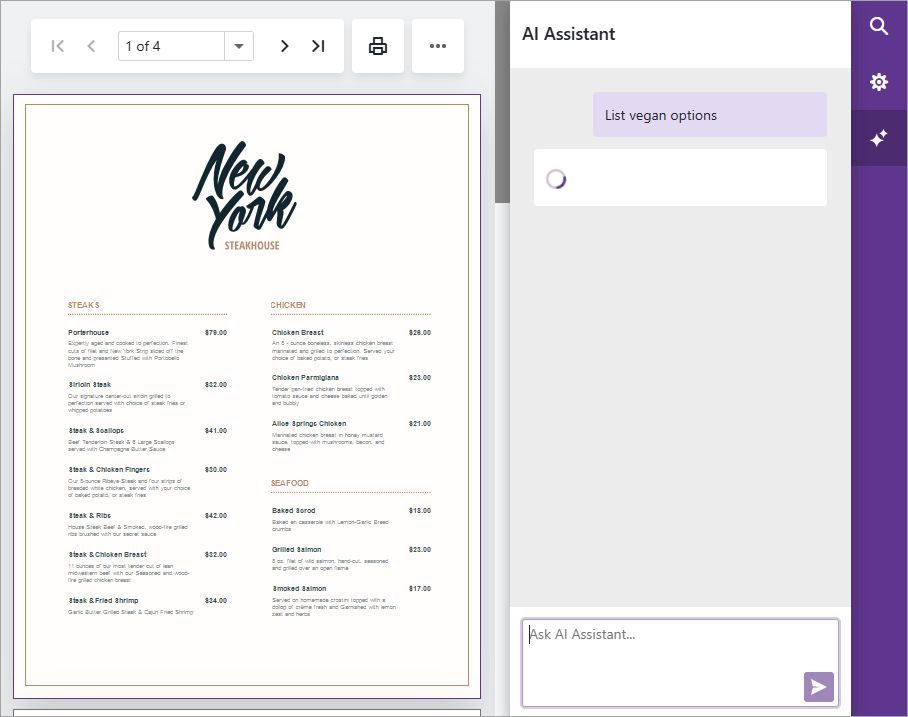
The following example adds an AI Assistant tab that allows users to ask questions about report content. The AI Assistant tab uses the DxAIChat component to display requests and responses. For implementation details, refer to to the example readme:
@using DevExpress.AI.Samples.Blazor.Components.Reporting
@using DevExpress.AI.Samples.Blazor.Models
@using DevExpress.Blazor.Reporting.Models

@* ... *@
<DxReportViewer @ref="Viewer" CssClass="my-report" OnCustomizeTabs="OnCustomizeTabs">
</DxReportViewer>
@* ... *@

@code {
    // ...
    void OnCustomizeTabs(List<TabModel> tabs) {
        tabs.Add(new TabModel(new UserAssistantTabContentModel(() => CurrentReport), "AI", "AI Assistant") {
            TabTemplate = (tabModel) => {
                return (builder) => {
                    builder.OpenComponent<AITabRenderer>(0);
                    builder.AddComponentParameter(1, "Model", tabModel.ContentModel);
                    builder.CloseComponent();
                };
            }
        });
    }
}
The following image illustrates the Report Viewer with an AI Assistant tab: