TextRunBase.TextProperties Property
Gets or sets the text settings applied to the text run.
Namespace: DevExpress.Docs.Presentation
Assembly: DevExpress.Docs.Presentation.v25.2.dll
NuGet Package: DevExpress.Docs.Presentation
Declaration
Property Value
| Type | Description |
|---|---|
| TextProperties | The text settings applied to the text run. |
Example
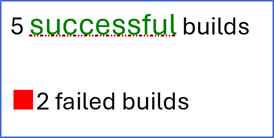
The following example adds a shape with two paragraphs and configures text settings:
using DevExpress.Docs.Presentation;

namespace PresentationApiSample;

public class Program {
    public static void Main(string[] _) {
        //...

        Shape shape = new Shape(ShapeType.Rectangle);
        shape.Outline = new OutlineStyle { Fill = new SolidFill(Color.RoyalBlue), Width = 4 };

        TextArea textArea = new TextArea();
        textArea.Paragraphs.Clear(); // Removes the default paragraph.
        TextParagraph paragraph1 = new TextParagraph();
        paragraph1.Runs.Add(new TextRun ("5 "));
        paragraph1.Runs.Add(new TextRun {
            Text = "successful",
            TextProperties = new TextProperties {
                Fill = new SolidFill(Color.Green),
                FontSize = 22,
                UnderlineFill = new SolidFill(Color.Black),
                UnderlineType = TextUnderlineType.HeavyDotDotDash,
                UnderlineStyle = new UnderlineStyle(new OutlineStyle { Fill = new SolidFill(Color.Red), Width = 2 }),

            }
        });
        paragraph1.Runs.Add(new TextRun (" builds"));
        textArea.Paragraphs.Add(paragraph1);

        TextParagraph paragraph2 = new TextParagraph();
        paragraph2.Runs.Add(new TextRun ("2 failed builds"));
        paragraph2.Properties = new ParagraphProperties() {
            SpacingBefore = new TextSpacing(TextSpacingType.Point, 30),
            ListBulletColor = new TextBulletColor(new OfficeColor(Color.Red)),
            ListBullet = new CharListBullet('■'),
            ListBulletSize = new TextBulletSize(TextBulletSizeType.Point, 30)
        };
        textArea.Paragraphs.Add(paragraph2);
        shape.TextArea = textArea;

        shape.X = 30;
        shape.Y = 30;
        shape.Width = 800;
        shape.Height = 400;

        slide.Shapes.Add(shape);
    }
}
See Also