LineStyle.EndWidth Property
Gets or sets the width of the line’s end arrowhead.
Namespace: DevExpress.Docs.Presentation
Assembly: DevExpress.Docs.Presentation.v26.1.dll
NuGet Package: DevExpress.Docs.Presentation
Declaration
Property Value
| Type | Description |
|---|---|
| ArrowSize | The size. |
Available values:
| Name | Description |
|---|---|
| Small | Specifies the small size. |
| Medium | Specifies the medium size. |
| Large | Specifies the large size. |
Example
The following code snippet adds a connector between two shapes:
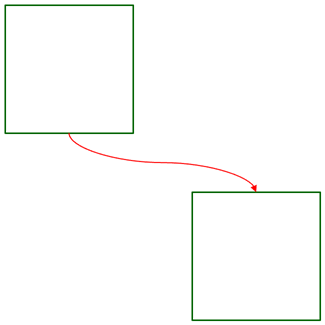
using DevExpress.Docs.Presentation;
using System.Drawing;

namespace PresentationApiSample;

public class Program {
    public static void Main(string[] _) {
        //...

        Shape shape1 = new Shape(ShapeType.Rectangle);
        shape1.Outline = new OutlineStyle { Fill = new SolidFill(Color.DarkGreen), Width = 8 };
        shape1.X = 30;
        shape1.Y = 30;
        shape1.Width = 800;
        shape1.Height = 800;
        slide.Shapes.Add(shape1);

        Shape shape2 = new Shape(ShapeType.Rectangle);
        shape2.Outline = new OutlineStyle { Fill = new SolidFill(Color.DarkGreen), Width = 8 };
        shape2.X = 1200;
        shape2.Y = 1200;
        shape2.Width = 800;
        shape2.Height = 800;
        slide.Shapes.Add(shape2);

        ConnectorShape connector = new ConnectorShape();
        connector.StartShape = shape1;
        connector.EndShape = shape2;
        connector.StartShapeSiteIndex = 2;
        connector.EndShapeSiteIndex = 0;
        connector.Type = ConnectorShapeType.Curved;

        connector.Outline = new LineStyle {
            Fill = new SolidFill(Color.Red),
            Width = 6,
            EndArrowType = ArrowType.TriangleArrow,
            EndLength = ArrowSize.Large,
            EndWidth = ArrowSize.Large
        };
        slide.Shapes.Add(connector);
    }
}
See Also