Presentation Class
A PowerPoint document.
Declaration
public class Presentation extends JavaObject implements IDisposableRemarks
The DevExpress Presentation API defines a hierarchical document model. A Presentation object is the root object (container) that organizes presentation components (slides, masters, layouts, notes, and shapes) in a strict hierarchy. It stores all document elements and global settings.
Warning
The Presentation should not be accessed simultaneously by different threads.
Example: Create and Populate a Multi-Slide PPTX Presentation
The following example creates a three-slide PowerPoint presentation, saves the presentation as a PPTX file, and exports it to a PDF document.
Demonstrated features:
- Create a new presentation
- Add slides based on layouts
- Work with placeholders for titles, subtitles, and body text
- Insert and format text content
- Build bullet lists
- Create and populate tables, apply table styling and formatting
- Set a custom background for all slides
- Add footer text and date
- Save a presentation as a PPTX file
- Export a presentation to PDF

Slide 1: Presentation Title
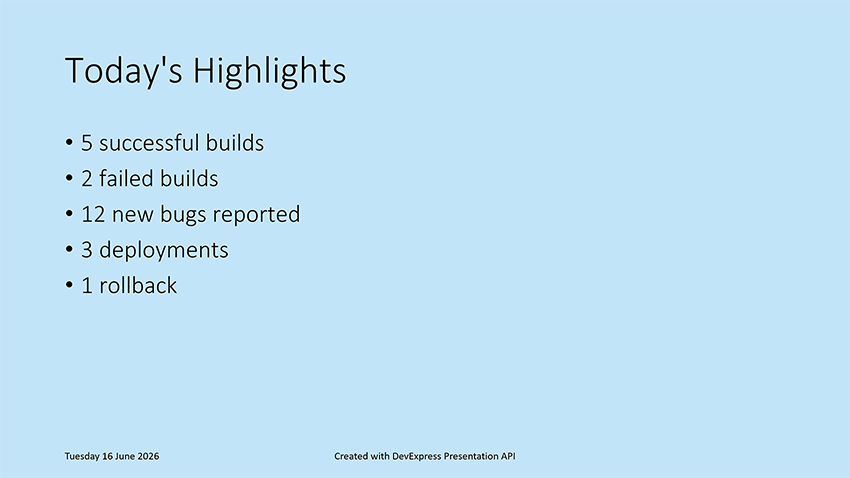
Slide 2: Today’s Highlights
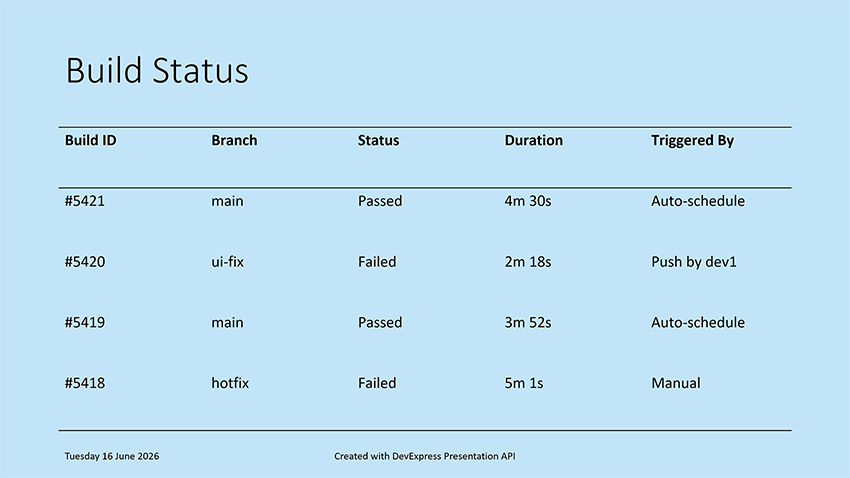
Slide 3: Build Status
package presentation;

import com.devexpress.docs.office.*;
import com.devexpress.system.drawing.*;
import com.devexpress.docs.presentation.*;

import java.io.FileOutputStream;
import java.io.IOException;
import java.nio.channels.*;
import java.nio.file.*;
import java.time.LocalDate;
import java.time.format.DateTimeFormatter;

public class Main {
    public static void main(String[] args) throws Exception {
        // Create a presentation.
        try (Presentation presentation = new Presentation()) {
            // Remove the default, blank slide from the presentation.
            presentation.getSlides().clear();

            createTitleSlide(presentation);
            createHighlightsSlide(presentation);
            createBuildStatusSlide(presentation);
            customizePresentationBackground(presentation, Color.fromArgb(194, 228, 249));
            addFooter(presentation);

            savePresentationToPptx(presentation);
            exportPresentationToPdf(presentation, "export-result.pdf");
        }
    }

    // Crease Slide 1: Presentation Title
    static void createTitleSlide(Presentation presentation) {
        SlideMaster slideMaster = presentation.getSlideMasters().get(0);
        Slide slide1 = new Slide(slideMaster.getLayouts().get(SlideLayoutType.TITLE));

        // Locate the centered title placeholder on the slide.
        Shape title = findPlaceholder(slide1, PlaceholderType.CENTERED_TITLE);

        // Specify the title.
        if (title != null) {
            title.setTextArea(new TextArea("Daily Testing Status Report"));
        }

        // Obtain the subtitle placeholder on the slide.
        Shape subtitle = findPlaceholder(slide1, PlaceholderType.SUBTITLE);

        // Display the current date in the subtitle placeholder.
        if (subtitle != null) {
            String date = LocalDate.now().format(DateTimeFormatter.ofPattern("EEEE, MMMM dd, yyyy"));
            subtitle.setTextArea(new TextArea(date));
        }

        presentation.getSlides().add(slide1);
    }

    // Create Slide 2: Today's Highlights
    static void createHighlightsSlide(Presentation presentation) {
        SlideMaster master = presentation.getSlideMasters().get(0);

        // Create a slide based on the Object layout.
        Slide slide2 = new Slide(master.getLayouts().getOrCreate(SlideLayoutType.OBJECT));
        Shape title = findPlaceholder(slide2, PlaceholderType.TITLE);

        if (title != null) {
            title.setTextArea(new TextArea("Today's Highlights"));
        }

        Shape body = findPlaceholder(slide2, PlaceholderType.BODY);

        if (body != null) {
            // Define slide content displayed as a bullet list.
            String[] highlights = {
                    "5 successful builds",
                    "2 failed builds",
                    "12 new bugs reported",
                    "3 deployments",
                    "1 rollback"};

            // Create a text area with multiple paragraphs.
            TextArea textArea = new TextArea();
            textArea.getParagraphs().clear();

            for (String item : highlights) {
                textArea.getParagraphs().add(new TextParagraph(item));
            }

            // Assign the text area to the placeholder shape.
            body.setTextArea(textArea);
        }
        presentation.getSlides().add(slide2);
    }

    // Create Slide 3: Build Status
    static void createBuildStatusSlide(Presentation presentation) {
        SlideMaster master = presentation.getSlideMasters().get(0);
        Slide slide3 = new Slide(master.getLayouts().getOrCreate(SlideLayoutType.OBJECT));

        Shape title = findPlaceholder(slide3, PlaceholderType.TITLE);

        if (title != null) {
            title.setTextArea(new TextArea("Build Status"));
        }

        Shape body = findPlaceholder(slide3, PlaceholderType.BODY);

        if (body != null) {
            RectangleF bounds = presentation.getActualShapeBounds(slide3, body);
            slide3.getShapes().remove(body);

            // Create a 5x5 table positioned within the placeholder bounds.
            Table table = new Table(
                    5,
                    5,
                    bounds.getX(),
                    bounds.getY(),
                    bounds.getWidth(),
                    bounds.getHeight());

            // Add the table to the slide.
            slide3.getShapes().add(table);

            // Populate the table with build status information.
            populateBuildTable(table);

            // Apply a predefined table style.
            table.setStyle(new ThemedTableStyle(TableStyleType.LIGHT_STYLE_1));

            // Disable alternating row colors.
            table.setHasBandedRows(false);
        }
        presentation.getSlides().add(slide3);
    }

    // Display a footer within presentation slides.
    static void addFooter(Presentation presentation) {
        HeaderFooterManager manager = presentation.getHeaderFooterManager();
        for(Slide slide : presentation.getSlides()) {
            manager.addFooterPlaceholder(slide, "Created with DevExpress Presentation API");
            manager.addDateTimePlaceholder(slide,
                    LocalDate.of(2026, 06, 14).format(
                            DateTimeFormatter.ofPattern(
                                    "EEEE dd MMMM yyyy")));
        }
    }

    // Specify the background color of a presentation.
    static void customizePresentationBackground(Presentation presentation, Color bgColor) {
        // Obtain the first slide master in the presentation.
        SlideMaster slideMaster = presentation.getSlideMasters().get(0);

        // Apply a custom background color to all slides that use this slide master.
        slideMaster.setBackground(
                new CustomSlideBackground(
                        new SolidFill(bgColor)));
    }

    // Save a presentation to a PPTX file.
    static void savePresentationToPptx(Presentation presentation)
            throws IOException {
        Path outputDir = Path.of("output");
        Files.createDirectories(outputDir);

        try (WritableByteChannel writableByteChannel =
                     FileChannel.open(outputDir.resolve("presentation.pptx"),
                             StandardOpenOption.CREATE,
                             StandardOpenOption.WRITE,
                             StandardOpenOption.TRUNCATE_EXISTING)) {

            presentation.saveDocument(writableByteChannel, DocumentFormat.PPTX);
        }
    }

    // Export a presentation to PDF.
    static void exportPresentationToPdf(Presentation presentation, String fileName)
            throws IOException {
        Path outputDir = Path.of("export");
        Files.createDirectories(outputDir);

        Path pdfPath = outputDir.resolve(fileName);

        try (FileOutputStream stream = new FileOutputStream(pdfPath.toFile())) {
            presentation.exportToPdf(stream);
        }
    }

    // Utility method: populates a table with data.
    static void populateBuildTable(Table table) {
        // Define table content.
        String[][] data = {
                {"Build ID", "Branch", "Status", "Duration", "Triggered By"},
                {"#5421", "main", "Passed", "4m 30s", "Auto-schedule"},
                {"#5420", "ui-fix", "Failed", "2m 18s", "Push by dev1"},
                {"#5419", "main", "Passed", "3m 52s", "Auto-schedule"},
                {"#5418", "hotfix", "Failed", "5m 1s", "Manual"}};

        // Fill table cells with data.
        for (int row = 0; row < data.length; row++) {
            for (int col = 0; col < data[row].length; col++) {
                table.getThis(row, col)
                        .getTextArea()
                        .setText(data[row][col]);
            }
        }
    }

    // Utility method: searches for a placeholder shape of the specified type.
    static Shape findPlaceholder(Slide slide, PlaceholderType type) {
        for (ShapeBase shapeBase : slide.getShapes()) {
            if (shapeBase instanceof Shape shape
                    && shape.getPlaceholderSettings().getType() == type) {
                return shape;
            }
        }
        return null;
    }
}
Implements
Inherited Members
Inheritance
Constructors
Presentation() Constructor
Initializes a new instance of the Presentation class. Creates a new PPTX presentation.
Declaration
public Presentation()Remarks
import com.devexpress.docs.presentation.*;

// Create a presentation.
try(Presentation presentation = new Presentation()) {

    // The presentation contains an empty slide by default.
    Slide slide = presentation.getSlides().getFirst();

    // Work with the presentation here.
}
Presentation(byte[] buffer, DocumentFormat documentFormat) Constructor
Initializes a new instance of the Presentation class with specified settings.
Declaration
public Presentation(byte[] buffer, DocumentFormat documentFormat)Parameters
| Name | Type | Description |
|---|---|---|
| buffer | byte[] | The presentation data. |
| documentFormat | DocumentFormat | The document format. |
Remarks
If you know the document format, specify it explicitly to improve load performance.
import com.devexpress.docs.presentation.*;
import java.io.FileOutputStream;
import java.nio.file.*;

// Load a PPTM presentation from a file into memory.
try(Presentation presentation =
                new Presentation(Files.readAllBytes(
                        Path.of("my-presentation.pptm")), DocumentFormat.PPTM)
) {
    // Your implementation goes here.
}
Presentation(byte[] buffer, LoadOptions options) Constructor
Initializes a new instance of the Presentation class with specified settings.
Declaration
public Presentation(byte[] buffer, LoadOptions options)Parameters
| Name | Type | Description |
|---|---|---|
| buffer | byte[] | The presentation data. |
| options | LoadOptions | Load options. |
Presentation(byte[] buffer) Constructor
Initializes a new instance of the Presentation class with specified settings.
Declaration
public Presentation(byte[] buffer)Parameters
| Name | Type | Description |
|---|---|---|
| buffer | byte[] | The presentation data. |
Remarks
import com.devexpress.docs.presentation.*;
import java.io.FileOutputStream;
import java.nio.file.*;

// Load a presentation from a file into memory.
try (Presentation presentation =
             new Presentation(Files.readAllBytes(
                     Path.of("my-presentation.pptx")))) {

    // Your implementation goes here.
}
Presentation(InputStream stream, DocumentFormat documentFormat) Constructor
Initializes a new instance of the Presentation class with specified settings.
Declaration
public Presentation(InputStream stream, DocumentFormat documentFormat)Parameters
| Name | Type | Description |
|---|---|---|
| stream | InputStream | The source stream. |
| documentFormat | DocumentFormat | The document format. |
Remarks
If you know the document format, specify it explicitly to improve load performance.
// Document format is explicitly specified as PPTX.
try(Presentation presentation = new Presentation(inputStream, DocumentFormat.PPTX)) {

      // Work with the presentation here.
}
Presentation(InputStream stream, LoadOptions options) Constructor
Initializes a new instance of the Presentation class with specified settings.
Declaration
public Presentation(InputStream stream, LoadOptions options)Parameters
| Name | Type | Description |
|---|---|---|
| stream | InputStream | The source stream. |
| options | LoadOptions | Load options. |
Presentation(InputStream stream) Constructor
Initializes a new instance of the Presentation class with specified settings.
Declaration
public Presentation(InputStream stream)Parameters
| Name | Type | Description |
|---|---|---|
| stream | InputStream | The source stream. |
Remarks
import com.devexpress.docs.presentation.*;
import java.io.FileInputStream;

// Open a stream to an existing presentation file and load the presentation.
try(FileInputStream inputStream = new FileInputStream("my-presentation.pptx");
    Presentation presentation = new Presentation(inputStream)) {

    // Work with the presentation here.
}
Presentation(ReadableByteChannel channel, DocumentFormat documentFormat) Constructor
Initializes a new instance of the Presentation class with specified settings.
Declaration
public Presentation(ReadableByteChannel channel, DocumentFormat documentFormat)Parameters
| Name | Type | Description |
|---|---|---|
| channel | ReadableByteChannel | The source channel. |
| documentFormat | DocumentFormat | The document format. |
Remarks
import com.devexpress.docs.presentation.*;

import java.nio.channels.*;
import java.nio.file.*;

// Open a readable byte channel to an existing presentation file.
try (ReadableByteChannel channel =
             FileChannel.open(Path.of("my-presentation.pptx"),
                     StandardOpenOption.READ);
     Presentation presentation =
             new Presentation(channel, DocumentFormat.PPTX)) {

    // Work with the presentation here.
}
Presentation(ReadableByteChannel channel, LoadOptions options) Constructor
Initializes a new instance of the Presentation class with specified settings.
Declaration
public Presentation(ReadableByteChannel channel, LoadOptions options)Parameters
| Name | Type | Description |
|---|---|---|
| channel | ReadableByteChannel | The source channel. |
| options | LoadOptions | Load options. |
Presentation(ReadableByteChannel channel) Constructor
Initializes a new instance of the Presentation class with specified settings.
Declaration
public Presentation(ReadableByteChannel channel)Parameters
| Name | Type | Description |
|---|---|---|
| channel | ReadableByteChannel | The source channel. |
Remarks
import com.devexpress.docs.presentation.*;

import java.nio.channels.*;
import java.nio.file.*;

// Open a readable byte channel to an existing presentation file.
try (ReadableByteChannel channel =
             FileChannel.open(Path.of("my-presentation.pptx"),
                     StandardOpenOption.READ);
     Presentation presentation =
             new Presentation(channel)) {

    // Work with the presentation here.
}
Methods
beginUpdate() Method
Locks the Presentation object until the Presentation.endUpdate method is called.
Declaration
public void beginUpdate()Remarks
Enclose your code in beginUpdate() / endUpdate() method calls to improve performance when you apply multiple modifications to a presentation.
Each call to beginUpdate() must have a corresponding call to endUpdate().
Use a try...finally statement to ensure that endUpdate() executes even if an exception occurs.
The following code snippet suspends internal updates to improve performance:
presentation.beginUpdate();
try {
    // Perform multiple presentation modifications here.
    // ...
    // Add slides.
    // Update slide content.
    // Modify shapes.
    // Change presentation settings.
    // ...
}
finally {
    // Resume updates and commit all changes.
    presentation.endUpdate();
}
close() Method
Closes the Presentation and releases associated resources.
Declaration
public void close()Remarks
The following example closes a presentation and releases resources:
Presentation presentation = null;

try {
    presentation = new Presentation();

    // Work with the presentation.
    // ...
}
finally {
    if (presentation != null) {
        // Close the presentation and release allocated resources.
        presentation.close();
    }
}
encrypt(EncryptionOptions options) Method
Encrypts a presentation with the specified encryption options.
Declaration
public void encrypt(EncryptionOptions options)Parameters
| Name | Type | Description |
|---|---|---|
| options | EncryptionOptions | Encryption options. |
Remarks
Use the EncryptionOptions class to specify presentation encryption settings. Pass an EncryptionOptions object to the Presentation.encrypt() method to encrypt a presentation.
EncryptionOptions options = new EncryptionOptions("password", EncryptionType.STRONG);
presentation.encrypt(options);
Refer to the following help topic for additional information: Encrypt Presentations.
endUpdate() Method
Unlocks the Presentation object after you call the beginUpdate() method.
Declaration
public void endUpdate()Remarks
Refer to the following help topic for additional information: beginUpdate().
exportTheme(OutputStream stream) Method
NOT SUPPORTED. RESERVED FOR FUTURE USE. Exports the current theme to a stream.
Declaration
public void exportTheme(OutputStream stream)Parameters
| Name | Type | Description |
|---|---|---|
| stream | OutputStream | An output stream to which the API writes the presentation theme. |
Remarks
The following code snippet implements the exportMasterTheme() method that exports the presentation theme to a file:
import com.devexpress.docs.presentation.*;

import java.io.*;
import java.nio.file.*;

static void exportMasterTheme(
        Presentation presentation,
        String fileName) throws IOException {

    Path outputDir = Path.of("themes");
    Files.createDirectories(outputDir);

    Path themePath = outputDir.resolve(fileName);

    try (FileOutputStream stream =
                 new FileOutputStream(themePath.toFile())) {

        presentation.exportTheme(stream);
    }
}
Refer to the following help topic for additional information: Export and Import Themes.
exportTheme(WritableByteChannel channel) Method
NOT SUPPORTED. RESERVED FOR FUTURE USE. Exports the current theme to a byte channel.
Declaration
public void exportTheme(WritableByteChannel channel)Parameters
| Name | Type | Description |
|---|---|---|
| channel | WritableByteChannel | A byte channel to which the theme is exported. |
Remarks
Refer to the following help topic for additional information: Export and Import Themes.
exportToImages(ImageExportOptions options, int[] slideIndexes) Method
Exports presentation slides to images. Parameters specify image indexes and export options.
Declaration
public DXImage[] exportToImages(ImageExportOptions options, int[] slideIndexes)Parameters
| Name | Type | Description |
|---|---|---|
| options | ImageExportOptions | Image export settings. |
| slideIndexes | int[] | A slide index array (specifies slides to be exported). |
Returns
| Type | Description |
|---|---|
| DXImage[] | An array of images that are exported slides. |
Remarks
Refer to the following help topic for additional information: Export Presentation Slides to Images.
exportToImages(int[] slideIndexes) Method
Exports the specified slides to images.
Declaration
public DXImage[] exportToImages(int[] slideIndexes)Parameters
| Name | Type | Description |
|---|---|---|
| slideIndexes | int[] | A slide index array that specifies slides to export. |
Returns
| Type | Description |
|---|---|
| DXImage[] | An array of images for the exported slides. |
Remarks
Refer to the following help topic for additional information: Export Presentation Slides to Images.
exportToPdf(OutputStream stream, PdfExportOptions options) Method
Exports the presentation to PDF, writes the generated document to the specified output stream, and applies PDF export options.
Declaration
public void exportToPdf(OutputStream stream, PdfExportOptions options)Parameters
| Name | Type | Description |
|---|---|---|
| stream | OutputStream | A stream to which the PDF document is exported. |
| options | PdfExportOptions | PDF export options. |
Remarks
Refer to the following help topic for additional information: Export PowerPoint Presentations to PDF.
exportToPdf(OutputStream stream) Method
Exports the presentation to PDF and writes the generated document to the specified output stream.
Declaration
public void exportToPdf(OutputStream stream)Parameters
| Name | Type | Description |
|---|---|---|
| stream | OutputStream | A stream to which the PDF document is exported. |
Remarks
Refer to the following help topic for additional information: Export PowerPoint Presentations to PDF.
exportToPdf(WritableByteChannel channel, PdfExportOptions options) Method
Writes the presentation as a PDF document to a writable byte channel and applies PDF export options.
Declaration
public void exportToPdf(WritableByteChannel channel, PdfExportOptions options)Parameters
| Name | Type | Description |
|---|---|---|
| channel | WritableByteChannel | A byte channel to which the PDF document is exported. |
| options | PdfExportOptions | PDF export options. |
Remarks
Refer to the following help topic for additional information: Export PowerPoint Presentations to PDF.
exportToPdf(WritableByteChannel channel) Method
Writes the presentation as a PDF document to the specified writable byte channel.
Declaration
public void exportToPdf(WritableByteChannel channel)Parameters
| Name | Type | Description |
|---|---|---|
| channel | WritableByteChannel | A byte channel to which the PDF document is exported. |
Remarks
Refer to the following help topic for additional information: Export PowerPoint Presentations to PDF.
findText(String text, TextSearchOptions options) Method
Finds all occurrences of the specified text in the presentation using specified search options.
Declaration
public List<TextSearchInfo> findText(String text, TextSearchOptions options)Parameters
| Name | Type | Description |
|---|---|---|
| text | String | The text to search for. |
| options | TextSearchOptions | Search options. |
Returns
| Type | Description |
|---|---|
| java.util.List<TextSearchInfo> | A collection of search results for the specified text. |
Remarks
import com.devexpress.docs.presentation.*;
import com.devexpress.system.collections.generic.*;

// Create search options.
TextSearchOptions searchOptions = new TextSearchOptions();
searchOptions.setMatchCase(false);          // Perform a case-insensitive search.
searchOptions.setWholeWordOnly(true);       // Match whole words only.

// Search for all occurrences of the specified text.
List<TextRange> searchResults =
        shape.getTextArea().findText("PowerPoint", searchOptions);

// Iterate through each found text range returned by the search.
for (TextRange searchEntry : searchResults) {

    // Process each matched text range (for example, apply formatting or modify text).
}
Refer to the following help topic for additional information: Find Text.
findText(String text) Method
Searches the presentation (including all shapes, notes, and tables) for all occurrences of the specified text, using the specified search options.
Declaration
public List<TextSearchInfo> findText(String text)Parameters
| Name | Type | Description |
|---|---|---|
| text | String | Text to find. |
Returns
| Type | Description |
|---|---|
| java.util.List<TextSearchInfo> | A collection of search results for the specified text. |
Remarks
Refer to the following help topic for additional information: Find Text.
getActualShapeBounds(Slide slide, FilledShape shape) Method
Returns bounds of the specified shape on the specified slide. For placeholder shapes, resolves bounds from the slide layout or slide master.
Declaration
public RectangleF getActualShapeBounds(Slide slide, FilledShape shape)Parameters
| Name | Type | Description |
|---|---|---|
| slide | Slide | The slide used to resolve bounds for the shape. |
| shape | FilledShape | The shape whose bounds to return. |
Returns
| Type | Description |
|---|---|
| RectangleF | Bounds of the specified shape. For placeholder shapes, the method resolves bounds from the slide layout or slide master; if it cannot resolve bounds, the method returns an empty rectangle. |
getDefaultTextStyle() Method
Returns the default text style for the presentation.
Declaration
public TextStyle getDefaultTextStyle()Returns
| Type | Description |
|---|---|
| TextStyle | The default text style for the presentation. |
Remarks
Presentation.DefaultTextStyle applies to all text elements in the presentation unless you specify a different style for certain text elements.
getDocumentProperties() Method
Returns presentation document properties.
Declaration
public DocumentProperties getDocumentProperties()Returns
| Type | Description |
|---|---|
| DocumentProperties | Document properties associated with the presentation. |
Remarks
Document properties are metadata fields stored in a presentation file. The DevExpress Presentation API allows you to read and modify both built-in and custom document properties.
Use the Presentation.getDocumentProperties() method to get a DocumentProperties object that contains all metadata fields.
try(Presentation presentation = new Presentation()) {
    DocumentProperties documentProperties = presentation.getDocumentProperties();
    documentProperties.setAuthor("Jane Doe");
    documentProperties.setTitle("Innovating for the Future: Trends in Sustainable Technology");
    documentProperties.setCompany("GreenTech Solutions Inc.");
    documentProperties.setKeywords("Sustainability, Green Technology, Innovation");

    // Perform additional presentation processing logic.
}
The following code snippet adds custom properties to the presentation metadata:
IDocumentCustomPropertyDictionary customProperties =
        presentation.getDocumentProperties().getCustomProperties();

// Add custom properties to the dictionary.
customProperties.put("string property", new DocumentCustomProperty("string"));
customProperties.put("boolean property", new DocumentCustomProperty(true));
customProperties.put("date property", new DocumentCustomProperty(Instant.now()));
customProperties.put("int property", new DocumentCustomProperty(5));
customProperties.put("double property", new DocumentCustomProperty(2.55));

// Get a custom property by key.
var propertyValue = customProperties.get("string property").getValue();
Refer to the following help topic for additional information: Read and Modify Presentation Document Properties.
getFirstSlideNumber() Method
Returns the starting number for slide numbering in the presentation.
Declaration
public int getFirstSlideNumber()Returns
| Type | Description |
|---|---|
| int | The first slide’s number. |
Remarks
Use the setFirstSlideNumber(int value) method to specify the starting number for slide numbering in the presentation.
getHeaderFooterManager() Method
Returns the HeaderFooter manager that allows you to add footer text, date, and slide numbers to its associated presentation.
Declaration
public HeaderFooterManager getHeaderFooterManager()Returns
| Type | Description |
|---|---|
| HeaderFooterManager | A HeaderFooterManager. |
Remarks
Refer to the following help topic for additional information: Customize Slide Footer — Presentation API for Java.
getIsDisposed() Method
Indicates whether the presentation has been disposed of.
Declaration
public boolean getIsDisposed()Returns
| Type | Description |
|---|---|
| boolean |
|
getNotesMaster() Method
Returns the Notes Master that is a shared layout for all notes in the presentation. The Notes Master contains visual parameters (location on a slide, text format settings, background, and so on) for headers, footers, and notes.
Declaration
public NotesMaster getNotesMaster()Returns
| Type | Description |
|---|---|
| NotesMaster | The NotesMaster master. |
Remarks
When a new Presentation is created, its NotesMaster is null. You can create it manually before adding notes if you need to configure shared layout settings in advance. Otherwise, the system automatically creates a default NotesMaster when you add the first speaker note to a slide.
The following code snippet creates a NotesMaster if it does not already exist:
try (Presentation presentation = new Presentation()) {
    // Ensure NotesMaster exists.
    if (presentation.getNotesMaster() == null) {
        presentation.setNotesMaster(new NotesMaster("notesMasterLayout"));
    }

    // Perform presentation processing logic.
}
Refer to the following help topic for additional information: Add Speaker Notes to Slides.
getProtectionMode() Method
Returns the presentation protection mode.
Declaration
public DocumentProtectionMode getProtectionMode()Returns
| Type | Description |
|---|---|
| DocumentProtectionMode | The protection mode of the presentation. |
Remarks
Refer to the following help topic for additional information: Protect a Presentation from Editing.
getSlideMasters() Method
Returns the presentation collection of Slide Masters. The Slide Master is a top-level template slide that you can use as a base for other slides.
Declaration
public ISlideMasterCollection getSlideMasters()Returns
| Type | Description |
|---|---|
| ISlideMasterCollection | A collection of slide masters. |
Remarks
The presentation is valid if it contains at least one slide master with one associated layout element.
Refer to the following help topic for additional information: Configure Slide Masters and Layouts — Presentation API for Java.
getSlides() Method
Returns the presentation’s collection of slides.
Declaration
public ISlideCollection getSlides()Returns
| Type | Description |
|---|---|
| ISlideCollection | The presentation slide collection. |
Remarks
import com.devexpress.docs.presentation.*;

// Access the first slide in the presentation.
Slide firstSlide = presentation.getSlides().getFirst();

// Access the second slide in the presentation.
Slide firstSlide = presentation.getSlides().get(1);
Refer to the following help topics for additional information about slides:
- Configure Slide Masters and Layouts
- Manage Slides
- Work with Shapes
- Slide Background
- Slide Size and Orientation
getSlideSize() Method
Returns the slide size and orientation.
Declaration
public SlideSize getSlideSize()Returns
| Type | Description |
|---|---|
| SlideSize | Specifies the slide size. |
Remarks
The following code snippet obtains slide dimensions and orientation:
import com.devexpress.docs.presentation.*;

// Get slide dimensions.
float width = presentation.getSlideSize().getWidth();
float height = presentation.getSlideSize().getHeight();

// Get slide orientation.
SlideOrientation slideOrientation = presentation.getSlideSize().getOrientation();
Refer to the following help topic for additional information: Slide Size and Orientation — Presentation API for Java.
getViewProperties() Method
Returns the presentation view properties.
Declaration
public ViewProperties getViewProperties()Returns
| Type | Description |
|---|---|
| ViewProperties | The presentation view properties. |
Remarks
Refer to the following help topic for additional information: Customize Presentation Views with Presentation API for Java.
importTheme(InputStream stream) Method
Imports the specified theme into the presentation.
Declaration
public void importTheme(InputStream stream)Parameters
| Name | Type | Description |
|---|---|---|
| stream | InputStream | An input stream that contains the theme to import. |
Remarks
The following code snippet imports a previously saved theme:
import com.devexpress.docs.presentation.*;

import java.io.*;
import java.nio.file.*;

static void importMasterTheme(
        Presentation presentation,
        String fileName) throws IOException {

    Path themePath =
            Path.of("themes").resolve(fileName);

    try (FileInputStream stream =
                 new FileInputStream(themePath.toFile())) {

        presentation.importTheme(stream);
    }
}
Note
The imported theme replaces the presentation’s current master theme (including its color, font, and format schemes). Presentation elements that reference theme values automatically reflect the imported theme. Elements that use explicitly assigned colors, fonts, or formatting remain unchanged.
Refer to the following help topic for additional information: Export and Import Themes.
importTheme(ReadableByteChannel channel) Method
Imports the specified theme into the presentation.
Declaration
public void importTheme(ReadableByteChannel channel)Parameters
| Name | Type | Description |
|---|---|---|
| channel | ReadableByteChannel | A channel that contains the theme to import. |
Remarks
Refer to the following help topic for additional information: Export and Import Themes.
inspect() Method
Inspects the presentation and returns information about its content.
Declaration
public PresentationInspectResult inspect()Returns
| Type | Description |
|---|---|
| PresentationInspectResult | A |
Remarks
Call the Presentation.inspect() method to inspect all supported content types. The parameterless overload uses PresentationInspectOptions.ALL.
PresentationInspectResult inspectResult = presentation.inspect();
Refer to the following help topic for additional information: Inspect a Presentation Before Sanitization.
inspect(PresentationInspectOptions options) Method
Inspects the presentation based on the specified options and returns information about its content.
Declaration
public PresentationInspectResult inspect(PresentationInspectOptions options)Parameters
| Name | Type | Description |
|---|---|---|
| options | PresentationInspectOptions | Options that specify the presentation content categories to inspect. |
Returns
| Type | Description |
|---|---|
| PresentationInspectResult | A |
Remarks
Use the Presentation.inspect(PresentationInspectOptions) method to specify which content types to inspect before sanitization:
PresentationInspectResult inspectResult = presentation.inspect(new PresentationInspectOptions());
Refer to the following help topic for additional information: Inspect a Presentation Before Sanitization.
modifyTextProperties(List<TextSearchInfo> textSearchInfos, TextProperties properties) Method
Modifies text properties for specified text ranges.
Declaration
public void modifyTextProperties(List<TextSearchInfo> textSearchInfos, TextProperties properties)Parameters
| Name | Type | Description |
|---|---|---|
| textSearchInfos | java.util.List<TextSearchInfo> | A collection of text ranges whose properties are modified. |
| properties | TextProperties | Text properties to apply. |
Remarks
The following code snippet finds and highlights all occurrences of the “PowerPoint“ substring:
List<TextRange> searchResults =
        shape.getTextArea().findText("PowerPoint", searchOptions);

TextProperties textProperties = new TextProperties();
textProperties.setFill(new SolidFill(Color.getYellow()));

for(TextRange searchEntry : searchResults) {
    shape.getTextArea().modifyTextProperties(searchEntry, textProperties);
}
Refer to the following help topic for additional information: Format Specified Text Ranges.
print() Method
NOT SUPPORTED. RESERVED FOR FUTURE USE. Prints presentation to the default printer.
Declaration
public void print()print(PrintOptions printOptions) Method
NOT SUPPORTED. RESERVED FOR FUTURE USE. Prints the presentation with specified print options.
Declaration
public void print(PrintOptions printOptions)Parameters
| Name | Type | Description |
|---|---|---|
| printOptions | com.devexpress.docs.presentation.printing.PrintOptions | An object that contains print options. |
protect(WriteProtectionOptions options) Method
Protects the presentation from editing with the specified password.
Declaration
public void protect(WriteProtectionOptions options)Parameters
| Name | Type | Description |
|---|---|---|
| options | WriteProtectionOptions | Write protection settings that specify the password and hash algorithm. |
Remarks
Follow these steps to enable write protection:
- Create a WriteProtectionOptions object and specify a password and hash algorithm.
- Pass the
WriteProtectionOptionsobject to thePresentation.protect()method.
The following code snippet applies password-based write protection:
package presentation;

import com.devexpress.docs.office.*;
import com.devexpress.docs.presentation.*;

import java.io.*;
import java.nio.file.*;

public class Main {
    public static void main(String[] args) throws Exception {
        try(Presentation presentation =
                    new Presentation(
                            Files.readAllBytes(
                                    Path.of("Presentation.pptx")))) {

            // Enable write protection.
            WriteProtectionOptions options =
                    new WriteProtectionOptions("password", HashAlgorithmType.SHA512);

            presentation.protect(options);

            Path outputDir = Path.of("output");
            Files.createDirectories(outputDir);

            // Save the protected presentation.
            try (FileOutputStream fileStream = new FileOutputStream(
                    outputDir.resolve("ProtectedPresentation.pptx").toFile())) {

                presentation.saveDocument(fileStream);
            }
        }
    }
}
Refer to the following help topic for additional information: Protect a Presentation from Editing.
removeEncryption() Method
Removes encryption from a presentation.
Declaration
public void removeEncryption()Remarks
Refer to the following help topic for additional information: Encrypt Presentations.
removeProtection() Method
Removes write protection from the presentation.
Declaration
public void removeProtection()Remarks
Call the Presentation.removeProtection() method to remove write protection from a presentation:
presentation.removeProtection();
Refer to the following help topic for additional information: Protect a Presentation from Editing.
removeText(List<TextSearchInfo> textSearchInfos) Method
Removes specified text ranges from the presentation.
Declaration
public void removeText(List<TextSearchInfo> textSearchInfos)Parameters
| Name | Type | Description |
|---|---|---|
| textSearchInfos | java.util.List<TextSearchInfo> | A collection of text ranges to remove. |
Remarks
The following code snippet removes the specified text from presentation slides:
// Define search options.
TextSearchOptions searchOptions = new TextSearchOptions();
searchOptions.setMatchCase(false);

// Find all occurrences of the specified text.
// Remove all found text ranges from the presentation.
presentation.removeText(
        presentation.findText("presentation", searchOptions));
replaceText(List<TextSearchInfo> textSearchInfos, String newText) Method
Replaces the specified text ranges with new text.
Declaration
public void replaceText(List<TextSearchInfo> textSearchInfos, String newText)Parameters
| Name | Type | Description |
|---|---|---|
| textSearchInfos | java.util.List<TextSearchInfo> | A collection of text ranges to replace. |
| newText | String | The replacement text. |
replaceText(String oldText, String newText, TextSearchOptions options) Method
Replaces matching text in the presentation with specified search options.
Declaration
public void replaceText(String oldText, String newText, TextSearchOptions options)Parameters
| Name | Type | Description |
|---|---|---|
| oldText | String | The text to replace. |
| newText | String | The replacement text. |
| options | TextSearchOptions | Search options. |
Remarks
// Define search options.
TextSearchOptions searchOptions = new TextSearchOptions();
searchOptions.setMatchCase(false);

// Replace specified text ranges in the presentation.
presentation.replaceText("v25.2",  "v26.1", searchOptions);
replaceText(String oldText, String newText) Method
Replaces matching text in the presentation.
Declaration
public void replaceText(String oldText, String newText)Parameters
| Name | Type | Description |
|---|---|---|
| oldText | String | The text to replace. |
| newText | String | The replacement text. |
Remarks
// Replace specified text ranges in the presentation.
presentation.replaceText("v25.2",  "v26.1");
resizeSlides(SlideSize newSize, ResizeMode mode) Method
Resizes all slides in the presentation to the specified size.
Declaration
public void resizeSlides(SlideSize newSize, ResizeMode mode)Parameters
| Name | Type | Description |
|---|---|---|
| newSize | SlideSize | Slide size. |
| mode | ResizeMode | Specifies how to resize slide content. |
Remarks
Use the resizeSlides(newSize, mode) method to resize all slides in a presentation to the specified size. The mode parameter specifies how to resize the slide content.
The following example resizes slides to 640 × 360 and scales the content to fit within the new slide boundaries:
package presentation;

import com.devexpress.docs.presentation.*;

import java.io.FileOutputStream;
import java.nio.file.*;

public class Main {
    public static void main(String[] args) throws Exception {
        try(Presentation presentation =
                    new Presentation(Files.readAllBytes(Path.of("Presentation.pptx")))) {

            presentation.resizeSlides(new SlideSize(640, 360), ResizeMode.ENSURE_FIT);

            Path outputDir = Path.of("output");
            Files.createDirectories(outputDir);

            try (FileOutputStream fileStream = new FileOutputStream(
                    outputDir.resolve("PresentationResized.pptx").toFile())) {

                presentation.saveDocument(fileStream);
            }
        }
    }
}
Refer to the following help topic for additional information: Slide Size and Orientation — Presentation API for Java.
resizeSlides(SlideSize newSize) Method
Resizes all slides in the presentation to the specified size and centers content on the resized slide.
Declaration
public void resizeSlides(SlideSize newSize)Parameters
| Name | Type | Description |
|---|---|---|
| newSize | SlideSize | Slide size. |
Remarks
Refer to the following help topic for additional information: Slide Size and Orientation — Presentation API for Java.
sanitize() Method
Sanitizes the presentation with default options.
Declaration
public List<PresentationSanitizeResult> sanitize()Returns
| Type | Description |
|---|---|
| java.util.List<PresentationSanitizeResult> | A list of |
Remarks
Call the Presentation.sanitize() method to remove private and hidden content from a loaded presentation with default sanitization options.
The sanitize() method returns a list of PresentationSanitizeResult objects. Each result describes a sanitization operation performed on the presentation.
The following code snippet applies a predefined sanitization policy:
package presentation;

import com.devexpress.docs.office.*;
import com.devexpress.docs.presentation.*;

import java.io.*;
import java.nio.file.*;
import java.util.List;

public class Main {
    public static void main(String[] args) throws Exception {
        try (FileInputStream inputStream = new FileInputStream("Presentation.pptx");
            Presentation presentation = new Presentation(inputStream)) {

            PresentationSanitizeOptions sanitizeOptions = new PresentationSanitizeOptions();

            sanitizeOptions.setRemoveNotes(true);
            sanitizeOptions.setRemoveOffSlideContent(true);
            sanitizeOptions.setRemoveMacros(true);
            sanitizeOptions.setRemoveActiveXContent(true);
            sanitizeOptions.setRemoveOleObjects(true);
            sanitizeOptions.setMetadata(MetadataRemovalScope.ALL);
            sanitizeOptions.setHiddenSlides(HiddenContentSanitizeMode.REMOVE);
            sanitizeOptions.setHiddenShapes(HiddenContentSanitizeMode.IGNORE);

            List<PresentationSanitizeResult> results = presentation.sanitize(sanitizeOptions);

            Path outputDir = Path.of("output");
            Files.createDirectories(outputDir);

            // Save the sanitized presentation.
            try (FileOutputStream fileStream = new FileOutputStream(
                    outputDir.resolve("Presentation_Sanitized.pptx").toFile())) {

                presentation.saveDocument(fileStream);
            }
        }
    }
}
Refer to the following help topic for additional information: Sanitize Presentation Content.
sanitize(PresentationSanitizeOptions options) Method
Sanitizes the presentation with the specified options.
Declaration
public List<PresentationSanitizeResult> sanitize(PresentationSanitizeOptions options)Parameters
| Name | Type | Description |
|---|---|---|
| options | PresentationSanitizeOptions | Options that specify how to sanitize the presentation. |
Returns
| Type | Description |
|---|---|
| java.util.List<PresentationSanitizeResult> | A list of |
Remarks
Refer to the following help topic for additional information: Sanitize Presentation Content.
saveDocument() Method
Saves the presentation to a byte array.
Declaration
public byte[] saveDocument()Returns
| Type | Description |
|---|---|
| byte[] | A byte array that contains the presentation data in the PPTX format. |
Remarks
Refer to the following help topic for additional information: Create, Load, and Save PowerPoint Presentations.
saveDocument(DocumentFormat documentFormat) Method
Saves the presentation in the specified format to a byte array.
Declaration
public byte[] saveDocument(DocumentFormat documentFormat)Parameters
| Name | Type | Description |
|---|---|---|
| documentFormat | DocumentFormat | The format in which the presentation should be saved. |
Returns
| Type | Description |
|---|---|
| byte[] | A byte array that contains the saved presentation. |
Remarks
Refer to the following help topic for additional information: Create, Load, and Save PowerPoint Presentations.
saveDocument(OutputStream stream, DocumentFormat documentFormat) Method
Saves the presentation in the specified format to a stream.
Declaration
public void saveDocument(OutputStream stream, DocumentFormat documentFormat)Parameters
| Name | Type | Description |
|---|---|---|
| stream | OutputStream | A stream to which the presentation is saved. |
| documentFormat | DocumentFormat | The format in which the presentation should be saved. |
Remarks
import com.devexpress.docs.presentation.*;
import java.io.FileOutputStream;
import java.nio.file.*;

try (Presentation presentation = new Presentation()) {
    // Ensure the output directory path is resolved.
    Path outputDir = Path.of("output");
    try (FileOutputStream fileStream = new FileOutputStream(
            outputDir.resolve("my-presentation-copy.pptm").toFile())) {

        // Save the presentation to a PPTX file.
        presentation.saveDocument(fileStream);
    }
}
Refer to the following help topic for additional information: Save the Presentation.
saveDocument(OutputStream stream, SaveOptions options) Method
Saves the presentation to a stream using the specified save options.
Declaration
public void saveDocument(OutputStream stream, SaveOptions options)Parameters
| Name | Type | Description |
|---|---|---|
| stream | OutputStream | A stream to which the presentation is saved. |
| options | SaveOptions | Options used to save the presentation. |
Remarks
Refer to the following help topic for additional information: Create, Load, and Save PowerPoint Presentations.
saveDocument(OutputStream stream) Method
Saves the presentation to a stream. The default output format is PPTX.
Declaration
public void saveDocument(OutputStream stream)Parameters
| Name | Type | Description |
|---|---|---|
| stream | OutputStream | A stream to which the presentation is saved. |
Remarks
import com.devexpress.docs.presentation.*;
import java.io.FileOutputStream;
import java.nio.file.*;

try (Presentation presentation = new Presentation()) {
    // Ensure the output directory path is resolved.
    Path outputDir = Path.of("output");
    try (FileOutputStream fileStream = new FileOutputStream(
            outputDir.resolve("my-presentation-copy.pptm").toFile())) {

        // Save the presentation to a PPTX file.
        presentation.saveDocument(fileStream);
    }
}
Refer to the following help topic for additional information: Save the Presentation.
saveDocument(SaveOptions options) Method
Saves the presentation to a byte array using the specified save options.
Declaration
public byte[] saveDocument(SaveOptions options)Parameters
| Name | Type | Description |
|---|---|---|
| options | SaveOptions | Options used to save the presentation. |
Returns
| Type | Description |
|---|---|
| byte[] | A byte array that contains the saved presentation. |
Remarks
Refer to the following help topic for additional information: Create, Load, and Save PowerPoint Presentations.
saveDocument(WritableByteChannel channel, DocumentFormat documentFormat) Method
Saves the presentation in the specified format to a byte channel.
Declaration
public void saveDocument(WritableByteChannel channel, DocumentFormat documentFormat)Parameters
| Name | Type | Description |
|---|---|---|
| channel | WritableByteChannel | A byte channel to which the presentation is saved. |
| documentFormat | DocumentFormat | The format in which the presentation should be saved. |
Remarks
The following code snippet loads a presentation from a file, optionally modifies it, and then saves it back to disk as a PPTX file.
// Load an existing presentation.
try (Presentation presentation = new Presentation(
        Files.readAllBytes(Path.of("input/presentation.pptx")))) {

    // Modify the presentation.

    // Save the presentation to a new file.
    Path outputDir = Path.of("output");
    Files.createDirectories(outputDir);

    try (WritableByteChannel writableByteChannel =
                 FileChannel.open(outputDir.resolve("presentation.pptx"),
                         StandardOpenOption.CREATE,
                         StandardOpenOption.WRITE,
                         StandardOpenOption.TRUNCATE_EXISTING)) {

        presentation.saveDocument(writableByteChannel, DocumentFormat.PPTX);
    }
}
Refer to the following help topic for additional information: Create, Load, and Save PowerPoint Presentations.
saveDocument(WritableByteChannel channel, SaveOptions options) Method
Saves the presentation to a byte channel using the specified save options.
Declaration
public void saveDocument(WritableByteChannel channel, SaveOptions options)Parameters
| Name | Type | Description |
|---|---|---|
| channel | WritableByteChannel | A byte channel to which the presentation is saved. |
| options | SaveOptions | Options used to save the presentation. |
Remarks
Refer to the following help topic for additional information: Create, Load, and Save PowerPoint Presentations.
saveDocument(WritableByteChannel channel) Method
Saves the presentation to a byte channel.
Declaration
public void saveDocument(WritableByteChannel channel)Parameters
| Name | Type | Description |
|---|---|---|
| channel | WritableByteChannel | A byte channel to which the presentation is saved. |
Remarks
Refer to the following help topic for additional information: Create, Load, and Save PowerPoint Presentations.
setDefaultTextStyle(TextStyle value) Method
Sets the default text style for the presentation.
Declaration
public void setDefaultTextStyle(TextStyle value)Parameters
| Name | Type | Description |
|---|---|---|
| value | TextStyle | The default text style. |
Remarks
The Presentation.setDefaultTextStyle() method applies the text style to all text elements in the presentation unless you specify a different style for certain text elements.
setFirstSlideNumber(int value) Method
Sets the starting number for slide numbering in the presentation.
Declaration
public void setFirstSlideNumber(int value)Parameters
| Name | Type | Description |
|---|---|---|
| value | int | The first slide’s number. |
setNotesMaster(NotesMaster value) Method
Sets the Notes Master that defines shared formatting and layout settings for all speaker notes in the presentation.
Declaration
public void setNotesMaster(NotesMaster value)Parameters
| Name | Type | Description |
|---|---|---|
| value | NotesMaster | The Notes Master. |
Remarks
When a new Presentation is created, its NotesMaster is null. You can create it manually before adding notes if you need to configure shared layout settings in advance. Otherwise, the system automatically creates a default NotesMaster when you add the first speaker note to a slide.
Use the following methods to work with the Notes Master:
The following code snippet creates a NotesMaster if it does not already exist:
try (Presentation presentation = new Presentation()) {
    // Ensure NotesMaster exists.
    if (presentation.getNotesMaster() == null) {
        presentation.setNotesMaster(new NotesMaster("notesMasterLayout"));
    }

    // Implement presentation processing logic.
}
Refer to the following help topic for additional information: Add Speaker Notes to Slides.
setSlideSize(SlideSize value) Method
Sets the slide size and orientation.
Declaration
public void setSlideSize(SlideSize value)Parameters
| Name | Type | Description |
|---|---|---|
| value | SlideSize | Specifies the slide size. |
Remarks
The SlideSizeType enumeration contains predefined slide formats.
The following code snippet creates a presentation that uses A4 paper format:
Presentation presentation = new Presentation();
presentation.setSlideSize(new SlideSize(SlideSizeType.A4_PAPER));
The following code snippet creates a presentation with a custom slide size of 1600 × 900 document units:
// Specify custom slide dimensions.
presentation.setSlideSize(new SlideSize(1600, 900));
Refer to the following help topic for additional information: Slide Size and Orientation — Presentation API for Java.