TableCell Class
A cell in a slide’s table.
Declaration
public class TableCell extends PresentationObjectRemarks
Follow the steps below to create a table and add it to a slide:
- Create a Table object:
- Specify the number of rows and columns.
- Set table position and size. Values are measured in Document units (1/300 inch).
- Add the table to the slide’s shapes.
Use the Table.getThis(row, column) method to access cells.
The TableCell.setTextArea() method specifies cell text.
Note
Cells support only text content.
The following code snippet creates a 3x3 table:
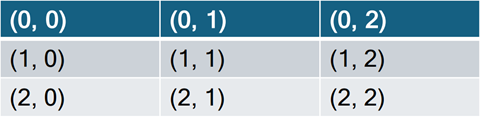
// Create a presentation.
try(Presentation presentation = new Presentation()) {
    // Gets the first slide.
    Slide slide = presentation.getSlides().getFirst();

    // Create a 3x3 table and define its position and size.
    Table table = new Table(3, 3, 100, 100);
    table.setHasHeaderRow(false);       // Disable the header row style.
    table.setWidth(1600);               // Set the table width.

    // Populate table cells with row/column coordinates.
    for (int rowIndex = 0; rowIndex < table.getRows().size(); rowIndex++) {
        for (int colIndex = 0; colIndex < table.getColumns().size(); colIndex++) {
            table.getThis(rowIndex, colIndex)
                    .getTextArea()
                    .setText(String.format("(%d, %d)", rowIndex, colIndex));
        }
    }

    // Add the table to the slide.
    slide.getShapes().add(table);

    // Your additional implementation goes here.
}
Refer to the following help topic for additional information: Work with Tables — Presentation API for Java.
Inherited Members
Inheritance
TableCell()
Initializes a new instance of the TableCell class.
Declaration
public TableCell()Methods
deepClone() Method
Clones the current TableCell instance.
Declaration
public TableCell deepClone()Returns
| Type | Description |
|---|---|
TableCell |
The cloned |
getBottomBorder() Method
Returns the cell bottom border settings.
Declaration
public LineStyle getBottomBorder()Returns
| Type |
|---|
| LineStyle |
Remarks
Refer to the following help topic for additional information: Customize Cell Borders.
getBottomMargin() Method
Returns the bottom margin of a table cell.
Declaration
public @Nullable Float getBottomMargin()Returns
| Type | Description |
|---|---|
The bottom margin of the table cell. |
getColumnSpan() Method
Returns the number of columns spanned by the current TableCell instance.
Declaration
public int getColumnSpan()Returns
| Type | Description |
|---|---|
| int | The number of columns that specifies the column span. |
Remarks
To merge cells, call the Table.MergeCells method.
getDiagonalDownBorder() Method
Returns the cell diagonal down border settings.
Declaration
public LineStyle getDiagonalDownBorder()Returns
| Type |
|---|
| LineStyle |
Remarks
Refer to the following help topic for additional information: Customize Cell Borders.
getDiagonalUpBorder() Method
Returns the cell diagonal up border settings.
Declaration
public LineStyle getDiagonalUpBorder()Returns
| Type |
|---|
| LineStyle |
Remarks
Refer to the following help topic for additional information: Customize Cell Borders.
getFill() Method
Returns the table cell fill settings.
Declaration
public Fill getFill()Returns
| Type | Description |
|---|---|
| Fill | The table cell fill settings. |
getHorizontalAnchorCenter() Method
Returns a value indicating whether the horizontal anchor of the cell is centered.
Declaration
public boolean getHorizontalAnchorCenter()Returns
| Type | Description |
|---|---|
| boolean |
|
getIsMergedHorizontally() Method
Indicates whether the current cell is merged horizontally with other cells.
Declaration
public boolean getIsMergedHorizontally()Returns
| Type | Description |
|---|---|
| boolean |
|
getIsMergedVertically() Method
Indicates whether the current cell is merged vertically with other cells.
Declaration
public boolean getIsMergedVertically()Returns
| Type | Description |
|---|---|
| boolean |
|
getLeftBorder() Method
Returns the cell left border settings.
Declaration
public LineStyle getLeftBorder()Returns
| Type |
|---|
| LineStyle |
Remarks
Refer to the following help topic for additional information: Customize Cell Borders.
getLeftMargin() Method
Returns the left margin of a table cell.
Declaration
public @Nullable Float getLeftMargin()Returns
| Type | Description |
|---|---|
The left margin of the table cell. |
getRightBorder() Method
Returns the cell right border settings.
Declaration
public LineStyle getRightBorder()Returns
| Type |
|---|
| LineStyle |
Remarks
Refer to the following help topic for additional information: Customize Cell Borders.
getRightMargin() Method
Returns the right margin of a table cell.
Declaration
public @Nullable Float getRightMargin()Returns
| Type | Description |
|---|---|
The right margin of the table cell. |
getRowSpan() Method
Returns the number of rows spanned by the current TableCell instance.
Declaration
public int getRowSpan()Returns
| Type | Description |
|---|---|
| int | The number of rows that specifies the row span. |
Remarks
To merge cells, call the Table.MergeCells method.
getTextArea() Method
Returns the table cell text box that allows you specify cell content and its formatting.
Declaration
public CellTextArea getTextArea()Returns
| Type | Description |
|---|---|
| CellTextArea | A table cell text box. |
getTextVerticalType() Method
Returns the vertical text orientation in a table cell.
Declaration
public TextOrientationType getTextVerticalType()Returns
| Type | Description |
|---|---|
| TextOrientationType | The text vertical type of the table cell. |
getTopBorder() Method
Returns the cell top border settings.
Declaration
public LineStyle getTopBorder()Returns
| Type |
|---|
| LineStyle |
getTopMargin() Method
Returns the top margin of a table cell.
Declaration
public @Nullable Float getTopMargin()Returns
| Type | Description |
|---|---|
The top margin of the table cell. |
getVerticalAnchorType() Method
Returns the vertical anchor type of the cell.
Declaration
public TextVerticalAnchorType getVerticalAnchorType()Returns
| Type | Description |
|---|---|
| TextVerticalAnchorType | The vertical anchor type of the table cell. |
setBottomBorder(LineStyle value) Method
Declaration
public void setBottomBorder(LineStyle value)Parameters
| Name | Type |
|---|---|
| value | LineStyle |
setBottomMargin(@Nullable Float value) Method
Sets the bottom margin of the table cell.
Declaration
public void setBottomMargin(@Nullable Float value)Parameters
| Name | Type | Description |
|---|---|---|
| value | The bottom margin. |
setDiagonalDownBorder(LineStyle value) Method
Declaration
public void setDiagonalDownBorder(LineStyle value)Parameters
| Name | Type |
|---|---|
| value | LineStyle |
setDiagonalUpBorder(LineStyle value) Method
Declaration
public void setDiagonalUpBorder(LineStyle value)Parameters
| Name | Type |
|---|---|
| value | LineStyle |
setFill(Fill value) Method
Sets the table cell fill settings.
Declaration
public void setFill(Fill value)Parameters
| Name | Type | Description |
|---|---|---|
| value | Fill | The table cell fill settings. |
setHorizontalAnchorCenter(boolean value) Method
Sets a value indicating whether the horizontal anchor of the cell is centered.
Declaration
public void setHorizontalAnchorCenter(boolean value)Parameters
| Name | Type | Description |
|---|---|---|
| value | boolean |
|
setLeftBorder(LineStyle value) Method
Declaration
public void setLeftBorder(LineStyle value)Parameters
| Name | Type |
|---|---|
| value | LineStyle |
setLeftMargin(@Nullable Float value) Method
Sets the left margin of the table cell.
Declaration
public void setLeftMargin(@Nullable Float value)Parameters
| Name | Type | Description |
|---|---|---|
| value | The left margin. |
setRightBorder(LineStyle value) Method
Declaration
public void setRightBorder(LineStyle value)Parameters
| Name | Type |
|---|---|
| value | LineStyle |
setRightMargin(@Nullable Float value) Method
Sets the right margin of the table cell.
Declaration
public void setRightMargin(@Nullable Float value)Parameters
| Name | Type | Description |
|---|---|---|
| value | The right margin. |
setTextArea(CellTextArea value) Method
Sets the table cell text box that allows you specify cell content and its formatting.
Declaration
public void setTextArea(CellTextArea value)Parameters
| Name | Type | Description |
|---|---|---|
| value | CellTextArea | A table cell text box. |
setTextVerticalType(TextOrientationType value) Method
Sets the text vertical type of the table cell.
Declaration
public void setTextVerticalType(TextOrientationType value)Parameters
| Name | Type | Description |
|---|---|---|
| value | TextOrientationType | The text vertical type. |
setTopBorder(LineStyle value) Method
Declaration
public void setTopBorder(LineStyle value)Parameters
| Name | Type |
|---|---|
| value | LineStyle |
setTopMargin(@Nullable Float value) Method
Sets the top margin of the table cell.
Declaration
public void setTopMargin(@Nullable Float value)Parameters
| Name | Type | Description |
|---|---|---|
| value | The top margin. |
setVerticalAnchorType(TextVerticalAnchorType value) Method
Sets the vertical anchor type of the table cell.
Declaration
public void setVerticalAnchorType(TextVerticalAnchorType value)Parameters
| Name | Type | Description |
|---|---|---|
| value | TextVerticalAnchorType | The vertical anchor type. |
split(int rowCount, int columnCount) Method
Splits the cell into the specified number of rows and columns.
Declaration
public void split(int rowCount, int columnCount)Parameters
| Name | Type | Description |
|---|---|---|
| rowCount | int | The resulting number of rows. |
| columnCount | int | The resulting number of columns. |
Remarks
Refer to the following help topic for additional information: Split Table Cells.