Table Class
A shape that allows you to create and manipulate tables in a presentation document.
Declaration
public class Table extends ShapeBase implements ICommandNotifierRemarks
The DevExpress Presentation API supports the following operations:
- Create and add a table to a slide
- Apply table style
- Format table cells
- Merge and split cells
- Insert and remove rows and columns
- Extract data from cells
- Clone and delete tables
Refer to the following help topic for additional information: Work with Tables — Presentation API for Java.
Example: Create and Add a Table to a Slide
Follow the steps below to create a table and add it to a slide:
- Create a
Tableobject:- Specify the number of rows and columns.
- Set table position and size. Values are measured in Document units (1/300 inch).
- Add the table to the slide’s shapes.
Use the Table.getThis(row, column) method to access cells.
The TableCell.setTextArea() method specifies cell text.
Note
Cells support only text content.
The following code snippet creates a 3x3 table:
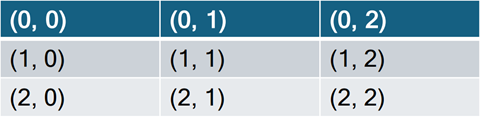
// Create a presentation.
try(Presentation presentation = new Presentation()) {
    // Gets the first slide.
    Slide slide = presentation.getSlides().getFirst();

    // Create a 3x3 table and define its position and size.
    Table table = new Table(3, 3, 100, 100);
    table.setHasHeaderRow(false);       // Disable the header row style.
    table.setWidth(1600);               // Set the table width.

    // Populate table cells with row/column coordinates.
    for (int rowIndex = 0; rowIndex < table.getRows().size(); rowIndex++) {
        for (int colIndex = 0; colIndex < table.getColumns().size(); colIndex++) {
            table.getThis(rowIndex, colIndex)
                    .getTextArea()
                    .setText(String.format("(%d, %d)", rowIndex, colIndex));
        }
    }

    // Add the table to the slide.
    slide.getShapes().add(table);

    // Your additional implementation goes here.
}
Inherited Members
Inheritance
Constructors
Table(int rowCount, int columnCount, float x, float y, float width, float height) Constructor
Initializes a new instance of the Table class with specified settings.
Declaration
public Table(int rowCount, int columnCount, float x, float y, float width, float height)Parameters
| Name | Type | Description |
|---|---|---|
| rowCount | int | The row count. |
| columnCount | int | The column count. |
| x | float | The X-coordinate. |
| y | float | The Y-coordinate. |
| width | float | The table width. |
| height | float | The table height. |
Table(int rowCount, int columnCount, float x, float y, float width) Constructor
Initializes a new instance of the Table class with specified settings.
Declaration
public Table(int rowCount, int columnCount, float x, float y, float width)Parameters
| Name | Type | Description |
|---|---|---|
| rowCount | int | The row count. |
| columnCount | int | The column count. |
| x | float | The X-coordinate. |
| y | float | The Y-coordinate. |
| width | float | The table width. |
Table(int rowCount, int columnCount, float x, float y) Constructor
Initializes a new instance of the Table class with specified settings.
Declaration
public Table(int rowCount, int columnCount, float x, float y)Parameters
| Name | Type | Description |
|---|---|---|
| rowCount | int | The row count. |
| columnCount | int | The column count. |
| x | float | The X-coordinate. |
| y | float | The Y-coordinate. |
Table(int rowCount, int columnCount, float x) Constructor
Initializes a new instance of the Table class with specified settings.
Declaration
public Table(int rowCount, int columnCount, float x)Parameters
| Name | Type | Description |
|---|---|---|
| rowCount | int | The row count. |
| columnCount | int | The column count. |
| x | float | The X-coordinate. |
Table(int rowCount, int columnCount) Constructor
Initializes a new instance of the Table class with specified settings.
Declaration
public Table(int rowCount, int columnCount)Parameters
| Name | Type | Description |
|---|---|---|
| rowCount | int | The row count. |
| columnCount | int | The column count. |
Table(Iterable<TableRow> rows, Iterable<TableColumn> columns, float x, float y) Constructor
Initializes a new instance of the Table class with specified settings.
Declaration
public Table(Iterable<TableRow> rows, Iterable<TableColumn> columns, float x, float y)Parameters
| Name | Type | Description |
|---|---|---|
| rows | java.lang.Iterable<TableRow> | Table rows. |
| columns | java.lang.Iterable<TableColumn> | Table columns. |
| x | float | The X-coordinate. |
| y | float | The Y-coordinate. |
Methods
deepClone() Method
Clones the current Table instance.
Declaration
public Table deepClone()Returns
| Type | Description |
|---|---|
Table |
The cloned |
Remarks
// Create deep copy of the table.
Table clonedTable = table.deepClone();

// Add the cloned table to the slide.
slide.getShapes().add(clonedTable);
getActiveCells(TableTraversalOrder order) Method
Returns all active cells in the table, skipping merged cells that do not display data.
Declaration
public Iterable<TableCell> getActiveCells(TableTraversalOrder order)Parameters
| Name | Type | Description |
|---|---|---|
| order | TableTraversalOrder | The order in which to traverse the table cells. |
Returns
| Type | Description |
|---|---|
| java.lang.Iterable<TableCell> | A collection of table cells. |
Remarks
When cells are merged, they remain in the table structure. Only the resulting/primary cell is displayed. Merged cells are hidden and can be restored when the merged cell is split.
Use the getActiveCells method to obtain active cells.
// Iterate through active cells in the table.
IGenericEnumerable<TableCell> cells =
        table.getActiveCells(TableTraversalOrder.ROW_THEN_COLUMN);
Refer to the following help topic for additional information: Iterate Active Cells.
getColumns() Method
Returns the collection of columns in the table.
Declaration
public ITableColumnCollection getColumns()Returns
| Type | Description |
|---|---|
| ITableColumnCollection | The collection of columns in the table. |
Remarks
// Obtain columns and remove the first column.
table.getColumns().removeFirst();
getEffects() Method
Returns the effects applied to the table.
Declaration
public TableEffectProperties getEffects()Returns
| Type | Description |
|---|---|
| TableEffectProperties | Contains the effects applied to the table. |
Remarks
Refer to the following help topic for additional information: Work with Tables — Presentation API for Java.
getFill() Method
Returns the fill applied to the table background.
Declaration
public Fill getFill()Returns
| Type | Description |
|---|---|
| Fill | The fill applied to the table background. |
Remarks
You can apply the following fill types to a table:
getHasBandedColumns() Method
Returns whether to highlight alternating columns.
Declaration
public boolean getHasBandedColumns()Returns
| Type | Description |
|---|---|
| boolean |
|
Remarks
The following image illustrates a table with banded columns:

Refer to the following help topic for additional information: Highlight Rows and Columns.
getHasBandedRows() Method
Returns whether to highlight alternating rows.
Declaration
public boolean getHasBandedRows()Returns
| Type | Description |
|---|---|
| boolean |
|
Remarks
The following image illustrates a table with banded rows:

Refer to the following help topic for additional information: Highlight Rows and Columns.
getHasFirstColumn() Method
Returns whether to highlight the first column.
Declaration
public boolean getHasFirstColumn()Returns
| Type | Description |
|---|---|
| boolean |
|
Remarks
The following image illustrates a table with the highlighted first column:

Refer to the following help topic for additional information: Highlight Rows and Columns.
getHasHeaderRow() Method
Returns whether to highlight the first row.
Declaration
public boolean getHasHeaderRow()Returns
| Type | Description |
|---|---|
| boolean |
|
Remarks
The following image illustrates a table with the highlighted first row:

Refer to the following help topic for additional information: Highlight Rows and Columns.
getHasLastColumn() Method
Returns whether to highlight the last column.
Declaration
public boolean getHasLastColumn()Returns
| Type | Description |
|---|---|
| boolean |
|
Remarks
The following image illustrates a table with the highlighted last column:

Refer to the following help topic for additional information: Highlight Rows and Columns.
getHasTotalRow() Method
Returns whether to highlight the last row.
Declaration
public boolean getHasTotalRow()Returns
| Type | Description |
|---|---|
| boolean |
|
Remarks
The following image illustrates a table with the highlighted last row:

Refer to the following help topic for additional information: Highlight Rows and Columns.
getRightToLeft() Method
Returns whether the right-to-left layout is applied.
Declaration
public boolean getRightToLeft()Returns
| Type | Description |
|---|---|
| boolean |
|
getRows() Method
Returns the collection of rows in the table.
Declaration
public ITableRowCollection getRows()Returns
| Type | Description |
|---|---|
| ITableRowCollection | The collection of rows in the table. |
Remarks
// Obtain table rows and remove the first row.
table.getRows().removeFirst();
getStyle() Method
Returns the table style.
Declaration
public TableStyle getStyle()Returns
| Type | Description |
|---|---|
| TableStyle | The table style. |
Remarks
Refer to the following help topic for additional information: Specify a Table Style.
getThis(int rowIndex, int columnIndex) Method
Returns the table cell at the specified row and column indexes.
Declaration
public TableCell getThis(int rowIndex, int columnIndex)Parameters
| Name | Type | Description |
|---|---|---|
| rowIndex | int | The zero-based row index. |
| columnIndex | int | The zero-based column index. |
Returns
| Type | Description |
|---|---|
| TableCell | The table cell at the specified indexes. |
mergeCells(TableCell tableCell1, TableCell tableCell2) Method
Merges two adjacent table cells into one cell.
Declaration
public void mergeCells(TableCell tableCell1, TableCell tableCell2)Parameters
| Name | Type | Description |
|---|---|---|
| tableCell1 | TableCell | The first table cell to merge. |
| tableCell2 | TableCell | The second table cell to merge. |
Remarks
// Merge two adjacent cells (1,1) and (1,2).
table.mergeCells(
        table.getThis(1, 1),    // The primary cell.
        table.getThis(1, 3)     // Merged cells.
);
Refer to the following help topic for additional information: Merge Cells.
raiseCommand(Object sender, String commandId) Method
Raises the specified command for the table.
Declaration
public void raiseCommand(Object sender, String commandId)Parameters
| Name | Type | Description |
|---|---|---|
| sender | Object | The command sender. |
| commandId | String | The command identifier. |
setEffects(TableEffectProperties value) Method
Adds visual effects to the table.
Declaration
public void setEffects(TableEffectProperties value)Parameters
| Name | Type | Description |
|---|---|---|
| value | TableEffectProperties | Visual effects. |
Remarks
The following code snippets adds an outer shadow effect to a table:
// Apply an outer shadow effect to the table.
TableEffectProperties effectProperties = new TableEffectProperties();
effectProperties.setOuterShadow(new OuterShadowEffect() {{
    setAngle(45);
    setColor(new OfficeColor(Color.getGray()));
    setBlurRadius(100);
    setDistance(10);
}});

table.setEffects(effectProperties);
setFill(Fill value) Method
Sets the fill applied to the table background.
Declaration
public void setFill(Fill value)Parameters
| Name | Type | Description |
|---|---|---|
| value | Fill | The fill applied to the table background. |
Remarks
You can apply the following fill types to a table:
setHasBandedColumns(boolean value) Method
Sets whether to highlight alternating columns.
Declaration
public void setHasBandedColumns(boolean value)Parameters
| Name | Type | Description |
|---|---|---|
| value | boolean |
|
Remarks
The following image illustrates a table with banded columns:
Refer to the following help topic for additional information: Highlight Rows and Columns.
setHasBandedRows(boolean value) Method
Sets whether to highlight alternating rows.
Declaration
public void setHasBandedRows(boolean value)Parameters
| Name | Type | Description |
|---|---|---|
| value | boolean |
|
Remarks
The following image illustrates a table with banded rows:
Refer to the following help topic for additional information: Highlight Rows and Columns.
setHasFirstColumn(boolean value) Method
Sets whether to highlight the first column.
Declaration
public void setHasFirstColumn(boolean value)Parameters
| Name | Type | Description |
|---|---|---|
| value | boolean |
|
Remarks
The following image illustrates a table with the highlighted first column:
Refer to the following help topic for additional information: Highlight Rows and Columns.
setHasHeaderRow(boolean value) Method
Sets whether to highlight the first row.
Declaration
public void setHasHeaderRow(boolean value)Parameters
| Name | Type | Description |
|---|---|---|
| value | boolean |
|
Remarks
The following image illustrates a table with the highlighted first row:
Refer to the following help topic for additional information: Highlight Rows and Columns.
setHasLastColumn(boolean value) Method
Sets whether to highlight the last column.
Declaration
public void setHasLastColumn(boolean value)Parameters
| Name | Type | Description |
|---|---|---|
| value | boolean |
|
Remarks
The following image illustrates a table with the highlighted last column:
Refer to the following help topic for additional information: Highlight Rows and Columns.
setHasTotalRow(boolean value) Method
Sets whether to highlight the last row.
Declaration
public void setHasTotalRow(boolean value)Parameters
| Name | Type | Description |
|---|---|---|
| value | boolean |
|
Remarks
The following image illustrates a table with the highlighted last row:
Refer to the following help topic for additional information: Highlight Rows and Columns.
setRightToLeft(boolean value) Method
Specifies whether to apply the right-to-left layout.
Declaration
public void setRightToLeft(boolean value)Parameters
| Name | Type | Description |
|---|---|---|
| value | boolean |
|
setStyle(TableStyle value) Method
Sets the table style.
Declaration
public void setStyle(TableStyle value)Parameters
| Name | Type | Description |
|---|---|---|
| value | TableStyle | The table style. |
Remarks
Refer to the following help topic for additional information: Specify a Table Style.
setThis(int rowIndex, int columnIndex, TableCell value) Method
Sets the table cell at the specified row and column indexes.
Declaration
public void setThis(int rowIndex, int columnIndex, TableCell value)Parameters
| Name | Type | Description |
|---|---|---|
| rowIndex | int | The zero-based row index. |
| columnIndex | int | The zero-based column index. |
| value | TableCell | The table cell. |
updateLayout() Method
Recalculates the table layout based on its cell content.
Declaration
public void updateLayout()