Presentation Document Model in Presentation API for Java
- 4 minutes to read
The DevExpress Presentation API defines a hierarchical document model. A Presentation object is the root object (container) that organizes presentation components (slides, masters, layouts, notes, and shapes) in a strict hierarchy.
Document Model
The following diagram illustrates the structure and relationships between presentation components. Each component exposes dedicated collections and access methods.
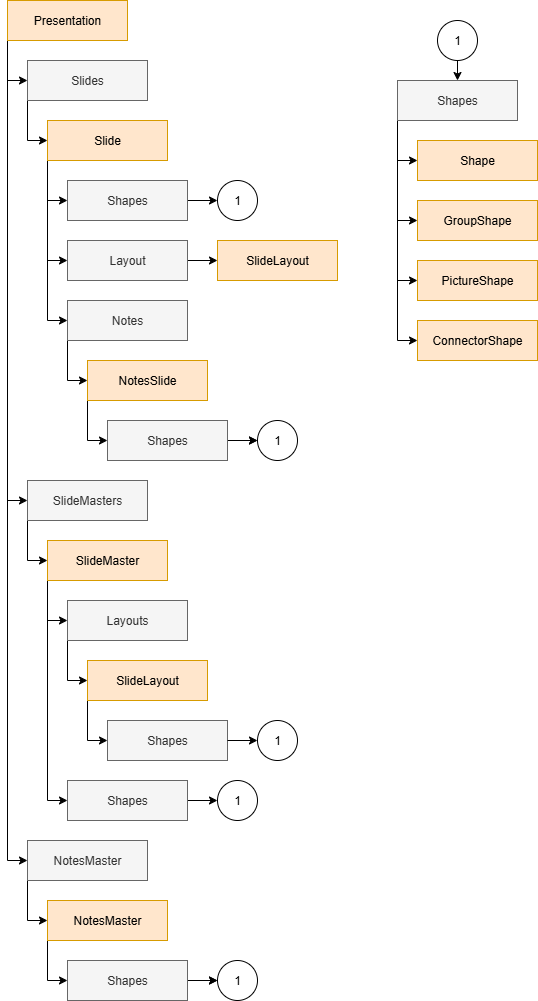
Presentation
A single PowerPoint document. It stores all document elements and global settings. Create a Presentation object to start a new document or load an existing file from a stream or byte array.
Key API methods:
import com.devexpress.docs.presentation.*;

// Create a presentation.
try(Presentation presentation = new Presentation()) {

    // Access the collection of slide masters.
    ISlideMasterCollection slideMasters = presentation.getSlideMasters();

    // Access the collection of presentation slides.
    ISlideCollection slides = presentation.getSlides();

    // Access the notes master.
    NotesMaster notesMaster = presentation.getNotesMaster();
}
Slide
Slides (Slide) are individual pages in a presentation.
The Presentation stores slides in the ISlideCollection. Use the getSlides() method to access the collection.
Each Slide object:
- Belongs to a
Presentation - References a SlideLayout
- Contains shapes and optional notes
Slide Operations
Slide operations include:
- Add
- Duplicate
- Remove
- Reorder
- Hide
// Access the first slide.
Slide slide = presentation.getSlides().getFirst();

// Add a blank slide.
Slide blankSlide = new Slide(SlideLayoutType.BLANK, "blank_slide");
presentation.getSlides().add(blankSlide);

// Duplicate the blank slide.
presentation.getSlides().add(blankSlide.deepClone());

// Reorder slides.
presentation.getSlides().move(1, 0);
Content Model
- Slide.getShapes() — Returns a collection that contains all visual elements (shapes) on the slide.
- Slide.getLayout() — Returns the slide layout.
Slide Master
A SlideMaster defines a global template for slides. It controls layout structure and default formatting.
The Presentation stores SlideMaster objects in the ISlideMasterCollection. Use the getSlideMasters() method to access the collection.
// Access the first slide master.
SlideMaster master = presentation.getSlideMasters().get(0);

// Access master shapes.
IShapeCollection shapes = master.getShapes();
Note
The presentation is valid if it contains at least one slide master with one associated layout element.
Slide Layout
A SlideLayout defines content placement rules for a slide.
Each SlideLayout:
- Belongs to a single
SlideMaster - Defines placeholders and structure
The SlideMaster stores SlideLayout objects in the ISlideLayoutCollection. Use the SlideMaster.getLayouts() method to access the collection.
// Access the first slide master.
SlideMaster master = presentation.getSlideMasters().get(0);

// Access the first layout.
SlideLayout layout = master.getLayouts().get(0);

// Access layout shapes.
IShapeCollection layoutShapes = layout.getShapes();
Note
The presentation is valid if it contains at least one slide master with one associated layout element.
Shape
Slides, slide masters, and slide layouts use shapes (Shape) to display visual content. Each container exposes a IShapeCollection. Use the getShapes() method to access the collection.
Shape types include:
| Shape Type | Description |
|---|---|
| Shape | Basic and custom geometry objects |
| PictureShape | Displays an image |
| GroupShape | A group of shapes |
| ConnectorShape | A connector shape |
| Table | A table |
Notes
Notes (NotesSlide) store speaker information for a slide. Notes are visible only to the presenter.
Use the Slide.getNotes() method to access notes.
// Access slide notes.
NotesSlide notes = slide.getNotes();

// Access note shapes.
IShapeCollection noteShapes = notes.getShapes();
Notes Master
A NotesMaster defines default formatting for slide notes. It controls layout and appearance of notes across the presentation.
Use the Presentation’s getNotesMaster() method to access its NotesMaster.
// Access the notes master.
NotesMaster notesMaster = presentation.getNotesMaster();

// Access notes master shapes.
IShapeCollection shapes = notesMaster.getShapes();