EPC QR Code
- 3 minutes to read
An EPC QR Code (European Payments Council Quick Response Code) is a two-dimensional barcode that contains payment information required to initiate a SEPA Credit Transfer (SCT). When scanned with a banking application, the code automatically populates payment details (such as the beneficiary’s name, IBAN, amount, and payment reference).
EPC QR Codes are widely used across Europe for invoices, bills, and person-to-person payments.
Refer to the following document to additional information: Quick Response Code - Guidelines to Enable the Data Capture for the Initiation of a SEPA Credit Transfer
Configure EPC QR Code Settings
Use the QRGS1Options class to configure QR GS1 barcode settings.
| Method | Description |
|---|---|
| setBeneficiaryName(String value) | Sets the beneficiary’s name. |
| setBIC(String value) | Sets the BIC (Bank Identifier Code) of the beneficiary’s bank account. |
| setEPCEncoding(EPCEncoding value) | Specifies the character encoding used in the EPC payload. |
| setEPCVersion(EPCVersion value) | Specifies the EPC QR Code specification version. |
| setFrameOptions(QRFrameOptions value) | Specifies frame options. The frame is displayed around the QR code. |
| setIBAN(String value) | Sets the beneficiary’s IBAN (International Bank Account Number). |
| setIncludeQuietZone(boolean value) | Specifies whether to include a quiet zone around the QR code. |
| setInformation(String value) | Sets the additional information to encode in the QR code. |
| setPaymentReference(String value) | Sets the structured payment reference. |
| setRemittanceInformation(String value) | Sets the unstructured remittance information to encode in the QR code. |
| setTransferAmount(@Nullable Double value) | Sets the amount of the SEPA credit transfer. |
| setTransferPurpose(String value) | Sets the transfer purpose to be encoded in the QR code. |
| setVersion(QRCodeVersion value) | Specifies the QR Code version used to generate the symbol. |
Note
The optional frame highlights the payment function of the code and improves user recognition. Refer to the following Payment Services Austria (PSA) document for additional information: Application of QR-Code for Initiating of Credit Transfers.
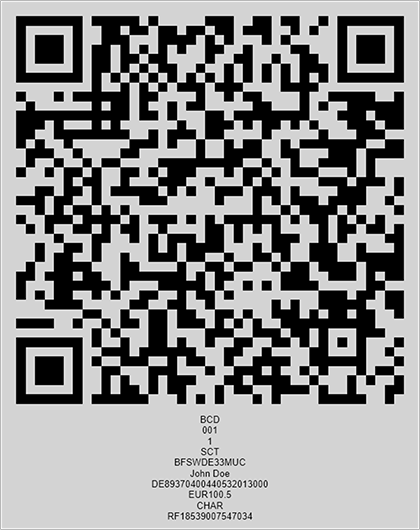
The following code snippet creates an EPC QR Code barcode and customizes its encoding parameters:
import com.devexpress.drawing.*;
import com.devexpress.docs.barcode.*;
import com.devexpress.system.drawing.*;
import com.devexpress.docs.Padding;

import java.io.*;
import java.nio.file.*;

public class Main {
    public static void main(String[] args) throws Exception {

        QRCodeEPCOptions options = new QRCodeEPCOptions();
        options.setTransferAmount(100.50);
        options.setEPCVersion(EPCVersion.VERSION_2);
        options.setEPCEncoding(EPCEncoding.UTF_8);
        options.setBIC("BFSWDE33MUC");
        options.setBeneficiaryName("John Doe");
        options.setIBAN("DE89370400440532013000");
        options.setPaymentReference("RF18539007547034");
        options.setTransferPurpose("CHAR");
        options.setBackColor(Color.getWhite());
        options.setPadding(new Padding(10));
        options.setShowText(true);
        options.setWidth(400);

        Path outputDir = Path.of("output");
        Files.createDirectories(outputDir);

        try (FileOutputStream fileStream = new FileOutputStream(
                outputDir.resolve("qrcodeEPC.png").toFile());
                BarcodeGenerator barcodeGenerator = new BarcodeGenerator(options)) {
                    barcodeGenerator.export(
                            options.getStringData(),
                            fileStream,
                            DXImageFormat.getPng());
        }
    }
}
Fluent API
Use the QRGS1OptionsBuilder class to configure QR GS1 barcode settings with the Fluent API.
The following code snippet creates an EPC QR Code barcode and customizes its encoding parameters with the Fluent API:
import com.devexpress.drawing.*;
import com.devexpress.docs.barcode.*;
import com.devexpress.system.drawing.*;
import com.devexpress.docs.Padding;

import java.io.*;
import java.nio.file.*;

public class Main {
    public static void main(String[] args) throws Exception {

        QRCodeEPCOptions options = QRCodeEPCOptionsBuilder.create()
            .withTransferAmount(100.50)
            .withEPCVersion(EPCVersion.VERSION_1)
            .withEPCEncoding(EPCEncoding.UTF_8)
            .withBackColor(Color.getLightGray())
            .withBIC("BFSWDE33MUC")
            .withBeneficiaryName("John Doe")
            .withIBAN("DE89370400440532013000")
            .withPaymentReference("RF18539007547034")
            .withTransferPurpose("CHAR")
            .withPadding(new Padding(10))
            .withShowText(true)
            .withWidth(400)
            .build();

        Path outputDir = Path.of("output");
        Files.createDirectories(outputDir);

        try (FileOutputStream fileStream = new FileOutputStream(
                outputDir.resolve("qrcodeEPC.png").toFile());
                BarcodeGenerator barcodeGenerator = new BarcodeGenerator(options)) {
                    barcodeGenerator.export(
                            options.getStringData(),
                            fileStream,
                            DXImageFormat.getPng());
        }
    }
}