Barcode Options
- 6 minutes to read
Use barcode option classes to control barcode appearance, layout, size, borders, QR frames, and logo images:
- Create a symbology-specific options object.
- Configure its settings.
- Pass the result to BarcodeGenerator.
Choose an Options Class
Create an instance of a symbology-specific options class, such as:
Symbology-specific options classes inherit common settings from BarcodeOptions.
The Barcode Generation API includes Fluent API builders (for example, QRCodeOptionsBuilder and DataMatrixOptionsBuilder). Builder classes expose the same settings with chained method calls and create the corresponding options object when you call build().
Refer to the following help topic for a complete list of supported symbologies: Barcode Types.
Common Barcode Settings
Most symbologies inherit the following settings from BarcodeOptions:
| Category | Settings | Use when you need |
|---|---|---|
| Colors and text | BackColor, ForeColor, ShowText, TextFont, CodeTextHorizontalAlignment, CodeTextVerticalAlignment, TextRenderingHint | To customize barcode colors and code text appearance. |
| Layout and size | Padding, Margin, RotationAngle, ModuleSize, Width, Height, Dpi, Unit, SizeMode | To control barcode spacing, scaling, and output size. |
| Border | BorderColor, BorderDashStyle, BorderStyle, BorderWidth, BorderSide | To customize border appearance. |
Symbology-Specific Settings
BarcodeOptions exposes common appearance and layout settings. Specific barcode types also include symbology-specific options.
For example:
- Use QRCodeOptions to configure frames, logos, quiet zones, and error correction.
- Use QRCodeEPCOptions to configure payment information and payment-specific QR frames.
- Use DataMatrixOptions to configure matrix size and compaction mode.
- Use Code128Options to configure character sets and function code placeholders.
Size Modes
The SizeMode enumeration lists values that specify how the API applies the specified barcode width and height.
| Value | Description |
|---|---|
AUTO |
The API calculates the barcode size automatically and preserves the barcode’s natural proportions. |
BARCODE_IMAGE |
The API generates a barcode image that matches the specified width and height. Use it when you need an image with exact dimensions (for example, when you place barcodes in labels, reports, or predefined layout regions). |
Note
Excessive scaling may reduce barcode readability. Choose width, height, and module size values that produce bars and modules large enough for the target display or printer resolution.
QR Frame and Logo Settings
QR Code classes include appearance settings that are not available for other symbologies.
Use the following APIs to customize QR frames and embed images:
| Category | Settings | Use when you need |
|---|---|---|
| Frame container | setFrameOptions(QRFrameOptions value) | To assign a frame configuration object to a QR Code. |
| Frame types | RectangleQRFrameOptions, CornerQRFrameOptions, PaymentServicesAustriaQRFrameOptions | To choose a QR frame style. |
| Frame appearance | FrameColor, FrameWidth, Padding | To customize frame color, thickness, and inner spacing. |
| Frame text | Text, TextAlignment, TextColor, TextPosition | To display text inside a frame. |
| Rectangle frame | CornerRadius | To create rounded frame corners. |
| Image | Logo | To embed an image inside a QR Code. |
Header and Footer (Barcode Label)
Use the BarcodeLabel class to customize the appearance and layout of barcode labels. A label can display text above (header) or below (footer) the barcode and supports the following settings:
- Text content
- Font and text color
- Text alignment
- Padding
- Visibility
Create a BarcodeLabel object and pass it to the BarcodeOptionsBuilder.withHeader() or BarcodeOptionsBuilder.withFooter() method to add a customized header or footer to the barcode.
If you only need to display plain text without additional formatting, use withHeader(String text) and withFooter(String text) methods.
The following code snippet uses the Fluent API to create a QR Code barcode, customize its encoding parameters, and add a header and footer.
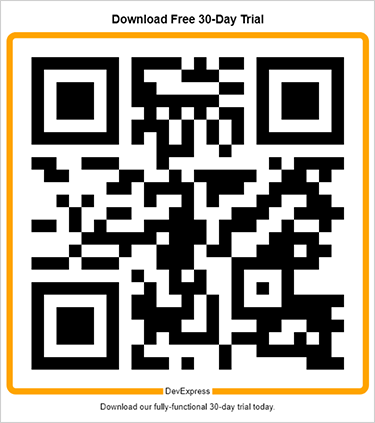
package barcodes;

import com.devexpress.docs.*;
import com.devexpress.drawing.*;
import com.devexpress.docs.barcode.*;
import com.devexpress.system.drawing.*;

import java.io.*;
import java.nio.file.*;

public class Main {
    public static void main(String[] args) throws Exception {
        // Customize QR Code header parameters.
        BarcodeLabel barcodeHeader = new BarcodeLabel();
        barcodeHeader.setText("Download Free 30-Day Trial");
        barcodeHeader.setAlignment(DXStringAlignment.CENTER);
        barcodeHeader.setFont(new DXFont("Arial", 14, DXFontStyle.BOLD));
        barcodeHeader.setForeColor(Color.getBlack());
        barcodeHeader.setPadding(new Padding(10));
        barcodeHeader.setVisible(true);

        // Customize QR Code footer parameters.
        BarcodeLabel barcodeFooter = new BarcodeLabel();
        barcodeFooter.setText("Download our fully-functional 30-day trial today.");
        barcodeFooter.setAlignment(DXStringAlignment.CENTER);
        barcodeFooter.setFont(new DXFont("Arial", 10));
        barcodeFooter.setForeColor(Color.getBlack());
        barcodeFooter.setPadding(new Padding(9));
        barcodeFooter.setVisible(true);

        // Customize QR Code frame parameters.
        RectangleQRFrameOptions frameOptions = new RectangleQRFrameOptions();
        frameOptions.setPadding(new Padding(10));
        frameOptions.setFrameColor(Color.getOrange());
        frameOptions.setFrameWidth(10);
        frameOptions.setText("DevExpress");
        frameOptions.setCornerRadius(10);
        frameOptions.setTextAlignment(QRFrameTextAlignment.CENTER);
        frameOptions.setTextColor(Color.getBlack());
        frameOptions.setTextPosition(QRFrameTextPosition.BOTTOM);

        // Customize QR Code parameters.
        QRCodeOptions options = QRCodeOptionsBuilder.create()
            .withFrameOptions(frameOptions)
            .withHeader(barcodeHeader)
            .withFooter(barcodeFooter)
            .withShowText(false)
            .withWidth(600)
            .build();

        Path outputDir = Path.of("output");
        Files.createDirectories(outputDir);

        try (FileOutputStream fileStream = new FileOutputStream(
                outputDir.resolve("qrcode.png").toFile());
             BarcodeGenerator barcodeGenerator = new BarcodeGenerator(options)) {
            barcodeGenerator.export(
                    "https://www.devexpress.com/try",
                    fileStream,
                    DXImageFormat.getPng());
        }
    }
}
Examples (Fluent API)
Customize Barcode Color, Text, and Size
The following code snippet creates an EPC QR Code barcode and customizes its encoding parameters with the Fluent API:
import com.devexpress.drawing.*;
import com.devexpress.docs.barcode.*;
import com.devexpress.system.drawing.*;
import com.devexpress.docs.Padding;

import java.io.*;
import java.nio.file.*;

public class Main {
    public static void main(String[] args) throws Exception {

        QRCodeEPCOptions options = QRCodeEPCOptionsBuilder.create()
            .withTransferAmount(100.50)
            .withEPCVersion(EPCVersion.VERSION_1)
            .withEPCEncoding(EPCEncoding.UTF_8)
            .withBackColor(Color.getLightGray())
            .withBIC("BFSWDE33MUC")
            .withBeneficiaryName("John Doe")
            .withIBAN("DE89370400440532013000")
            .withPaymentReference("RF18539007547034")
            .withTransferPurpose("CHAR")
            .withPadding(new Padding(10))
            .withShowText(true)
            .withWidth(400)
            .build();

        Path outputDir = Path.of("output");
        Files.createDirectories(outputDir);

        try (FileOutputStream fileStream = new FileOutputStream(
                outputDir.resolve("qrcodeEPC.png").toFile());
                BarcodeGenerator barcodeGenerator = new BarcodeGenerator(options)) {
                    barcodeGenerator.export(
                            options.getStringData(),
                            fileStream,
                            DXImageFormat.getPng());
        }
    }
}
Customize Barcode Border Settings
The following code snippet creates a Data Matrix (ECC200) barcode, customizes its encoding parameters, and adds the border:
package barcodes;

import com.devexpress.drawing.*;
import com.devexpress.docs.barcode.*;
import com.devexpress.system.drawing.*;

import java.io.*;
import java.nio.file.*;

public class Main {
    public static void main(String[] args) throws Exception {
        DataMatrixOptions options =  DataMatrixOptionsBuilder.create()
            .withCompactionMode(DataMatrixCompactionMode.C40)
            .withMatrixSize(DataMatrixSize.MATRIX_12X12)
            .withBorderDashStyle(BorderDashStyle.SOLID)
            .withBorderStyle(BorderStyle.INSET)
            .withBorderColor(Color.getOrange())
            .withSides(BorderSide.ALL)
            .withBorderWidth(10)
            .withModuleSize(5)
            .build();

        Path outputDir = Path.of("output");
        Files.createDirectories(outputDir);

        try (FileOutputStream fileStream = new FileOutputStream(
                outputDir.resolve("datamatrix.png").toFile());
             BarcodeGenerator barcodeGenerator = new BarcodeGenerator(options)) {
            barcodeGenerator.export(
                    "SN:DX-987654321",
                    fileStream,
                    DXImageFormat.getPng());
        }
    }
}
The BarcodeOptionsBuilder.withBorderStyle() method specifies where to draw the border relative to the barcode boundary:
INSET— draws the border inside the barcode boundary.OUTSET— draws the border outside the barcode boundary.CENTER— centers the border on the barcode boundary.
Add QR Frame and Logo
The following code snippet creates a QR Code barcode and customizes its encoding parameters with the Fluent API:
import com.devexpress.drawing.*;
import com.devexpress.docs.barcode.*;
import com.devexpress.system.drawing.*;
import com.devexpress.docs.Padding;

import java.io.*;
import java.nio.file.*;

public class Main {
    public static void main(String[] args) throws Exception {

        byte[] logoBytes = Files.readAllBytes(Path.of("images/devexpress-logo.png"));

        try (DXImage logo = DXImage.fromStream(new ByteArrayInputStream(logoBytes))) {
            // Customize QR Code frame parameters.
            RectangleQRFrameOptions frameOptions = new RectangleQRFrameOptions();
            frameOptions.setPadding(new Padding(10));
            frameOptions.setFrameColor(Color.getOrange());
            frameOptions.setFrameWidth(10);
            frameOptions.setText("DevExpress");
            frameOptions.setCornerRadius(10);
            frameOptions.setTextAlignment(QRFrameTextAlignment.CENTER);
            frameOptions.setTextColor(Color.getBlack());
            frameOptions.setTextPosition(QRFrameTextPosition.BOTTOM);

            // Customize QR Code parameters.
            QRCodeOptions options = QRCodeOptionsBuilder.create()
                .withErrorCorrectionLevel(QRCodeErrorCorrectionLevel.H)
                .withCompactionMode(QRCodeCompactionMode.AUTO)
                .withVersion(QRCodeVersion.VERSION_10)
                .withIncludeQuietZone(true)
                .withFrameOptions(frameOptions)
                .withLogo(logo)
                .withPadding(new Padding(10))
                .withModuleSize(10)
                .withShowText(false)
                .build();

            Path outputDir = Path.of("output");
            Files.createDirectories(outputDir);

            try (FileOutputStream fileStream = new FileOutputStream(
                    outputDir.resolve("qrcode.png").toFile());
                    BarcodeGenerator barcodeGenerator = new BarcodeGenerator(options)) {
                        barcodeGenerator.export(
                                "https://www.devexpress.com",
                                fileStream,
                                DXImageFormat.getPng());
            }
        }
    }
}
Note
Dispose DXImage instances with try-with-resources.