GS1 Data Matrix
- 2 minutes to read
GS1 Data Matrix is a variant of the Data Matrix symbology that follows GS1 standards for structured data encoding. It uses the Function 1 Symbol Character (FNC1) in the first position to indicate that the encoded data complies with GS1 rules.
GS1 Data Matrix is widely used in healthcare, manufacturing, and logistics, especially for direct part marking (DPM) where space is limited and high data density is required.
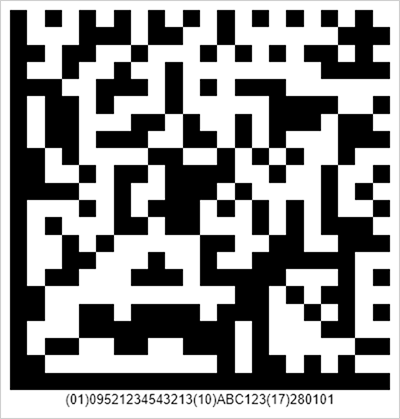
Refer to the following page for additional information: GS1 DataMatrix Guideline.
Configure GS1 Data Matrix Settings
Use the DataMatrixGS1Options class to configure GS1 Data Matrix barcode settings.
| Method | Description |
|---|---|
| setFNC1Substitute(String value) | Sets a substitute character that represents the GS1 FNC1 separator in input data. |
| setHumanReadableText(boolean value) | Sets whether to display the human-readable GS1 text below the barcode. |
The following code snippet creates a GS1 Data Matrix barcode and customizes its encoding parameters:
import com.devexpress.drawing.*;
import com.devexpress.docs.barcode.*;
import com.devexpress.system.drawing.*;
import com.devexpress.docs.Padding;

import java.io.*;
import java.nio.file.*;

public class Main {
    public static void main(String[] args) throws Exception {

        DataMatrixGS1Options options = new DataMatrixGS1Options();
        options.setCompactionMode(DataMatrixCompactionMode.C40);
        options.setMatrixSize(DataMatrixSize.MATRIX_12X12);
        options.setModuleSize(5);
        options.setPadding(new Padding(10));
        options.setShowText(true);
        options.setWidth(600);

        Path outputDir = Path.of("output");
        Files.createDirectories(outputDir);

        try (FileOutputStream fileStream = new FileOutputStream(
                outputDir.resolve("datamatrixGS1.png").toFile());
                BarcodeGenerator barcodeGenerator = new BarcodeGenerator(options)) {
                    barcodeGenerator.export(
                            "(01)09521234543213(10)ABC123(17)280101",
                            fileStream,
                            DXImageFormat.getPng());
        }
    }
}
Fluent API
Use the DataMatrixGS1OptionsBuilder class to configure GS1 Data Matrix barcode settings with the Fluent API.
The following code snippet creates a GS1 Data Matrix barcode and customizes its encoding parameters with the Fluent API:
import com.devexpress.drawing.*;
import com.devexpress.docs.barcode.*;
import com.devexpress.system.drawing.*;
import com.devexpress.docs.Padding;

import java.io.*;
import java.nio.file.*;

public class Main {
    public static void main(String[] args) throws Exception {

        DataMatrixGS1Options options = DataMatrixGS1OptionsBuilder.create()
            .withCompactionMode(DataMatrixCompactionMode.C40)
            .withMatrixSize(DataMatrixSize.MATRIX_12X12)
            .withModuleSize(5)
            .withPadding(new Padding(10))
            .withShowText(true)
            .withWidth(600)
            .build();

        Path outputDir = Path.of("output");
        Files.createDirectories(outputDir);

        try (FileOutputStream fileStream = new FileOutputStream(
                outputDir.resolve("datamatrixGS1.png").toFile());
                BarcodeGenerator barcodeGenerator = new BarcodeGenerator(options)) {
                    barcodeGenerator.export(
                            "(01)09521234543213(10)ABC123(17)280101",
                            fileStream,
                            DXImageFormat.getPng());
        }
    }
}