Get Started — Barcode Generation API for Java
- 4 minutes to read
This tutorial demonstrates the basic Barcode Generation API workflow:
- Create a Java application
- Configure QR Code settings
- Add a frame around the QR Code
- Export the barcode to PDF, PNG, and SVG files
Create a Java Application
Create a new Java application and add the devexpress-docs-barcode dependency.
Refer to the following help topic for additional information: Add DevExpress API Libraries to a Project.
Configure QR Code Options
Create a QRCodeOptions object and configure barcode options:
QRCodeOptions options = new QRCodeOptions();

// Encode the input as a sequence of bytes.
options.setCompactionMode(QRCodeCompactionMode.BYTE);
options.setVersion(QRCodeVersion.VERSION_10);

// Allow the barcode to remain readable even if part of the code is damaged.
options.setErrorCorrectionLevel(QRCodeErrorCorrectionLevel.H);

// Configure the barcode appearance.
options.setModuleSize(10);
options.setShowText(false);
options.setIncludeQuietZone(true);
options.setPadding(new Padding(10));

// Add a logo to the QR Code.

/*
 * NOTE:
 * Dispose DXImage instances with try-with-resources.
 * See the complete example at the end of this tutorial.
*/
byte[] logoBytes = Files.readAllBytes(Path.of("images/devexpress-logo.png"));
DXImage logo = DXImage.fromStream(new ByteArrayInputStream(logoBytes));
options.setLogo(logo);
Tip
The DevExpress Barcode Generation API for Java includes Fluent API builders (for example, QRCodeOptionsBuilder) that configure barcode options with chained method calls. See the individual barcode topics for Fluent API examples.
Add a Decorative Frame
Create a rectangular frame and assign it to the QR Code:
RectangleQRFrameOptions frameOptions = new RectangleQRFrameOptions();

// Configure frame content and appearance options.
frameOptions.setFrameWidth(10);
frameOptions.setCornerRadius(10);
frameOptions.setPadding(new Padding(10));
frameOptions.setFrameColor(Color.getOrange());

frameOptions.setText("DevExpress");
frameOptions.setTextColor(Color.getBlack());
frameOptions.setTextPosition(QRFrameTextPosition.BOTTOM);
frameOptions.setTextAlignment(QRFrameTextAlignment.CENTER);

// Apply the frame to the QR Code.
options.setFrameOptions(frameOptions);
Export the Barcode
Create a BarcodeGenerator instance and export the generated barcode to PDF, PNG, and SVG files.
Path outputDir = Path.of("output");
Files.createDirectories(outputDir);

try (BarcodeGenerator generator = new BarcodeGenerator(options)) {

    // The text to encode in the QR Code.
    String text = "https://www.devexpress.com";

    // Export the QR Code to a PDF document.
    try (OutputStream pdfStream =
                 Files.newOutputStream(
                         outputDir.resolve("qr-code.pdf"))) {

        generator.exportToPdf(
                text,
                StandardCharsets.UTF_8,
                pdfStream);
    }

    // Export the QR Code to an SVG image.
    try (FileOutputStream svgStream = new FileOutputStream(
        outputDir.resolve("qr-code.svg").toFile());

        FileOutputStream pngStream = new FileOutputStream(
                outputDir.resolve("qr-code.png").toFile());

        FileOutputStream pdfStream = new FileOutputStream(
                outputDir.resolve("qr-code.pdf").toFile());

        BarcodeGenerator generator = new BarcodeGenerator(options)) {

    // The text to encode in the QR Code.
    String text = "https://www.devexpress.com";

    // Export the QR Code to a PDF document.
    generator.exportToPdf(
            text,
            StandardCharsets.UTF_8,
            pdfStream);

    // Export the QR Code to a PNG image.
    generator.export(
            text,
            pngStream,
            DXImageFormat.getPng());

    // Export the QR Code to an SVG image.
    generator.export(
            text,
            svgStream,
            DXImageFormat.getSvg());
    }
}
Run the Application
Run the application. The code generates the following files in the output directory:
- qr-code.pdf
- qr-code.png
- qr-code.svg
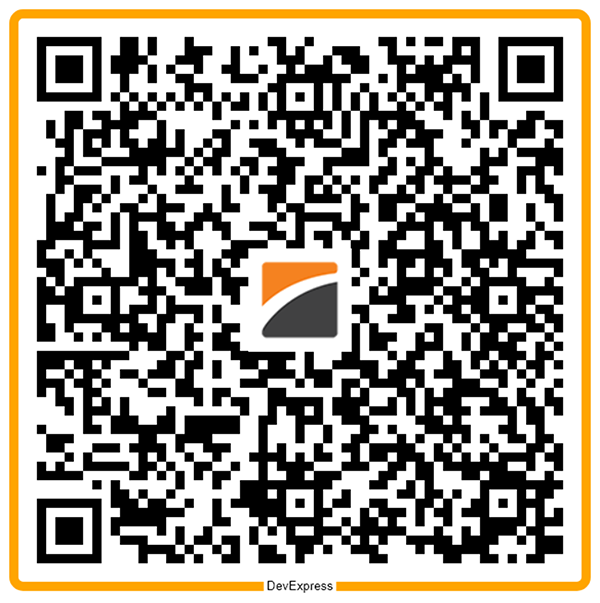
The generated QR Code uses byte compaction mode, high error correction, and a rectangular frame.
Tutorial Source Code
Expand this section to see the tutorial’s complete source code.
package barcodes;

import com.devexpress.docs.*;
import com.devexpress.drawing.*;
import com.devexpress.docs.barcode.*;
import com.devexpress.system.drawing.*;

import java.io.*;
import java.nio.file.*;
import java.nio.charset.StandardCharsets;

public class Main {
    public static void main(String[] args) throws Exception {

        byte[] logoBytes = Files.readAllBytes(Path.of("images/devexpress-logo.png"));
        try (DXImage logo = DXImage.fromStream(new ByteArrayInputStream(logoBytes))) {
            QRCodeOptions options = new QRCodeOptions();

            // Encode the input as a sequence of bytes.
            options.setCompactionMode(QRCodeCompactionMode.BYTE);
            options.setVersion(QRCodeVersion.VERSION_10);

            // Allow the barcode to remain readable even if part of the code is damaged.
            options.setErrorCorrectionLevel(QRCodeErrorCorrectionLevel.H);

            // Configure the barcode appearance.
            options.setModuleSize(10);
            options.setShowText(false);
            options.setIncludeQuietZone(true);
            options.setPadding(new Padding(10));

            // Add a logo to the QR Code.
            options.setLogo(logo);

            RectangleQRFrameOptions frameOptions = new RectangleQRFrameOptions();

            // Configure frame content and appearance options.
            frameOptions.setFrameWidth(10);
            frameOptions.setCornerRadius(10);
            frameOptions.setPadding(new Padding(10));
            frameOptions.setFrameColor(Color.getOrange());

            frameOptions.setText("DevExpress");
            frameOptions.setTextColor(Color.getBlack());
            frameOptions.setTextPosition(QRFrameTextPosition.BOTTOM);
            frameOptions.setTextAlignment(QRFrameTextAlignment.CENTER);

            // Apply the frame to the QR Code.
            options.setFrameOptions(frameOptions);

            Path outputDir = Path.of("output");
            Files.createDirectories(outputDir);

            try (FileOutputStream svgStream = new FileOutputStream(
                    outputDir.resolve("qr-code.svg").toFile());
                 FileOutputStream pngStream = new FileOutputStream(
                         outputDir.resolve("qr-code.png").toFile());
                 FileOutputStream pdfStream = new FileOutputStream(
                         outputDir.resolve("qr-code.pdf").toFile());
                 BarcodeGenerator generator = new BarcodeGenerator(options)) {

                // The text to encode in the QR Code.
                String text = "https://www.devexpress.com";

                // Export the QR Code to a PDF document.
                generator.exportToPdf(
                        text,
                        StandardCharsets.UTF_8,
                        pdfStream);

                // Export the QR Code to a PNG image.
                generator.export(
                        text,
                        pngStream,
                        DXImageFormat.getPng());

                // Export the QR Code to an SVG image.
                generator.export(
                        text,
                        svgStream,
                        DXImageFormat.getSvg());
            }
        }
    }
}