Stepper
- 3 minutes to read
Stepper is a UI control that allows you to display and analyze multi-dimensional data.
Getting Started
The Stepper UI Control is based on the DevExtreme Stepper component.
The following help topics explain how to add this control to your project:
- Add DevExtreme to a Visual Studio Project or Configure a non Visual Studio Project
- Add Controls to a Project
- Razor Syntax
Basic Syntax
@(Html.DevExtreme().Stepper()
    .Items(i => {
        i.Add().Label("Ready");
        i.Add().Label("Set");
        i.Add().Label("Go");
    })
)
Built-in Capabilities and Configuration Guides
- Orientation Options
Stepper supports horizontal and vertical orientation options. - Navigation Modes
The linear property enables sequential navigation. Disable linear to allow users to skip steps. - Step Types and States
The component offers various step types and states such as optional and disabled. You can also indicate step validity with the isValid property.
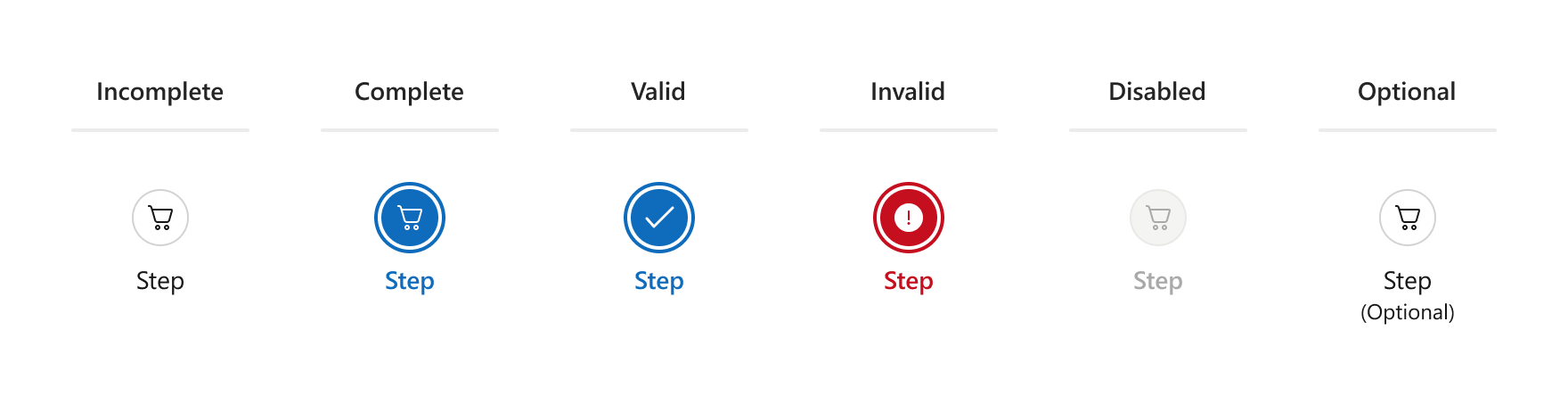
- Step Customization
Stepper offers multiple step customization options like configurable step labels and hints. You can also set custom step icons or text. Advanced Customization with Templates
Implement in-depth customizations such as custom step shapes with item templates. To do so, define itemTemplate or items[].template.Selection Options
You can get and set the selected step with selectedItem and selectedIndex. Implement custom logic upon selection change with onSelectionChanged and onSelectionChanging.- Keyboard Navigation
Stepper supports keyboard navigation. The component automatically selects steps focused with the keyboard if selectOnFocus is enabled. - Right-to-Left Mode
Switch between left-to-right and right-to-left progression on horizontal Steppers with the rtlEnabled property. rtlEnabled changes the placement of step labels on vertical Steppers.
API
Server-Side API
- Initialization
- Call the Stepper() method to create a Stepper control. This action initializes a StepperBuilder instance. Use the instance methods to specify Stepper options and event handlers.
- Options
- For a complete option list, see StepperBuilder Members. For details on how to specify control options, refer to the following help topic: Specify Options.
- Events
- For available events, see Events. For details on how to handle events, refer to the following help topic: Handle Events and Define Callbacks.
Client-Side API
- Options
- If you need to specify the Stepper options dynamically on the client side, use client-side API. For a complete option list, see DevExtreme Stepper options.
- Methods
- For a list of available methods, see DevExtreme Stepper methods. For details on how to call methods, refer to the following help topic: Call Methods.
Demos
See Also