PromptClarificationAnswer.Value Property
Gets the submitted clarification text.
Namespace: DevExpress.AIIntegration.Reporting
Assembly: DevExpress.AIIntegration.Reporting.Common.v26.1.dll
Declaration
Property Value
| Type | Description |
|---|---|
| String | The user-provided answer, or |
Remarks
Read this property after you confirm that the request was not canceled.
Host implementation receives generation progress and handles clarification questions:
using DevExpress.AIIntegration.Reporting;

namespace Reporting.Generation.Console {
    // Console host for interactive Prompt-to-Report generation.
    public class ConsoleAIReportGenerationHost : IAIReportGenerationHost {
        // Tracks where dynamic status lines are printed.
        private int currentCursorTop;
        // Indicates whether status output is printed for the first time.
        private bool isFirstStatusLine = true;
        // Stores the latest status value to detect status changes.
        private string lastStatus = string.Empty;
        private const int MenuInstructionsOffset = 2;
        // Request clarification from the user (choice list or free text).
        public Task<PromptClarificationAnswer> ClarifyPromptAsync(PromptClarificationQuestion request) {
            ClearStatusLines();
            DisplayQuestion(request.Text);
            if (request.Choices != null && request.Choices.Count > 0) {
                return HandleChoiceQuestion(request.Choices);
            } else {
                return HandleTextInputQuestion();
            }
        }
        // Clear previously rendered status lines before showing a question.
        void ClearStatusLines() {
            if (!isFirstStatusLine) {
                try {
                    ClearLine(currentCursorTop - 1);
                    ClearLine(currentCursorTop);
                    System.Console.SetCursorPosition(0, currentCursorTop - 1);
                } catch {
                    System.Console.WriteLine();
                }
            }
        }
        // Clear a single console line by overwriting it with spaces.
        void ClearLine(int lineNumber) {
            System.Console.SetCursorPosition(0, lineNumber);
            System.Console.Write(new string(' ', System.Console.BufferWidth - 1));
        }
        // Display a clarification question in a highlighted color.
        void DisplayQuestion(string questionText) {
            System.Console.ForegroundColor = ConsoleColor.Cyan;
            System.Console.WriteLine();
            System.Console.WriteLine(questionText);
            System.Console.ResetColor();
            System.Console.WriteLine();
        }
        // Handle clarification questions with predefined options.
        Task<PromptClarificationAnswer> HandleChoiceQuestion(IReadOnlyList<string> choices) {
            var selectedIndex = ShowInteractiveMenu(choices);
            isFirstStatusLine = true;
            if (selectedIndex == -1) {
                return Task.FromResult(PromptClarificationAnswer.Canceled());
            }
            return Task.FromResult(PromptClarificationAnswer.FromValue(choices[selectedIndex]));
        }
        // Handle clarification questions that require a text response.
        Task<PromptClarificationAnswer> HandleTextInputQuestion() {
            System.Console.ForegroundColor = ConsoleColor.DarkGray;
            System.Console.WriteLine("(Press Enter without text to cancel)");
            System.Console.ResetColor();
            System.Console.Write("Your answer: ");
            var answer = System.Console.ReadLine();
            System.Console.WriteLine();
            isFirstStatusLine = true;
            if (string.IsNullOrWhiteSpace(answer)) {
                return Task.FromResult(PromptClarificationAnswer.Canceled());
            }
            return Task.FromResult(PromptClarificationAnswer.FromValue(answer));
        }
        // Render an interactive menu and return the selected option index.
        int ShowInteractiveMenu(IReadOnlyList<string> choices) {
            int selectedIndex = 0;
            var startTop = System.Console.CursorTop;
            System.Console.WriteLine("Use ↑↓ arrows to navigate, Enter to select, Esc to cancel");
            System.Console.WriteLine();
            while (true) {
                RenderMenuItems(choices, selectedIndex, startTop);
                var action = ProcessKeyInput(ref selectedIndex, choices.Count);
                if (action.HasValue) {
                    System.Console.SetCursorPosition(0, startTop + MenuInstructionsOffset + choices.Count);
                    System.Console.WriteLine();
                    return action.Value;
                }
            }
        }
        // Draw all menu items for the current selection state.
        void RenderMenuItems(IReadOnlyList<string> choices, int selectedIndex, int startTop) {
            for (int i = 0; i < choices.Count; i++) {
                System.Console.SetCursorPosition(0, startTop + MenuInstructionsOffset + i);
                RenderMenuItem(choices[i], i == selectedIndex);
            }
        }
        // Draw one menu item with highlighted styling for the selected row.
        void RenderMenuItem(string text, bool isSelected) {
            if (isSelected) {
                System.Console.BackgroundColor = ConsoleColor.Gray;
                System.Console.ForegroundColor = ConsoleColor.Black;
                System.Console.Write($"> {text}");
                System.Console.ResetColor();
            } else {
                System.Console.Write($"  {text}");
            }
            var padding = Math.Max(0, System.Console.BufferWidth - text.Length - 3);
            System.Console.Write(new string(' ', padding));
        }
        // Process keyboard input and update the selected item.
        int? ProcessKeyInput(ref int selectedIndex, int itemCount) {
            var key = System.Console.ReadKey(true);
            switch (key.Key) {
                case ConsoleKey.UpArrow:
                    selectedIndex = selectedIndex > 0 ? selectedIndex - 1 : itemCount - 1;
                    return null;
                case ConsoleKey.DownArrow:
                    selectedIndex = selectedIndex < itemCount - 1 ? selectedIndex + 1 : 0;
                    return null;
                case ConsoleKey.Enter:
                    return selectedIndex;
                case ConsoleKey.Escape:
                    return -1;
                default:
                    return null;
            }
        }
        // Receive progress updates from the report generation workflow.
        public void NotifyAsync(string status, string reasoning) {
            bool statusChanged = lastStatus != status;
            lastStatus = status;
            if (isFirstStatusLine) {
                DisplayInitialStatus(status, reasoning);
            } else {
                UpdateStatus(status, reasoning, statusChanged);
            }
        }
        // Print initial status and reasoning lines.
        void DisplayInitialStatus(string status, string reasoning) {
            System.Console.WriteLine($"Status: {status}");
            if (!string.IsNullOrEmpty(reasoning)) {
                System.Console.Write($"Reasoning: {reasoning}");
            }
            currentCursorTop = System.Console.CursorTop;
            isFirstStatusLine = false;
        }
        // Update status output in-place when possible.
        void UpdateStatus(string status, string reasoning, bool statusChanged) {
            try {
                if (statusChanged) {
                    UpdateBothLines(status, reasoning);
                } else {
                    UpdateReasoningOnly(reasoning);
                }
            } catch {
                FallbackStatusDisplay(status, reasoning);
            }
        }
        // Re-render both status and reasoning lines.
        void UpdateBothLines(string status, string reasoning) {
            ClearLine(currentCursorTop - 1);
            System.Console.SetCursorPosition(0, currentCursorTop - 1);
            System.Console.WriteLine($"Status: {status}");

            ClearLine(currentCursorTop);
            System.Console.SetCursorPosition(0, currentCursorTop);
            if (!string.IsNullOrEmpty(reasoning)) {
                System.Console.Write($"Reasoning: {reasoning}");
            }
        }
        // Re-render only the reasoning line when status text has not changed.
        void UpdateReasoningOnly(string reasoning) {
            ClearLine(currentCursorTop);
            System.Console.SetCursorPosition(0, currentCursorTop);
            if (!string.IsNullOrEmpty(reasoning)) {
                System.Console.Write($"Reasoning: {reasoning}");
            }
        }
        // Fall back to plain output when cursor-based updates fail.
        void FallbackStatusDisplay(string status, string reasoning) {
            System.Console.WriteLine();
            System.Console.WriteLine($"Status: {status}");
            if (!string.IsNullOrEmpty(reasoning)) {
                System.Console.Write($"Reasoning: {reasoning}");
            }
            currentCursorTop = System.Console.CursorTop;
        }
    }
}
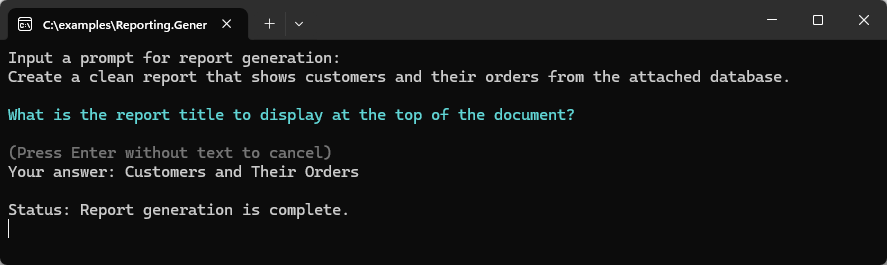
The following image demonstrates a console-based interaction with the report generation workflow:
See Also