AIReportPrompt Class
A prompt in natural language used to generate a report.
Namespace: DevExpress.AIIntegration.Reporting
Assembly: DevExpress.AIIntegration.Reporting.Common.v26.1.dll
NuGet Package: DevExpress.AIIntegration.Reporting.Common
Declaration
Remarks
Create an AIReportPrompt object and specify the following properties:
- AIReportPrompt.Text
- Specifies the prompt text.
- IReportPrompt.Title
- Specifies the prompt title.
Web Report Designer
Use the ConfigurePredefinedPrompts(Action<List<AIReportPrompt>>) method to change predefined prompts shown in the Report Wizard.
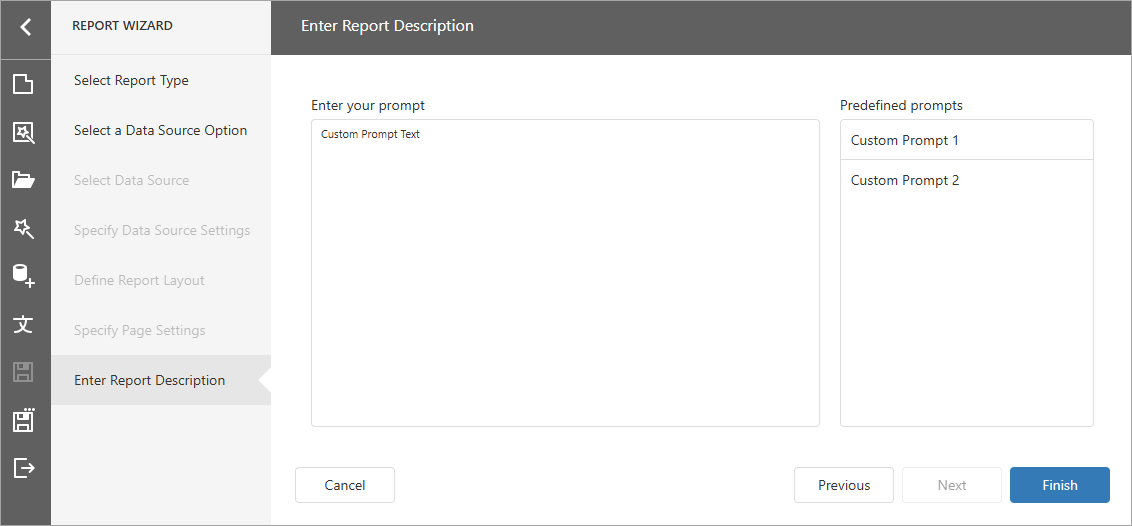
The following code snippet removes all DevExpress built-in prompts and adds two custom prompts:
using DevExpress.AspNetCore.Reporting;
using DevExpress.AIIntegration.Reporting;
//...
builder.Services.AddDevExpressAI(config => {
    config.AddWebReportingAIIntegration(aiConfig => {
        aiConfig
        .AddPromptToReportConverter(options => {
            options.ConfigurePredefinedPrompts(prompts => {
                prompts.Clear();
                prompts.Add(new AIReportPrompt {
                    Title = "Custom Prompt 1",
                    Text = "Custom Prompt Text"
                });
                 prompts.Add(new AIReportPrompt {
                     Title = "Custom Prompt 2",
                     Text = "Custom Prompt Text"
                });
            });
        });
    });
});
The following images shows the resulting Enter Report Description page in the Report Wizard:
Review the following help topic for more information on how to create and manage prompts: Generate Reports From Prompts in Web Report Designer.
WinForms Report Designer
Use ReportPromptToReportBehaviorProperties.PredefinedPrompts property to display prompts in the Report Wizard.
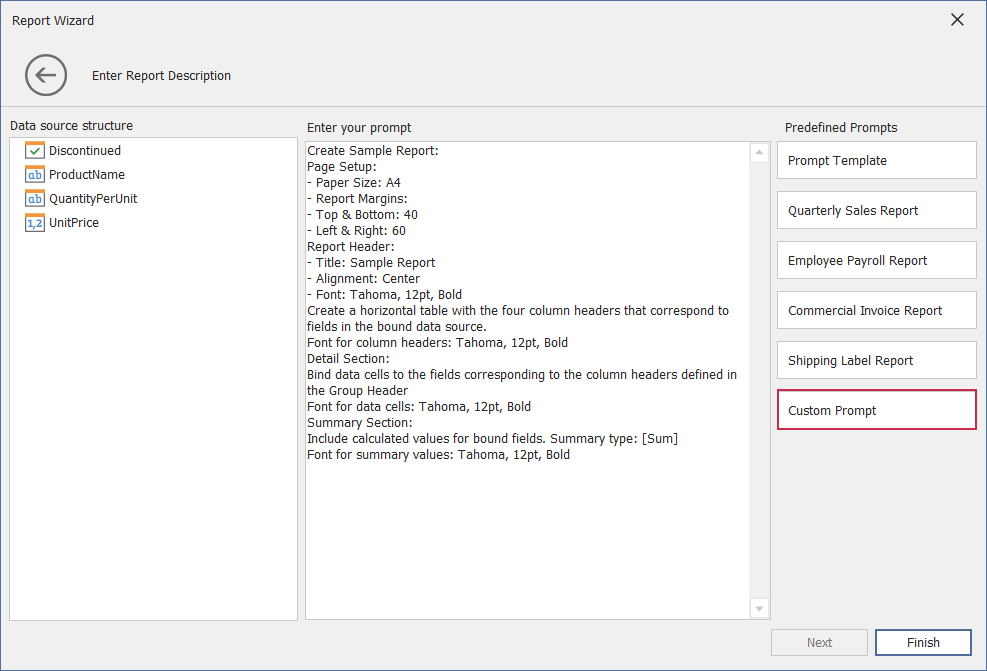
The following code snippet obtains built-in DevExpress prompts from AIReportPromptCollection, creates a custom prompt (an AIReportPrompt object), and adds this prompt to the collection. The collection is assigned to the ReportPromptToReportBehaviorProperties.PredefinedPrompts property.
using DevExpress.AIIntegration.WinForms.Reporting;
// ...
public partial class Form1 : Form {
    public Form1() {
        behaviorManager1.Attach<ReportPromptToReportBehavior>(reportDesigner1, behavior => {
            // Obtain built-in DevExpress prompts from the collection.
            var collection = AIReportPromptCollection.GetDefaultReportPrompts();
            // Create a custom prompt.
            AIReportPrompt customPrompt = new AIReportPrompt();
            customPrompt.Title = "Custom Prompt";
            customPrompt.Text = "Custom Prompt Text";
            // Add this prompt to the collection.
            collection.Add(customPrompt);
            // Display Prompts in the Report Wizard.
            behavior.Properties.PredefinedPrompts = collection;
        });
    }
}
The following image illustrates the result:
Review the following help topic for more information on how to create and manage prompts: Prompt to Report Behavior in the WinForms Report Designer.