Register Data Connections in the Blazor Report Designer
- 2 minutes to read
Note
In Blazor WebAssembly Standalone applications, only JSON and Object data sources are currently supported.
The Data Source Wizard allows you to create a new data source if a data connection provider is registered in the application. You can register a built-in connection string provider or implement and register a custom provider.
Built-in Connection String Providers
Built-in data connection providers allow you to create data sources based on connection strings stored in the application configuration file (appsettings.json).
Add data connections to the application’s configuration file (appsettings.json):
{
    "ConnectionStrings": {
        "NWindConnectionString": "XpoProvider=SQLite;Data Source=|DataDirectory|/Data/nwind.db",
        "JsonConnection": "Uri=https://raw.githubusercontent.com/DevExpress-Examples/DataSources/master/JSON/customers.json",
        "MongoDBConnection": "mongodb://localhost:27017/"
    }
}
Register required built-in data connection providers at application startup:
using DevExpress.AspNetCore.Reporting;
using DevExpress.XtraReports.Web.Extensions;
// ...
var builder = WebApplication.CreateBuilder(args);

builder.Services.AddDevExpressBlazor();
// ...
builder.Services.ConfigureReportingServices(configurator => {
    configurator.ConfigureReportDesigner(designerConfigurator => {
        // Register built-in data connection provider for SQL data sources.
        designerConfigurator.RegisterDataSourceWizardConfigFileConnectionStringsProvider();
        // Register built-in data connection provider for JSON data sources.
        designerConfigurator.RegisterDataSourceWizardConfigFileJsonConnectionStringsProvider();
        // Register built-in data connection provider for MongoDB data sources.
        designerConfigurator.RegisterDataSourceWizardConfigFileMongoDBConnectionStringsProvider();
    });
});
// ...
var app = builder.Build();
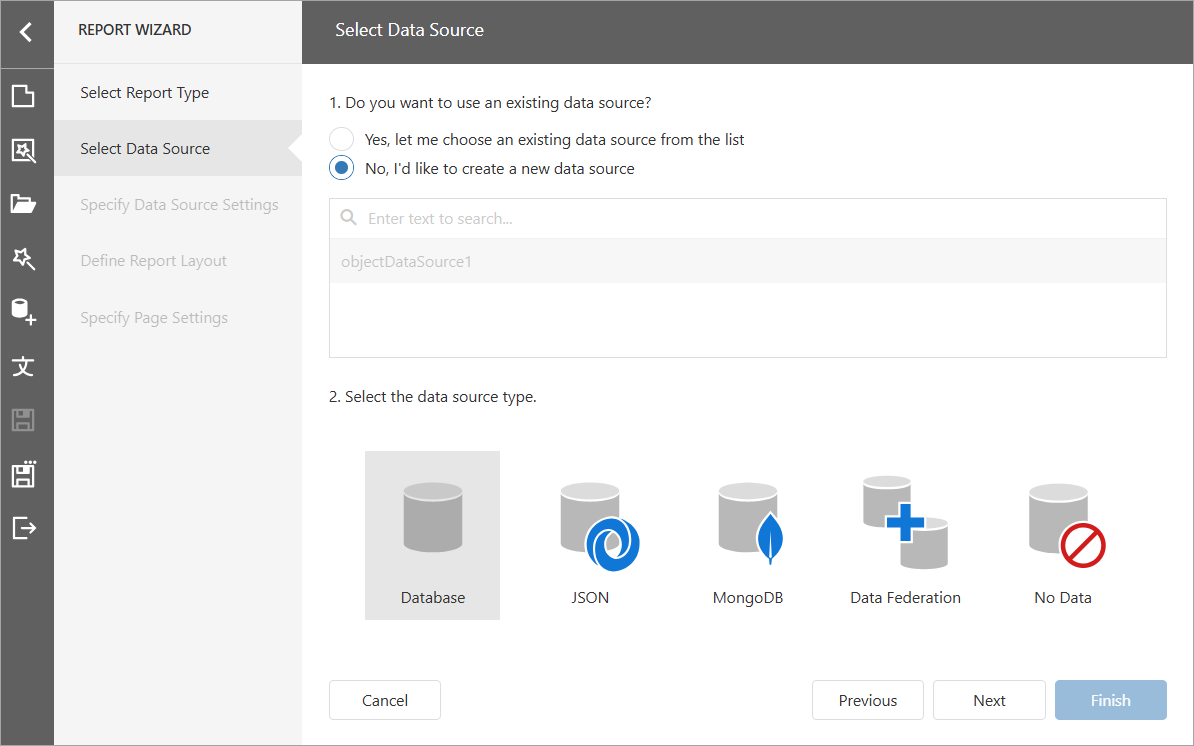
Users can now create data sources based on the connection strings defined in the appsettings.json file in the Report and Data Source Wizards:
Custom Connection String Providers
A custom connection provider allows you to manage data connections that are accessible to users:
- Modify connections at runtime (for example, depending on a user)
- Allow users to create new connections
- Validate connections and keep them in a separate storage
- Store credentials securely
For sample implementations of custom connection string providers, refer to the following help topics: