Register Predefined Data Sources in the Blazor Report Designer
- 2 minutes to read
Note
In Blazor WebAssembly Standalone applications, only JSON and Object data sources are currently supported.
This document describes how to create predefined data sources for the Blazor Report Designer. These predefined data sources are displayed when the user invokes the Report Wizard and Data Source Wizard:
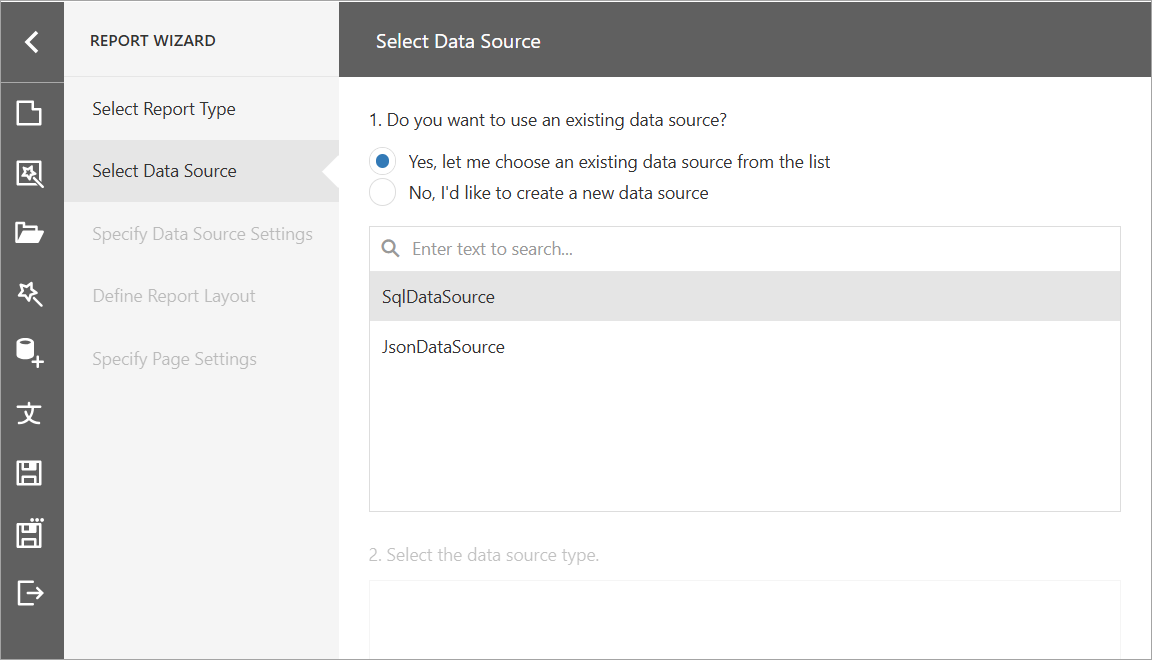
The following sections show how to add predefined SQL and JSON data sources.
DxReportDesigner Component
Create and configure SqlDataSource and JsonDataSource objects. Assign them to the DataSources property:
@using DevExpress.DataAccess.Json
@using DevExpress.DataAccess.Sql;

<DxReportDesigner ReportName="TestReport" Height="calc(100vh - 130px)" Width="100%" DataSources="DataSources">
</DxReportDesigner>

@code {
    Dictionary<string, object> DataSources = new Dictionary<string, object>();
    protected override async Task OnInitializedAsync() {
        await base.OnInitializedAsync();
        SqlDataSource sqlDataSource = new SqlDataSource("NWindConnectionString");
        // Create a SQL query to access the Products data table.
        SelectQuery query = SelectQueryFluentBuilder.AddTable("Products")
            .SelectAllColumnsFromTable()
            .Build("Products");
        sqlDataSource.Queries.Add(query);
        sqlDataSource.RebuildResultSchema();

        // Create a JSON data source.
        JsonDataSource jsonDataSource = new JsonDataSource();
        Uri nwindUri = new Uri("https://raw.githubusercontent.com/" +
            "DevExpress-Examples/DataSources/master/JSON/customers.json");
        jsonDataSource.JsonSource = new UriJsonSource(nwindUri);
        jsonDataSource.Fill();
        DataSources.Add("SqlDataSource", sqlDataSource);
        DataSources.Add("JsonDataSource", jsonDataSource);
    }
}
DxWasmReportDesigner Component
Add a Northwind connection string to your appsettings.json file:
{
  "ConnectionStrings": {
    "NWindConnectionString": "XpoProvider=SQLite;Data Source=|DataDirectory|Data/nwind.db"
  }
}
In the ReportingController.cs file, create and configure SqlDataSource and JsonDataSource objects. Pass data source instances to the designer’s client-side model generator (an IReportDesignerClientSideModelGenerator implementation):
using DevExpress.AspNetCore.Reporting.ReportDesigner;
using DevExpress.AspNetCore.Reporting.ReportDesigner.Native.Services;
using DevExpress.DataAccess.Json;
using DevExpress.DataAccess.Sql;
using DevExpress.XtraReports.UI;
using DevExpress.XtraReports.Web.ReportDesigner;

//...
public class CustomReportDesignerController : ReportDesignerController
{
    public CustomReportDesignerController(IReportDesignerMvcControllerService controllerService) : base(controllerService)
    {
    }
    [HttpPost("[action]")]
    public async Task<object> GetReportDesignerModel(
        [FromForm] string reportUrl,
        [FromForm] ReportDesignerSettingsBase designerModelSettings,
        [FromServices] IReportDesignerClientSideModelGenerator designerClientSideModelGenerator)
    {
        Dictionary<string, object> dataSources = new Dictionary<string, object>();
        SqlDataSource sqlDataSource = new SqlDataSource("NWindConnectionString");
        // Create a SQL query to access the Products data table.
        SelectQuery query = SelectQueryFluentBuilder.AddTable("Products")
            .SelectAllColumnsFromTable()
            .Build("Products");
        sqlDataSource.Queries.Add(query);
        sqlDataSource.RebuildResultSchema();

        // Create a JSON data source.
        JsonDataSource jsonDataSource = new JsonDataSource();
        Uri nwindUri = new Uri("https://raw.githubusercontent.com/" +
            "DevExpress-Examples/DataSources/master/JSON/customers.json");
        jsonDataSource.JsonSource = new UriJsonSource(nwindUri);
        jsonDataSource.Fill();
        dataSources.Add("SqlDataSource", sqlDataSource);
        dataSources.Add("JsonDataSource", jsonDataSource);
        ReportDesignerModel model;
        if (string.IsNullOrEmpty(reportUrl))
            model = await designerClientSideModelGenerator.GetModelAsync(new XtraReport(), dataSources, "/DXXRD", "/DXXRDV", "/DXXQB");
        else
            model = await designerClientSideModelGenerator.GetModelAsync(reportUrl, dataSources, "/DXXRD", "/DXXRDV", "/DXXQB");
        model.Assign(designerModelSettings);

        var modelJsonScript = designerClientSideModelGenerator.GetJsonModelScript(model);
        return Content(modelJsonScript, "application/json");
    }
}
//...