Enable Rich Text Editor in Web Report Designer
The XRRichText control can display text with rich formatting in your report. You can specify content directly in the control, load text from an RTF/HTML file, or bind the control to a data field.
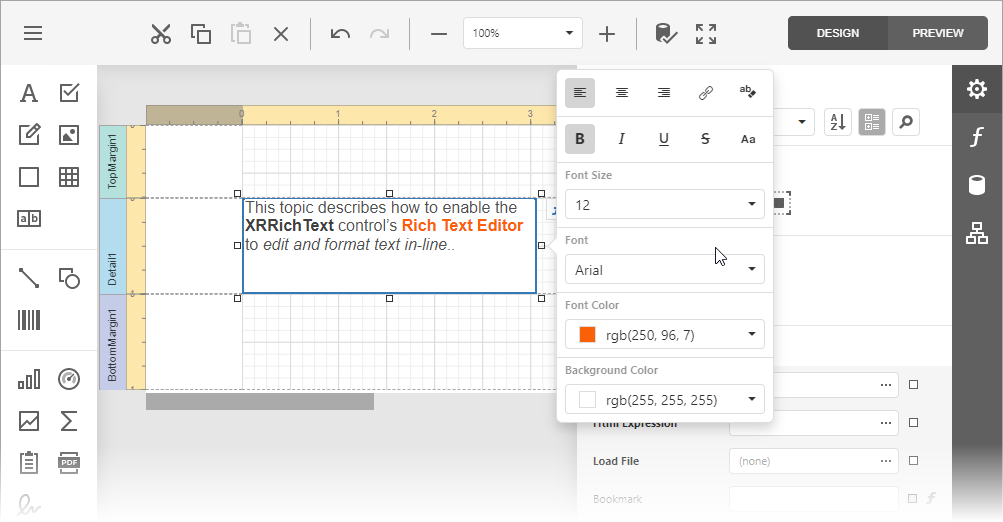
You can activate an inline Rich Text Editor and allow users to format and edit content in the Web Report Designer:
Note
The inline Rich Text Editor does not support Right-To-Left mode. For more information on limitations, refer to the following help topic: Rich Text Editor Unsupported Features.
Important
The Rich Text Editor is based on the DxRichEdit component. The DxRichEdit ships as part of the following subscriptions: ASP.NET & Blazor, DXperience, and Universal. Refer to the following page for additional information: DevExpress Subscriptions.
Follow the steps below to enable inline editing functionality in the Rich Text control:
In the App.razor file, call the RegisterRichEditScripts() method to register scripts required for the inline Rich Text Editor.
@using DevExpress.Blazor.Reporting

@DxResourceManager.RegisterScripts((config) => {
        config.ConfigureReporting(x => x.RegisterRichEditScripts());
    })
Refer to the following topic for the list of DevExpress resources for Blazor components: DxResourceManager.
Reference the Rich Edit stylesheet:
<link href="_content/DevExpress.Blazor.Resources/css/devexpress-richedit/dx.richedit.css" rel="stylesheet" />