Organize Annotations Using New DevExpress PDF Document API
- 6 minutes to read
The PDF Document API supports the following annotation types:
- Markup Annotations
- Annotations used to mark up document content. The following markups are available:
- Non-Markup Annotations
This topic describes common annotation management and customization tasks:
Create Annotations
Use Page.Annotations to access the AnnotationCollection that contains all annotations on the page. Use PdfDocument.Pages to obtain the corresponding Page instance.
Add an annotation to the AnnotationCollection to display it on the page.
The following code snippet opens the Invoice.pdf file, adds a TextAnnotation to the first page, and saves the file:
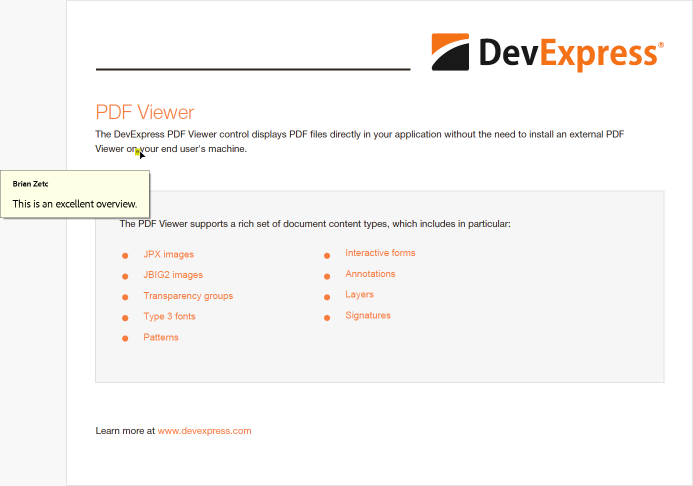
FileStream fs = File.OpenRead("Invoice.pdf");
var options = new LoadOptions();
PdfDocument document = new PdfDocument(fs, options);

TextAnnotation textAnnotation = new TextAnnotation(new RectangleF(85, 405, 20, 20)) {
    Color = Color.Yellow,
    Title = "Brian Zetc",
    Content = "This is an excellent overview."
};
document.Pages[0].Annotations.Add(textAnnotation);

document.Save(new FileStream("Invoice2.pdf", FileMode.Create, FileAccess.Write));
System.Diagnostics.Process.Start(new System.Diagnostics.ProcessStartInfo("Invoice2.pdf") { UseShellExecute = true });
Create Watermark Annotations
Create a WatermarkAnnotation instance and add it to the AnnotationCollection to display the watermark annotation.
The following code snippet creates a text watermark annotation:
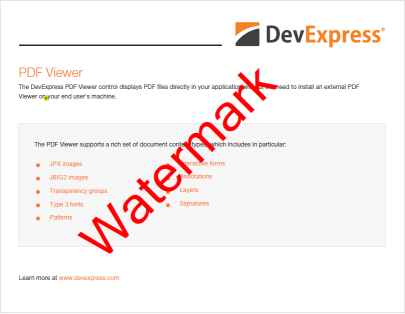
FileStream fs = File.OpenRead("Demo.pdf");
var options = new LoadOptions();
PdfDocument document = new PdfDocument(fs, options);
Page page = document.Pages[0];

FormTemplate form = new() { Bounds = page.MediaBox };
form.AddTextFragment(new TextFragment {
    Text = "Watermark",
    RotationAngle = 45,
    ForegroundFill = new SolidFill(PdfColor.Red),
    Location = new PointF(200, 100),
    Font = new TextFont("SegoeUI", TextFontStyle.Regular),
    FontSize = 100,
});

WatermarkAnnotation confidential = new(page.MediaBox) {
    Appearance = new AnnotationAppearances {
        Normal = new AnnotationAppearance {
            DefaultForm = form
        }
    }
};
document.Pages[0].Annotations.Add(confidential);
document.Save(new FileStream("Demo2.pdf", FileMode.Create, FileAccess.Write));
Search and Edit Annotations
The Page.Annotations property returns all annotations on a page. You can filter the collection, cast elements to proper annotation classes, and use class properties to modify annotations.
The following code snippet searches for a TextAnnotation which title or content contains Brian Zetc. If the annotation is found, the code changes its Content and Color:
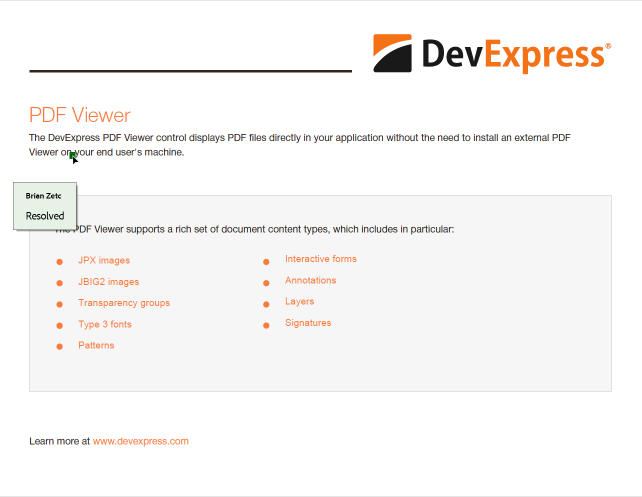
static void Main(string[] args){
    FileStream fs = File.OpenRead("Invoice.pdf");
    var options = new LoadOptions();
    PdfDocument document = new PdfDocument(fs, options);
    List<TextAnnotation> textAnnotation = FindTextAnnotations(document, "Brian Zetc");

    if (textAnnotation.Count > 0) {
        textAnnotation[0].Content = "Resolved";
        textAnnotation[0].Color = Color.Green;
    }
    document.Save(new FileStream("Invoice2.pdf", FileMode.Create, FileAccess.Write));
}

static List<TextAnnotation> FindTextAnnotations(PdfDocument document, string searchText) {
    var result = new List<TextAnnotation>();

    foreach (var page in document.Pages) {
        foreach (var annotation in page.Annotations) {
            if (annotation is TextAnnotation textAnnotation) {
                bool matchByTitle =
                    !string.IsNullOrEmpty(textAnnotation.Title) &&
                    textAnnotation.Title.IndexOf(searchText, StringComparison.OrdinalIgnoreCase) >= 0;

                bool matchByContent =
                    !string.IsNullOrEmpty(textAnnotation.Content) &&
                    textAnnotation.Content.IndexOf(searchText, StringComparison.OrdinalIgnoreCase) >= 0;

                if (matchByTitle || matchByContent)
                    result.Add(textAnnotation);
            }
        }
    }
    return result;
}
Remove Annotations
To remove an annotation, delete the corresponding element from the Annotations collection.
If an annotation contains replies, remove them first.
The following code snippet removes annotations if their title contains the text Brian Zetc:
FileStream fs = File.OpenRead("Invoice.pdf");
var options = new LoadOptions();
PdfDocument document = new PdfDocument(fs, options);

for (int i = 0; i < document.Pages.Count; i++) {
    var markups = document.Pages[i].Annotations
        .Where(annotation => annotation is MarkupAnnotation && ((MarkupAnnotation)annotation).Title == "Brian Zetc")
        .Cast<MarkupAnnotation>()
        .ToList();

    foreach (var markupAnnotation in markups) {
        // remove replies
        foreach (var reply in document.Pages[i].Annotations
        .OfType<TextAnnotation>()
        .Where(a => a.InReplyTo == markupAnnotation)
        .ToList()) {
            document.Pages[i].Annotations.Remove(reply);
        }
        // remove the annotation itself
        document.Pages[i].Annotations.Remove(markupAnnotation) ;
    }
}
document.Save(new FileStream("Invoice2.pdf", FileMode.Create, FileAccess.Write));
Customize Annotation Appearance
Use annotation properties to customize borders, colors, annotation-specific visuals, and appearance states.
The following code snippet creates a free text annotation and customizes its foreground color, border color, and border effect:
FileStream fs = File.OpenRead("Demo.pdf");
var options = new LoadOptions();
PdfDocument document = new PdfDocument(fs, options);

document.Pages[0].Annotations.Add(new FreeTextAnnotation(new RectangleF(310, 50, 370, 50)) {
    Color = PdfColor.LightBlue,
    BorderEffect = new AnnotationBorderEffect {
        Style = AnnotationBorderEffectStyle.CloudyEffect, Intensity = 1 },
    Border = new AnnotationBorder {
        Width = 2, Style = new LineStyle { DashPattern = [1.5, 2.0], DashPhase = 2.5d },
        HorizontalCornerRadius = 5,
        VerticalCornerRadius = 5 },
    OutlineFill = new SolidFill(PdfColor.LightSalmon),
    Title = "Brian Zetc",
    Content = "A free text annotation"
});
document.Save(new FileStream("Demo2.pdf", FileMode.Create, FileAccess.Write));