AI Assistant Extensions in Memo and Rich Text Editors
- 3 minutes to read
AI Assistant extensions allow you to enhance the way users interact with text content. These extensions leverage advanced natural language processing (NLP) technologies to offer automated, intelligent text manipulation capabilities directly within your XAF ASP.NET Core Blazor and Windows Forms applications.
The XAF AI Integration Module adds DevExpress AI-powered extensions to Detail View property editors. No manual setup is needed.
If necessary, you can edit the Application Model to deactivate AI extensions for specific editors. Developers can also customize extension properties in code to tailor the AI experience to specific business requirements.
Note
This feature is available as a Community Technology Preview (CTP) in our v26.1 release cycle.
AI Assistant (ASP.NET Core Blazor)
Prerequisites
Install and configure the XAF AI Integration Module before using the AI Assistant. See AI-powered Features in XAF (CTP).
Supported Editors
| XAF Property Editor | Control | AI Feature |
|---|---|---|
| StringPropertyEditor (multiline) | DxMemo | Smart Autocomplete |
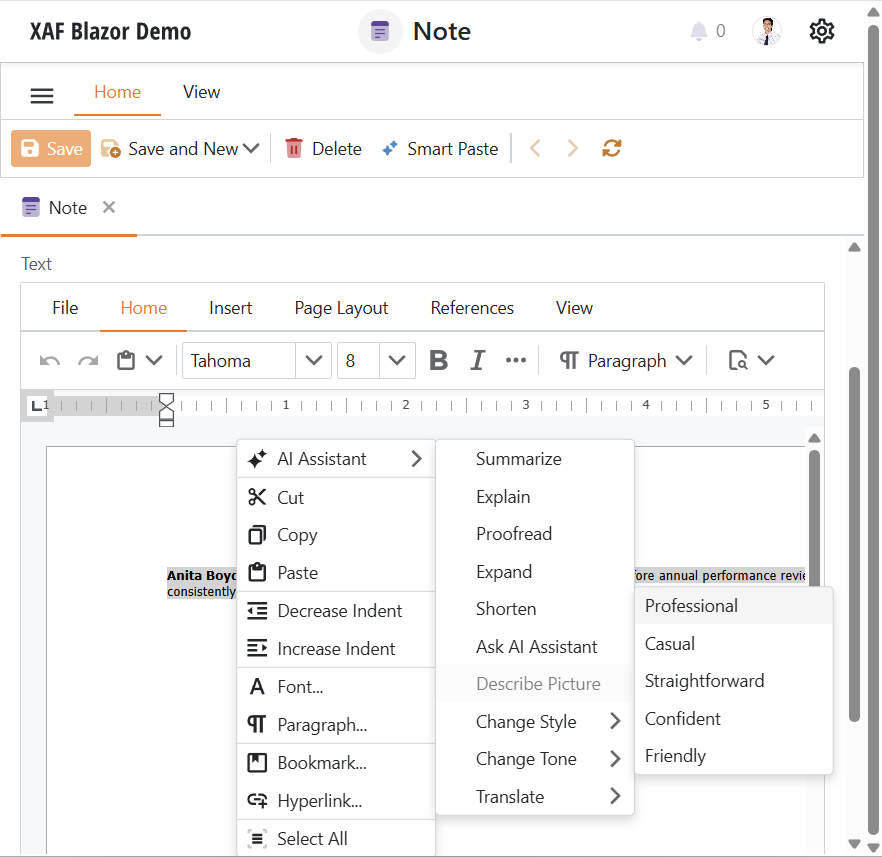
| RichTextPropertyEditor | DxRichEdit | Change Style, Change Tone, Expand, Explain, Proofread, Shorten, Summarize, Translate |
How It Works
BlazorAIExtensionsController attaches relevant AI extension models to a component if the following conditions are met:
- The underlying Blazor component supports the necessary extension
- The following Application Model option is active:
DevExpress.ExpressApp.AI.IModelPropertyEditorAISettings.AIExtensionsEnabled
Use the Application Model to Toggle AI Action Availability
To disable AI actions for a specific editor:
- Double-click the SolutionName.Blazor.Server\Model.xafml to invoke the Model Editor for the Blazor application project.
- Navigate to Views | <Class> | <Class>_DetailView | Items | <Property>.
Set
AIExtensionsEnabledtofalse.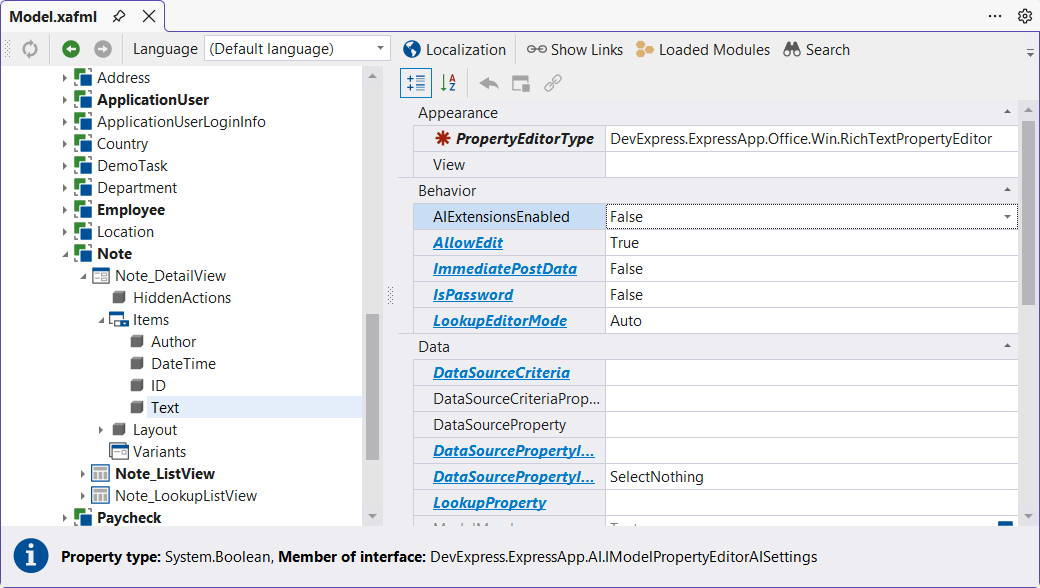
Customize AI Extensions in Code
To access AI extension properties, handle the AIExtensionsController.CustomizeExtension event:
File: SolutionName.Blazor.Server\Controllers\AICustomizationController.cs
using DevExpress.ExpressApp;
using DevExpress.ExpressApp.AI.Blazor.Components.Models;
using DevExpress.ExpressApp.AI.Controllers;

namespace SolutionName.Blazor.Server.Controllers;
public class AICustomizationController : ViewController<DetailView> {
    protected override void OnActivated() {
        base.OnActivated();
        Frame.GetController<AIExtensionsController>().CustomizeExtension += AICustomizationController_CustomizeExtension;
    }
    protected override void OnDeactivated() {
        Frame.GetController<AIExtensionsController>().CustomizeExtension -= AICustomizationController_CustomizeExtension;
        base.OnDeactivated();
    }
    private void AICustomizationController_CustomizeExtension(object sender, CustomizeExtensionEventArgs e) {
        if (e.Extension is ChangeStyleAIContextMenuItemModel changeStyleItem) {
            changeStyleItem.PromptAugmentation = "Insert your additional prompt here";
        }
    }
}
Refer to the following help topic for a full list of available AI command models: AI-powered Document Editing for Blazor Rich Text Editor.
AI Assistant (WinForms)
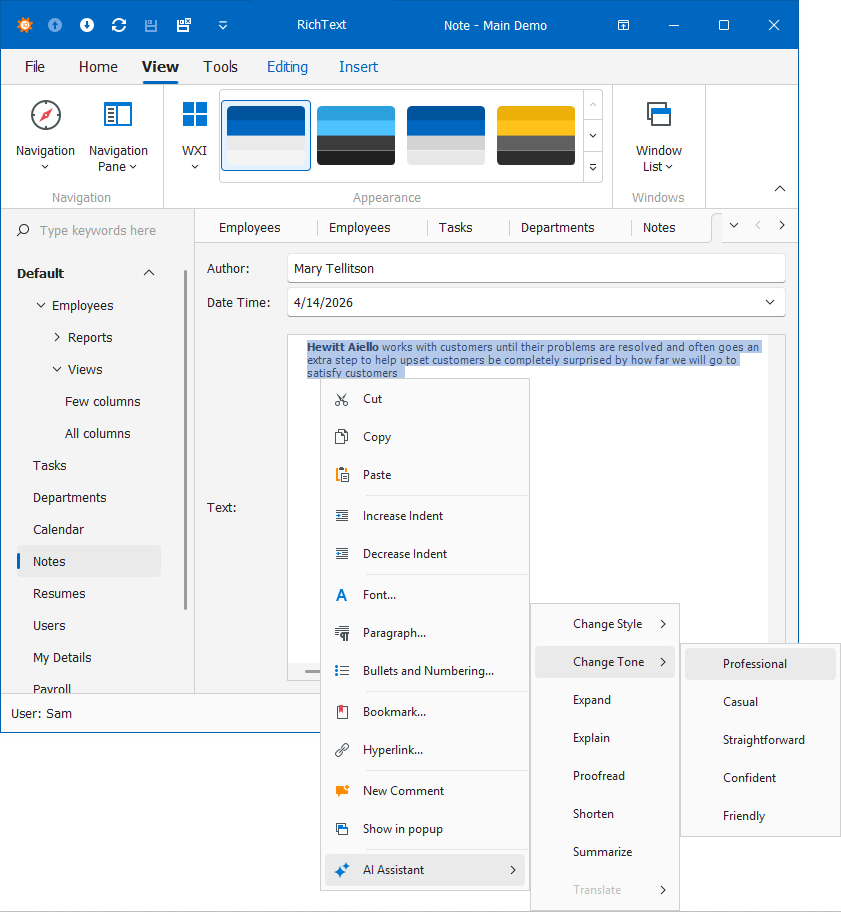
XAF AI Integration Module automatically integrates DevExpress WinForms AI-powered extensions into WinForms Detail View property editors. No manual setup is necessary.
Supported Editors
| XAF Property Editor | Control | AI Feature |
|---|---|---|
| StringPropertyEditor | MemoEdit | ChangeStyle, ChangeTone, Expand, Explain, Proofread, Shorten, Summarize, Translate |
| RichTextPropertyEditor | RichEditControl | ChangeStyle, ChangeTone, Expand, Explain, Proofread, Shorten, Summarize, Translate |
| PDFViewerPropertyEditor | PdfViewer | Summarize, Translate |
How It Works
For each property editor, the AI module locates the underlying WinForms control through the IExtendableControlProvider interface and attaches DevExpress AI behaviors to that control. Behavior attachment happens when the DevExpress.ExpressApp.AI.IModelPropertyEditorAISettings.AIExtensionsEnabled option in the Application Model is set to true.
Prerequisites
Install and configure the XAF AI Integration Module before using AI Smart Actions. See AI-powered Features in XAF (CTP).
Use the Application Model to Toggle AI Action Availability
To disable AI actions for a specific editor:
- Double-click the SolutionName.Win\Model.xafml to invoke the Model Editor for the WinForms application project.
- Navigate to Views | <Class> | <Class>_DetailView | Items | <Property>.
Set
AIExtensionsEnabledtofalse.
Customize AI Behaviors in Code
To access AI behavior properties, handle the WinAIExtensionsController.CustomizeExtension event. The following example sets a custom prompt:
File: SolutionName.Win\Controllers\AICustomizationController.cs
using DevExpress.AIIntegration.WinForms;
using DevExpress.ExpressApp;
using DevExpress.ExpressApp.AI.Controllers;

namespace SolutionName.Win.Controllers {
    public class AIAssistantCustomizationController : ViewController<DetailView> {
        protected override void OnActivated() {
            base.OnActivated();
            Frame.GetController<AIExtensionsController>().CustomizeExtension +=
            AIAssistantCustomizationController_CustomizeExtension;
        }
        protected override void OnDeactivated() {
            Frame.GetController<AIExtensionsController>().CustomizeExtension -=
            AIAssistantCustomizationController_CustomizeExtension;
            base.OnDeactivated();
        }
        private void AIAssistantCustomizationController_CustomizeExtension(object sender, CustomizeExtensionEventArgs e) {
            if (e.Extension is ChangeTextBehaviorProperties changeTextBehavior) {
                changeTextBehavior.PromptAugmentation = "Insert your additional prompt here";
            }
        }
    }
}