Generate Filter Criteria from a Natural Language Prompt (Prompt to Expression)
- 2 minutes to read
Note
Prompt to Expression is available for WinForms applications only.
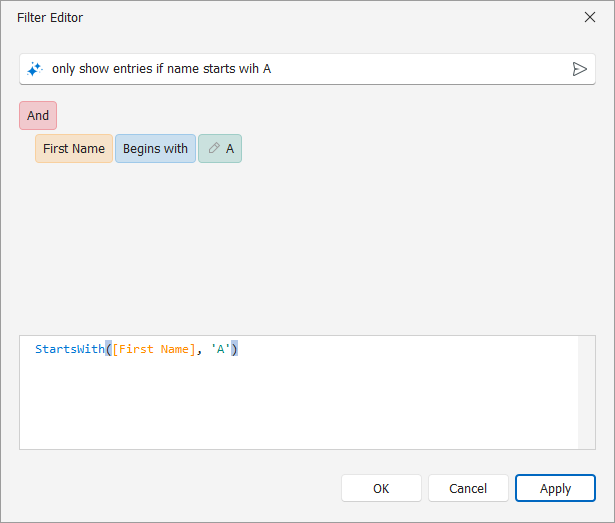
With Prompt to Expression, end users can describe a filter in the natural language. For example, they can use the this prompt: “orders placed this month with total above 500”. The AI extension generates the corresponding criteria expression automatically.
If necessary, you can edit the Application Model to deactivate AI extensions for specific editors. Developers can also customize behavior properties in code to tailor the AI experience to specific business requirements.
Note
This feature is available as a Community Technology Preview (CTP) in our v26.1 release cycle.
Prerequisites
Install and configure the XAF AI Integration Module before using Prompt to Expression. See AI-powered Features in XAF (CTP).
Supported Editors
| XAF Property Editor | Control |
|---|---|
| GridListEditor | GridControl |
| TreeListEditor | TreeList |
The prompt input is available in the Filter Editor.
AIExtensionsController attaches appropriate AI extension models to a component if the following conditions are met:
- The underlying Blazor component supports the necessary extension
- The following Application Model option is active:
DevExpress.ExpressApp.AI.IModelPropertyEditorAISettings.AIExtensionsEnabled
Enable or Disable Prompt to Expression in the Application Model
Prompt to Expression is enabled by default for all supported list views. To disable it for a specific list view:
- Double-click the SolutionName.Win\Model.xafml to invoke the Model Editor for the WinForms application project.
- Navigate to Views | <Class> | <Class>_ListView.
- Set
AIExtensionsEnabledtofalse.
Customize the Prompt to Expression Behavior
To access PromptToExpressionBehavior properties, handle the AIExtensionsController.CustomizeBehavior event.
The following code snippet restricts the AI to a specific data domain:
File: SolutionName.Win\Controllers\ListViewAICustomizationController.cs
using DevExpress.AIIntegration.WinForms;
using DevExpress.ExpressApp;

namespace SolutionName.Win.Controllers {
    public class ListViewAICustomizationController :
    ViewController<DevExpress.ExpressApp.ListView> {
        protected override void OnActivated() {
            base.OnActivated();
            Frame.GetController<AIExtensionsController>().CustomizeExtension +=
            AIAssistantListViewCustomizationController_CustomizeExtension;
        }
        protected override void OnDeactivated() {
            Frame.GetController<AIExtensionsController>().CustomizeExtension -=
            AIAssistantListViewCustomizationController_CustomizeExtension;
            base.OnDeactivated();
        }
        private void AIAssistantListViewCustomizationController_CustomizeExtension(object sender,
        CustomizeExtensionEventArgs e) {
            if (e.Extension is PromptToExpressionBehavior promptBehavior) {
                promptBehavior.Properties.PromptAugmentation =
                    "Display all numbers as integers.";
            }
        }
    }
}