Smart Paste in Detail View and Split View
- 4 minutes to read
Smart Paste allows end users to paste unstructured text — such as a customer email, a business card, or a meeting note — into a Detail View or a Split View, and have AI automatically map the content to relevant fields.
Note
This feature is available as a Community Technology Preview (CTP) in our v26.1 release cycle.
Prerequisites
Install and configure the XAF AI Integration Module before using Smart Paste. See AI-powered Features in XAF (CTP).
How Smart Paste Works
- Open a new View in your XAF application.
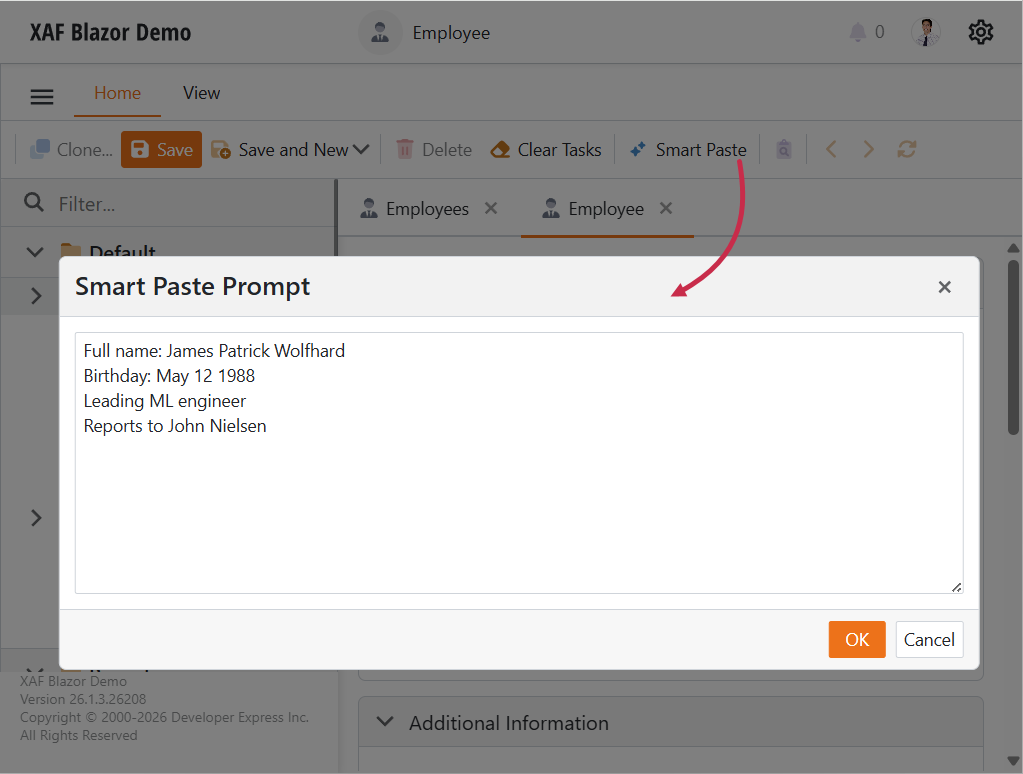
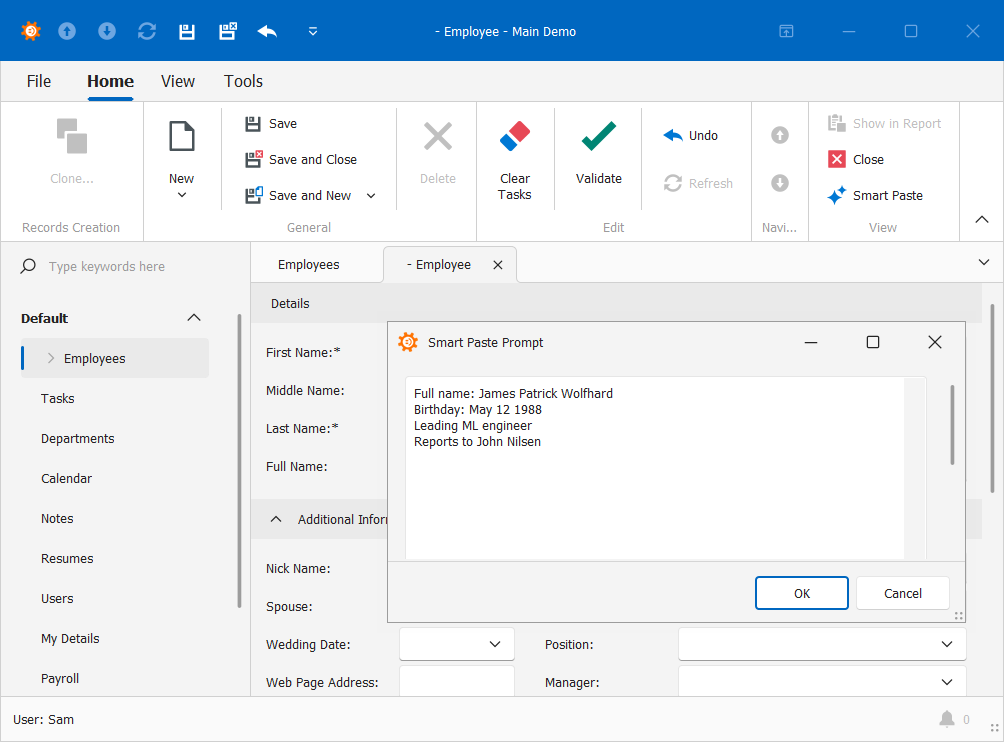
- Click the Smart Paste action in the View toolbar.
- In the Smart Paste Prompt popup, type or paste the unstructured text that contains the data to map — for example, a contact note or a new task.
- Click OK. AI extracts the relevant values from the text and populates the matching fields automatically.
- ASP.NET Core Blazor
- Windows Forms
Smart Paste Action
Smart Paste is implemented as a PopupWindowShowAction exposed by AIExtensionsController through its SmartPasteAction property. The action is active in all Detail Views and Split Views when the AI Integration Module is registered.
The following code snippet configures the action to restrict it to a specific business object type:
File: SolutionName.Module\Controllers\SmartPasteActionController.cs
using DevExpress.ExpressApp;
using DevExpress.ExpressApp.AI.Controllers;
using SolutionName.Module.BusinessObjects;

namespace SolutionName.Module.Controllers {
    public class SmartPasteActionController : BlazorAIExtensionsController  {
        const string ActiveKey_ForEmployeeOnly = "SupportedObjectType";
        protected override void OnActivated() {
            base.OnActivated();
            SmartPasteAction.Active[ActiveKey_ForEmployeeOnly] =
            View.ObjectTypeInfo.Type == typeof(Employee);
        }
    }
}
Customize Smart Paste
Customize the AI Prompt (ASP.NET Core Blazor)
The following code snippet injects additional context into the prompt sent to AI:
File: SolutionName.Blazor.Server\Controllers\SmartPastePromptBlazorController.cs
using DevExpress.ExpressApp;
using DevExpress.ExpressApp.AI.Blazor.Components.Models;
using DevExpress.ExpressApp.AI.Controllers;

namespace SolutionName.Blazor.Server.Controllers {
    public class SmartPastePromptBlazorController : ViewController<DetailView> {
        protected override void OnActivated() {
            base.OnActivated();
            Frame.GetController<AIExtensionsController>().CustomizeExtension +=
                SmartPastePromptBlazorController_CustomizeExtension;
        }
        protected override void OnDeactivated() {
            Frame.GetController<AIExtensionsController>().CustomizeExtension -=
                SmartPastePromptBlazorController_CustomizeExtension;
            base.OnDeactivated();
        }
        private void SmartPastePromptBlazorController_CustomizeExtension(object sender,
            CustomizeExtensionEventArgs e) {
            if (e.Extension is FormLayoutSmartPasteModel smartPasteModel) {
                smartPasteModel.PromptAugmentation =
                    "The 'FullName' field expects the format 'Last Name, First Name'.";
            }
        }
    }
}
Customize the AI Prompt (Windows Forms)
The following code snippet injects additional context into the prompt sent to AI:
File: SolutionName.Win\Controllers\SmartPastePromptWinController.cs
using DevExpress.AIIntegration.WinForms;
using DevExpress.ExpressApp;
using DevExpress.ExpressApp.AI.Controllers;

namespace SolutionName.Win.Controllers {
    public class SmartPastePromptWinController : ViewController<DetailView> {
        protected override void OnActivated() {
            base.OnActivated();
            Frame.GetController<AIExtensionsController>().CustomizeExtension +=
                SmartPastePromptWinController_CustomizeExtension;
        }
        protected override void OnDeactivated() {
            Frame.GetController<AIExtensionsController>().CustomizeExtension -=
                SmartPastePromptWinController_CustomizeExtension;
            base.OnDeactivated();
        }
        private void SmartPastePromptWinController_CustomizeExtension(object sender,
            CustomizeExtensionEventArgs e) {
            if (e.Extension is SmartPasteBehavior smartPasteBehavior) {
                smartPasteBehavior.Properties.PromptAugmentation =
                    "The 'FullName' field expects the format 'Last Name, First Name'.";
            }
        }
    }
}
Control Fields Available for Smart Paste (ASP.NET Core Blazor)
Handle the CustomizeExtension event to control form fields that Smart Paste processes.
File: SolutionName.Blazor.Server\Controllers\SmartPasteCustomizationBlazorController.cs
using DevExpress.ExpressApp;
using DevExpress.ExpressApp.AI.Blazor.Components.Models;
using DevExpress.ExpressApp.AI.Blazor.Controllers;
using DevExpress.ExpressApp.AI.Controllers;
using SolutionName.Module.BusinessObjects;

namespace SolutionName.Blazor.Server.Controllers;

public class SmartPasteCustomizationBlazorController : ViewController<DetailView> {
    protected override void OnActivated() {
        base.OnActivated();
        Frame.GetController<BlazorAIExtensionsController>().CustomizeExtension +=
            BlazorAIExtensionsController_CustomizeExtension;
    }

    protected override void OnDeactivated() {
        Frame.GetController<BlazorAIExtensionsController>().CustomizeExtension -=
            BlazorAIExtensionsController_CustomizeExtension;
        base.OnDeactivated();
    }

    private void BlazorAIExtensionsController_CustomizeExtension(object sender,
     CustomizeExtensionEventArgs e) {
        if (e.Extension is FormLayoutSmartPasteModel smartPasteModel) {
            smartPasteModel.ExcludedItems = new List<string> { nameof(Employee.Birthday) };
        }
    }
}
Control Fields Available for Smart Paste (Windows Forms)
Handle the CustomizeExtension event to control form fields that Smart Paste processes.
File: SolutionName.Win\Controllers\SmartPasteCustomizationWinController.cs
using DevExpress.AIIntegration.WinForms;
using DevExpress.ExpressApp;
using DevExpress.ExpressApp.AI.Controllers;
using DevExpress.ExpressApp.AI.Win.Controllers;
using DevExpress.ExpressApp.Win.Layout;
using DevExpress.XtraLayout;
using SolutionName.Module.BusinessObjects;

namespace SolutionName.Win.Controllers {
    public class SmartPasteCustomizationController :
    ObjectViewController<DetailView, Employee> {
        protected override void OnActivated() {
            base.OnActivated();
            Frame.GetController<WinAIExtensionsController>().CustomizeExtension +=
            OnCustomizeExtension;
        }

        protected override void OnDeactivated() {
            Frame.GetController<WinAIExtensionsController>().CustomizeExtension -=
            OnCustomizeExtension;
            base.OnDeactivated();
        }

        private void OnCustomizeExtension(object sender, CustomizeExtensionEventArgs e) {
            if (e.ViewItem is not WinLayoutManager { Container: LayoutControl lc } ||
            e.Extension is not SmartPasteBehaviorProperties properties) {
                return;
            }

            var birthdayControl = View.FindItem(nameof(Employee.Birthday)).Control;
            var item = lc.Items.OfType<LayoutControlItem>().FirstOrDefault(i =>
            i.Control == birthdayControl);
            if (item != null && !properties.ExcludedItems.Contains(item)) {
                properties.ExcludedItems.Add(item);
            }
        }
    }
}
Limitations
- Mapping accuracy — AI maps text to fields using field names and types as context clues. Ambiguous, abbreviated, or highly technical field names reduce accuracy. Use
ApplySmartPastePromptto add additional context when needed. - Supported layout (Blazor) — Smart Paste relies on the DxFormLayout component to identify and populate form fields. Custom layouts not based on
DxFormLayoutmay not be fully supported.