Register JSON Data Connections (ASP.NET Web Forms)
- 7 minutes to read
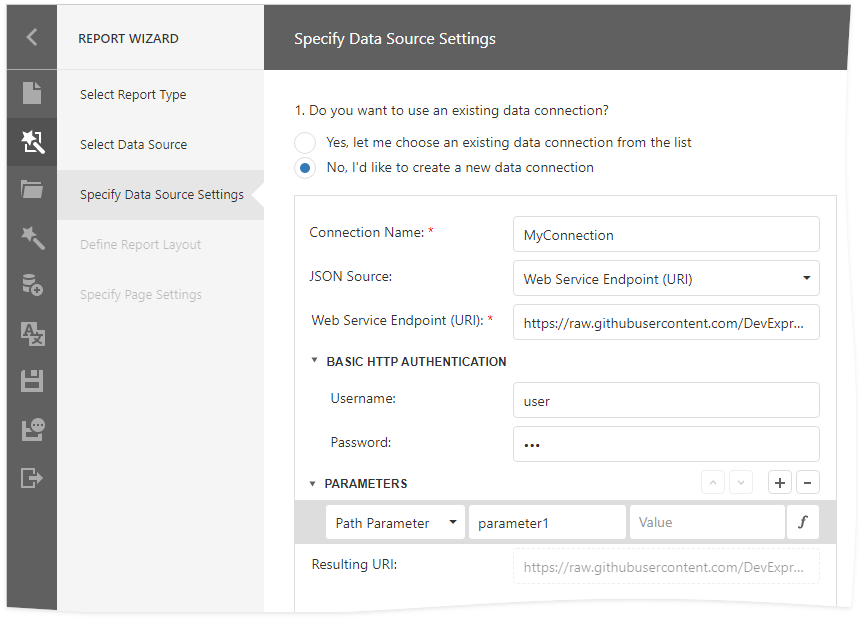
This document describes how to provide JSON data connections to the Web Report Designer. The Data Source Wizard displays these connections when users create new JSON data sources.
The Data Source Wizard allows you to create a new JSON data source if a JSON data connection provider is registered in the application. You can register a built-in connection provider or implement and register a custom provider:
- Built-in connection provider
- The provider obtains connections from the application’s configuration file (Web.config).
- Custom connection provider
- The provider allows you to create connection strings at runtime and use a custom storage to store/load connection strings and credentials.
Important
The JsonDataSource object uses the System.Text.Json library. Install the System.Text.Json NuGet package to work with JSON data sources. For more information, refer to the following section: JsonDataSource - Install the System.Text.Json Package.
Use the Application Configuration File
Follow the steps below to use connection strings from the application configuration file:
Add data connections to the application’s configuration file (Web.config).
<!-- ... -->
<connectionStrings>
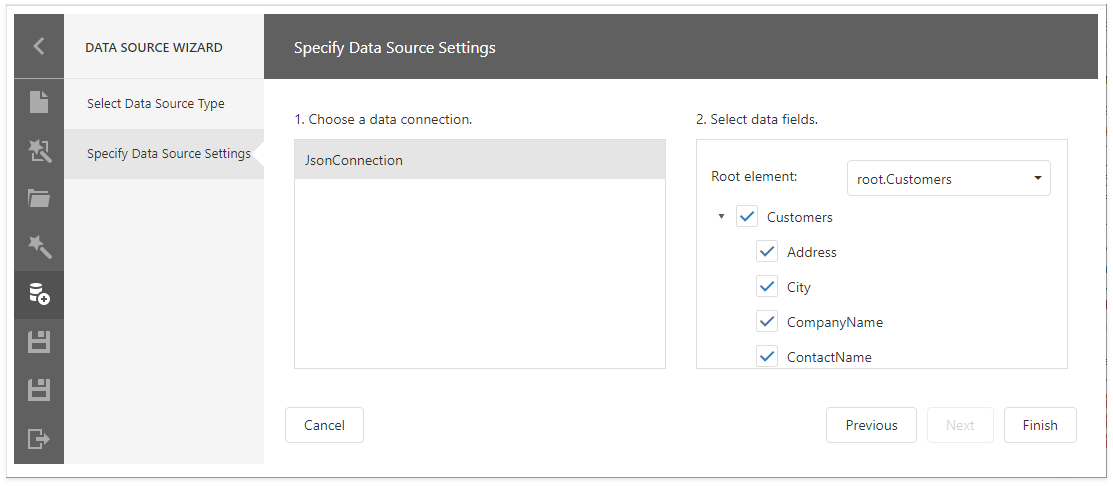
    <add name="JsonConnection" connectionString="Uri=https://raw.githubusercontent.com/DevExpress-Examples/DataSources/master/JSON/customers.json" providerName="JsonSourceProvider" />
</connectionStrings>
Register the connection string provider. Call the static DefaultReportDesignerContainer.RegisterDataSourceWizardConfigFileJsonConnectionStringsProvider method at application startup.
using DevExpress.XtraReports.Web.ReportDesigner;
// ...
public class Global : System.Web.HttpApplication
{
    void Application_Start(object sender, EventArgs e)
    {
        // ...
        DefaultReportDesignerContainer.RegisterDataSourceWizardConfigFileJsonConnectionStringsProvider();
        // ...
    }
// ...
}
Implement a Custom Connection String Provider
A custom connection provider allows you to manage JSON connections accessible to users:
- Modify connections at runtime (for example, depending on the user)
- Allow users to create new connections
- Validate connections and keep them in a separate storage
- Store credentials securely
Tip
To review a sample JSON connection provider and storage implementation, use DevExpress template to create a Web Forms Reporting application and view the following files:
- Services\CustomDataSourceWizardJsonDataConnectionStorage.cs
- Services\CustomJsonDataConnectionProviderFactory.cs
- Global.asax.cs
For more information on DevExpress templates, refer to the following help topic: Use DevExpress Visual Studio Templates to Create an ASP.NET Web Forms Reporting App with a Report Designer.
To use a custom JSON connection provider, follow the steps below:
Create a class that implements the IDataSourceWizardJsonConnectionStorage interface. The code snippet below stores connections in a session.
Note
For information on how to use a session in methods implemented in a custom connection provider class, refer to the following topic: Access HttpContext.Session in Services.
Show code- CustomDataSourceWizardJsonDataConnectionStorage.cs
- CustomDataSourceWizardJsonDataConnectionStorage.vb
using DevExpress.DataAccess.Json; using DevExpress.DataAccess.Web; using DevExpress.DataAccess.Wizard.Services; using System; using System.Collections.Generic; using System.Linq; using System.Web; public class CustomDataSourceWizardJsonDataConnectionStorage : IDataSourceWizardJsonConnectionStorage { public const string JsonDataConnectionsKey = "myJsonDataConnections"; public Dictionary<string, JsonDataConnection> Connections { get { if (HttpContext.Current == null || HttpContext.Current.Session == null) { return null; } else if (HttpContext.Current.Session[JsonDataConnectionsKey] == null) { HttpContext.Current.Session[JsonDataConnectionsKey] = GetDefaults(); } return HttpContext.Current.Session[JsonDataConnectionsKey] as Dictionary<string, JsonDataConnection>; } } bool IJsonConnectionStorageService.CanSaveConnection { get { return HttpContext.Current != null && HttpContext.Current.Session != null; } } bool IJsonConnectionStorageService.ContainsConnection(string connectionName) { return Connections == null ? false : Connections.ContainsKey(connectionName); } IEnumerable<JsonDataConnection> IJsonConnectionStorageService.GetConnections() { if (Connections == null) { return new List<JsonDataConnection>(); } return Connections.Select(x => x.Value); } JsonDataConnection IJsonDataConnectionProviderService.GetJsonDataConnection(string name) { if (Connections == null || !Connections.ContainsKey(name)) throw new InvalidOperationException(); return Connections[name]; } void IJsonConnectionStorageService.SaveConnection(string connectionName, JsonDataConnection dataConnection, bool saveCredentials) { // The saveCredentials parameter is always true in Web Reporting. if (Connections == null) { return; } dataConnection.Name = connectionName; dataConnection.StoreConnectionNameOnly = true; Connections[connectionName] = dataConnection; } Dictionary<string, JsonDataConnection> GetDefaults() { var connections = new Dictionary<string, JsonDataConnection>(); var dataConnection = new JsonDataConnection(@"Uri=https://raw.githubusercontent.com/DevExpress-Examples/DataSources/master/JSON/customers.json") { Name = "Customers (JSON)", StoreConnectionNameOnly = true }; connections.Add("Customers (JSON)", dataConnection); return connections; } }Create a new class (
CustomJsonDataConnectionProviderFactoryin this example) that implements the IJsonDataConnectionProviderFactory interface.The Designer’s preview loads data using this class. The class collects all JSON connections and provides them to the preview when it starts on a different thread. To collect connections,
CustomJsonDataConnectionProviderFactoryuses a class that implements the IJsonDataConnectionProviderService interface (CustomDocumentViewerJsonDataConnectionProviderin this example).Show codeusing DevExpress.DataAccess.Json; using DevExpress.DataAccess.Web; using System.Collections.Generic; using System.Web; namespace WebApplication1 { public class CustomJsonDataConnectionProviderFactory : IJsonDataConnectionProviderFactory { Dictionary<string, JsonDataConnection> connections; public CustomJsonDataConnectionProviderFactory() { connections = HttpContext.Current == null || HttpContext.Current.Session == null ? null : HttpContext.Current.Session[CustomDataSourceWizardJsonDataConnectionStorage.JsonDataConnectionsKey] as Dictionary<string, JsonDataConnection>; } IJsonDataConnectionProviderService IJsonDataConnectionProviderFactory.Create() { return new CustomDocumentViewerJsonDataConnectionProvider(connections); } } public class CustomDocumentViewerJsonDataConnectionProvider : IJsonDataConnectionProviderService { readonly Dictionary<string, JsonDataConnection> jsonDataConnections; public CustomDocumentViewerJsonDataConnectionProvider(Dictionary<string, JsonDataConnection> jsonDataConnections) { this.jsonDataConnections = jsonDataConnections; } JsonDataConnection IJsonDataConnectionProviderService.GetJsonDataConnection(string name) { return jsonDataConnections == null ? null : jsonDataConnections[name]; } } }Register services at application startup:
Show codeusing DevExpress.DataAccess.Web; using DevExpress.XtraReports.Web.Extensions; using DevExpress.XtraReports.Web.QueryBuilder; using DevExpress.XtraReports.Web.QueryBuilder.Native; using DevExpress.XtraReports.Web.ReportDesigner; using DevExpress.XtraReports.Web.ReportDesigner.Native; using DevExpress.XtraReports.Web.WebDocumentViewer; using DevExpress.XtraReports.Web.WebDocumentViewer.Native; using System; using System.Web.SessionState; namespace WebApplication1 { public class Global : System.Web.HttpApplication { protected void Application_Start(object sender, EventArgs e) { ReportDesignerBootstrapper.SessionState = SessionStateBehavior.Required; WebDocumentViewerBootstrapper.SessionState = SessionStateBehavior.Required; QueryBuilderBootstrapper.SessionState = SessionStateBehavior.Required; // ... DefaultReportDesignerContainer.RegisterDataSourceWizardConfigFileJsonConnectionStringsProvider(); DefaultReportDesignerContainer.RegisterDataSourceWizardJsonConnectionStorage<CustomDataSourceWizardJsonDataConnectionStorage>(true); DefaultWebDocumentViewerContainer.Register<IJsonDataConnectionProviderFactory, CustomJsonDataConnectionProviderFactory>(); DefaultQueryBuilderContainer.Register<IJsonDataConnectionProviderFactory, CustomJsonDataConnectionProviderFactory>(); // ... } // ... } }
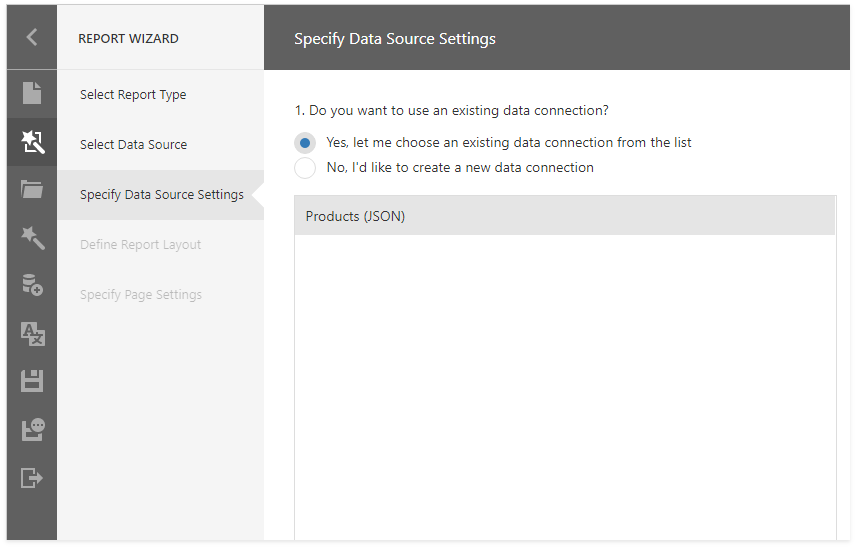
After you register a custom JSON connection provider, you can do the following:
Use an existing connection to create a new JSON data source:
Create a new JSON connection: