AI Agent Integration in WPF AI Chat Control
- 5 minutes to read
AI agents add an orchestration layer above the underlying chat client. An agent evaluates incoming messages, applies predefined instructions, and resolves required actions.
The DevExpress WPF AI Chat Control supports AI agent integration. You can bind the chat control to an IChatResponseProvider implementation backed by an AI agent. The control then delegates response generation to agent-driven logic instead of direct IChatClient calls.
How It Works
The AI Chat Control routes user input to the associated AI agent. The agent processes the input and executes orchestration logic through the Microsoft Agent Framework APIs. After execution completes, the agent returns a response payload to the UI for display.
Prerequisites
Install the following NuGet packages:
DevExpress.AIIntegration.AgentsDevExpress.AIIntegration.WPFDevExpress.AIIntegration.WPF.Chat- Microsoft.Agents.AI.OpenAI (1.0.0-rc1)
- Microsoft.Extensions.AI.OpenAI (10.3.0)
Install a NuGet package for an AI service provider (for example, Azure.AI.OpenAI (2.2.0-beta.5 or later)).
Add the WPF AI Chat Control to your application.
Create and Configure an AI Agent
Create an AI agent from an existing chat client. Define clear, task-focused instructions to control agent behavior.
using Azure.AI.OpenAI;
using DevExpress.AIIntegration;
using DevExpress.AIIntegration.Agents;
using DevExpress.AIIntegration.Chat;
using Microsoft.Agents.AI;
using Microsoft.Extensions.AI;
using Microsoft.Extensions.DependencyInjection;
using System;
using System.ClientModel;
namespace AiChatControl
{
    internal static class Program
    {
        [STAThread]
        static void Main()
        {
            // Create an Azure OpenAI chat client.
            IChatClient chatClient = new AzureOpenAIClient(
                new Uri(AzureOpenAIEndpoint),
                new ApiKeyCredential(AzureOpenAIKey))
                    .GetChatClient(ModelId)
                    .AsIChatClient();
            // Create an AI agent and define instructions.
            AIAgent taskAgent = chatClient.AsAIAgent(
                name: "TaskAgent",
                instructions:
                    "You are a task-oriented AI agent. Break down user requests into clear steps. " +
                    "Execute tasks in a logical order. " +
                    "Return structured results. " +
                    "Do not include unnecessary explanations unless explicitly requested."
                );
            // Create a service collection to register the AI agent.
            var serviceCollection = new ServiceCollection();
            // Register the agent as IChatResponseProvider.
            serviceCollection.AddSingleton<IChatResponseProvider>(taskAgent.AsIChatResponseProvider());
            serviceCollection.AddDevExpressAIDesktop();
            // Start the WPF application.
            var app = new App();
            app.InitializeComponent();
            app.Run(new MainWindow());
        }
        static string AzureOpenAIEndpoint =>
            Environment.GetEnvironmentVariable("AZURE_OPENAI_ENDPOINT") ?? string.Empty;
        static string AzureOpenAIKey =>
            Environment.GetEnvironmentVariable("AZURE_OPENAI_APIKEY") ?? string.Empty;
            // Must match the Deployment Name in Azure Portal → Azure OpenAI → Deployments
        static string ModelId => "gpt-5.2";
    }
}
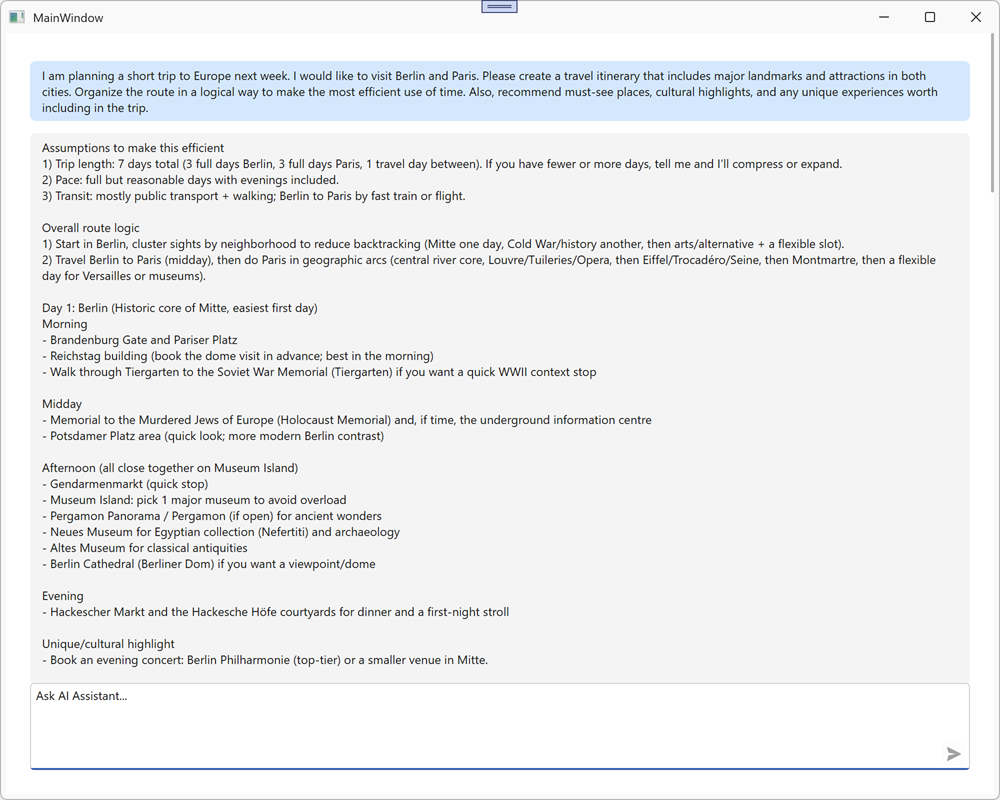
The following screenshot illustrates the result:
Manage and Persist Conversation History
The following example persists chat message history to a JSON file and restores it on application startup.
The example implements the following tasks:
- Defines an
AIAgentStatefulStorehelper class that serializes and deserializes theAgentSessionobject to a JSON file. - Registers the agent in the service collection and restores the saved session during first access.
- Overrides
OnClosingto persist chat messages and agent session state to disk before the application exits. - Handles the
Loadedevent to load saved messages from disk and restore the conversation in the chat control.
using Azure.AI.OpenAI;
using DevExpress.AIIntegration;
using DevExpress.AIIntegration.Agents;
using DevExpress.AIIntegration.Chat;
using Microsoft.Agents.AI;
using Microsoft.Extensions.AI;
using Microsoft.Extensions.DependencyInjection;
using System;
using System.ClientModel;

namespace DXWpfAIChatAgents {
    internal static class Program {
        [STAThread]
        static void Main() {
            // Create an Azure OpenAI chat client.
            IChatClient chatClient = new AzureOpenAIClient(
                new Uri(AzureOpenAIEndpoint),
                new ApiKeyCredential(AzureOpenAIKey))
                    .GetChatClient(ModelId)
                    .AsIChatClient();

            AIAgent agent = chatClient.AsAIAgent(
                name: "TaskAgent",
                instructions:
                    "You are a task-oriented AI agent. Break down user requests into clear steps. " +
                    "Execute tasks in a logical order. " +
                    "Return structured results. " +
                    "Do not include unnecessary explanations unless explicitly requested."
                );

            // Create a stateful store to manage the agent session between application runs.
            AIAgentStatefulStore statefulStore = new AIAgentStatefulStore(agent);

            // Create a service collection to register the AI agent.
            var serviceCollection = new ServiceCollection();

            serviceCollection.AddSingleton<IChatResponseProvider>(
                sp => agent.AsIChatResponseProvider(statefulStore.GetOrRestoreSession()));
            serviceCollection.AddDevExpressAIDesktop();

            // Start the WPF application.
            var app = new App();
            app.InitializeComponent();
            app.Run(new MainWindow(statefulStore));
        }

        static string AzureOpenAIEndpoint =>
            Environment.GetEnvironmentVariable("AZURE_OPENAI_ENDPOINT") ?? string.Empty;
        static string AzureOpenAIKey =>
            Environment.GetEnvironmentVariable("AZURE_OPENAI_APIKEY") ?? string.Empty;
        static string ModelId => "gpt-5.2";
    }
}
using DevExpress.AIIntegration.Blazor.Chat;
using DevExpress.AIIntegration.Blazor.Chat.WebView;
using Microsoft.Extensions.AI;
using System;
using System.Collections.Generic;
using System.ComponentModel;
using System.IO;
using System.Linq;
using System.Text.Json;
using System.Windows;

namespace DXWpfAIChatAgents {
    public partial class MainWindow {
        readonly AIAgentStatefulStore stateStore;
        readonly string statefulMessagesFilePath;

        public MainWindow(AIAgentStatefulStore stateStore) {
            InitializeComponent();
            this.stateStore = stateStore;
            statefulMessagesFilePath = Path.Combine(
                AppDomain.CurrentDomain.BaseDirectory,
                "stateful_messages.json");
        }

        protected override void OnClosing(CancelEventArgs e) {
            base.OnClosing(e);
            // Persist messages and agent session state before the window closes.
            SaveMessages(aiChatControl.SaveMessages());
            stateStore.SaveSession();
        }

        void AiChatControl_Initialized(object sender, AIChatControlInitializedEventArgs e) {
            // Restore persisted messages after the chat control is initialized.
            List<BlazorChatMessage> messages = LoadMessages();
            if (messages.Count == 0)
                return;
            aiChatControl.LoadMessages(messages);
        }

        void SaveMessages(IEnumerable<BlazorChatMessage> messages) {
            List<StoredChatMessage> storedMessages = messages
                .Select(StoredChatMessage.Create)
                .ToList();

            using FileStream stream = File.Create(statefulMessagesFilePath);
            JsonSerializer.Serialize(stream, storedMessages);
        }

        List<BlazorChatMessage> LoadMessages() {
            if (!File.Exists(statefulMessagesFilePath))
                return new List<BlazorChatMessage>();

            try {
                using FileStream stream = File.OpenRead(statefulMessagesFilePath);
                List<StoredChatMessage> storedMessages =
                    JsonSerializer.Deserialize<List<StoredChatMessage>>(stream)
                    ?? new List<StoredChatMessage>();

                return storedMessages
                    .Select(x => x.ToBlazorChatMessage())
                    .ToList();
            }
            catch {
                return new List<BlazorChatMessage>();
            }
        }

        sealed record StoredChatMessage(ChatRole Role, string Content, List<StoredChatFile> Files, bool Typing) {
            internal static StoredChatMessage Create(BlazorChatMessage message) {
                ArgumentNullException.ThrowIfNull(message);

                return new StoredChatMessage(
                    ToChatRole(message.Role),
                    message.Content,
                    message.Files.Select(StoredChatFile.Create).ToList(),
                    message.Typing);
            }

            internal BlazorChatMessage ToBlazorChatMessage() {
                BlazorChatMessage message = new(
                    Role,
                    Content,
                    Files.Select(x => x.ToUploadFileInfo()).ToList()) {
                        Typing = Typing
                    };
                return message;
            }

            static ChatRole ToChatRole(ChatMessageRole role) {
                return role switch {
                    ChatMessageRole.User => ChatRole.User,
                    ChatMessageRole.Assistant => ChatRole.Assistant,
                    ChatMessageRole.System => ChatRole.System,
                    ChatMessageRole.Tool => ChatRole.Tool,
                    _ => throw new InvalidOperationException($"Unsupported chat role '{role}'.")
                };
            }
        }

        sealed record StoredChatFile(string Name, string Type, decimal Size, byte[] Data, string Guid) {
            internal static StoredChatFile Create(AIChatUploadFileInfo file) {
                ArgumentNullException.ThrowIfNull(file);

                return new StoredChatFile(file.Name, file.Type, file.Size, file.Data.ToArray(), file.Guid);
            }

            internal AIChatUploadFileInfo ToUploadFileInfo() {
                return new AIChatUploadFileInfo(Name, Type, Size, new ReadOnlyMemory<byte>(Data), Guid);
            }
        }
    }
}
The chat control saves the conversation state on application close and restores chat messages on restart.
The following Microsoft Agent Framework examples create an agent that uses memory to store and reuse conversation data: