CircleAnnotation Class
Defines a circle annotation in a PDF document.
Declaration
public class CircleAnnotation extends ShapeAnnotationRemarks
CircleAnnotation and SquareAnnotation inherit from the ShapeAnnotation class and share the following style settings in addition to their geometric parameters:
- Border Style
Method: setBorderStyle(AnnotationBorderStyle value)
Defines the appearance of the annotation outline.
- Interior Color
Method: setInteriorColor(PdfColor value)
Defines the fill appearance inside closed shapes (such as circle, square, and polygon annotations).
- Border Effect
Method: setBorderEffect(AnnotationBorderEffect value)
Specifies additional visual effects for the annotation border, such as glow or decorative effects.
- Padding
Method: setPadding(Padding value)
Specifies the internal spacing between the annotation boundary and its content, such as title and comment text.
The following code snippet uses a circle annotation to highlight a paragraph area:
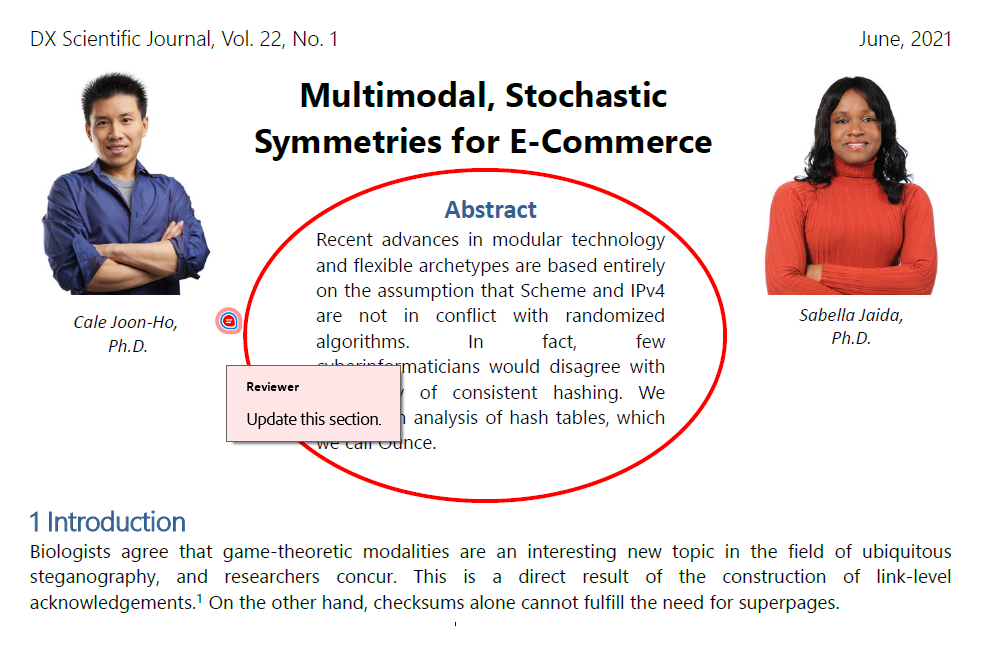
package pdf;

import com.devexpress.docs.*;
import com.devexpress.docs.pdf.*;
import com.devexpress.system.drawing.*;

import java.nio.channels.*;
import java.nio.file.*;

public class Main {
    public static void main(String[] args) throws Exception {
        try (FileChannel fileChannel = FileChannel.open(Path.of("Document.pdf"));
             PdfDocument pdfDocument = new PdfDocument(fileChannel)) {

            Page page = pdfDocument.getPages().getFirst();

            createCircleAnnotation(page);

            // Save the document.
            try (WritableByteChannel channel =
                         FileChannel.open(Path.of("Result.pdf"),
                                 StandardOpenOption.CREATE,
                                 StandardOpenOption.WRITE,
                                 StandardOpenOption.TRUNCATE_EXISTING)) {

                pdfDocument.save(channel);
            }
        }
    }

    static void createCircleAnnotation(Page page) {
        CircleAnnotation annotation = new CircleAnnotation(new RectangleF(210, 500, 240, 160));
        annotation.setTitle("Reviewer");
        annotation.setContent("Update this section.");

        annotation.setPadding(new Padding(4));
        annotation.setColor(PdfColor.getRed());

        AnnotationBorderStyle borderStyle = new AnnotationBorderStyle();
        borderStyle.setStyle(BorderStyle.SOLID);
        borderStyle.setWidth(2);

        annotation.setBorderStyle(borderStyle);

        page.getAnnotations().add(annotation);
    }
}
Refer to the following help topic for additional information: Drawing Annotations.
Inherited Members
Inheritance
CircleAnnotation(RectangleF bounds)
Initializes a new instance of the CircleAnnotation class with specified bounds.
Declaration
public CircleAnnotation(RectangleF bounds)Parameters
| Name | Type | Description |
|---|---|---|
| bounds | RectangleF | The annotation bounds. |