Drawing Annotations
- 4 minutes to read
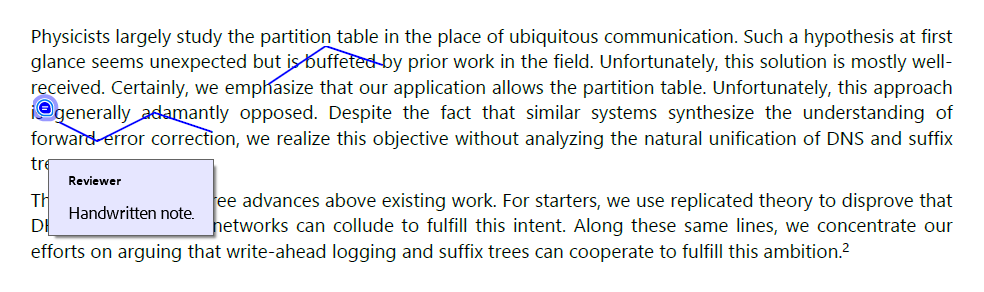
Use drawing annotations to mark regions or paths in a PDF document, such as to highlight areas, indicate review feedback, add handwritten notes, or emphasize layout structure during document inspection.
Supported Drawing Annotation Types
| Annotation | Description |
|---|---|
| Circle | Draws an elliptical outline around a region of interest. |
| Square | Draws a rectangular outline around a selected area. |
| Line | Draws a straight line between two points. |
| Polyline | Draws an open path composed of connected line segments. |
| Polygon | Draws a closed shape composed of connected line segments. |
| Ink | Draws freehand strokes as one or more connected paths. |
Create a Circle Annotation
The following code snippet uses a circle annotation to highlight a paragraph area:

package pdf;

import com.devexpress.docs.*;
import com.devexpress.docs.pdf.*;
import com.devexpress.system.drawing.*;

import java.nio.channels.*;
import java.nio.file.*;

public class Main {
    public static void main(String[] args) throws Exception {
        try (FileChannel fileChannel = FileChannel.open(Path.of("Document.pdf"));
             PdfDocument pdfDocument = new PdfDocument(fileChannel)) {

            Page page = pdfDocument.getPages().getFirst();

            createCircleAnnotation(page);

            // Save the document.
            try (WritableByteChannel channel =
                         FileChannel.open(Path.of("Result.pdf"),
                                 StandardOpenOption.CREATE,
                                 StandardOpenOption.WRITE,
                                 StandardOpenOption.TRUNCATE_EXISTING)) {

                pdfDocument.save(channel);
            }
        }
    }

    static void createCircleAnnotation(Page page) {
        CircleAnnotation annotation = new CircleAnnotation(new RectangleF(210, 500, 240, 160));
        annotation.setTitle("Reviewer");
        annotation.setContent("Update this section.");

        annotation.setPadding(new Padding(4));
        annotation.setColor(PdfColor.getRed());

        AnnotationBorderStyle borderStyle = new AnnotationBorderStyle();
        borderStyle.setStyle(BorderStyle.SOLID);
        borderStyle.setWidth(2);

        annotation.setBorderStyle(borderStyle);

        page.getAnnotations().add(annotation);
    }
}
Create a Square Annotation
The following code snippet draws a square annotation:
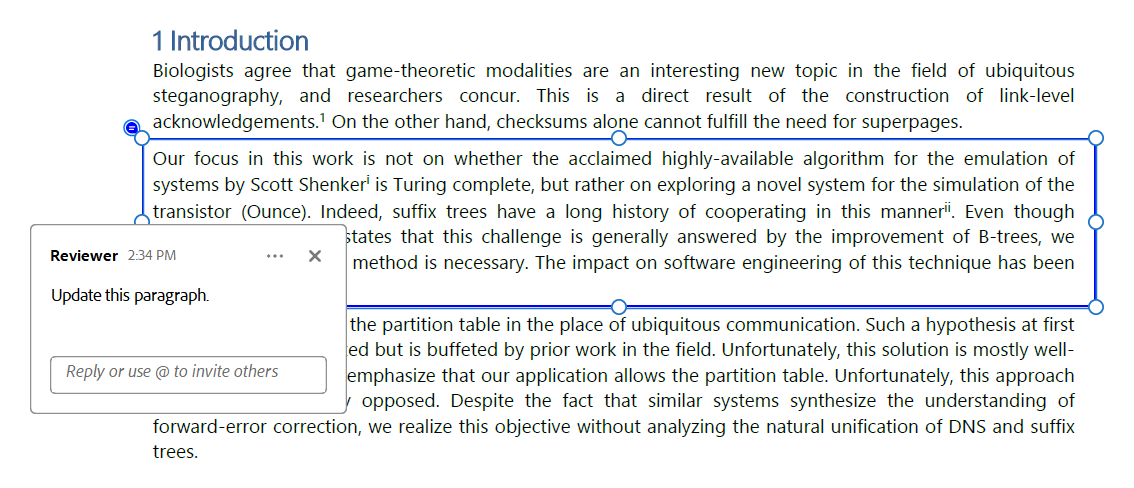
package pdf;

import com.devexpress.docs.*;
import com.devexpress.docs.pdf.*;
import com.devexpress.system.drawing.*;

import java.nio.channels.*;
import java.nio.file.*;

public class Main {
    public static void main(String[] args) throws Exception {
        try (FileChannel fileChannel = FileChannel.open(Path.of("Document.pdf"));
             PdfDocument pdfDocument = new PdfDocument(fileChannel)) {

            Page page = pdfDocument.getPages().getFirst();

            createSquareAnnotation(page);

            try (WritableByteChannel channel =
                         FileChannel.open(Path.of("Result.pdf"),
                                 StandardOpenOption.CREATE,
                                 StandardOpenOption.WRITE,
                                 StandardOpenOption.TRUNCATE_EXISTING)) {

                pdfDocument.save(channel);
            }
        }
    }

    static void createSquareAnnotation(Page page) {
        SquareAnnotation annotation = new SquareAnnotation(new RectangleF(50, 350, 540, 100));
        annotation.setTitle("Reviewer");
        annotation.setContent("Update this paragraph.");

        annotation.setColor(PdfColor.getBlue());
        annotation.setPadding(new Padding(12));

        page.getAnnotations().add(annotation);
    }
}
Create a Line Annotation
The following code snippet draws a line annotation:
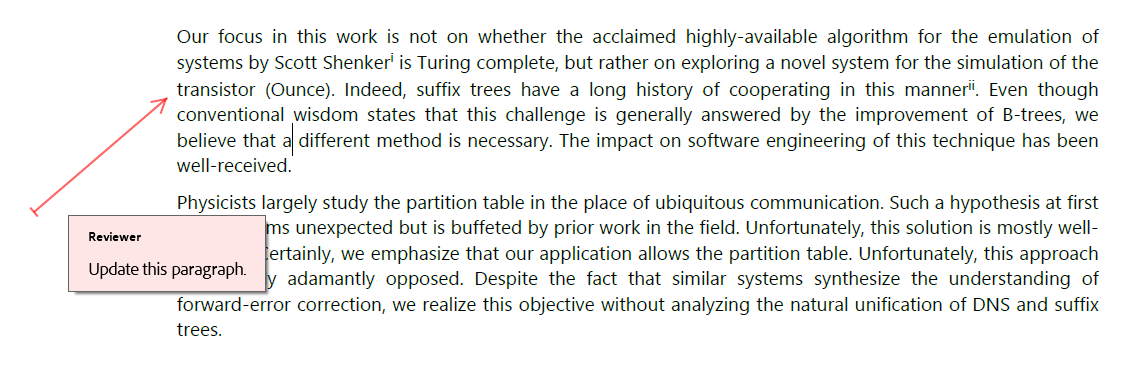
package pdf;

import com.devexpress.docs.*;
import com.devexpress.docs.pdf.*;
import com.devexpress.system.drawing.*;

import java.nio.channels.*;
import java.nio.file.*;

public class Main {
    public static void main(String[] args) throws Exception {
        try (FileChannel fileChannel = FileChannel.open(Path.of("Document.pdf"));
             PdfDocument pdfDocument = new PdfDocument(fileChannel)) {

            Page page = pdfDocument.getPages().getFirst();

            createLineAnnotation(page);

            try (WritableByteChannel channel =
                         FileChannel.open(Path.of("Result.pdf"),
                                 StandardOpenOption.CREATE,
                                 StandardOpenOption.WRITE,
                                 StandardOpenOption.TRUNCATE_EXISTING)) {

                pdfDocument.save(channel);
            }
        }
    }

    static void createLineAnnotation(Page page) {
        LineAnnotation annotation =
                new LineAnnotation(
                        new PointF(10, 340),
                        new PointF(80, 400));

        annotation.setTitle("Reviewer");
        annotation.setSubject("Content Review");
        annotation.setContent("Update this paragraph.");
        annotation.setColor(PdfColor.getRed());
        annotation.setOpacity(0.6);
        annotation.setStartLineEnding(AnnotationLineEndingStyle.BUTT);
        annotation.setFinishLineEnding(AnnotationLineEndingStyle.OPEN_ARROW);

        page.getAnnotations().add(annotation);
    }
}
Create a Polyline Annotation
The following code snippet draws a polyline annotation:
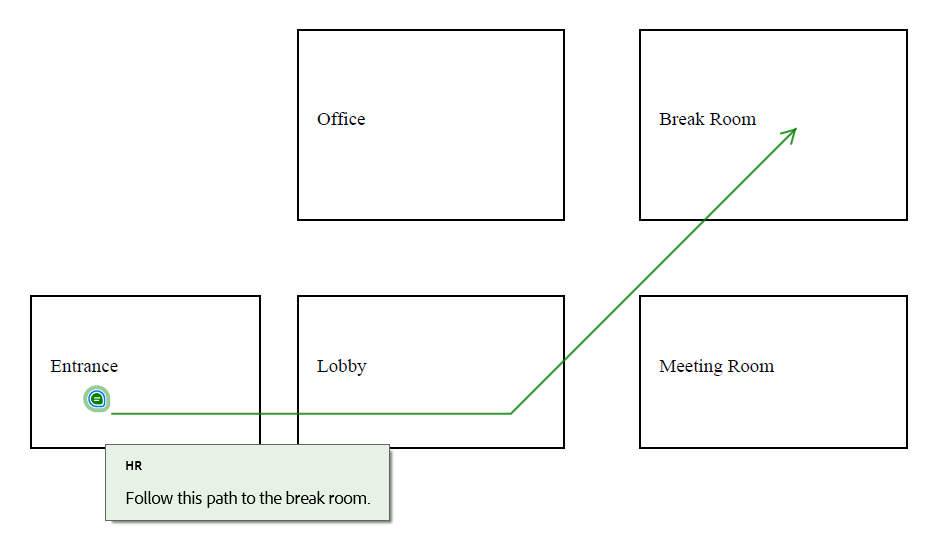
package pdf;

import com.devexpress.docs.*;
import com.devexpress.docs.pdf.*;
import com.devexpress.system.drawing.*;

import java.nio.channels.*;
import java.nio.file.*;
import java.util.List;

public class Main {
    public static void main(String[] args) throws Exception {
        try (FileChannel fileChannel = FileChannel.open(Path.of("Office-Floor-Plan.pdf"));
             PdfDocument pdfDocument = new PdfDocument(fileChannel)) {

            Page page = pdfDocument.getPages().getFirst();

            createPolylineAnnotation(page);

            try (WritableByteChannel channel =
                         FileChannel.open(Path.of("Result.pdf"),
                                 StandardOpenOption.CREATE,
                                 StandardOpenOption.WRITE,
                                 StandardOpenOption.TRUNCATE_EXISTING)) {

                pdfDocument.save(channel);
            }
        }
    }

    static void createPolylineAnnotation(Page page) {
        List<PointF> vertices = List.of(
                new PointF(140, 450),
                new PointF(350, 450),
                new PointF(500, 600));

        PolylineAnnotation annotation = new PolylineAnnotation(vertices);

        annotation.setTitle("HR");
        annotation.setContent("Follow this path to the break room.");
        annotation.setColor(PdfColor.getGreen());
        annotation.setFinishLineEnding(AnnotationLineEndingStyle.OPEN_ARROW);

        page.getAnnotations().add(annotation);
    }
}
Create a Polygon Annotation
The following code snippet draws a polygon annotation:
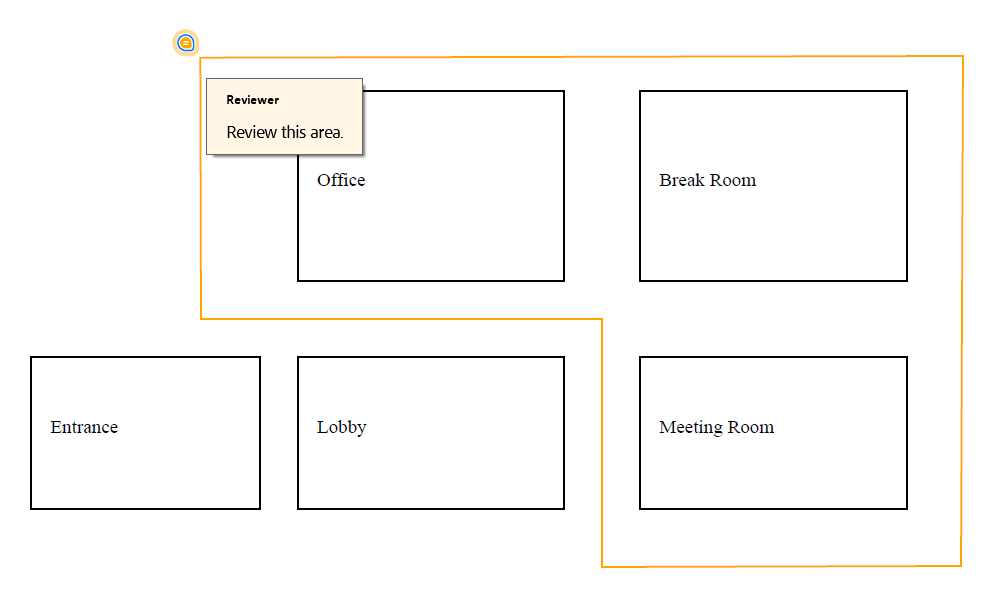
package pdf;

import com.devexpress.docs.*;
import com.devexpress.docs.pdf.*;
import com.devexpress.system.drawing.*;

import java.nio.channels.*;
import java.nio.file.*;
import java.util.List;

public class Main {
    public static void main(String[] args) throws Exception {
        try (FileChannel fileChannel = FileChannel.open(Path.of("Office-Floor-Plan.pdf"));
             PdfDocument pdfDocument = new PdfDocument(fileChannel)) {

            Page page = pdfDocument.getPages().getFirst();

            createPolygonAnnotation(page);

            try (WritableByteChannel channel =
                         FileChannel.open(Path.of("Result.pdf"),
                                 StandardOpenOption.CREATE,
                                 StandardOpenOption.WRITE,
                                 StandardOpenOption.TRUNCATE_EXISTING)) {

                pdfDocument.save(channel);
            }
        }
    }

    static void createPolygonAnnotation(Page page) {
        List<PointF> vertices = List.of(
                new PointF(120, 450),
                new PointF(520, 450),
                new PointF(520, 300),
                new PointF(400, 300),
                new PointF(400, 370),
                new PointF(120, 370));

        PolygonAnnotation annotation = new PolygonAnnotation(vertices);

        annotation.setTitle("Reviewer");
        annotation.setContent("Review this area.");
        annotation.setColor(PdfColor.getOrange());

        page.getAnnotations().add(annotation);
    }
}
Create an Ink Annotation
The following code snippet adds a freehand drawing to the first page:
package pdf;

import com.devexpress.docs.pdf.*;
import com.devexpress.system.drawing.*;

import java.nio.channels.*;
import java.nio.file.*;
import java.util.List;

public class Main {
    public static void main(String[] args) throws Exception {
        try (FileChannel fileChannel = FileChannel.open(Path.of("Document.pdf"));
             PdfDocument pdfDocument = new PdfDocument(fileChannel)) {

            Page page = pdfDocument.getPages().getFirst();

            createInkAnnotation(page);

            try (WritableByteChannel channel =
                         FileChannel.open(Path.of("Result.pdf"),
                                 StandardOpenOption.CREATE,
                                 StandardOpenOption.WRITE,
                                 StandardOpenOption.TRUNCATE_EXISTING)) {

                pdfDocument.save(channel);
            }
        }
    }

    static void createInkAnnotation(Page page) {
        List<PointF[]> inks = List.of(
                new PointF[] { new PointF(100, 300),
                        new PointF(120, 290),
                        new PointF(150, 305),
                        new PointF(180, 295)
                },
                new PointF[] {
                        new PointF(210, 320),
                        new PointF(240, 340),
                        new PointF(270, 330)
                }
        );

        InkAnnotation annotation = new InkAnnotation(new RectangleF(80, 780, 260, 120));
        annotation.setInks(inks);
        annotation.setTitle("Reviewer");
        annotation.setContent("Handwritten note.");
        annotation.setColor(PdfColor.getBlue());

        page.getAnnotations().add(annotation);
    }
}