Use DevExpress Templates to Create an ASP.NET Core Dashboard Application
- 3 minutes to read
DevExpress Templates help you create a ready-to-use ASP.NET Core application with a Dashboard control.
Project Template Kit (Visual Studio, Visual Studio Code, JetBrains Rider)
Use the Cross-IDE Project Template Kit to create an ASP.NET Core application with the Dashboard component.
To create an ASP.NET Core application with a Dashboard control, follow the steps below:
Install the DevExpress Project Template Kit extension. Refer to the following sections in the Project Template Kit help topic for instructions depending on the IDE of your choice:
Select ASP.NET Core or BI Dashboards in the Platforms list. Select the ASP.NET Core BI Dashboard Application template:
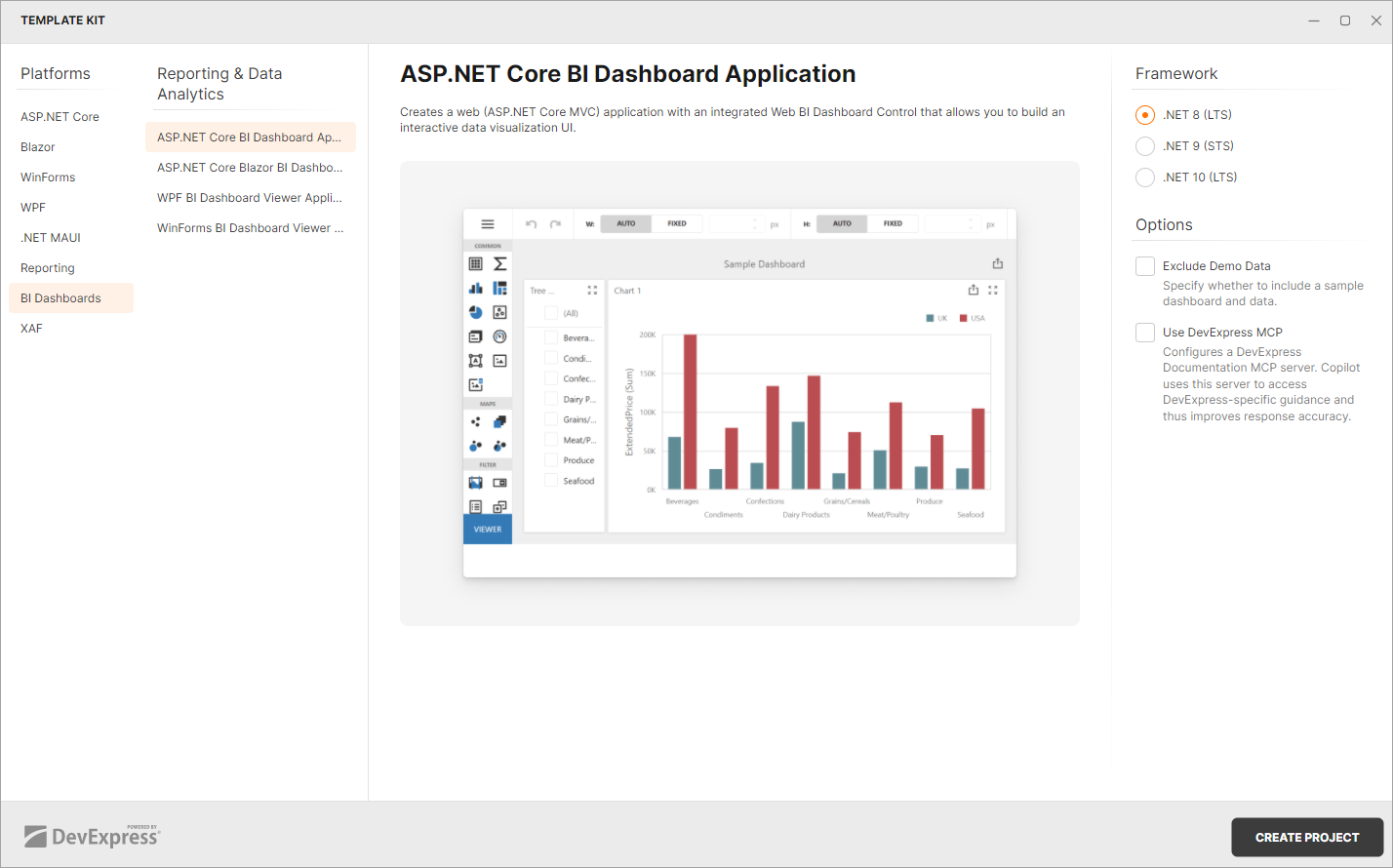
Specify additional template options. Click Create Project to generate the project.
.NET CLI Templates
Use CLI Project Templates to create an ASP.NET Core application with the BI Dashboard component.
DevExpress ASP.NET Core project templates are included in our Unified Component Installer.
You can also install the templates from nuget.org.
Ensure that the nuget.org source is enabled. If it is disabled, you may encounter error NU1101: Unable to find package DevExpress.AspNetCore.ProjectTemplates. To list sources with their status, run dotnet nuget list source. To enable a source, run dotnet nuget enable source <source name>.
To create an ASP.NET Core application with a Dashboard control, follow the steps below:
Run the following command to install DevExpress ASP.NET Core project templates from nuget.org:
dotnet new install DevExpress.AspNetCore.ProjectTemplatesCreate a project with a Dashboard control:
dotnet new dx.aspnetcore.dashboard -n DashboardAppYou can also specify additional options when you create a project. To view available command options, use one of the following parameters:
-? | -h | --help. For example, execute the following command:dotnet new dx.aspnetcore.dashboard --helpTemplate OptionsThe following list contains options you can specify when creating DevExpress ASP.NET Core BI Dashboard project templates:
-prerelease, --use-prerelease-dx-version- A flag that indicates whether to use a pre-release DevExpress package version in the project.
--framework <TFM>- Specifies the target framework. It expects a target framework moniker (TFM). Example:
net8.0. --dx-version <version>- Specifies DevExpress package version to be used in the project. Examples:
26.1.3,26.1.*,26.1.*-* -ndd, --no-demo-data- Specifies whether to create a project without a sample dashboard and predefined data source.
-mcp,--use-devexpress-mcp- Installs the DevExpress Documentation MCP Server for the generated solution. GitHub Copilot queries DevExpress documentation through this server to improve response accuracy and reduce model hallucinations. Refer to DevExpress Documentation MCP Server for setup details.
Next Steps
- Create Dashboards on the Web
- Describes how to create and configure dashboards in the Web Dashboard control.
- ASP.NET Core Dashboard Control
- Contains instructions on how to integrate the Dashboard control into an ASP.NET Core application.