Create a Blazor Hybrid Project
- 3 minutes to read
If you are new to .NET MAUI, WinForms, or WPF, please review the following Microsoft tutorials for additional information:
Microsoft tutorials for WinForms and WPF referenced above add Counter components to the application. You need to replace these components with DevExpress components.
using Microsoft.AspNetCore.Components.WebView.WindowsForms;
using Microsoft.Extensions.DependencyInjection;
using DevExpress.Blazor;

namespace WinFormsBlazorApp1 {
    public partial class Form1 : Form {
        public Form1() {
            InitializeComponent();

            var services = new ServiceCollection();
            services.AddWindowsFormsBlazorWebView();
            blazorWebView1.HostPage = "wwwroot\\index.html";
            blazorWebView1.Services = services.BuildServiceProvider();
            //blazorWebView1.RootComponents.Add<Counter>("#app");
            blazorWebView1.RootComponents.Add<MyComponent>("#app");
        }
    }
}
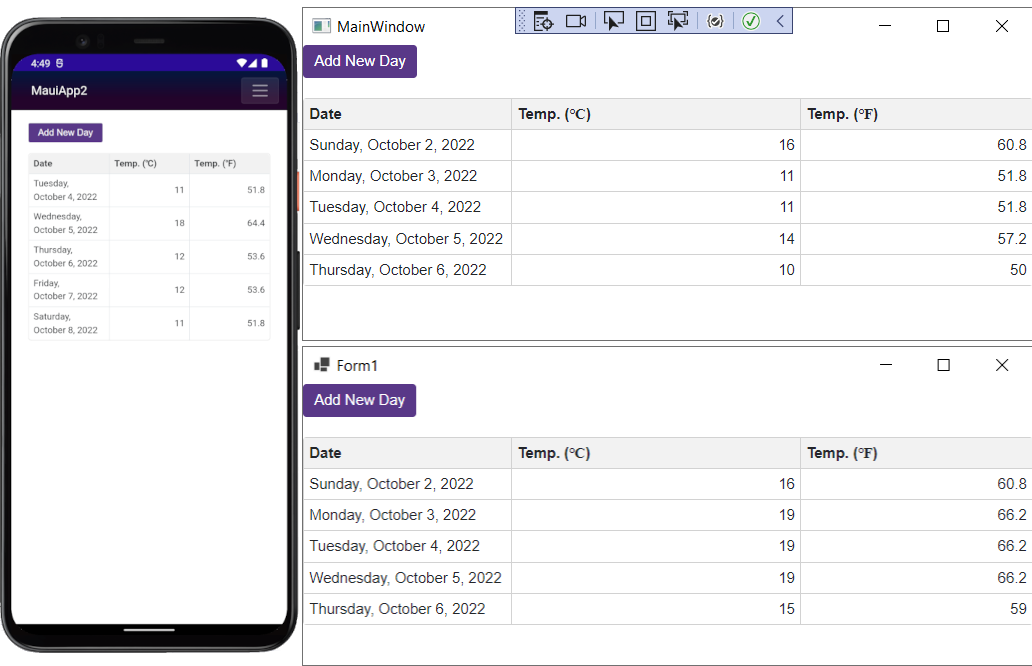
Blazor MAUI apps work with .razor files. You can add components in the same manner as in regular Blazor applications. Create a MyComponent.razor page in the project root. Add DevExpress Blazor components (such as DxGrid and DxButton) to this page.
@using System.Collections.ObjectModel

<DxButton Text="Add New Day"
        Click="(e) => AddNewForecast()" />

<p />
<DxGrid Data="@WeatherForecastData">
    <Columns>
        <DxGridDataColumn FieldName="Date" DisplayFormat="D" />
        <DxGridDataColumn FieldName="TemperatureC" Caption="@("Temp. (\x2103)")" />
        <DxGridDataColumn FieldName="TemperatureF" Caption="@("Temp. (\x2109)")" />
    </Columns>
</DxGrid>

@code {
    public class WeatherForecast {
        public DateTime Date { get; set; }
        public int TemperatureC { get; set; }
        public double TemperatureF => Math.Round((TemperatureC * 1.8 + 32), 2);
        public string Forecast { get; set; }
        public string CloudCover { get; set; }
        public bool Precipitation { get; set; }
    }

    int DayCount { get; set; } = 0;
    ObservableCollection<WeatherForecast> WeatherForecastData { get; set; }
    static readonly Random Rnd = new Random();

    protected override void OnInitialized() {
        WeatherForecastData = new ObservableCollection<WeatherForecast>();
        foreach (var date in Enumerable.Range(1, 5).Select(i => DateTime.Now.Date.AddDays(i))) {
            AddNewForecast();
        }
    }

    void AddNewForecast() {
        WeatherForecastData.Add(new WeatherForecast() {
                Date = DateTime.Now.Date.AddDays(++DayCount),
                TemperatureC = Rnd.Next(10, 20)
            });
    }
}
Additional Setup for .NET MAUI
iOS and MacOS require ahead-of-time compilation. You must also enable the
<UseInterpreter>property: set it totruewithin the application’s project file.<PropertyGroup> <UseInterpreter>true</UseInterpreter> </PropertyGroup>iOS or MacOS may require MacOS BigSur+.
- Update Android System WebView to the latest version. Outdated versions, common on Android emulators, may cause compatibility issues.
- Configure your Blazor MAUI project to support browser developer tools.
- Configure Windows to deploy and debug MAUI applications.
- BlazorWebView is not currently in the supported browser list.
DevExpress MAUI Components
You have a few alternatives when it comes to MAUI applications:
- You can embed Blazor components directly into a .NET MAUI application instead of using a Hybrid hosting model.
- You can use native DevExpress MAUI components instead of DevExpress Blazor Components.
If you choose to switch to .NET MAUI controls and applications, refer to the following tutorial: Get Started with DevExpress Controls for .NET Multi-platform App UI.