v26.1 Release Notes
- 11 minutes to read
Tip
Visit our website to explore new features/capabilities available across the entire DevExpress product line: What’s New in our Latest Update.
Migration to a Single License Key for All DevExpress Products
DevExtreme JS/TS products for Angular, React, Vue, and jQuery now use the same license key as DevExpress .NET components/libraries. You can develop different DevExpress-powered applications on one machine using the same key.
If your project uses both ASP.NET Core controls and DevExtreme JS/TS components, follow our updated guide to register your license key: License Key for DevExpress Products.
DataGrid and TreeList — AI Assistant
DevExtreme v26.1 ships with a new AI Assistant for our DataGrid and TreeList components. This feature allows users to interact with the component and modify its layout using natural language, making complex configurations faster and more intuitive. Users can also enter prompts via speech with built-in speech-to-text support. Simply said, this AI Assistant transforms our DataGrid and TreeList components into AI-augmented data exploration tools.
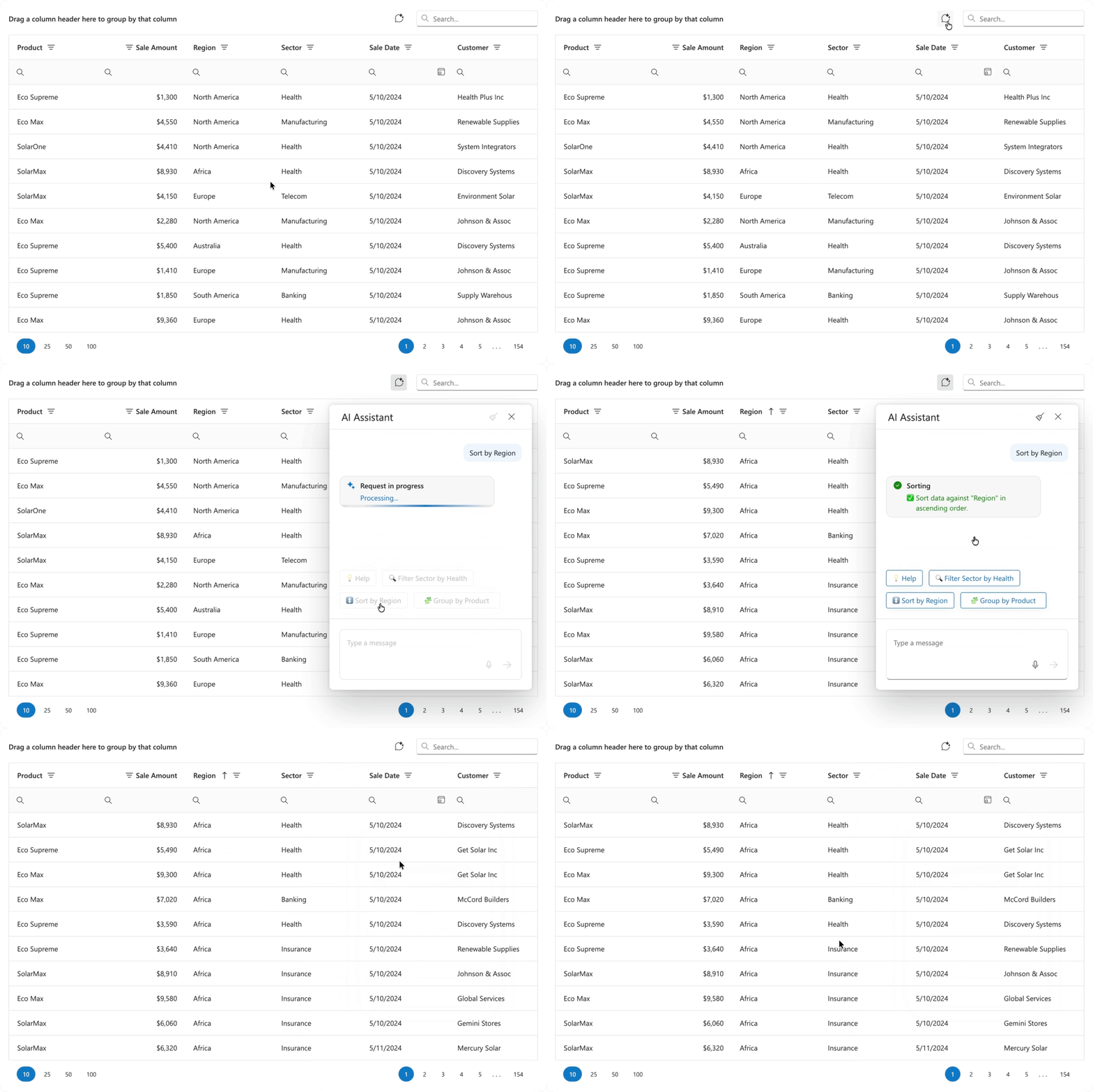
DevExtreme AI Assistant is perfect for the following usage scenarios:
- Complex Grid Configurations: Users can quickly specify data display preferences that are otherwise time-consuming to set up manually.
- Large Data Sets: Apply complex filtering, sorting, grouping, and searching settings to navigate large sets of data with ease.
- Repeated Configurations: Reuse the same natural language prompt to apply data display preferences across sessions and save time on routine adjustments.
- Accessibility-first Applications: Support a new way to interact with an app - hands-free voice input (convenient on the go).
To activate our AI Assistant, configure aiIntegration settings at the component/assistant level and set the aiAssistant.enabled property to true. Once activated, the component adds aiAssistantButton to the toolbar. This button opens the AI Assistant Chat in a pop-up window.
The aiAssistant configuration allows you to access assistant chat/popup objects and customize associated settings as needs dictate. For instance, you can display commonly used commands inside the AI Assistant Chat (using suggestions) to streamline user workflows.
DevExtreme AI Assistant also supports response customization. Define customizeResponseText and customizeResponseTitle callbacks to specify custom messages and titles. You can also use these callbacks to localize assistant responses.
DevExtreme AI Agent Skills
We published a set of AI agent skills for DevExtreme libraries. These skills help AI coding agents generate higher-quality code that follows DevExtreme APIs, patterns, and best practices. Combined with the DevExpress MCP server, our skills improve accuracy and relevance of AI-generated code.
The v26.1 release cycle includes AI skills for the following DevExtreme components and features:
- DataGrid
- Scheduler
- Form
- DevExtreme Data Layer (DataSource)
- DevExtreme Themes
For additional information about DevExtreme AI skills, refer to the following help topic: DevExtreme - AI Skills
Chat Enhancements
Speech to Text
The DevExtreme Chat interface now supports speech-to-text conversion (allows users to dictate messages instead of typing).
To activate this feature, set the speechToTextEnabled property to true. Once enabled, a microphone icon appears in the chat input field. Users can click the icon to start speech-to-text conversion.
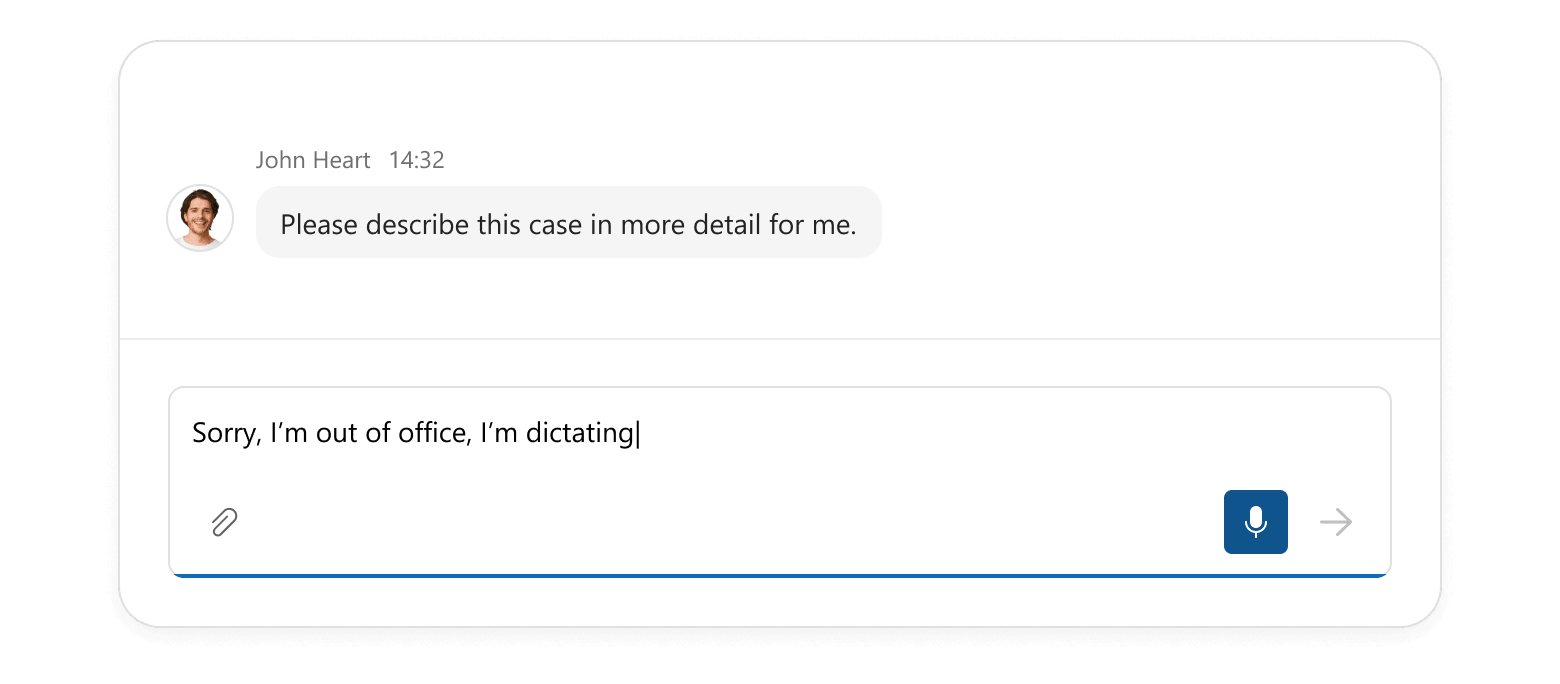
Use the speechToTextOptions property to configure conversion settings. For instance, you can specify the language for speech recognition and set a maximum duration for speech input.
Use the new speech-to-text option to enhance accessibility, improve user-efficiency, and support new interaction scenarios (such as hands-free voice input).
Suggestions
DevExtreme Chat can now display suggestion buttons above the input field. These buttons remain visible even after a message is entered. Use our new suggestions API to define suggestions and configure each button individually. Usage scenarios include:
- Prompt suggestions in AI chats: Specify ready-to-use prompts and help users understand AI assistant capabilities so they can obtain relevant responses faster.
- Initial message suggestions for new conversations: Allow users to start conversations with a single click to improve the onboarding experience.
- Dynamic, context-aware suggestions: Update suggestions based on conversation flow, user input, or application state to keep interactions relevant and helpful.
- One-time or dismissible suggestions: Hide suggestions after selection or at specific conversation stages to keep the interface clean and focused.
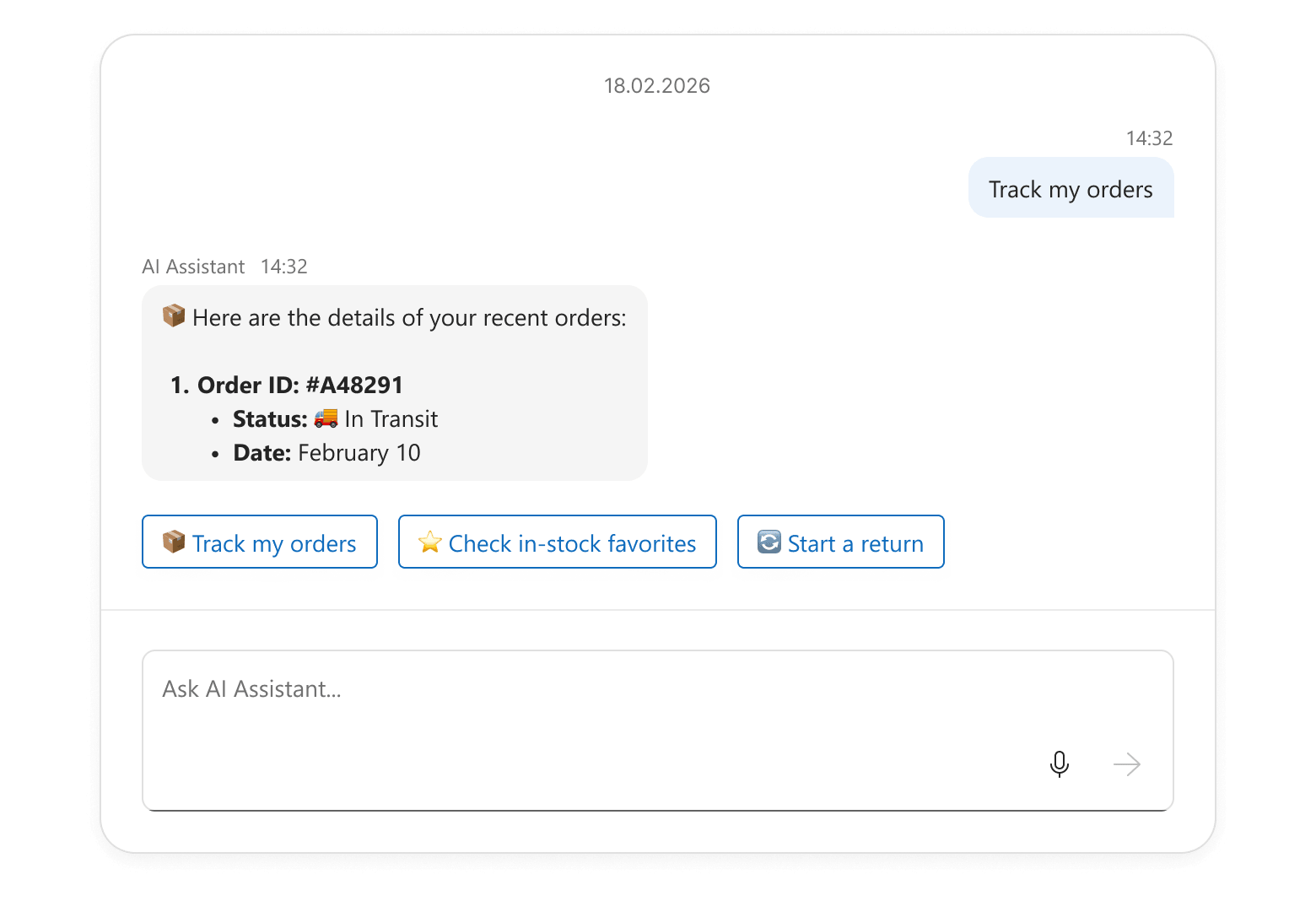
The suggestions API accepts DevExtreme ButtonGroup options and allows you to handle click actions using the onItemClick option. You can update the input field text, send messages immediately, or execute any other action as your needs dictate.
Message Streaming
With v26.1, you can now stream AI message responses incrementally inside a message bubble. Message streaming improves the user experience for DevExtreme-powered AI assistants, chatbots, and long-running operations. Conversations feel more dynamic and responsive.
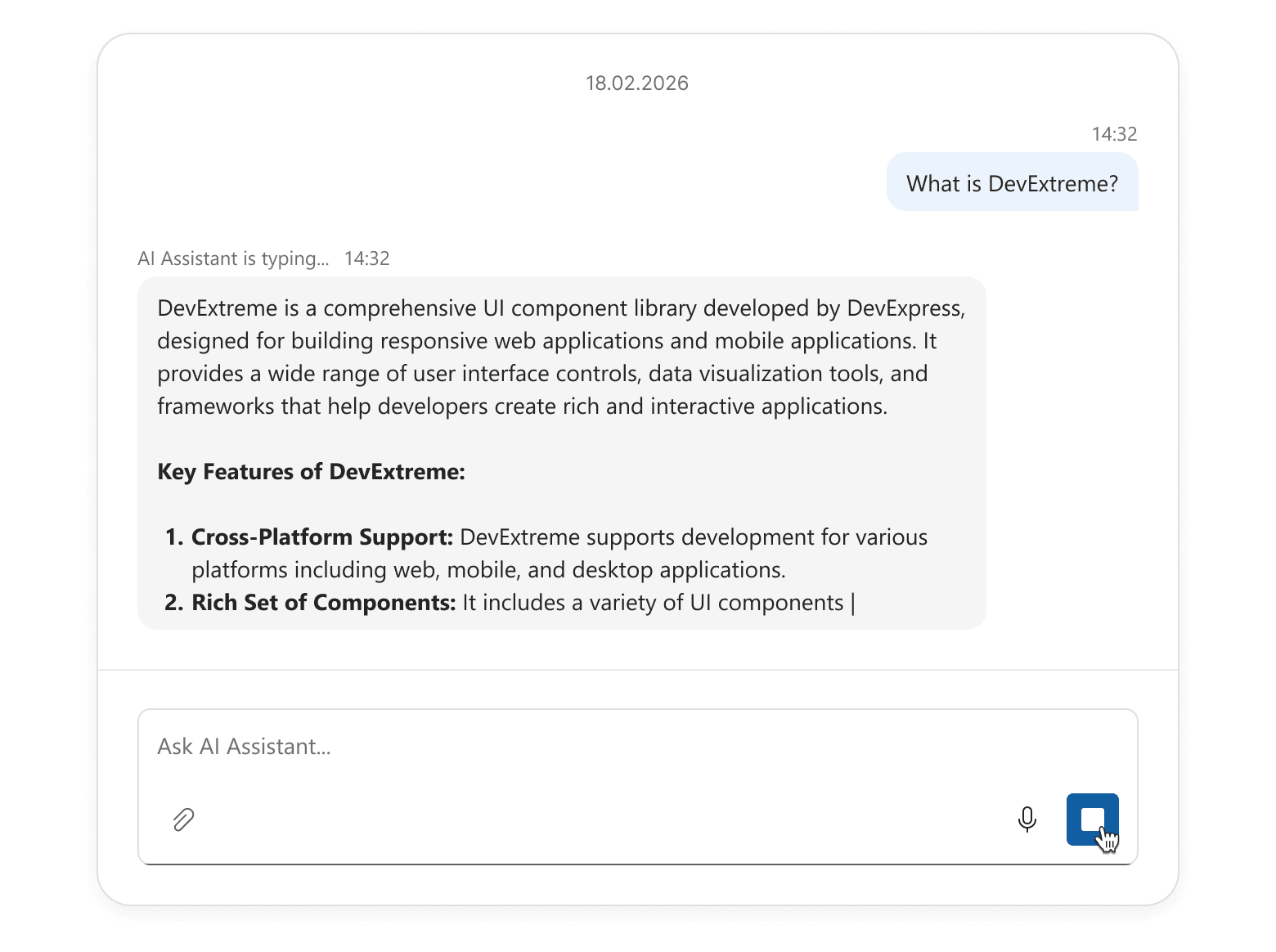
Use our new sendButtonOptions property to implement message streaming. Switch the button to custom mode, customize the icon, and handle click events as needed. For instance, the button can start an AI request, stream the response into Chat UI in chunks, and act as a Stop button during generation.
Refer to our “Chat - Message Streaming” demo to learn more about our message streaming implementation. You can reuse and adapt our demo code to address a specific usage scenario.
Input Field Text
Our new inputFieldText property allows you to display custom text within the Chat input field:
- Add a default message (users can modify it before sending).
- Suggest prompts to guide user responses.
- Dynamically pre-populate the input field based on context, such as previous messages.
Scheduler Enhancements
Handle Appointment Time Overlaps
DevExtreme Scheduler v26.1 allows you to handle appointment time overlaps. The new getOccurrences method retrieves all appointment occurrences across a time range (both recursive and standard).
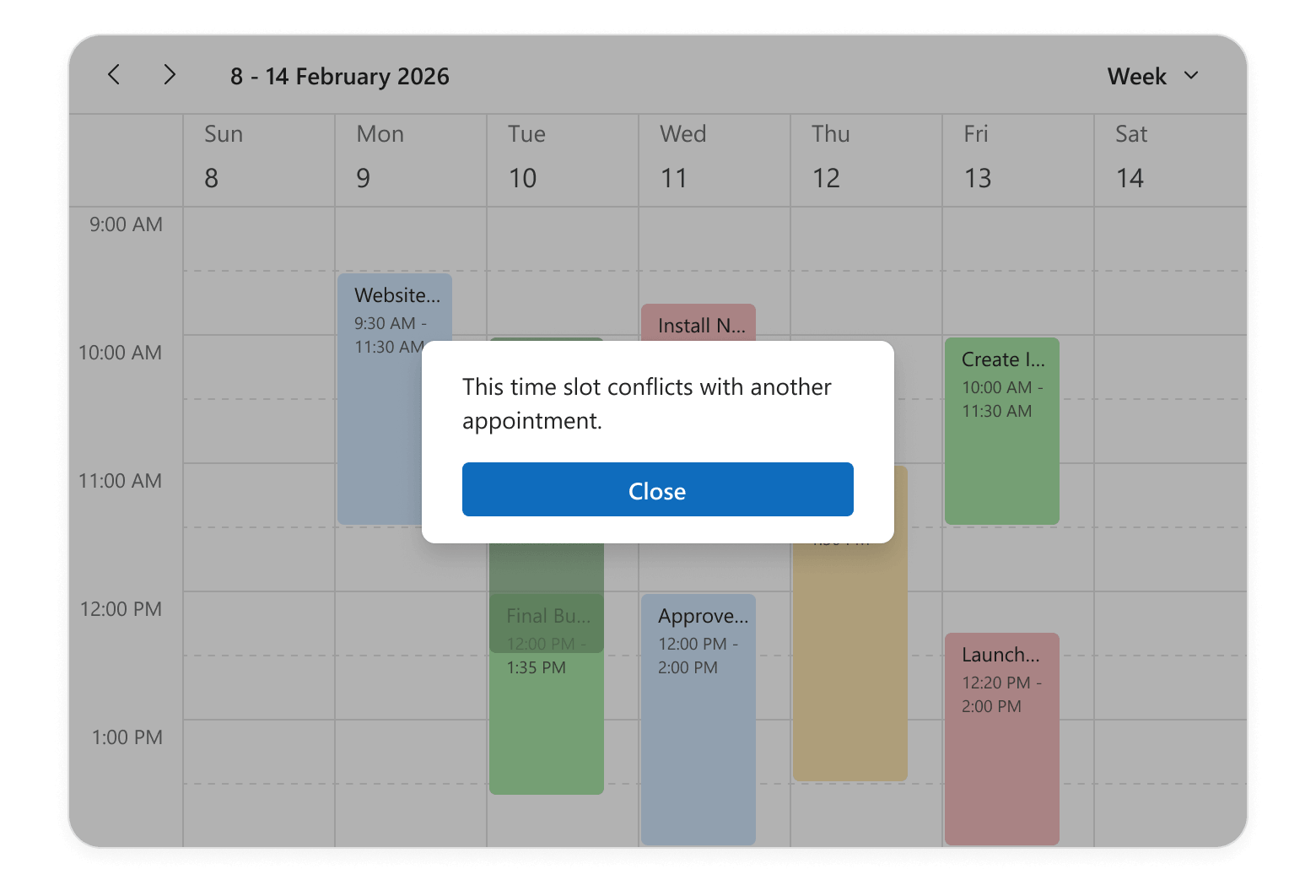
Use this method to detect overlaps when:
- Creating or updating events
- Building custom validation logic (to prevent double-booking)
- Implementing advanced scheduling features such as conflict resolution or alternative time suggestions.
Appointment Snap Modes
The DevExtreme Scheduler can now align appointments with time cells to ensure a visually consistent layout. Set the snapToCellsMode property to “always” to snap all appointments to the grid, regardless of their duration. In “auto” mode, appointments that occupy less than 2 time cells stretch to cell borders, while the remaining appointments do not stretch.
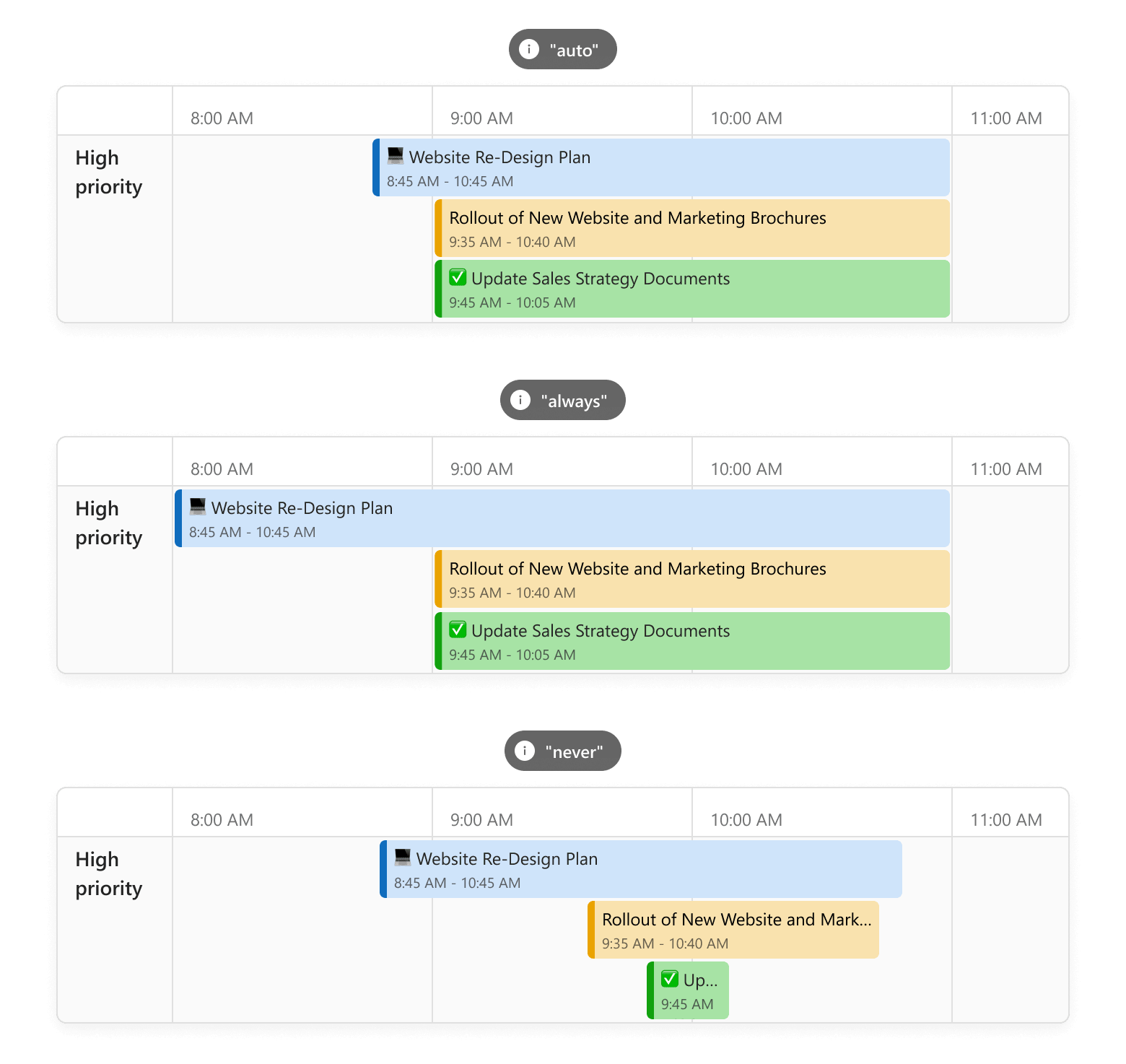
Appointment snapping is particularly useful when displaying a mix of short and long events in the Scheduler component (for instance, in booking systems). When enabled, appointments align neatly within the grid, improving readability and visual balance. It also reduces text truncation and ensures that key details (such as titles or assignees) remain visible.
Hide Days of the Week
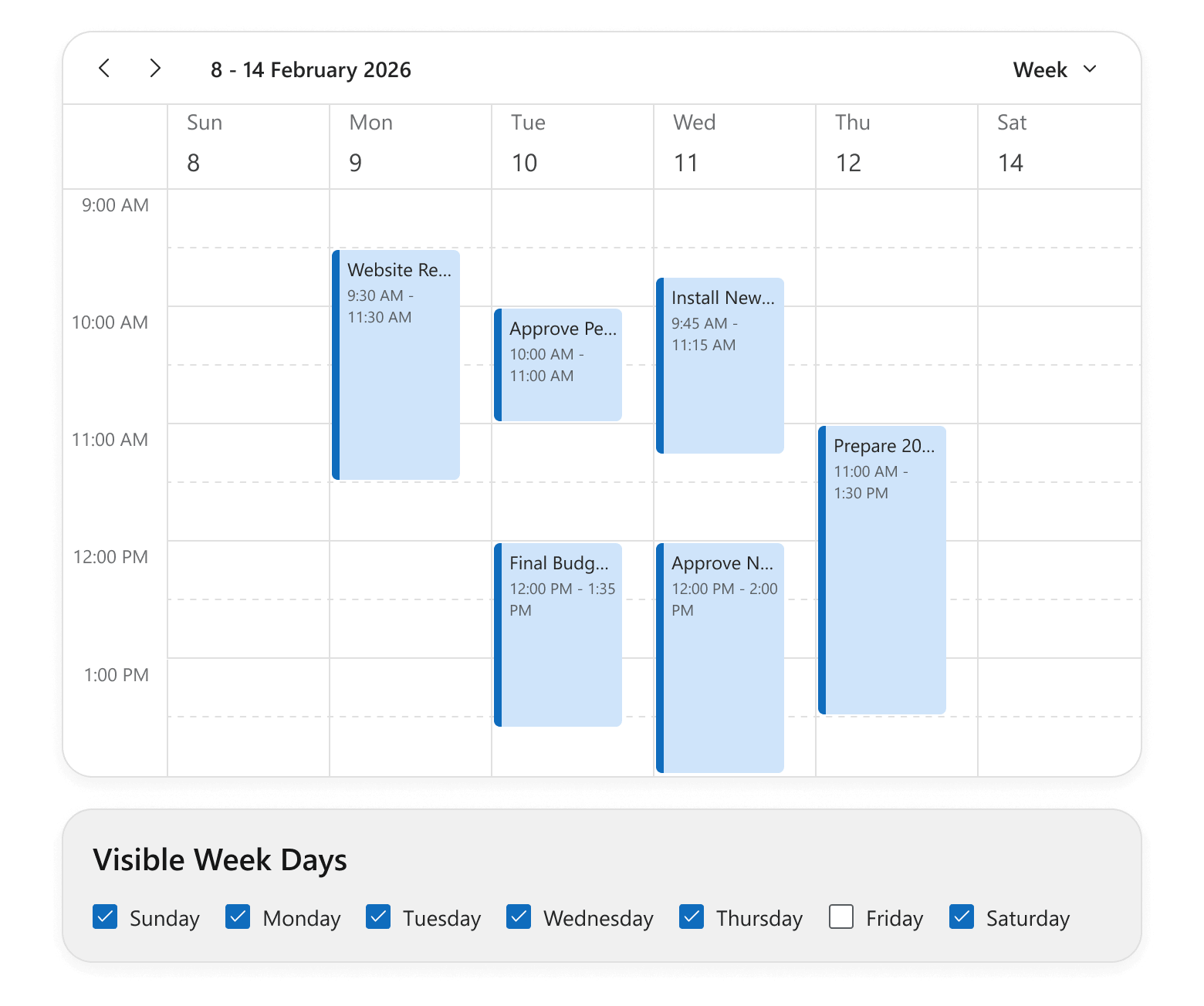
You can hide specific days of the week across the Scheduler component or within individual views. Pass day numbers (0-Sunday through 6-Saturday) to the hiddenWeekDays property.
This functionality helps focus UI on relevant days without affecting underlying data. For example, you can hide weekends, exclude specific non-operational days, and tailor views for part-time or shift-based teams.
Handle Cell Selection Completion
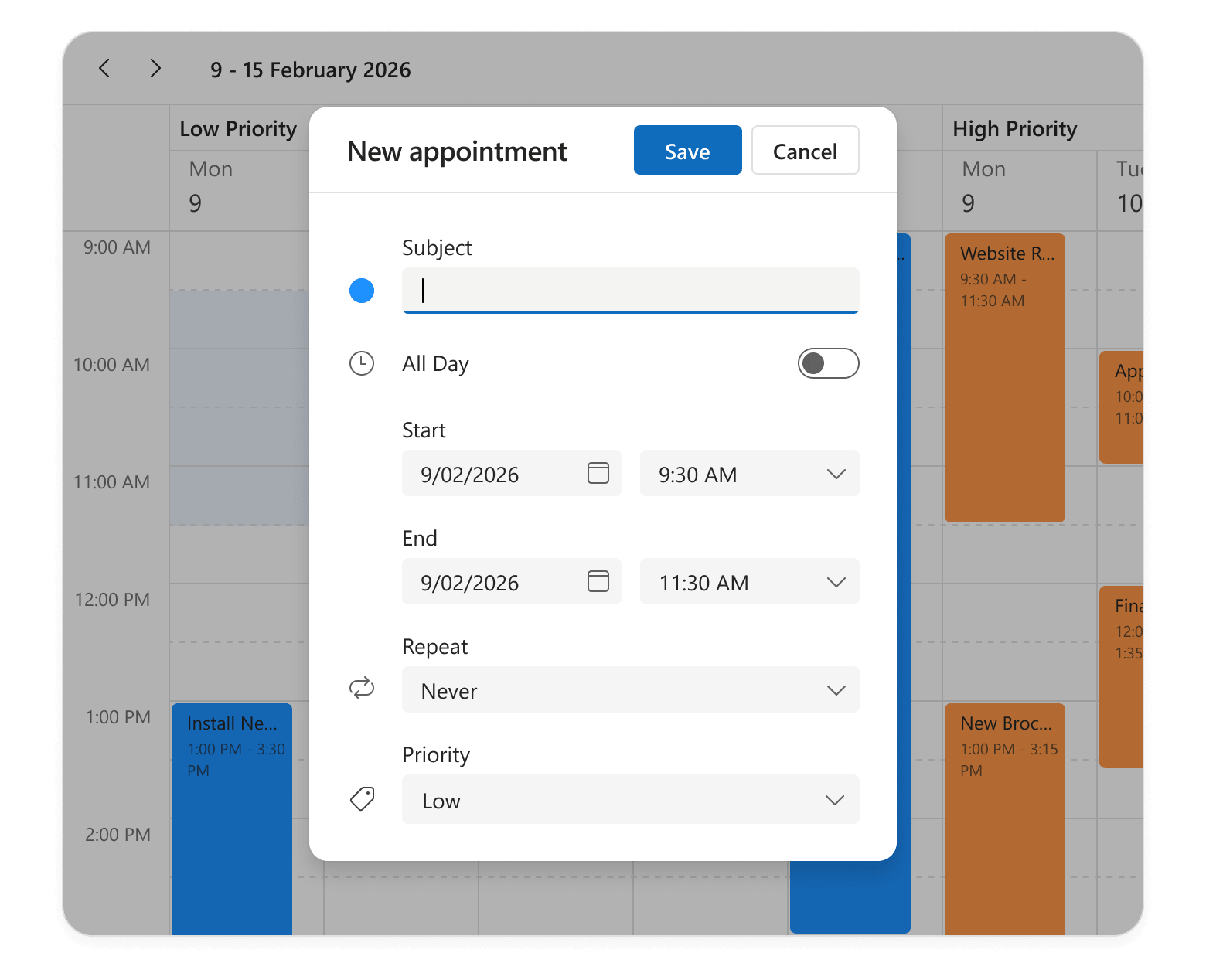
The Scheduler component now includes a new onSelectionEnd event handler. This event fires when a user selects cells (on mouse up) and gives you access to selectedCellData, so you can run custom logic at the end of the selection process.
For instance, you can automatically open an appointment creation form when selection is complete. The edit form is pre-populated with the selected time range and resources to simplify scheduling workflows and enhance overall user experience.
UI/UX and API Enhancements
AI Integration — New Response Language Configuration Option
Our new AIIntegrationOptions allow you to configure services for DevExtreme AI-powered capabilities (such as AI Columns and Smart Paste). v26.1 includes a lang option you can use to specify the AI response language. We expect to extend AIIntegrationOptions in future release cycles.
TreeView — Prevent Selection for Disabled Nodes
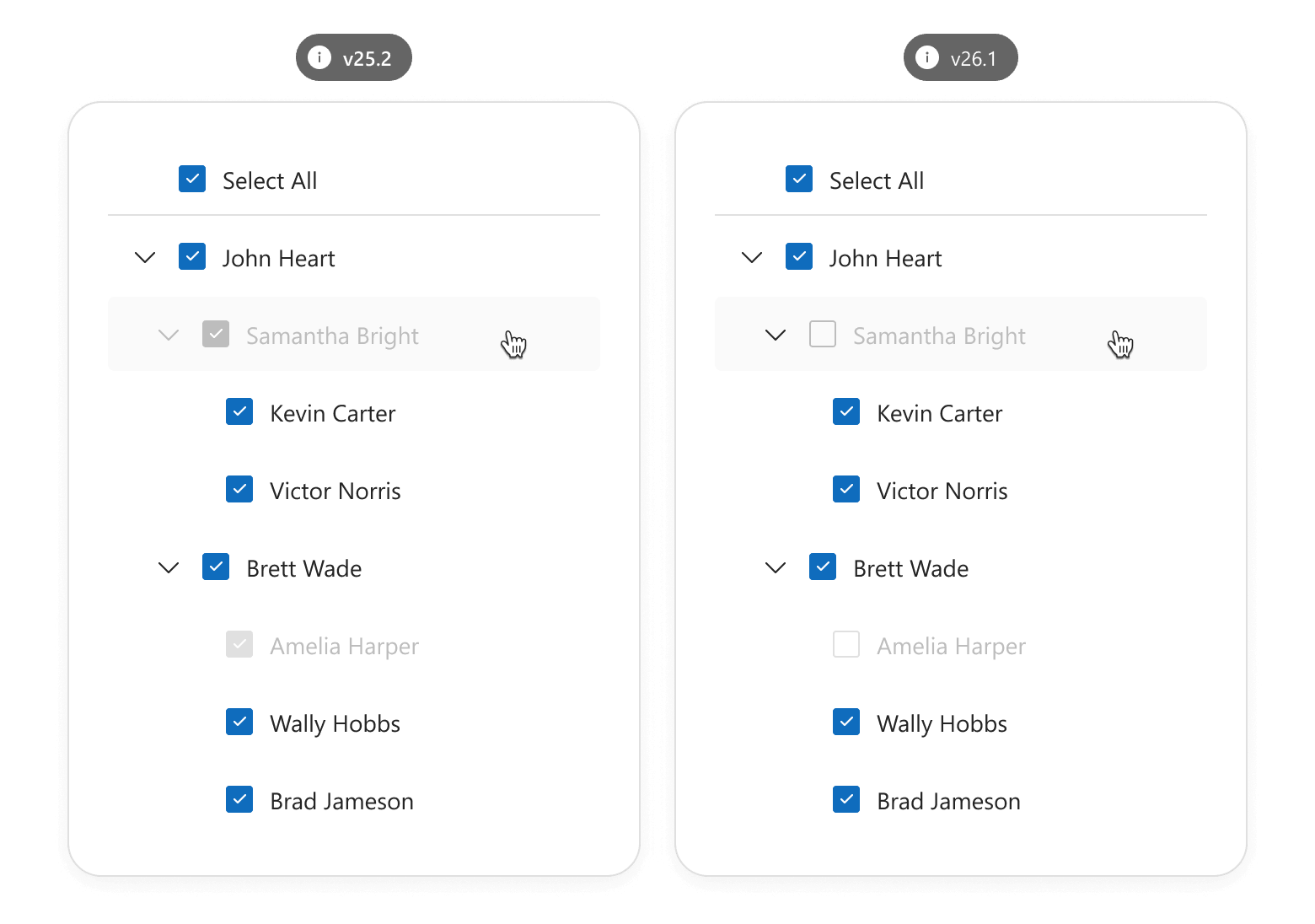
Our new disabledNodeSelectionMode property specifies the selection behavior of disabled TreeView nodes. You can prevent selection state changes or allow recursive selection and select all operations to affect disabled nodes.
Use this feature to display items that should not be modified/selected. For instance, if you build a permission management tool where administrators assign directory access privileges to user roles.
TreeView — Expand/Collapse Disabled Nodes
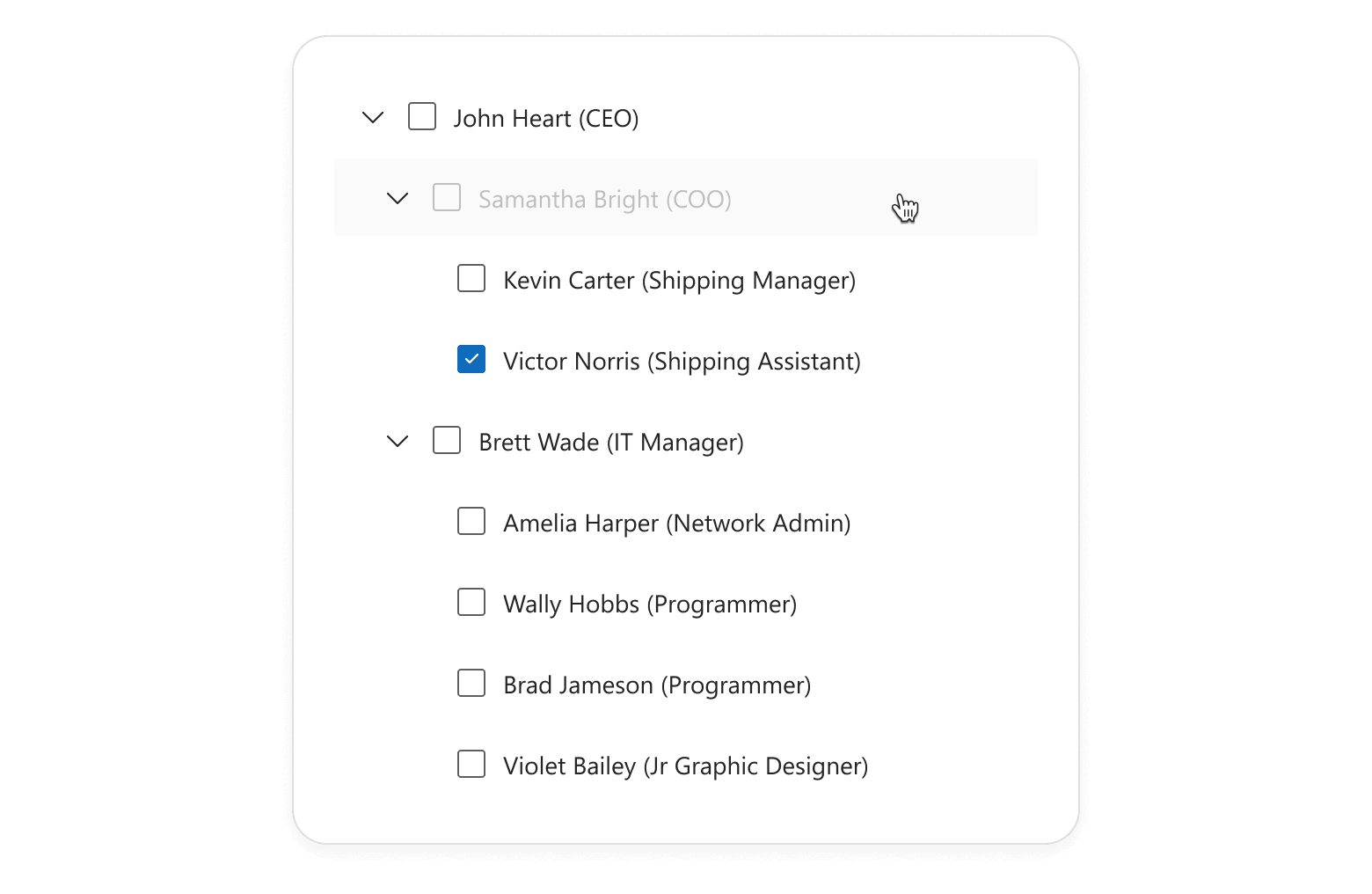
You can now expand/collapse disabled nodes to explore child items in the DevExtreme TreeView component.
Form — New getScrollable Method
The DevExtreme Form component includes a new getScrollable() method. The returned Scrollable allows you to save/restore scroll positions using DevExtreme ScrollView API, ensuring a smooth user experience across frequent Form re-renders.
Usage scenarios include:
- Long forms with numerous validation rules (including asynchronous validation).
- Dynamic forms (where field number changes at runtime).
Form — Rendering Logic Improved
v26.1 ships with improved DevExtreme Form rendering logic. The component is no longer re-rendered once Form size changes and items are repositioned (the number of Form columns changes). Editor states, values, and validation statuses now persist across Form layout changes.
List — Item Text Selection
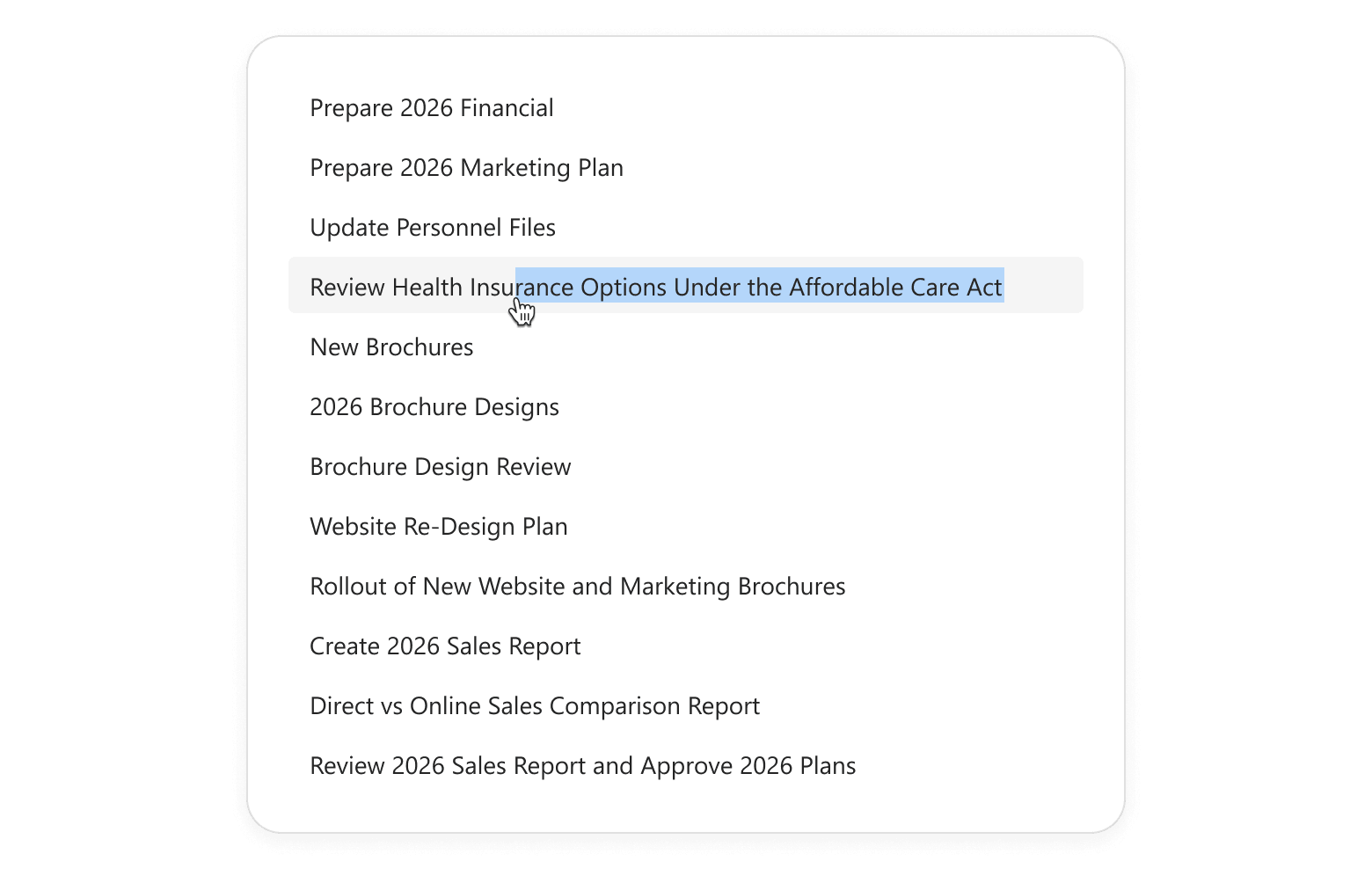
Our List component now supports item text selection when swipe actions are disabled (no onItemSwipe handler is defined). Users can easily copy information (such as contact details, notes, or product names) using standard text selection actions.
Splitter — Enhanced Pane Sizing Logic
The DevExtreme Splitter now preserves configured pane sizes and min/max size constraints across layout changes (when panes are displayed, hidden, or resized). This enhancement improves layout predictability and consistency.
ODataStore/ODataContext — Updated Date Processing Behavior
ODataStore and ODataContext data requests now store time zone information from date fields. This ensures that components bound to OData services handle time zone-aware values accurately out of the box, both on the client and in requests to the server.
To implement this new behavior, we replaced deserializeDates with a new processDatesAsUtc option in our ODataStore.
GlobalConfig — New Format Configuration API
DevExtreme v26.1 ships with a new global format configuration API. It allows you to configure date/time/number formats application-wide (globally or per locale) and ensure consistent look and feel across your app.
DevExpress.config({
    dateFormat: {
        default: 'dd.MM.yyyy',
        'en-US': 'MM.dd.yyyy',
    },
});
New configuration options support both custom format strings and predefined DevExtreme formats. You can also override predefined formats as needs dictate.
Centralized formatting logic simplifies maintenance, reduces duplication, and helps adapt your application to different regional requirements.
Accessibility
DevExtreme v26.1 ships with the following accessibility enhancements:
- You can now navigate to first and last appointments in the Scheduler‘s current view using Home and End keys.
- Use our new tabFocusLoopEnabled option to manage keyboard navigation in the Popup component. When set to true, focus loops inside the Popup. When false, users can tab through elements and exit the Popup.
- Popover and Tooltip can now be canceled and support hover interactions.
Improved Color Contrast for Fluent and Material Themes
Our Fluent and Material themes now offer enhanced color contrast across all DevExtreme components (improves readability and accessibility). Fluent Blue and Material Blue themes also better align with accessibility contrast guidelines (such as WCAG 2.2, criterion 1.4.3).
These enhancements also apply to custom elements that rely on our predefined CSS variables (such as –dx-color-primary).
UI Template Kit Update
We added new ASP.NET Core application templates to the DevExpress UI Template Kit.
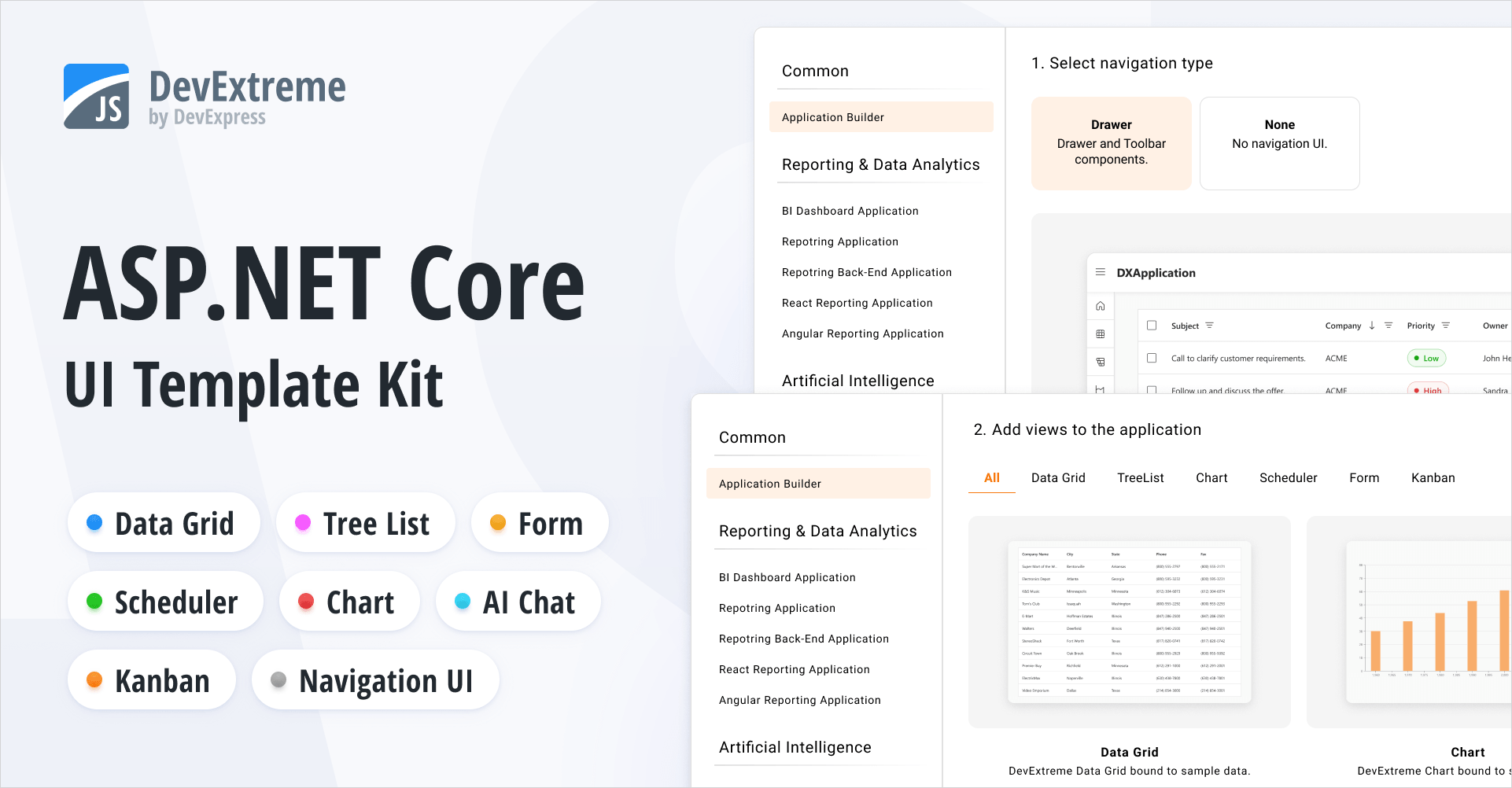
Our new Application Builder template allows you to create a DevExpress-powered ASP.NET Core app with a single click. It includes predefined views for popular DevExtreme-based UI controls (DataGrid, Chart, Scheduler, Form, and TreeList). You can use the built-in page navigation or implement custom navigation UI.
The Template Kit also includes a new AI Chat template designed to simplify AI-powered application development.
All new templates are available for both MVC Views and Razor Pages application patterns. The Template Kit also allows you to select a desired theme and customize app look and feel as needs dictate.
Rich Text Editor — Screen Reader Support
Screen readers now announce document content as users navigate with the keyboard.
- Read aloud paragraphs, lines, words, and characters.
- Announce and read changes to text selection.
- Notify users about hyperlinks and inline images.
- Read text in table cells.
Web Reporting
Enhancements and new capabilities in v26.1:
- Accessibility Enhancements: PDF/UA-2 Format Support
- Report Designer for JetBrains Rider: .NET Projects Support
- AI-powered Extensions: AI Prompt-to-Report Wizard — Optimized Report Generation
- AI-assisted Development: AI Agent Skills for DevExpress Reports
- Framework Support: jQuery 4 and Angular 22
BI Dashboard
Enhancements and new capabilities in v26.1: