ReportPromptToReportBehaviorProperties.PredefinedPrompts Property
Specifies predefined prompts that can be used to create a report in the Report Wizard.
Namespace: DevExpress.AIIntegration.WinForms.Reporting
Assembly: DevExpress.AIIntegration.WinForms.Reporting.v26.1.dll
NuGet Package: DevExpress.AIIntegration.WinForms.Reporting
Declaration
[DXCategory("Behavior")]
public IEnumerable<AIReportPrompt> PredefinedPrompts { get; set; }Property Value
| Type | Description |
|---|---|
| IEnumerable<AIReportPrompt> | A prompt collection. |
Remarks
Use the ReportPromptToReportBehaviorProperties.PredefinedPrompts property to display prompts in the Report Wizard.
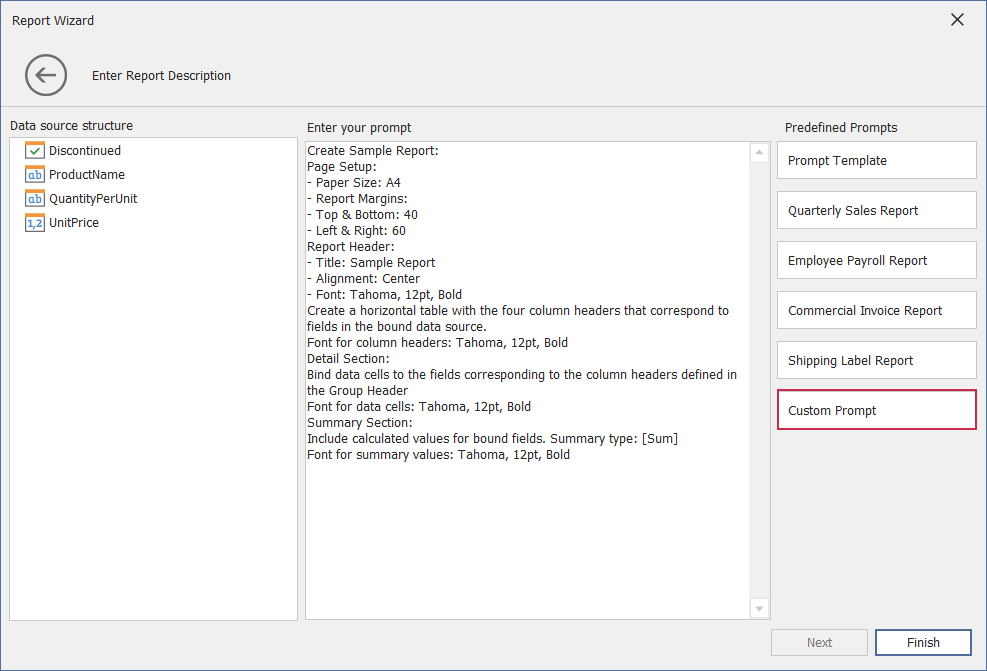
The following code snippet obtains built-in DevExpress prompts from AIReportPromptCollection, creates a custom prompt (an AIReportPrompt object), and adds this prompt to the collection. The collection is assigned to the ReportPromptToReportBehaviorProperties.PredefinedPrompts property.
using DevExpress.AIIntegration.WinForms.Reporting;
// ...
public partial class Form1 : Form {
    public Form1() {
        behaviorManager1.Attach<ReportPromptToReportBehavior>(reportDesigner1, behavior => {
            // Obtain built-in DevExpress prompts from the collection.
            var collection = AIReportPromptCollection.GetDefaultReportPrompts();
            // Create a custom prompt.
            AIReportPrompt customPrompt = new AIReportPrompt();
            customPrompt.Title = "Custom Prompt";
            customPrompt.Text = "Custom Prompt Text";
            // Add this prompt to the collection.
            collection.Add(customPrompt);
            // Display Prompts in the Report Wizard.
            behavior.Properties.PredefinedPrompts = collection;
        });
    }
}
The following image illustrates the result:
Review the following help topic for more information on how to create and manage prompts: Prompt to Report Behavior in the WinForms Report Designer.