Add DevExpress Products to a Project
- 2 minutes to read
The DevExpress Unified Component Installer creates a local NuGet feed with DevExpress .NET Framework and .NET assemblies, and registers this feed in your Visual Studio IDE as a package source. The package source name is: “DevExpress 26.1 Local“.
We recommend that you use DevExpress wizards when you create new projects or add new items. These wizards automatically register required DevExpress dependencies (install NuGet packages from the local source to your project).
You can also find and add required DevExpress packages manually.
Use DevExpress Template Kit and Other Wizards
If you create a new project, we recommend that you use the DevExpress Template Kit. The DevExpress Unified Installer makes this kit available as one “New Project” templates.
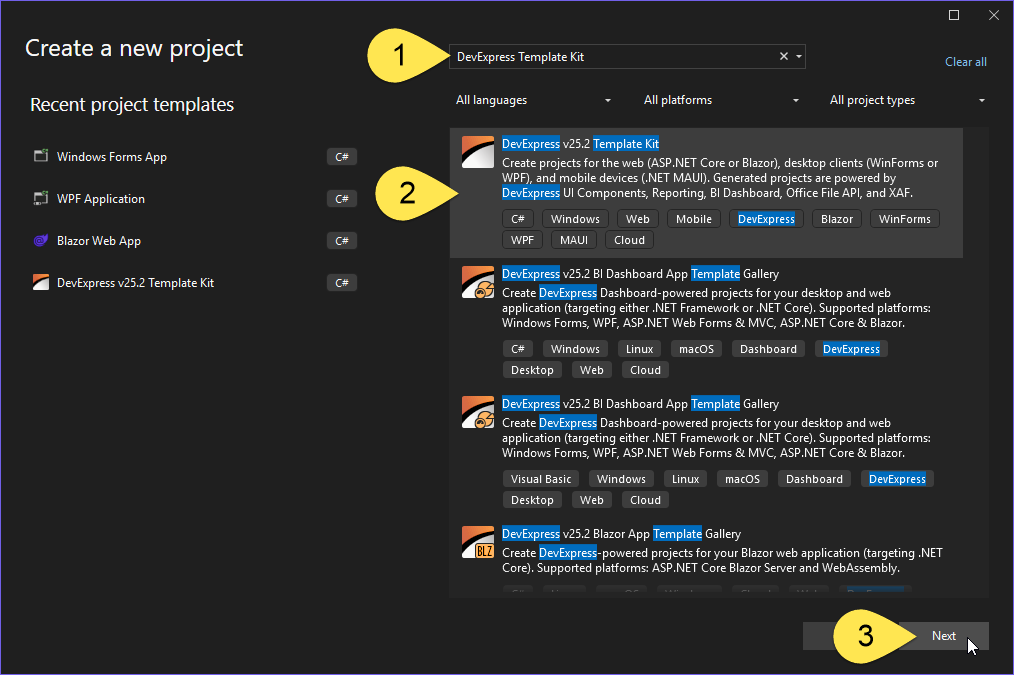
Run the DevExpress Template Kit to select a development platform, specify project settings, and add views, compoments, and boilerplate code. The wizard creates a new project and adds required DevExpress packages based on your selections.
DevExpress Unified Installer integrates additional wizards into the Visual Studio IDE - project settings dialogs, “Add New Item” guides, and others. These wizards may also add packages references to your project depending on your selections.
Find and Add Packages Manually
To add DevExpress dependencies manually, first consult the documentation to learn which packages are required for a particular library or component.
Follow the steps below to add DevExpress packages from the local NuGet feed registered by the installer:
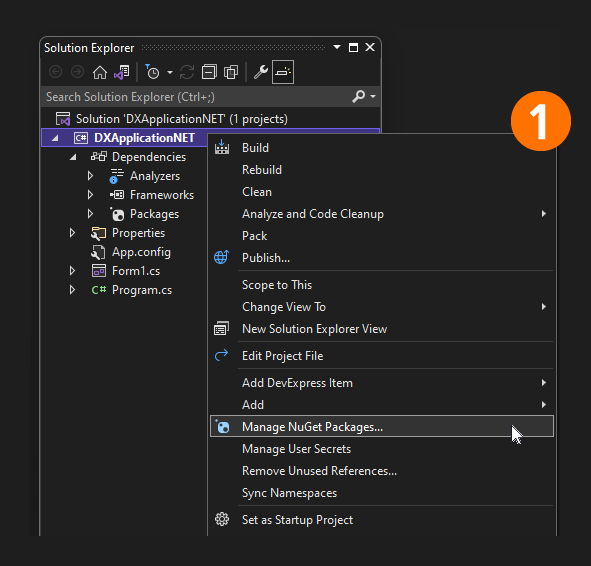
Open the Visual Studio NuGet Package Manager for a solution or project. In the Solution Explorer, right-click the solution or project and select Manage NuGet Packages… in the context menu:
Select the All or DevExpress 26.1 Local NuGet feed as a package source:

Browse and install DevExpress packages. Enable the ‘Include prerelease’ option to include DevExpress packages with hotfix, EAP/CTP, and Beta releases.

Package and Configuration File Location
The following paths may be useful for troubleshooting or package content analysis:
| Resource | Location |
|---|---|
| NuGet packages (*.nupkg files) | %ProgramFiles%\DevExpress 26.1\Components\System\Components\Packages |
| Explore packages and included DLLs | %ProgramFiles%\DevExpress 26.1\Components\Offline Packages |
| DevExpress Feed Config | %ProgramFiles(x86)%\NuGet\Config |
| NuGet.Config | %AppData%\NuGet\NuGet.Config |
Tip
Hotfix installations also create a local NuGet feed. Use this feed to test bug fixes in your CI/CD system: Use DevExpress .NET Products in Popular Continuous Integration Systems.
You can also obtain hotfixes from the DevExpress NuGet Feed: Install Hot Fixes via NuGet.