DashboardViewer.CustomPalette Event
Allows you to substitute a dashboard palette used to paint dashboard item elements.
Namespace: DevExpress.DashboardWin
Assembly: DevExpress.Dashboard.v26.1.Win.dll
NuGet Package: DevExpress.Win.Dashboard
Declaration
Event Data
The CustomPalette event's data class is CustomPaletteEventArgs. The following properties provide information specific to this event:
| Property | Description |
|---|---|
| Palette | Gets or sets a palette used to color dashboard item elements. |
| PaletteName | Gets the name of the selected palette. |
Remarks
DevExpress Dashboard uses a set of colors from predefined palettes. Use the DashboardPalette static read-only fields to get predefined dashboard palettes.
Handle the CustomPalette event to substitute a palette. Assign a DashboardPalette (built from DashboardPaletteItem objects that define a color, fill style, and line style) to CustomPaletteEventArgs.Palette.
The following code snippet applies a custom palette for dashboardViewer1:
using DevExpress.DashboardCommon;
using DevExpress.Drawing;
using System.Collections.Generic;
using System.Drawing;

dashboardViewer1.CustomPalette += dashboardViewer1_CustomPalette;

  void dashboardViewer1_CustomPalette(object sender, CustomPaletteEventArgs e){
    // Create a new custom palette.
    List<DashboardPaletteItem> paletteItems = new List<DashboardPaletteItem>();
    paletteItems.Add(new DashboardPaletteItem(Color.SteelBlue));
    paletteItems.Add(new DashboardPaletteItem(Color.SeaGreen, DXHatchStyle.DiagonalCross));
    paletteItems.Add(new DashboardPaletteItem(Color.IndianRed, DXHatchStyle.Sphere, DXDashStyle.Dash));
    paletteItems.Add(new DashboardPaletteItem(Color.Goldenrod));

    // The same palette is applied for every PaletteName.
    e.Palette = new DashboardPalette(paletteItems);
}
The image below displays the resulting palette:
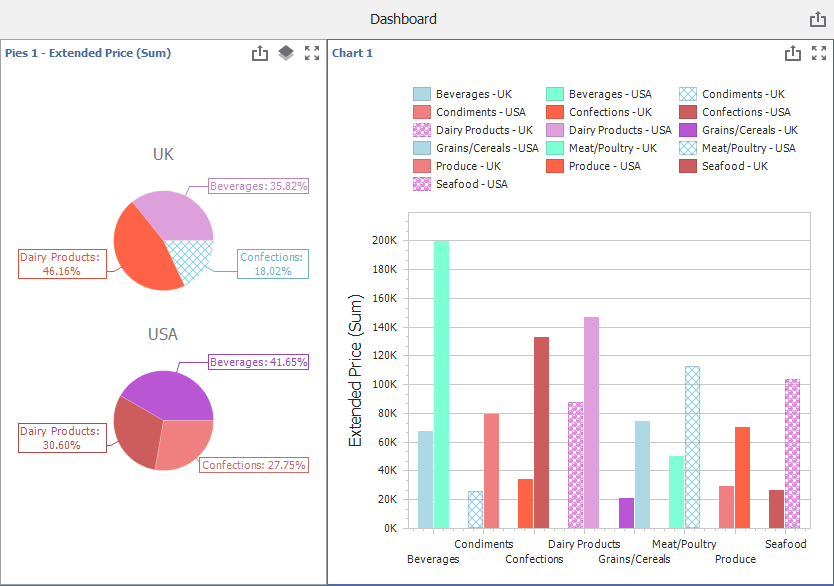
You can use e.PaletteName in a CustomPalette event handler to identify the requested palette and supply custom colors for it.