Enable Text Editor Functionality
- 7 minutes to read
The Web Dashboard supports the Rich Text Editor used to edit Text Box item content: add data items, format and edit characters, paragraphs, lists, tables, and so on.
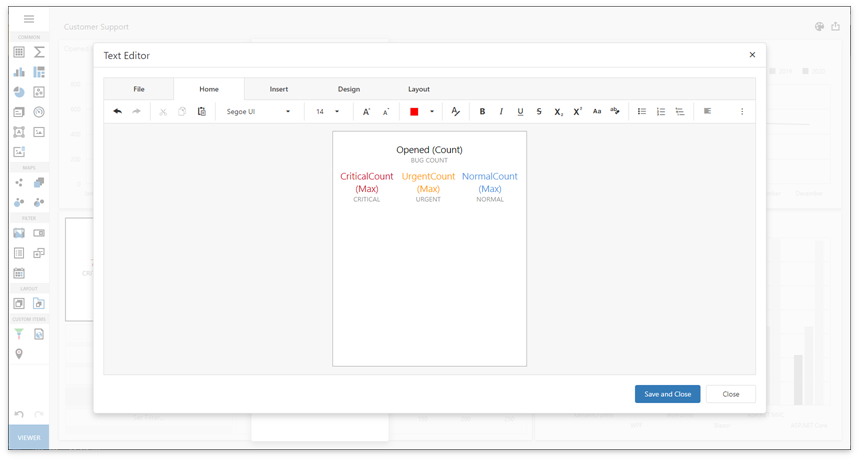
You need to enable Rich Edit control functionality before use.
ASP.NET Web Forms
Set the ASPxDashboard.EnableTextBoxItemEditor property to true.
<dx:ASPxDashboard ID="ASPxDashboard1" runat="server" EnableTextBoxItemEditor="true">
</dx:ASPxDashboard>
All required libraries are added automatically.
ASP.NET MVC
Add ClientRichEdit scripts and styles.
<head>
    <meta charset="UTF-8" />
    <title>Dashboard Web Application</title>
    <meta name="viewport" content="width=device-width, initial-scale=1.0, maximum-scale=1.0, user-scalable=no" />

    @Html.DevExpress().GetStyleSheets(
        new StyleSheet { ExtensionSuite = ExtensionSuite.Dashboard },
        new StyleSheet { ExtensionSuite = ExtensionSuite.ClientRichEdit }
    )
    @Html.DevExpress().GetScripts(
        new Script { ExtensionSuite = ExtensionSuite.Dashboard },
        new Script { ExtensionSuite = ExtensionSuite.ClientRichEdit }
    )
</head>
Pass the TextBoxItemEditorExtension instance as the DashboardControl.registerExtension method parameter before the Web Dashboard control is rendered:
<script type="text/javascript">
    function onBeforeRender(sender) {
        var control = sender.GetDashboardControl();
        control.registerExtension(new DevExpress.Dashboard.Designer.TextBoxItemEditorExtension(control));
    }
</script>
@Html.DevExpress().Dashboard(settings => {
    settings.Name = "Dashboard";
    settings.WorkingMode = DevExpress.DashboardWeb.WorkingMode.Designer;
    // ...
    settings.ClientSideEvents.BeforeRender = "onBeforeRender";
}).GetHtml()
Refer to the following help topic for information on how to handle client-side events in the Dashboard Extension for ASP.NET MVC: Client-Side API Overview
ASP.NET Core
Install the
devexpress-richeditandjszipnpm packages in addition to scripts the Web Dashboard requires:{ "name": "dxwebapplication3", "version": "1.0.0", "private": true, "dependencies": { "devextreme-dist": "26.1.5", "@devexpress/analytics-core": "26.1.5", "devexpress-dashboard": "26.1.5", "devexpress-richedit": "26.1.5", "jszip": "3.5.0" } }Install the libgdiplus library when you add the application to a Linux container. More information: ASP.NET Core Dashboard Control on Linux and MacOS.
Add Rich Edit scripts, styles, and JSZip library to the bundleconfig.json file in the following order:
[
    {
        "outputFileName": "wwwroot/css/site.min.css",
        "inputFiles": [
            ...
            "node_modules/devextreme-dist/css/dx.light.css",
            "node_modules/devexpress-richedit/dist/dx.richedit.css",
            "node_modules/@devexpress/analytics-core/dist/css/dx-analytics.common.css",
            ...
        ],
        "minify": {
            "enabled": false,
            "adjustRelativePaths": false
        }
    },
    {
        "outputFileName": "wwwroot/js/site.min.js",
        "inputFiles": [
            ...
            "node_modules/jszip/dist/jszip.min.js",
            "node_modules/devextreme-dist/js/dx.all.js",
            "node_modules/devexpress-richedit/dist/dx.richedit.min.js",
            "node_modules/@devexpress/analytics-core/dist/js/dx-analytics-core.min.js",
            ...
        ],
        ...
    }
]
Important
The order in which script references are added is important; begin with DevExtreme Libraries, and follow up with Rich Edit, DevExpress Analytics Components, Dashboard.
Add the Rich Edit’s icon fonts to the libman.json file to copy them to the application’s static content folder. If this file does not exist, create it in the root directory of the project next to bundleconfig.json and package.json files:
{
"version": "1.0",
"defaultProvider": "filesystem",
"libraries": [
    // ...
    {
        "library": "node_modules/devexpress-richedit/dist/icons/",
        "destination": "wwwroot/css/icons/",
        "files": [
            "dxre-icons.ttf",
            "dxre-icons.woff",
            "dxre-icons.woff2"
        ]
    }
]
}
Note
This step requires the Microsoft.Web.LibraryManager.Build NuGet package to be installed.
Pass the TextBoxItemEditorExtension instance as the DashboardControl.registerExtension method parameter before the Web Dashboard control is rendered:
<!DOCTYPE html>
<html lang="en">
<head>
    <!-- ... -->
    <script>
        function onBeforeRender(dashboardControl) {
            dashboardControl.registerExtension(new DevExpress.Dashboard.Designer.TextBoxItemEditorExtension(dashboardControl));
        }
    </script>
</head>
<body>
    <div style="position: absolute; left:0;top:0;right:0;bottom:0;">
        @(Html.DevExpress().Dashboard("clientDashboardControl1")
            .ControllerName("DefaultDashboard")
            .WorkingMode(WorkingMode.Designer)
            .OnBeforeRender("onBeforeRender")
            .Width("100%").Height("100%")
        )
    </div>
</body>
</html>
Refer to the following help topic for information on how to handle client-side events in the Dashboard Control for ASP.NET Core: Client-Side API Overview.
Dashboard Component for Blazor
In the wwwroot/js folder, create the custom dashboard-events-scripts.js file. Add the following code to register the TextBoxItemEditorExtension extension:
window.dashboardEvents = {
    onBeforeRender: (args) => {
        var dashboardControl = args.component;
        dashboardControl.registerExtension(new DevExpress.Dashboard.Designer.TextBoxItemEditorExtension(dashboardControl));
    }
}
Reference the RichEdit’s stylesheet and the created dashboard-events-scripts.js file on the _Layout.cshtml page. The order of attachments is important:
<head>
    <link href="css/site.css" rel="stylesheet" />
    @* ... *@
    <link href="_content/DevExpress.Blazor.Resources/css/devexpress-richedit/dx.richedit.css" rel="stylesheet" />
    <script src="js/dashboard-events-scripts.js"></script>
</head>
In the wwwroot/js folder, create a custom dashboard-events-scripts.js file. Attach it to the page after DevExtreme and Web Dashboard scripts:
<head>
    <link href="css/site.css" rel="stylesheet" />

    <link href="_content/DevExpress.Blazor.Dashboard/dx.light.css" rel="stylesheet" />
    <link href="css/dx.richedit.css" rel="stylesheet" />
    <link href="_content/DevExpress.Blazor.Dashboard/dx-analytics.common.css" rel="stylesheet" />
    <link href="_content/DevExpress.Blazor.Dashboard/dx-analytics.light.css" rel="stylesheet" />
    <link href="_content/DevExpress.Blazor.Dashboard/dx-querybuilder.css" rel="stylesheet" />
    <link href="_content/DevExpress.Blazor.Dashboard/dx-dashboard.light.min.css" rel="stylesheet" />
    <script src="js/dashboard-events-scripts.js"></script>
</head>
In the Dashboard component, call the RegisterRichEditScripts method to register required scripts. Pass the name of the object created in the
windowto the Identifier property:@page "/" @using DevExpress.Blazor @DxResourceManager.RegisterScripts((config) => { config.ConfigureDashboards(x => x.RegisterRichEditScripts()); }) <DxDashboard Endpoint="api/dashboard" style="width: 100%; height: 100%;"> <DxJSCustomization Identifier="dashboardEvents"></DxJSCustomization> </DxDashboard>
Dashboard Component for Angular
Install
devexpress-richeditandjszipnpm packages in addition to scripts the Web Dashboard requires.npm i devexpress-richedit@26.1.5 jszipImport the TextBoxItemEditorExtension module.
import { Component } from "@angular/core";
import {TextBoxItemEditorExtension} from 'devexpress-dashboard/designer/text-box-item-editor-extension';

@Component({
    selector: 'app-root',
    templateUrl: './app.component.html',
    styleUrls: ['./app.component.css']
})
export class AppComponent {
    // ...
}
In the tsconfig.json file, add a path to map the jszip module.
{
    "compilerOptions": {
        // ...
        "paths": {
            "jszip": [
            "node_modules/jszip/dist/jszip.min.js"
           ]
        }
    }
}
Handle the onBeforeRender event. Use the e.component property to get the dashboard control instance. Pass the TextBoxItemEditorExtension instance as the control’s registerExtension method parameter:
<dx-dashboard-control style="display: block;width:100%;height:800px;" endpoint='https://demos.devexpress.com/services/dashboard/api' workingMode="Designer" (onBeforeRender) = "onBeforeRender($event)" > </dx-dashboard-control>Add Rich Edit styles. The order of attachments is important:
@import url("../node_modules/ace-builds/css/ace.css");
@import url("../node_modules/ace-builds/css/theme/dreamweaver.css");
@import url("../node_modules/ace-builds/css/theme/ambiance.css");
@import url("../node_modules/devextreme/dist/css/dx.light.css");
@import url("../node_modules/devexpress-richedit/dist/dx.richedit.css");
@import url("../node_modules/@devexpress/analytics-core/dist/css/dx-analytics.common.css");
@import url("../node_modules/@devexpress/analytics-core/dist/css/dx-analytics.light.css");
@import url("../node_modules/@devexpress/analytics-core/dist/css/dx-querybuilder.css");
@import url("../node_modules/devexpress-dashboard/dist/css/dx-dashboard.light.css");
Dashboard Component for React
Install
devexpress-richeditandjszipnpm packages in addition to scripts the Web Dashboard requires.npm i devexpress-richedit@26.1.5 jszipImport the TextBoxItemEditorExtension module. Handle the onBeforeRender event. Use the e.component property to get a dashboard control instance. Pass this TextBoxItemEditorExtension instance as the control’s registerExtension method parameter:
import './App.css';
import DashboardControl from 'devexpress-dashboard-react';
import {TextBoxItemEditorExtension} from 'devexpress-dashboard/designer/text-box-item-editor-extension';

function onBeforeRender(e) {
    e.component.registerExtension(new TextBoxItemEditorExtension(e.component));
}

function App() {
    return (
        <div style={{ position : 'absolute', top : '0px', left: '0px', right : '0px', bottom: '0px' }}>
            <DashboardControl style={{ height: '90%' }}
                endpoint="https://demos.devexpress.com/services/dashboard/api"
                workingMode="Designer"
                onBeforeRender = { onBeforeRender(e)}
            ></DashboardControl>
        </div>
    );
};

export default App;
Add Rich Edit styles. The order of attachments is important:
@import url("../node_modules/devextreme/dist/css/dx.light.css");
@import url("../node_modules/devexpress-richedit/dist/dx.richedit.css");
@import url("../node_modules/@devexpress/analytics-core/dist/css/dx-analytics.common.css");
@import url("../node_modules/@devexpress/analytics-core/dist/css/dx-analytics.light.css");
@import url("../node_modules/@devexpress/analytics-core/dist/css/dx-querybuilder.css");
@import url("../node_modules/devexpress-dashboard/dist/css/dx-dashboard.light.css");
Dashboard Component for Vue
Install
devexpress-richeditandjszipnpm packages in addition to scripts the Web Dashboard requires.npm i devexpress-richedit@26.1.5 jszipImport the TextBoxItemEditorExtension module and pass the TextBoxItemEditorExtension instance as the DashboardControl.registerExtension method parameter before the Web Dashboard control is rendered:
<template>
    <div>
        <DxDashboardControl
        style="height:900px; display: 'block'; width: '100%';"
        endpoint="https://demos.devexpress.com/services/dashboard/api"
        @beforeRender="onBeforeRender" />
    </div>
</template>

<script>
import { DxDashboardControl } from 'devexpress-dashboard-vue';
import {TextBoxItemEditorExtension} from 'devexpress-dashboard/designer/text-box-item-editor-extension';

export default {
    components: {
        DxDashboardControl
    },
    methods: {
        onBeforeRender(e) {
            e.component.registerExtension(new TextBoxItemEditorExtension(e.component));
        }
    }
}
</script>
Add Rich Edit styles. The order of attachments is important:
import { createApp } from 'vue'
import App from './App.vue'

import "ace-builds/css/ace.css";
import "ace-builds/css/theme/dreamweaver.css";
import "ace-builds/css/theme/ambiance.css";
import 'devextreme/dist/css/dx.light.css';
import "devexpress-richedit/dist/dx.richedit.css";
import "@devexpress/analytics-core/dist/css/dx-analytics.common.css";
import "@devexpress/analytics-core/dist/css/dx-analytics.light.css";
import "@devexpress/analytics-core/dist/css/dx-querybuilder.css";
import "devexpress-dashboard/dist/css/dx-dashboard.light.css";

createApp(App).mount('#app')
Dashboard Control for JavaScript Applications
Install
devexpress-richeditandjszipnpm packages in addition to scripts the Web Dashboard requires.npm i devexpress-richedit@26.1.5 jszipAttach Rich Edit scripts, styles, and the JSZip library to the project inside the <head> section in the following order:
<head>
    <!-- ... -->
    <link href="node_modules/devextreme-dist/css/dx.light.css" rel="stylesheet" />
    <link href="node_modules/devexpress-richedit/dist/dx.richedit.css" rel="stylesheet" />
    <link href="node_modules/@devexpress/analytics-core/dist/css/dx-analytics.common.css" rel="stylesheet" />
    <!-- ... -->
    <script src="node_modules/ace-builds/src-min-noconflict/theme-ambiance.js"></script>
    <script src="node_modules/jszip/dist/jszip.min.js"></script>
    <script src="node_modules/devextreme-dist/js/dx.all.js"></script>
    <script src="node_modules/devexpress-richedit/dist/dx.richedit.min.js"></script>
    <script src="node_modules/@devexpress/analytics-core/dist/js/dx-analytics-core.min.js"></script>
    <!-- ... -->
</head>
See Required Client Libraries for a full list of scripts and styles.
Important
The order in which script references are added is important; begin with DevExtreme Libraries, then add Rich Edit, DevExpress Analytics Components, Dashboard.
Pass the TextBoxItemEditorExtension instance as the DashboardControl.registerExtension method parameter before the Web Dashboard control is rendered:
<script>
    window.onload = function () {
        var dashboardControl = new DevExpress.Dashboard.DashboardControl(document.getElementById("web-dashboard"), {
            endpoint: "/dashboardControl"
        });
        // Register the Text Box Item Editor extension.
        dashboardControl.registerExtension(new DevExpress.Dashboard.Designer.TextBoxItemEditorExtension(dashboardControl));
        dashboardControl.render();
    };
</script>