DxPdfViewer.ZoomLevelChanged Event
Fires when the ZoomLevel property value changes.
Namespace: DevExpress.Blazor.PdfViewer
Assembly: DevExpress.Blazor.PdfViewer.v26.1.dll
Declaration
[Parameter]
public EventCallback<double> ZoomLevelChanged { get; set; }
Parameters
| Type | Description |
|---|---|
| Double | A new ZoomLevel property value. |
Remarks
The DevExpress PDF Viewer allows you to zoom documents in and out both in UI and code. Users can change a document’s zoom level using built-in toolbar commands.

You can use the ZoomLevel property to zoom documents in code. To respond to zoom level changes, handle the ZoomLevelChanged event. This event is handled automatically when you use two-way data binding for the ZoomLevel property (@bind-ZoomLevel).
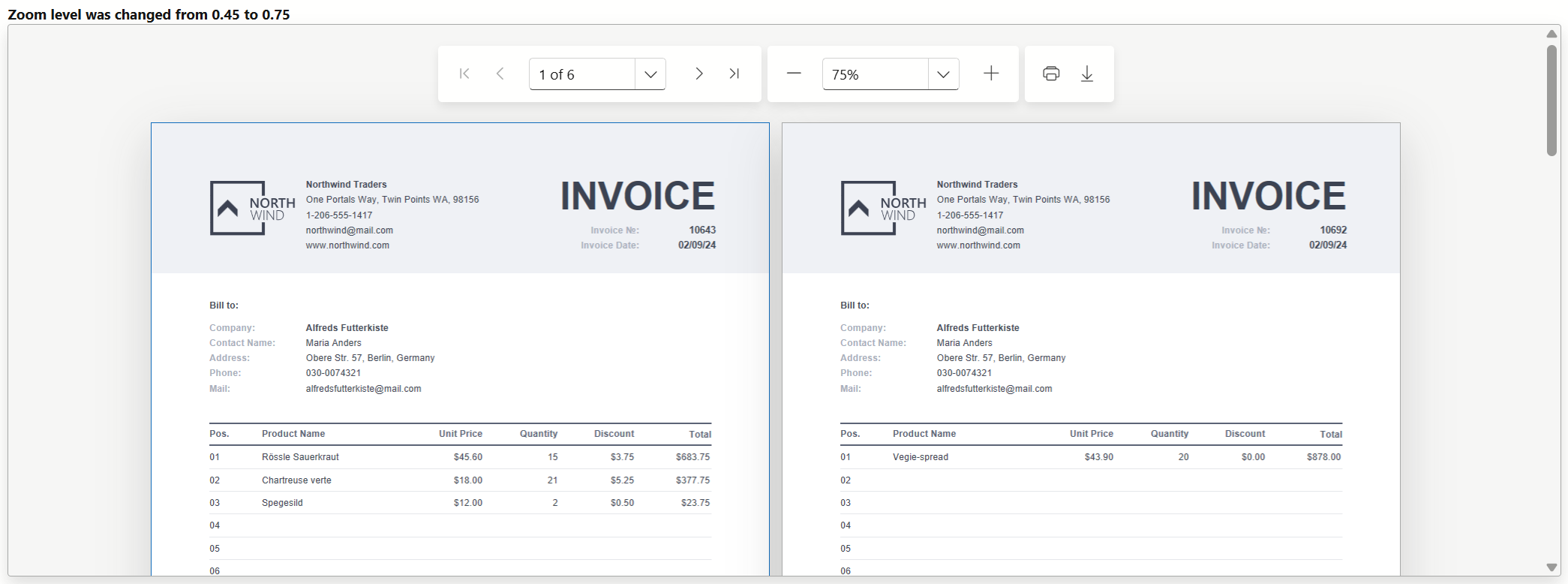
The following code snippet displays a message when users change a document’s zoom level:
<div><b>@ZoomLevelInfo</b></div>

<DxPdfViewer DocumentContent="DocumentContent"
             ZoomLevel="@ZoomLevel"
             ZoomLevelChanged="@OnZoomLevelChanged"/>

@code {
    byte[]? DocumentContent { get; set; }
    double ZoomLevel { get; set; } = 1;
    string ZoomLevelInfo { get; set; } = "Zoom Level is 1";
    string DocumentSource = "SampleApp.Documents.Invoice.pdf";

    protected override async Task OnInitializedAsync() {
        await base.OnInitializedAsync();

        await using Stream stream =
            System.Reflection.Assembly.GetExecutingAssembly()
            .GetManifestResourceStream(DocumentSource)
            ?? throw new InvalidOperationException("Resource not found.");
        using MemoryStream ms = new();
        await stream.CopyToAsync(ms);
        DocumentContent = ms.ToArray();
    }

    void OnZoomLevelChanged(double newZoomLevel) {
        ZoomLevelInfo = "Zoom level was changed from " + ((decimal)ZoomLevel)
                         + " to " + ((decimal)newZoomLevel);
        ZoomLevel = newZoomLevel;
    }
}
See Also