BarGroupCollection.AddCustomGroup() Method
Adds a custom item group to the ribbon or toolbar.
Namespace: DevExpress.Blazor.Office
Assembly: DevExpress.Blazor.v26.1.dll
NuGet Package: DevExpress.Blazor
Declaration
public IBarGroup AddCustomGroup()Returns
| Type | Description |
|---|---|
| IBarGroup | The inserted custom group. |
Remarks
The AddCustomGroup method overloads allow you to add a custom group to a ribbon tab or toolbar. Use the Items property to populate the group with items. The Rich Text Editor hides empty groups and groups that contain no visible and enabled items.
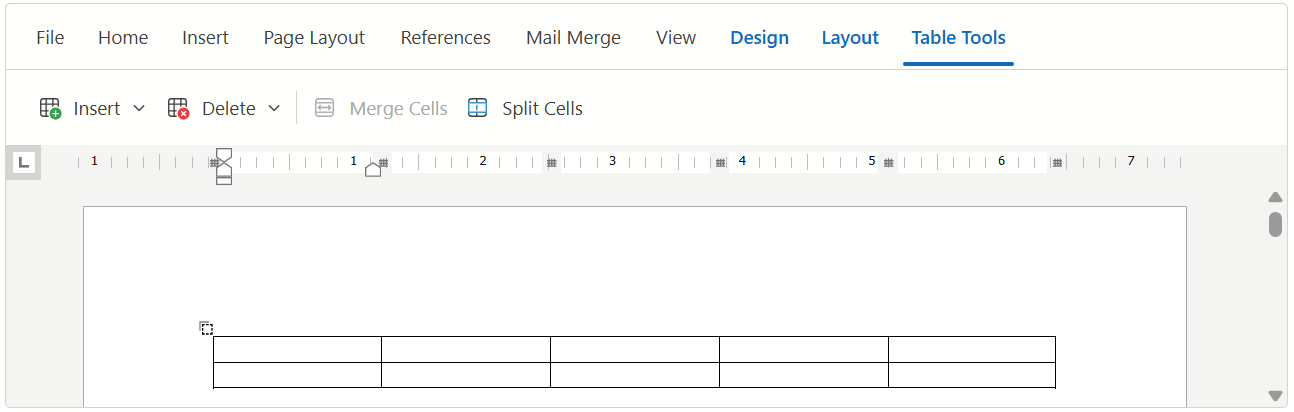
The following code snippet customizes the ribbon as follows:
- Creates a new contextual Table Tools tab. This tab appears when a user creates or edits a table.
- Adds custom groups to the tab.
- Populates the groups with default items.
<DxRichEdit CustomizeRibbon=OnCustomizeRibbon />

@code {
    void OnCustomizeRibbon(IRibbon ribbon) {
        IRibbonTab tableToolsTab = ribbon.Tabs.AddCustomTab("Table Tools", RichEditRibbonContextTabType.Table);
        // Inserts a new group at the end of the group collection
        IBarGroup secondGroup = tableToolsTab.Groups.AddCustomGroup();
        secondGroup.Items.Add(RichEditBarItemNames.MergeTableCells);
        secondGroup.Items.Add(RichEditBarItemNames.ShowSplitCellsDialog);
        // Inserts a new group at the first position in the group collection
        IBarGroup firstGroup = tableToolsTab.Groups.AddCustomGroup(0);
        firstGroup.Items.Add(RichEditBarItemNames.InsertTableElementsMenu);
        firstGroup.Items.Add(RichEditBarItemNames.DeleteTableElementsMenu);
    }
}
See Also