MessageSentEventArgs.Contexts Property
OBSOLETE
This property is obsolete and will be removed in a future version. Use Contexts instead.
Returns the collection of AI resources and files attached to the chat message.
Namespace: DevExpress.AIIntegration.Blazor.Chat
Assembly: DevExpress.AIIntegration.Blazor.Chat.v26.1.dll
NuGet Package: DevExpress.AIIntegration.Blazor.Chat
Declaration
[Obsolete("This property is obsolete and will be removed in a future version. Use MessageSendingEventArgs.Contexts instead.")]
public List<IAIChatMessageContextItem> Contexts { get; }
Property Value
| Type | Description |
|---|---|
| List<IAIChatMessageContextItem> | The collection of resources. |
Remarks
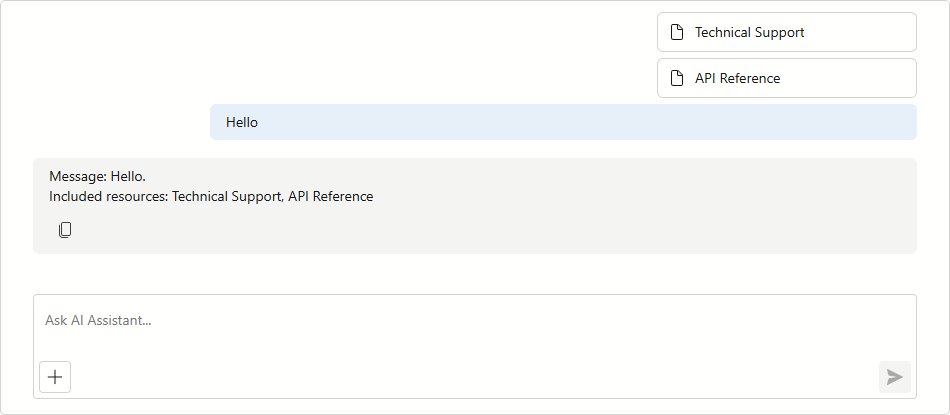
Use the Contexts property to access the collection of AI resources and files attached to the chat message.
Note
The Contexts collection is populated only for messages in which a user explicitly attaches resources or files. Subsequent messages can reference previously selected resources, but their Contexts collection remains empty.
<DxAIChat Resources="Resources"
          MessageSent="OnMessageSent">
</DxAIChat>

@code {
    List<AIChatResource> Resources { get; set; } = [];

    protected override async Task OnInitializedAsync() {
        AIChatResource instructions = await FileResourceProvider.GetTextResourceAsync("instructions",
            "Technical Support",
            "An assistant that helps troubleshoot technical issues and provides step-by-step solutions.");
        AIChatResource documentation = await FileResourceProvider.GetTextResourceAsync("api-reference.md",
            "API Reference",
            "DevExpress Blazor AI Chat API Reference.");
        AIChatResource screenshot = await FileResourceProvider.GetBinaryResourceAsync("ai-chat-image.png",
            "AI Chat Screenshot",
            "An annotated screenshot of the AI Chat component.",
            "image/png");
        Resources.Add(instructions);
        Resources.Add(documentation);
        Resources.Add(screenshot);
        await base.OnInitializedAsync();
    }

    private void OnMessageSent(MessageSentEventArgs args) {
        string message = $"Message: {args.Content}.{System.Environment.NewLine}";
        if(args.Contexts != null && args.Contexts.Count > 0) {
            message += "Included resources: " + string.Join(", ", args.Contexts.Select(c => c.Name));
        }
        args.Chat.SendMessage(message, ChatRole.Assistant);
    }
}
See Also