Implement a Property Editor Based on a Custom Razor Component (Blazor)
- 6 minutes to read
This topic explains how you can implement your own Razor component and register it as a Property Editor for ASP.NET Core Blazor.
This approach differs from Implement a Property Editor Based on a Custom Component (Blazor), which relies on built-in XAF mechanisms to bind a Component Model to a third-party Razor component’s parameters automatically. When you author the Razor component yourself, you must explicitly declare the component’s parameters and ensure that your Component Model’s properties have matching names.
If the control is a JavaScript widget, see Implement a Property Editor Based on a JavaScript Widget (Blazor).
Note
When you use Razor markup (*.razor) to create a custom component, ensure that the component’s logic is separated from property editors. Use Parameters and the @inject directive to supply necessary data to the component. Avoid mixing the component’s logic with the component model or property editor.
The process of component creation in XAF is similar to non-XAF applications. The Component Model contains information about component parameters and component type, and is responsible for linking the component with the property editor.
For more information about the XAF Component Model, refer to the following help topic: Underlying Controls and Components Behind UI Elements (ASP.NET Core Blazor).
The following example implements a Property Editor for a three-value Priority enum. Instead of a standard dropdown, it renders three inline buttons:
- Low
- Normal
- High
The selected button uses the Contained (filled) style. Unselected buttons use the Outline style. Each button click immediately updates the property value.
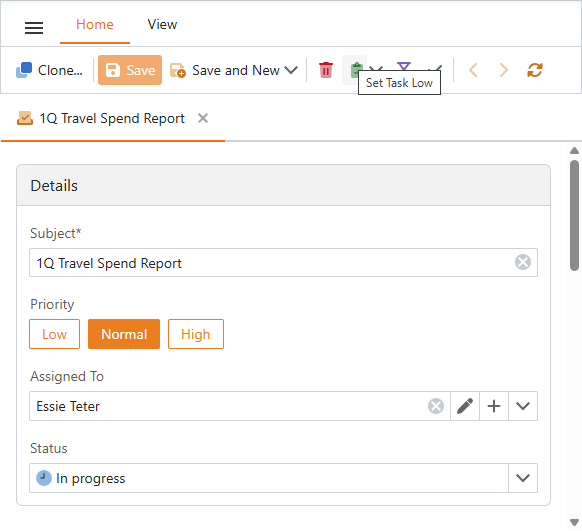
Implement the following entities in the application project (SolutionName.Blazor.Server):
- Razor Component
- A Razor markup file (*.razor) that renders the buttons and handles click events.
- Component Model
- An object with properties that exactly match the names of the component’s declared parameters. XAF uses these names to bind the model to the component at render time.
- Property Editor
- A class that integrates the component into your XAF application.
Note
XAF automatically maps the Component Model’s properties to the Razor component’s parameters by matching their names. The property names in the Component Model must exactly match the property names in the Razor component that are decorated with the [Parameter] attribute.
Razor Component
- Create a Razor component file named EnumSelector.razor. Use the
[Parameter]attribute to expose every property that the Property Editor needs to read or set. Use the DevExpress Blazor DxButton component to render a button for each value. Set RenderStyleMode to
ButtonRenderStyleMode.Containedfor the selected value andButtonRenderStyleMode.Outlinefor all others.File: SolutionName.Blazor.Server\Editors\EnumSelector.razor
@namespace SolutionName.Blazor.Server.Editors
@using DevExpress.ExpressApp.Utils
@typeparam TEnum where TEnum : Enum

<div class="xaf-enum-selector">
    @foreach (var item in _items)
    {
        <DxButton Text="@item.Label"
                RenderStyleMode="@(EqualityComparer<TEnum>.Default.Equals(Value, item.Value) ? ButtonRenderStyleMode.Contained : ButtonRenderStyleMode.Outline)"
                Enabled="@(!ReadOnly)"
                Click="() => SelectValue(item.Value)" />
    }
</div>

@code {
    [Parameter] public TEnum Value { get; set; }
    [Parameter] public EventCallback<TEnum> ValueChanged { get; set; }
    [Parameter] public bool ReadOnly { get; set; }

    private List<EnumItem<TEnum>> _items = new();

    protected override void OnInitialized()
    {
        base.OnInitialized();
        var descriptor = new EnumDescriptor(typeof(TEnum));
        _items = descriptor.Values
            .Cast<TEnum>()
            .Select(v => new EnumItem<TEnum>(v, descriptor.GetCaption(v)))
            .ToList();
    }

    private async Task SelectValue(TEnum value)
    {
        Value = value;
        await ValueChanged.InvokeAsync(value);
    }

    private record EnumItem<T>(T Value, string Label);
}
In the Properties window, set this file’s Build Action to Content.
Add the following style to the site.css file:
File: SolutionName.Blazor.Server\wwwroot\css\site.css
.xaf-enum-selector {
    display: flex;
    flex-wrap: wrap;
    gap: 8px;
}
Component Model
- Create a
ComponentModelBasedescendant named EnumSelectorModel.cs. - Declare properties with the same names and types as the parameters in
EnumSelector.razor. Override the
ComponentTypeproperty to returntypeof(EnumSelector<TEnum>).File: SolutionName.Blazor.Server\Editors\EnumSelectorModel.cs
using DevExpress.ExpressApp.Blazor.Components.Models;
using Microsoft.AspNetCore.Components;

namespace SolutionName.Blazor.Server.Editors;

public class EnumSelectorModel<TEnum> : ComponentModelBase where TEnum : Enum {
    public TEnum Value {
        get => GetPropertyValue<TEnum>();
        set => SetPropertyValue(value);
    }
    public EventCallback<TEnum> ValueChanged {
        get => GetPropertyValue<EventCallback<TEnum>>();
        set => SetPropertyValue(value);
    }
    public bool ReadOnly {
        get => GetPropertyValue<bool>();
        set => SetPropertyValue(value);
    }
    public override Type ComponentType => typeof(EnumSelector<TEnum>);
}
Property Editor
- Create a
BlazorPropertyEditorBasedescendant named PrioritySelectorPropertyEditor.cs. - Add the
[PropertyEditor(typeof(Priority), false)]attribute to assign this editor to thePriorityproperty. Thefalseargument means that this is not the default editor. You have to assign it explicitly in the Application Model. - Override
CreateComponentModelto create the component model and define what happens when the user clicks a button: mark the clicked button as selected and save the new value to the business object. - Override
ReadValueCoreto pass the current property value from the business object to the Component Model so that the correct button appears selected. Override
ApplyReadOnlyto disable the buttons when the property is not editable. The null check prevents a crash during startup, because XAF calls this method before the component is ready.File: SolutionName.Blazor.Server\Editors\PrioritySelectorPropertyEditor.cs
using DevExpress.ExpressApp.Blazor.Components.Models;
using DevExpress.ExpressApp.Blazor.Editors;
using DevExpress.ExpressApp.Editors;
using DevExpress.ExpressApp.Model;
using SolutionName.Module.BusinessObjects;
using Microsoft.AspNetCore.Components;

namespace SolutionName.Blazor.Server.Editors;

[PropertyEditor(typeof(Priority), false)]
public class PrioritySelectorPropertyEditor : BlazorPropertyEditorBase {
    public PrioritySelectorPropertyEditor(Type objectType, IModelMemberViewItem model) : base(objectType, model) { }
    public override EnumSelectorModel<Priority> ComponentModel => (EnumSelectorModel<Priority>)base.ComponentModel;

    protected override IComponentModel CreateComponentModel() {
        var model = new EnumSelectorModel<Priority>();
        model.ValueChanged = EventCallback.Factory.Create<Priority>(this, value => {
            model.Value = value;
            OnControlValueChanged();
            WriteValue();
        });
        return model;
    }

    protected override void ReadValueCore() {
        base.ReadValueCore();
        ComponentModel.Value = (Priority)PropertyValue;
    }

    protected override object GetControlValueCore() => (Priority)ComponentModel.Value;

    protected override void ApplyReadOnly() {
        base.ApplyReadOnly();
        if (ComponentModel != null) {
            ComponentModel.ReadOnly = !AllowEdit;
        }
    }
}
Rebuild your solution and double-click the SolutionName.Blazor.Server\Model.xafml to invoke the Model Editor for the ASP.NET Core Blazor application project.
Navigate to BOModel | <Class> | OwnMembers | <Member> and set the PropertyEditorType property to
PrioritySelectorPropertyEditor.Tip
You can also set this Property Editor for a specific View only. To do this, specify the Views | <DetailView> | Items | <PropertyEditor> node’s
PropertyEditorTypeproperty.
Additional Customizations
The following techniques described in Implement a Property Editor Based on a Custom Component (Blazor) also apply to this approach:
- Access XafApplication and ObjectSpace
- If the Property Editor requires access to the application or the View ObjectSpace, implement the
IComplexViewIteminterface. Use IComplexViewItem.Setup to obtain the XafApplication and IObjectSpace objects. - Display a Custom Component in a List View
- By default, the Property Editor renders the same component in Detail Views and during inline editing in List Views. To specify a different component for regular List View cells, override the
BlazorPropertyEditorBase.CreateViewComponentCoremethod.