Property Editors
- 6 minutes to read
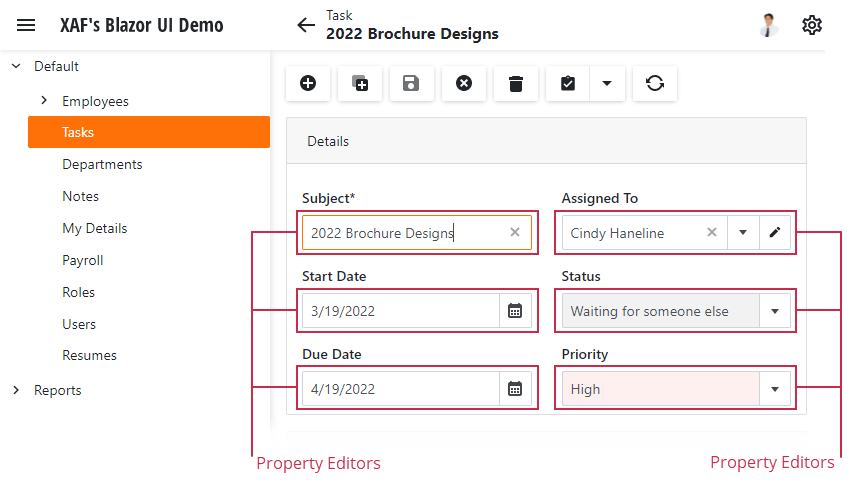
Detail Views use Property Editors to display object data. Each Property Editor is bound to a property in the associated object/entity.
Tip
To display static information or an unbound control, implement a View Item instead of a Property Editor. For more information, refer to the following topic: Add an Unbound Control (Button) to the Form Layout in an XAF View.
Property Editors create UI controls based on Application Model settings. To customize a Property Editor in a specific Detail View before XAF creates the control, use the PropertyEditor object and its descendants. After XAF creates and initializes the control, customize the underlying platform control settings. For more information on how to access Property Editor settings, refer to the following help topic: Get the View Item or Property Editor Object.
XAF includes built-in Property Editors that address most data management scenarios. For more information about built-in Property Editors, refer to the following help topic: Data Types Supported by Built-in Editors.
Custom Property Editors
If built-in Property Editors do not meet your requirements, you can implement a custom Property Editor. This section explains common reasons to create a custom editor and outlines basic implementation steps.
- Customize a built-in Property Editor’s control functionality
- Built-in XAF Property Editors use controls supplied by DevExperss WinForms Editors and DevExpress Blazor Editors. You can customize these controls by accessing the Property Editor and changing its settings. If you want to reuse the same customization across views, implement a custom Property Editor that inherits from a built-in editor. For more information about accessing Property Editor settings, refer to the following help topic: Access the Settings of a Property Editor in a Detail View.
- Use third-party controls
- If you want to use a third-party control for data editing, implement a custom Property Editor.
- Support management of custom data types
- If a business class has a property of a custom type, implement a custom Property Editor to display and edit this value.
- Advanced data management scenarios
- Implement a custom Property Editor when you need to read and write values from a custom data source.
Implement Custom Property Editor
To implement a custom Property Editor, inherit from the PropertyEditor class or one of its descendants.
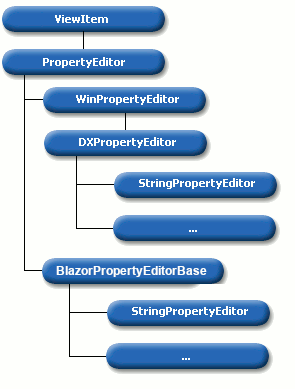
Use the following table to choose a base class for your Property Editor:
| Base class | Description | When to Use |
|---|---|---|
| PropertyEditor | Implements platform-independent Property Editor features. | Inherit from this class if you need to develop Property Editors for a platform that is not supported internally by XAF. In other cases, use one of the following classes. |
| BlazorPropertyEditorBase, WinPropertyEditor |
Base classes for Property Editors that create and configure a custom control. | Inherit from BlazorPropertyEditorBase to implement a Blazor Property Editor that uses a custom component. Inherit from WinPropertyEditor to implement a WinForms Property Editor that uses a custom control. Override CreateControlCore to create the control. In ASP.NET Core Blazor, you can also override BlazorPropertyEditorBase.CreateViewComponentCore(System.Object) to customize how the editor renders in a List View. |
| DXPropertyEditor | Base class for WinForms Property Editors that use XtraEditors controls and XtraGrid repository items. |
Inherit from DXPropertyEditor when you build a WinForms Property Editor based on XtraEditors and you need consistent behavior in both Detail Views and List Views. Override CreateControlCore to create the editor control for a Detail View and CreateRepositoryItem/SetupRepositoryItem to configure the repository item for a grid column. |
BooleanPropertyEditor, StringPropertyEditor, and others |
Type-specific base classes for common data types. These classes extend platform-specific base classes such as DXPropertyEditor (WinForms) and BlazorPropertyEditorBase (ASP.NET Core Blazor). | Inherit from a type-specific editor when you need to customize how XAF displays or edits a specific data type (for example, string or Boolean). |
Register Custom Property Editor
XAF loads custom Property Editors into the Application Model so you can use them in the UI.
Implement the editor in a platform-specific project (SolutionName.Blazor.Server or SolutionName.Win) and apply the PropertyEditorAttribute. If your solution does not have a platform-specific project, implement the editor in an application project (SolutionName.Model).
For more information, refer to the following help topic: PropertyEditorAttribute.
Replace Standard Property Editors with a Custom Control
To display an object in a Detail View with a specific control instead of a set of standard Property Editors, follow these steps:
- Create a custom Property Editor based on the required control and add a non-persistent (not mapped) property to the target business class that returns the current object’s instance.
- To hide this property in List Views, apply the VisibleInListViewAttribute.
- Assign your custom Property Editor to the new property (make it the default editor for the property’s data type or set the property’s PropertyEditorType in the Application Model).
Customize the Detail View layout to hide all Property Editors except your custom Property Editor.
File: SolutionName.Module/BusinessObjects/MyBusinessClass.cs
using DevExpress.Persistent.Base; using DevExpress.Persistent.BaseImpl.EF; using System.ComponentModel.DataAnnotations.Schema; namespace SolutionName.Module.BusinessObjects { public class MyBusinessClass : BaseObject { [NotMapped] [VisibleInListView(false)] public virtual MyBusinessClass Self => this; } }As a result, List Views display a set of properties and Detail Views display the custom control.
Custom Property Editor Tutorials
- How to: Customize a Built-in Property Editor (Blazor)
- How to: Implement a Property Editor Based on a Custom Control (Blazor)
- How To: Implement a Property Editor Based on a Custom Razor Component (Blazor)
- How To: Implement a Property Editor Based on a JavaScript Widget (Blazor)
- Add a Custom Button to a Property Editor (Blazor)
- How to: Customize a Built-in Property Editor (WinForms)
- How to: Implement a Property Editor Based on a Custom Control (WinForms)
- Supply Predefined Values for the String Property Editor Dynamically
Examples of Custom Property Editors for Popular Scenarios
- XAF - How to Display an Enumeration Property as a Drop-down Box with Check Boxes
- XAF - How to display a collection property as a checked list box
- XAF - How to show a hyperlink (URL, email, etc.) for a business class property
- XAF WinForms - How to use a custom Lookup Property Editor control for reference properties
- Multiple File Upload, Markup Content Property Editors
- Implement a Property Editor Based on a Custom Razor Component (Blazor)
- Implement a Property Editor Based on a JavaScript Widget (Blazor)
- Implement a Property Editor Based on a Custom Component (Blazor)
You can find more custom property editors in the Outlook Inspired Demo. Directories to review:
- Blazor Editors: OutlookInspiredDemo.NET.EFCore/CS/OutlookInspiredDemo.Blazor.Server/Editors
- WinForms Editors: OutlookInspiredDemo.NET.EFCore/CS/OutlookInspiredDemo.Win/Editors