v26.1 Release Notes
- 14 minutes to read
Tip
Visit our website to explore new features/capabilities available across the entire DevExpress product line: What’s New in our Latest Update.
Security — Stronger Password Hashing
We re-configured standard System.Security.Cryptography.Rfc2898DeriveBytes APIs (powered by PBKDF2) to use a stronger pseudo-random number generator. Previously, Rfc2898DeriveBytes used SHA1 with 20K iterations (introduced in 2017). With this update, APIs use HMACSHA512 with 600K iterations.
All new applications generated with the Template Kit use these settings out of the box. If your application was created prior to v26.1, you can transition as follows:
- Upgrade existing user passwords to the new hashing standard
- Continue using the previous algorithm
- Apply a mixed strategy (legacy passwords remain unchanged, new passwords use updated settings)
Breaking Change Article: XAF Security — A stronger password hashing algorithm has been configured
DevExpress Blog Post: Application Security — Stronger Hashes and Safer Passwords
Content Security Policy Enhancements
We removed inline style attributes, <style> tags, and component API style assignments (for instance, Grid.CustomizeElement with e.Style) from XAF Blazor source code. As a result, you no longer need the following content security policy (CSP) requirement: style-src: 'unsafe-inline'.
Entity Framework Core 10 for Data Access
v26.1 adds official support for the most recent version of Entity Framework (EF Core 10) to our XAF Blazor/WinForms UI and Web API Service. We also updated our performance benchmarks - comparing EF Core 10 with XPO.
The Template Kit automatically selects EF Core 10 for apps targeting .NET 10. Our MainDemo.NET.EFCore will also use EF Core 10 and .NET 10 in v26.1.
While EF Core 10 introduces performance and customization improvements, it also includes breaking changes that require updates on our side. Not all EF Core database providers currently offer EF Core 10-compatible NuGet packages (for instance, Pomelo.EntityFrameworkCore.MySql). In addition, XAF’s Web API Service continues to use an older Swashbuckle.AspNetCore version when targeting .NET 10.
DateTimeOffset Type Support for Microsoft SQL Server and Oracle (EF Core and XPO)
We implemented DateTimeOffset support in DevExpress.Data, DevExpress.Xpo, and related XAF libraries. Supported data sources include Microsoft SQL (EF Core and XPO), Oracle (XPO), and LINQ (XPO). For our next step, we expect to support DateTimeOffset data model properties in key XAF List and Property Editors (by the end of the year). This enchantment will be especially useful for applications with users in multiple time zones.
WinForms v26.1 Release Notes — DateTimeOffset Support
Scalability & Performance Optimizations
As you may already know from our roadmap, our key focus for the next few release cycles remains scalability (number of concurrent web users). XAF v26.1 includes multiple core/Blazor UI rendering optimizations designed to reduce memory usage and speed up code execution under high load.
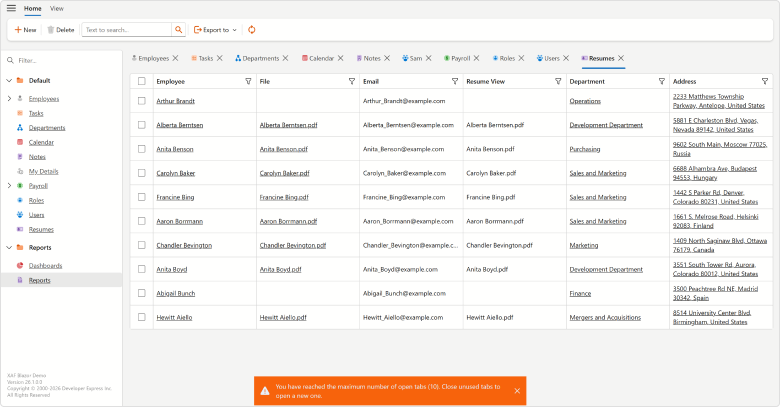
Tab Limit for MDI Applications
You can now specify the maximum number of open tabs in XAF Blazor apps using the BlazorMdiShowViewStrategy.MaxTabLimit property:
File: SolutionName.Blazor.Server\Program.cs
public static int Main(string[] args) {
    BlazorMdiShowViewStrategy.MaxTabLimit = 5;
    BlazorMdiShowViewStrategy.TabOverflowStrategy = TabOverflowStrategy.CloseLeastRecentTab;
    // ...
}
If users exceed the tab limit (10 by default), the framework applies our configured TabOverflowStrategy:
- Close or unload older tabs
- Block the opening of new tabs
This enhancement helps optimize resource usage and maintain application performance for apps with heavy tab usage.
Lookup Property Editor View Mode
XAF Lookup Property Editor v26.1 now supports View mode for Detail Views. When used, the editor is displayed as a Text Box and switches to a ComboBox when users start editing.
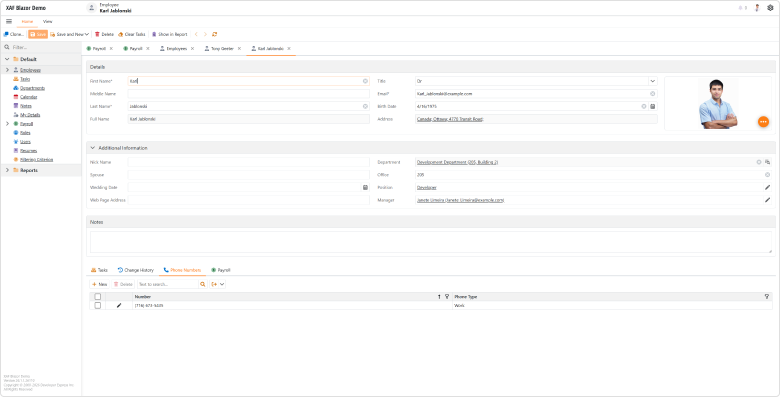
Manager Lookup Property Editor as Text Box
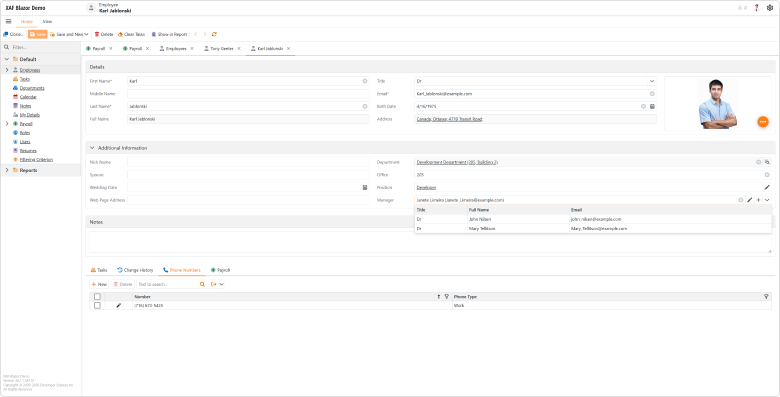
Manager Lookup Property Editor as ComboBox
This View Mode improves initial page rendering performance, especially for complex data-intensive views.
Breaking Change Article: XAF Blazor – Lookup Property Editor now uses Text Box in Search mode
Improved XAF Blazor UI Rendering Performance and Reduced Memory Usage Across Multiple UI Elements
We enhanced rendering performance and reduced memory consumption across high-load UI scenarios, especially in applications with numerous Actions and complex Detail Views. Key optimizations include:
- Improved
LookupPropertyEditorperformance when loading EF Core reference properties in Detail Views. - Removed unnecessary ViewItem objects and reduced rendering overhead in multi-column
LookupPropertyEditorscenarios - Improved Prev/Next Record navigation speed in layouts that combine List View and Detail View.
- Minimized internal rendering allocations and component rendering overhead to improve startup performance and reduce memory consumption.
- Significantly improved performance for applications that use Toolbar and Ribbon templates with large numbers of Actions and complex Action hierarchies.
Memory usage example:
Scenario 1: 250 SimpleAction items (50 active), 50 SingleChoiceAction items × 5 subitems (10 active), and 200 hidden navigation items
| Template | v25.2 | v26.1 |
|---|---|---|
| Ribbon | 321.55 MB | 197.26 MB |
| Toolbar | 360.11 MB | 203.10 MB |
Scenario 2: 1000 SimpleAction items (100 active), 100 SingleChoiceAction × 5 subitems (20 active), and 1000 hidden navigation items
| Template | v25.2 | v26.1 |
|---|---|---|
| Ribbon | 617.83 MB | 338.16 MB |
| Toolbar | 644.04 MB | 358.33 MB |
These enhancements will be especially noticeable in large enterprise applications with action-heavy toolbars and ribbons.
XAF Blazor v26.1 with 500 Users Performs Better than v25.2 at 200 Users (CTP)
We optimized XAF Blazor for peak-load scenarios, where all web users execute application commands simultaneously. As a result, our XAF Blazor MainDemo v26.1 delivers significantly better performance and maintains predictable, linear (rather than exponential) latency and response times under high loads when compared to v25.2:
- v26.1 with 500 concurrent users responds much faster than v25.2 with 200 users.
- v26.1 handles 2.5x the number of concurrent users while delivering the same or lower latency as v25.2 at 200 users.
- v26.1 successfully completed a 500-user load test, whereas v25.2 could not scale beyond 200 concurrent users due to lock contention.
- With 200 concurrent users, v26.1 uses 21% less memory than v25.2.
| Command | v26.1 vs v25.2 |
|---|---|
| Log In | 2.4x faster |
| Navigate | 3.7x faster |
| Process Row | 3.7x faster |
| Prev/Next Record | 1.4x faster |
| Close Tab | 1.5x faster |
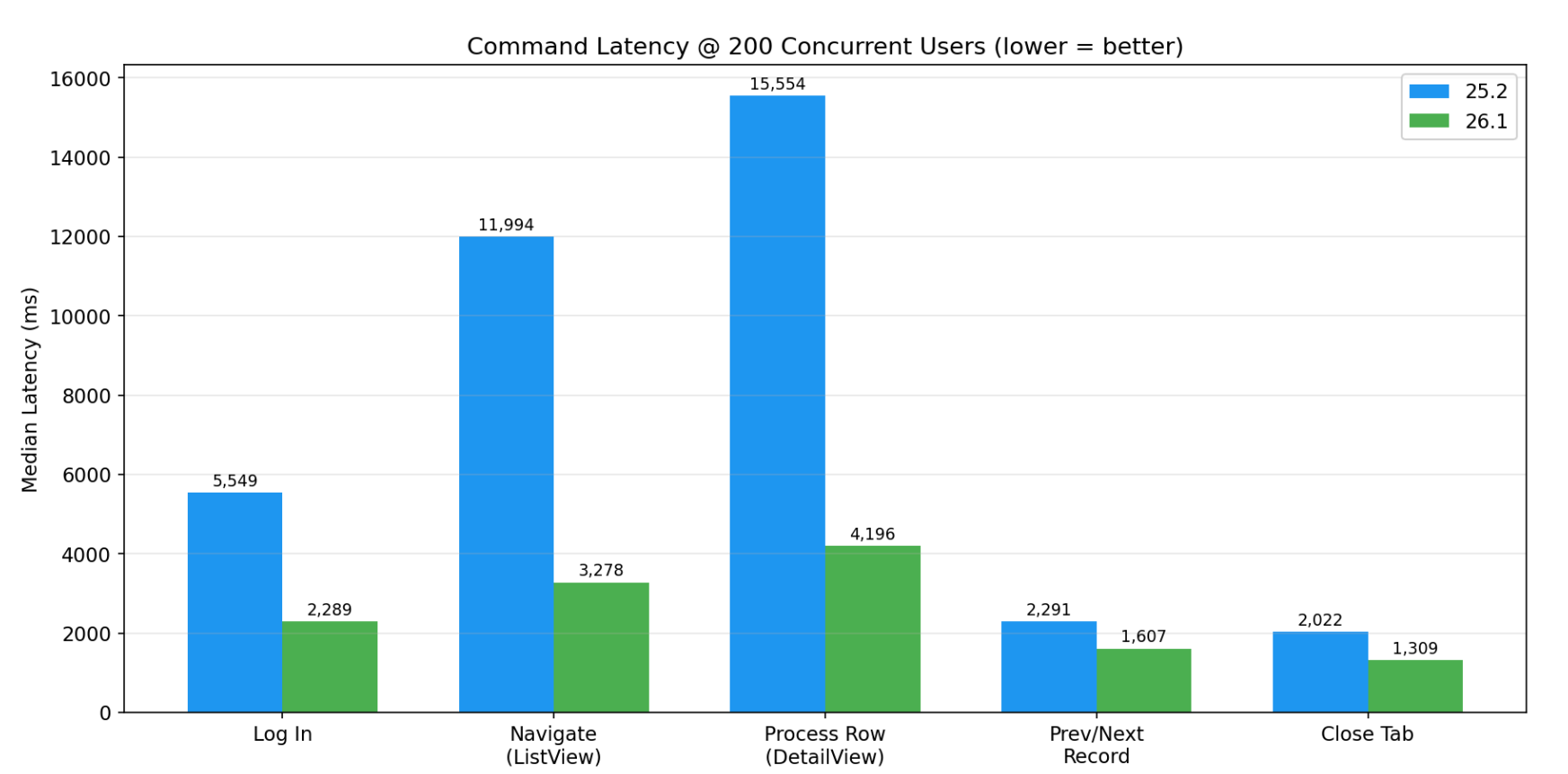
| Command | v25.2 | v26.1 | Improvement |
|---|---|---|---|
| Log In | 5,549 ms | 2,289 ms | ~3,260 ms (~59%) |
| Navigate | 11,994 ms | 3,278 ms | ~8,716 ms (~73%) |
| Process Row | 15,554 ms | 4,196 ms | ~11,358 ms (~73%) |
| Prev/Next Record | 2,291 ms | 1,607 ms | ~684 ms (~30%) |
| Close Tab | 2,022 ms | 1,309 ms | ~713 ms (~35%) |
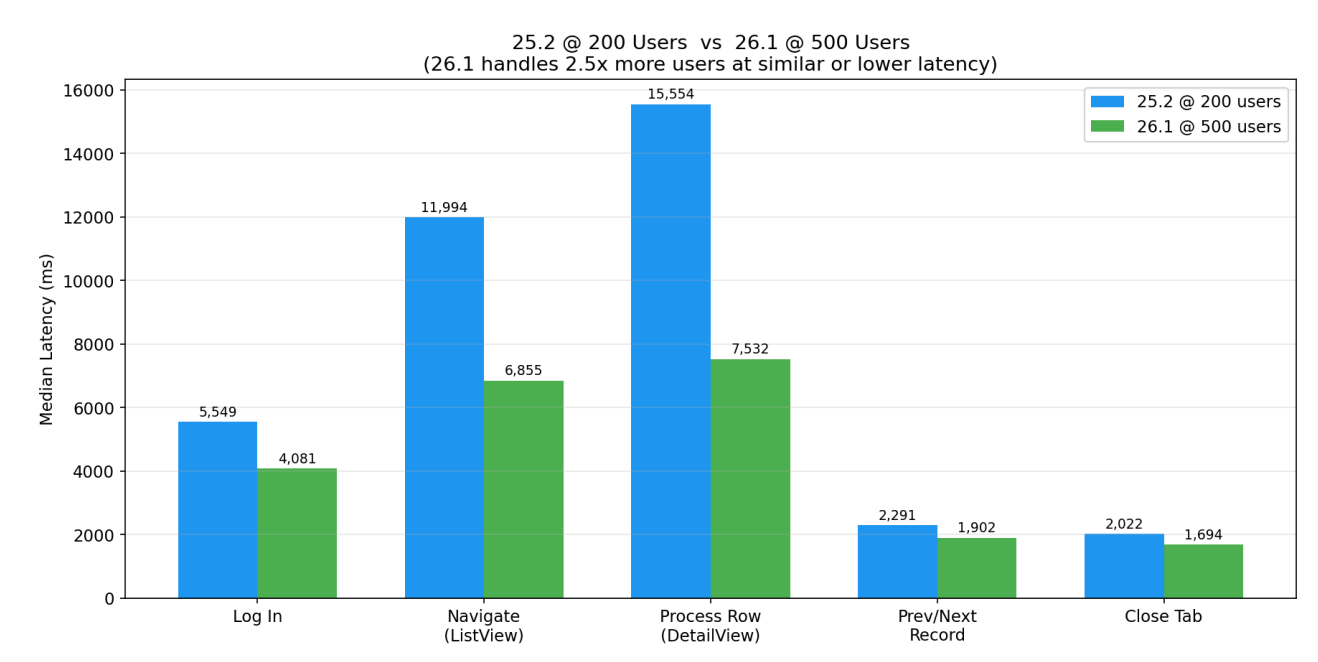
| Command | v25.2 @ 200 users | v26.1 @ 500 users |
|---|---|---|
| Log In | 5,549 ms | 4,081 ms |
| Navigate | 11,994 ms | 6,855 ms |
| Process Row | 15,554 ms | 7,532 ms |
| Prev/Next Record | 2,291 ms | 1,902 ms |
| Close Tab | 2,022 ms | 1,694 ms |
Note
Test results were collected using XAF EasyTest with Selenium. The automation layer adds approximately 0.5–2 seconds of overhead per command. It affects both versions equally and does not impact relative comparisons. Measurement variance is approximately ±5%.
For technical details (load test conditions, hardware, latency comparisons between v26.1 and v25.2), please refer to our Technical FAQ.
These experimental scalability enhancements are available as a Community Technology Preview in our v26.1 release cycle.
Security System Performance Optimizations
We optimized Security System performance. In high-volume data read scenarios, performance enhancements can reach up to 25%. Detailed testing methodology, benchmark results, and a comparison between versions 25.2 and 26.1 are available in the following repository: .NET App Security API Benchmark for EF Core and XPO
Blazor Component Performance Enhancements
We enhanced DevExpress Blazor component rendering to reduce first load time and improve XAF Blazor performance. Learn more…
Blazor UI Enhancements
Custom Property Editor Buttons
A new Buttons property allows you to add custom buttons to Property Editors in XAF Detail and List Views. You can handle button click events to run custom logic, specify a tooltip, icon, and other settings. Supported editors include:
- BooleanPropertyEditor (if DxComboBox is used)
- ComboBoxListPropertyEditor
- DateTimePropertyEditor and TimeSpanPropertyEditor
- DxFileDataPropertyEditor
- EnumPropertyEditor
- LookupPropertyEditor and ObjectPropertyEditor
- NumericPropertyEditor
- StringPropertyEditor (if DxTextBox, DxMaskedInput<T>, or DxComboBox<TData, TValue> are used)
- TypePropertyEditor
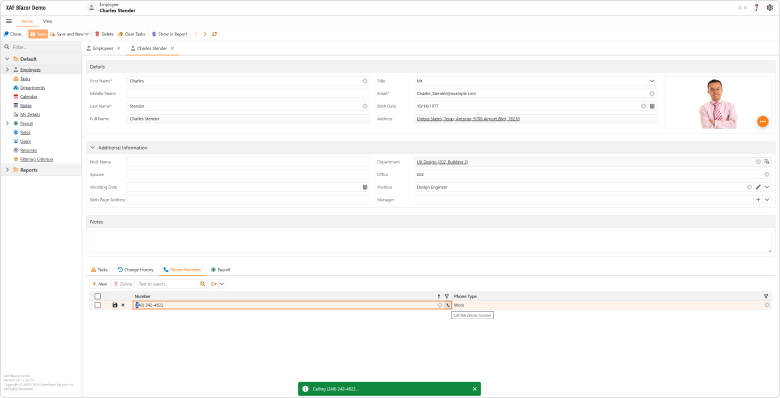
File: SolutionName.Blazor.Server\Controllers\PropertyEditorCustomButtonDetailViewController.cs
using DevExpress.ExpressApp;
using DevExpress.ExpressApp.Blazor.Components.Models;
using DevExpress.ExpressApp.Blazor.Editors;
using DevExpress.ExpressApp.Blazor.Utils;
using SolutionName.Module.BusinessObjects;
using Microsoft.AspNetCore.Components;
using Microsoft.AspNetCore.Components.Web;

namespace SolutionName.Blazor.Server.Controllers;

public class PropertyEditorCustomButtonDetailViewController : ObjectViewController<DetailView, PhoneNumber> {
    protected override void OnActivated() {
        base.OnActivated();
        View.CustomizeViewItemControl<StringPropertyEditor>(this, Customize_PhoneNumberEditor, nameof(PhoneNumber.Number));
    }

    private void Customize_PhoneNumberEditor(StringPropertyEditor editor) {
        var customButtonModel = new DxEditorButtonModel() {
            IconCssClass = "fluent-icon fluent-icon-phone",
            Tooltip = "Call this phone number",
            Click = EventCallback.Factory.Create<MouseEventArgs>(this,
                 (e) => Application.ShowViewStrategy.ShowMessage($"Calling {ViewCurrentObject.Number}..."))
        };
        editor.Buttons.Add(customButtonModel);
    }
}
Report Module Enhancements
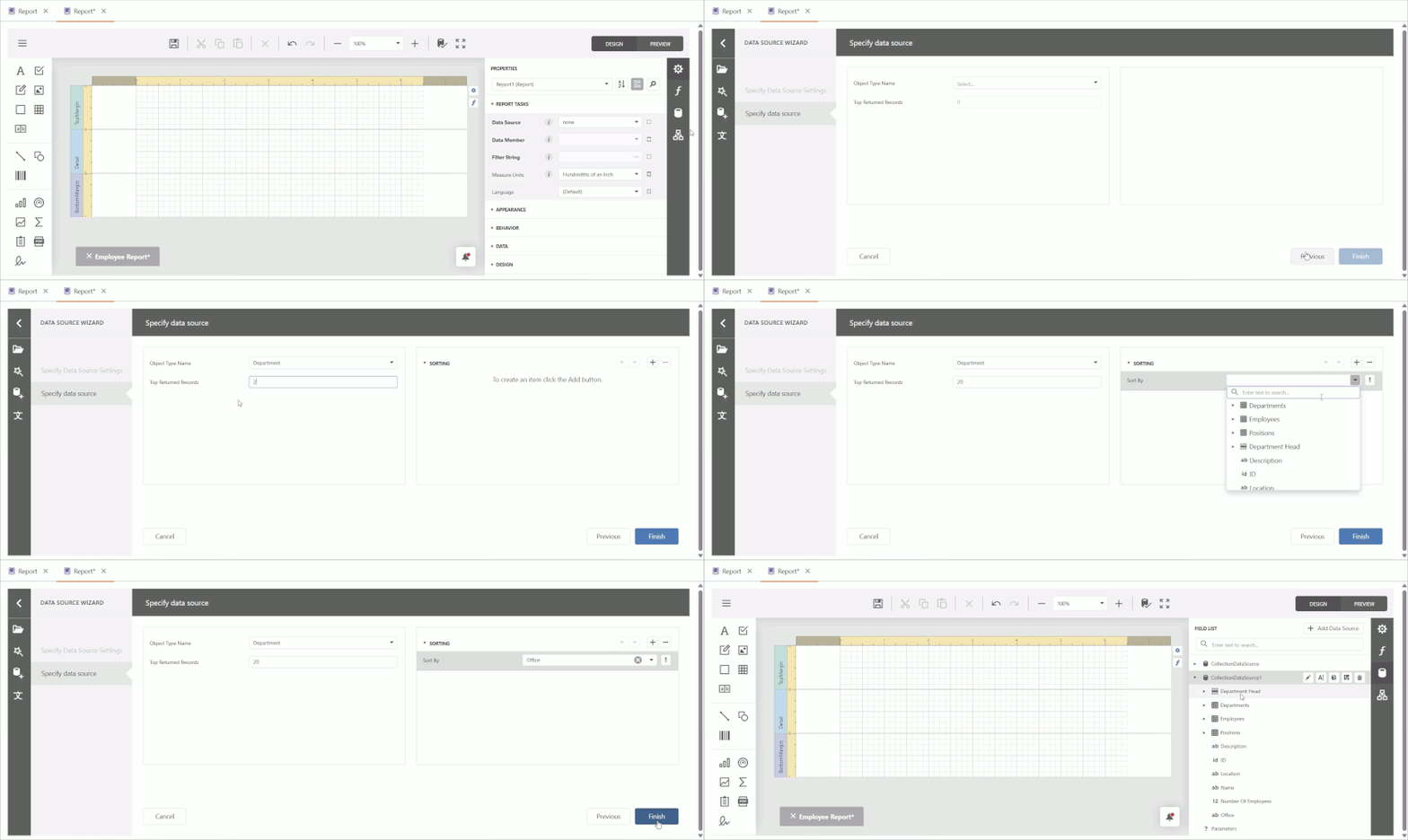
Add Data Source at Runtime
DevExpress Blazor Report Designer v26.1 allows you to add and configure a CollectionDataSource at runtime. Use our Add Data Source wizard to specify the following settings for the new data source:
- Object Type Name — binds data source to the specified business object type
- Top Returned Records — limits the number of retrieved records
- Sorting — defines sort order for retrieved records
Copy Predefined Report: Numbered Counter
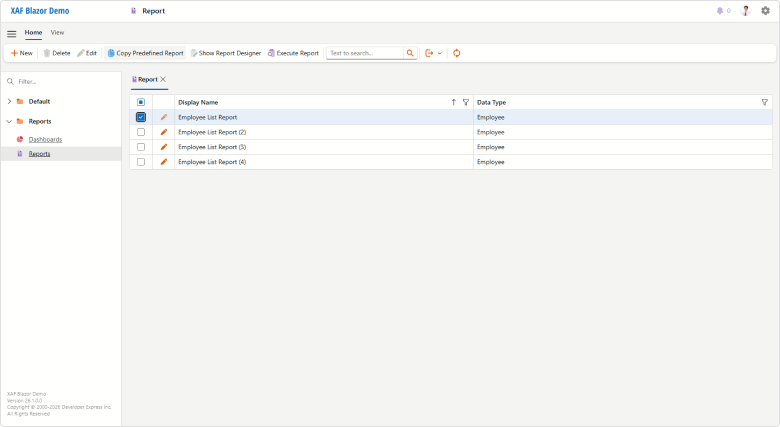
You can now identify copied predefined reports at a glance — XAF appends a sequential counter to each copy name in the DevExpress Blazor Report Designer (for instance, “Monthly Sales (2)”).
Native Blazor Filter Builder Integration (Beta)
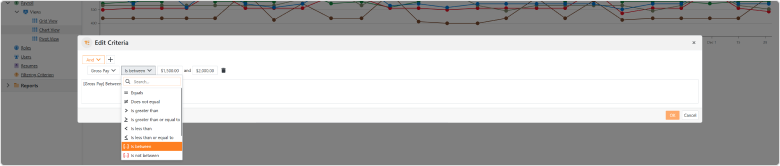
PopupCriteriaPropertyEditor and CriteriaPropertyEditor are nearly ready for production use (not yet enabled by default in v26.1). CriteriaPropertyEditor is based on the new DevExpress Blazor Filter Builder component and delivers simplified localization, improved performance, and native support for Blazor themes/palettes.
Both Property Editors are optimized for complex data models and support collection operations and plain-text criteria input/validation. Filter Panel is now visible in DxGridListEditor and DxTreeListEditor when your List View is filtered (otherwise, it is hidden).
Our previous JS-based PopupFilterPropertyEditor and FilterPropertyEditor will soon be in maintenance mode. We will not introduce additional functionality and plan to remove these components from our distribution in v26.2. We recommend that you migrate to the new property editors as soon as possible.
Pivot Grid Module Support (CTP)
XAF Blazor v26.1 includes the DxPivotGridListEditor (powered by the DevExpress Blazor DxPivotTable - key features). DxPivotGridListEditor (Pivot Table) is available as a Community Technology Preview in our v26.1 release cycle.
This new Pivot Table List Editor is a part of our DevExpress.ExpressApp.Blazor module (much like DxGridListEditor). Like XAF WinForms/Blazor UI List Editors, DxPivotGridListEditor supports EF Core and XPO business objects and offers simplified configuration options via the Model Editor.
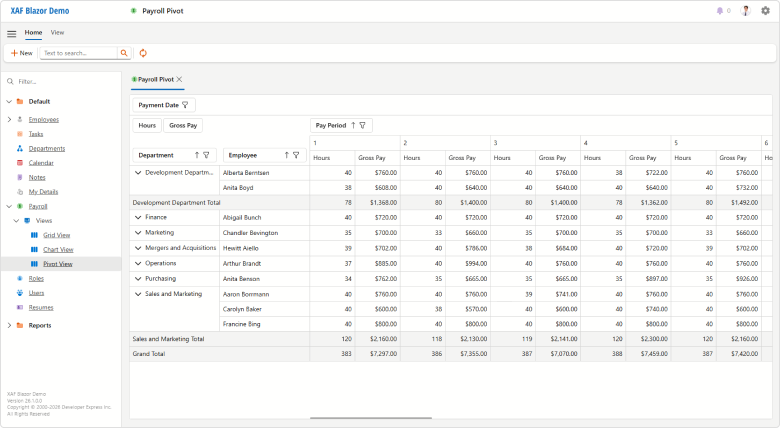
To configure DxPivotGridListEditor for your XAF Blazor ListView, you must:
- Invoke the Model Editor for your ASP.NET Core Blazor project. Under Views, find a node that defines the List View you wish to visualize as a Pivot Grid.
- Set the EditorType node property to
DxPivotGridListEditor. - In the List View node’s Columns section, set PivotFieldArea, PivotGroupInterval, PivotSummaryType properties for required columns (a part of the
IModelColumnPivotGridBlazorAPI). - At runtime, reorder or move Pivot Grid fields between areas, display/hide fields using the Field List. The Pivot Grid will persists layout settings between view openings (using the
IModelListViewPivotGridBlazor.LayoutSettingsAPI).
You can also specify Pivot Grid settings in code:
File: CS\MainDemo.Blazor.Server\Controllers\MyBlazorController.cs
using System;
using DevExpress.ExpressApp;
using DevExpress.ExpressApp.Blazor.Editors;

namespace MainDemo.Blazor.Server.Controllers;

public class MyBlazorController : ViewController {
    protected override void OnViewControlsCreated() {
        base.OnViewControlsCreated();
        if (View.Editor is DxPivotGridListEditor pivotListEditor) {
            // Place your pivot grid configuration code here.
            pivotListEditor.PivotGridModel.AllowDragFields = false;
            // Iterate your pivot grid columns
            // using the 'pivotListEditor.Columns' and DxPivotGridColumnWrapper
            // or pivotListEditor.ColumnModels and DxPivotTableFieldModel API respectively.
        }
    }
}
Miscellaneous
The Detail View for a new XAF Blazor Scheduler appointment now opens a full-sized form as a separate tab when the Options.UIType is set to TabbedMDI. Previously, a narrow popup form was opened.
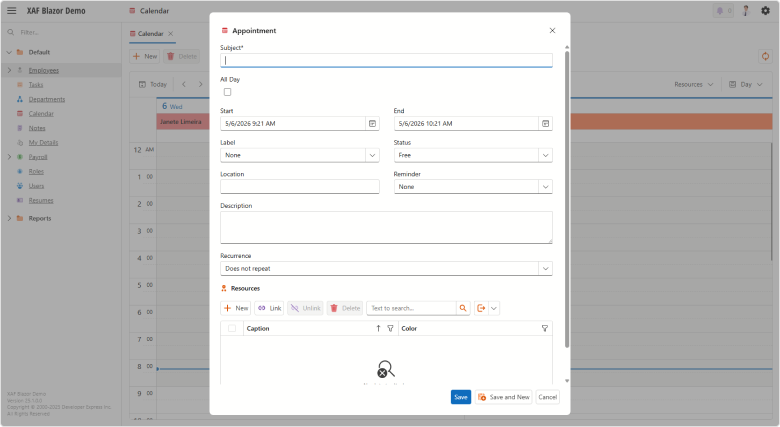
XAF Blazor new scheduler appointment in a pop-up Detail View
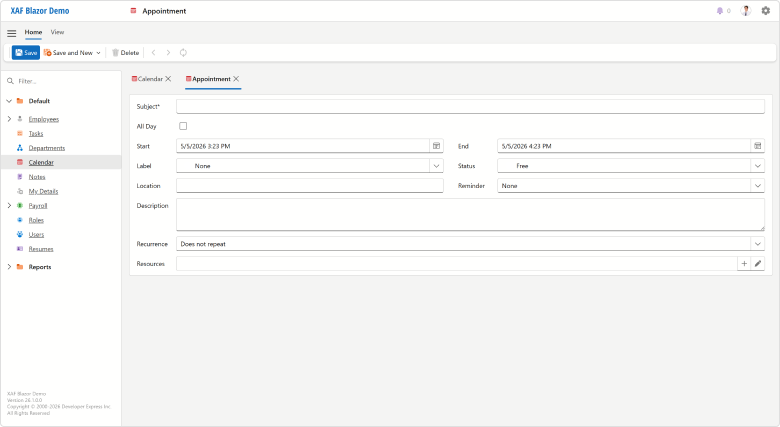
XAF Blazor new scheduler appointment in a tab
Popup Detail Views are now wider and no longer override default layout caption position. For example, we display layout item captions to the left of associated editors (DxFormLayout.CaptionPosition = Horizontal in v26.1 instead of Vertical in previous versions).
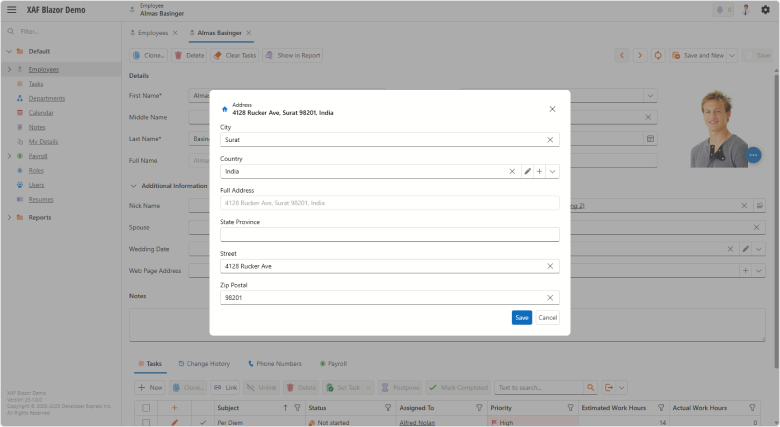
XAF Blazor Pop-up Detail View with vertical caption layout
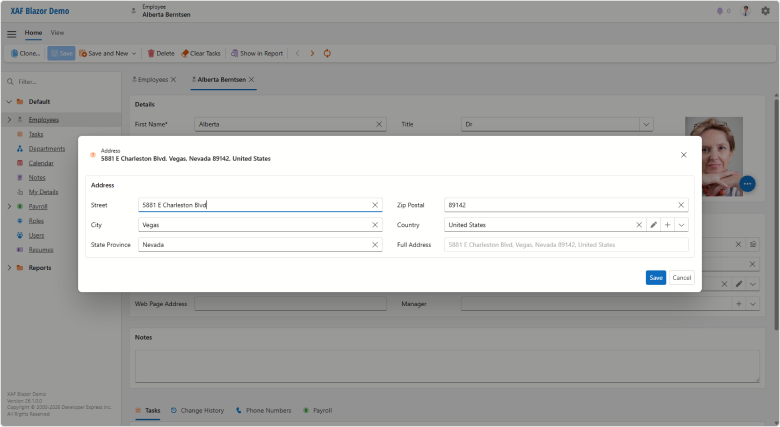
XAF Blazor Pop-up Detail View with horizontal caption layout
These changes improve overall XAF UI usability and consistency.
Extended Localization Support
XAF v26.1 ships with DevExpress Localization Tool support — a desktop application designed to simplify localization of DevExpress-powered applications.
Key features:
- Advanced Data Shaping Capabilities. Our Localization Tool allows you to search, filter, group, and manage localization resources.
- Improved Translation Quality. Locate duplicate strings, find inconsistent translations using our built-in validator, review context information, and run batch operations.
- Multiple Export Formats. Export translations as satellite assemblies, NuGet packages, a single merged RESX file for multiple products (replaces hundreds of assemblies), or JSON files for JS/TS-based products.
- New Collaboration Capabilities. Use change tracking, reviews, import/export functionality, and built-in backups to streamline translation workflows.
- Flexible Localization Workflows. All DevExpress localization resources are available on GitHub. Use our Windows-based tool, edit translations directly in RESX files, or integrate localization into your own tooling.
- Cross-Platform Support. Our Localization Tool already supports DevExpress WinForms, WPF, Blazor, ASP.NET Core, Reports, Dashboard, and XAF UI libraries. We expect to add support for .NET MAUI, DevExtreme, and VCL UI Controls in future release cycles.
- AI-Powered Resource Translation. Connect an AI service and generate translations directly within the Localization Tool.
Documentation | GitHub Repository
XAF AI Integration Module (CTP)
XAF v26.1 ships with the XAF AI Integration Module (available as a Community Technology Preview). You can connect DevExpress AI-powered extensions to XAF applications so users can create filters and work with text inside supported editors.
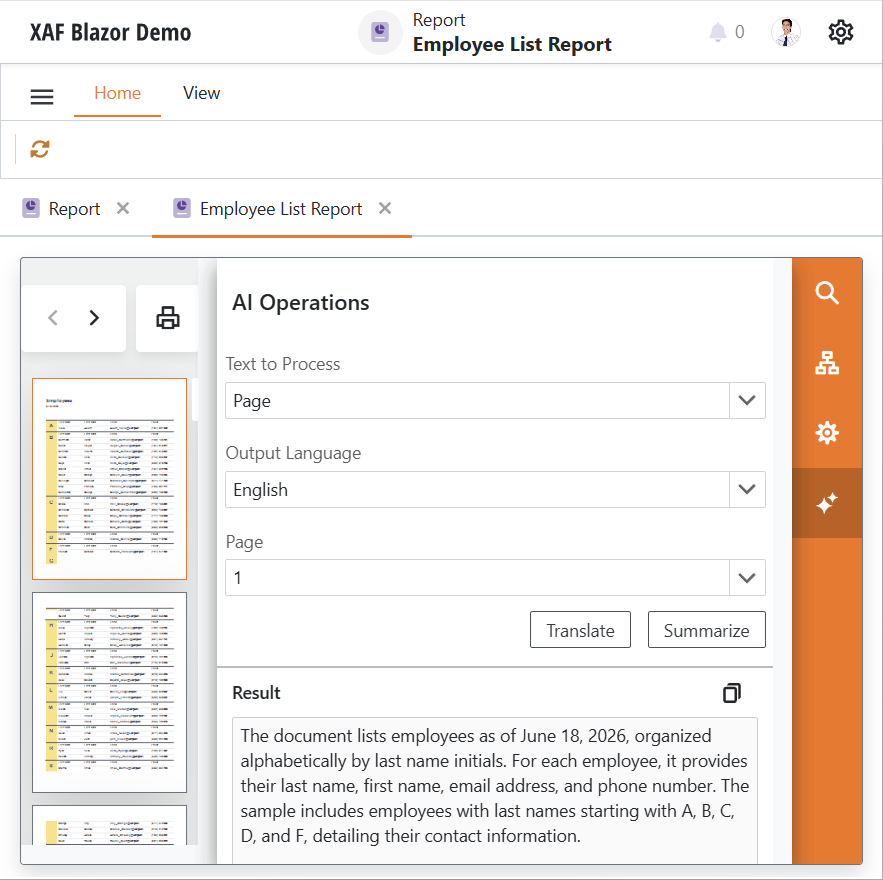
Key capabilities include:
- Generate Filter Criteria from Natural Language Prompts. WinForms users can describe a filter in plain language and generate criteria expressions from the Filter Editor.
- AI Assistant in Memo and Rich Text Editors. Blazor and WinForms users can get smart autocomplete suggestions, rewrite text, summarize content, translate text, proofread content, and adjust tone directly inside supported property editors.
- AI-Powered Reporting Workflows. WinForms and Blazor users can summarize and translate report documents, generate reports from natural language prompts in the Report Wizard, and access AI assistance in Report Designer workflows such as expression generation and localization.
- Application Model and Controller Customization. Enable or disable AI extensions per editor or List View in the Application Model and customize AI extension settings in code.
Unit Testing with EF Core (New GitHub Example)
We published a new example that builds unit tests for XAF applications powered by EF Core. The example uses Moq and xUnit frameworks and addresses the following testing scenarios:
- Action state validation based on user permissions
- Action behavior validation (whether it changes property values)
- Controller event handler testing
- Action state validation based on Detail View target criteria
- Action state validation based on List View selection dependency
- Custom New Action business logic testing (new objects inherit parent property values)
- Object query and Detail View creation testing
- CaptionHelper localization testing
Use this example to implement automated testing workflows for XAF EF Core applications and integrate them into your CI/CD process.
Documentation | GitHub Example
XAF AI Module (CTP)
XAF v26.1 ships with the XAF AI Module (available as a Community Technology Preview in our v26.1 release cycle). You can connect DevExpress AI-powered extensions to XAF applications, so users can generate filters, create/configure reports, and work with text inside supported editors.
Key capabilities include:
- Generate Filter Criteria from Natural Language Prompts. WinForms users can describe a filter in plain language and generate criteria expressions from the Filter Editor.
- AI Assistant in Memo and Rich Text Editors. Blazor and WinForms users can obtain suggestions, rewrite text, summarize content, translate text, proofread content, and adjust tone directly inside supported property editors.
- AI-Powered Reporting Workflows. WinForms and Blazor users can summarize and translate report documents, generate reports from natural language prompts in the DevExpress Report Wizard, and access AI assistance within Report Designer workflows such as expression generation and localization.
- Application Model and Controller Customization. Enable or disable AI extensions per editor or List View in the Application Model and customize AI extension settings in code.
AI Agent Skills
XAF v26.1 ships with 13 AI agent skills for Claude Code, GitHub Copilot (Visual Studio, VS Code, JetBrains Rider), and Cursor. Based on DevExpress documentation and XAF best practices, these skills help AI assistants generate accurate code across key framework areas, including Business Model Design, Controllers & Actions, Security, and more. Dedicated EF Core and XPO skills cover ORM-specific usage scenarios.
You can install skills from the DevExpress AI Agent Skills repository as a plugin (GitHub Copilot CLI or Claude Code):
/plugin marketplace add DevExpress/agent-skills
/plugin install dx-xaf@DevExpress-agent-skills
Once installed, restart your IDE and run /skills to explore available options.
Alternatively, copy our skill folders into your project (.github/skills/ for GitHub Copilot, .claude/skills/ for Claude Code) or a global skills directory. AI assistants automatically select the most relevant skill for the task.