How to: Add a Grid Column with an Action (ASP.NET Core Blazor)
- 3 minutes to read
This topic explains how to add an inline Action to a List View’s grid in an XAF ASP.NET Core Blazor application.
This functionality has the following limitations:
- XAF supports it only for SimpleAction or PopupWindowShowAction.
- The Action must mapped to one of the following Action Container categories:
Edit,RecordEdit, orListView.
Note
For the purposes of this topic, you can use the MainDemo.NET (ASP.NET Core Blazor) application installed as a part of the XAF package. The default location of the application is %PUBLIC%\Documents\DevExpress Demos 26.1\Components\XAF.
Use a View Controller to Add a PopupWindowShowAction to a List View Grid
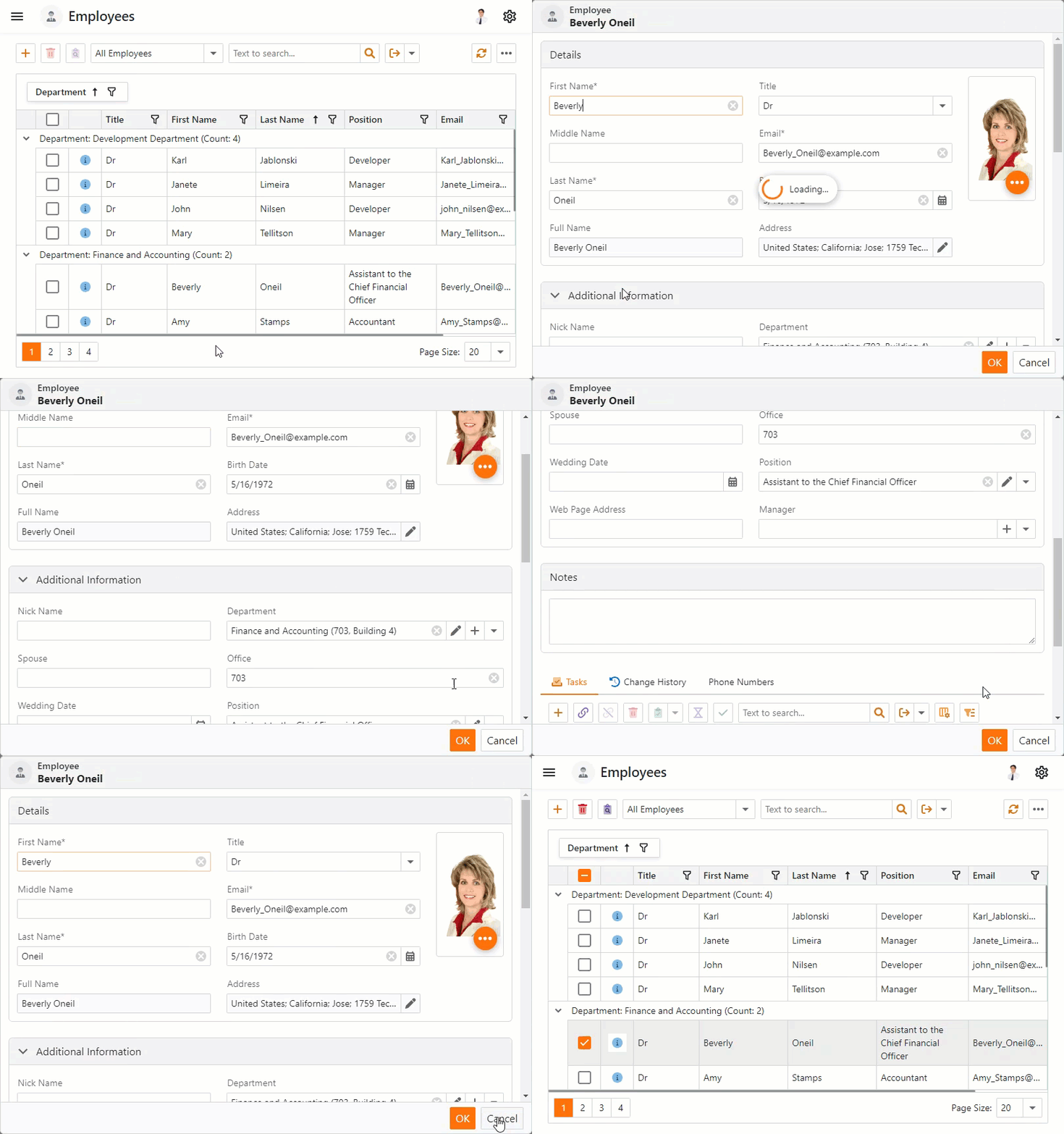
The instructions below explain how to add an Action to the Employee List View grid. The Action opens the selected Employee object’s Detail View in a pop-up window.
Navigate to the MainDemo.Module\Controllers folder. Create a new View Controller and name it ShowPopupViewController.
Replace the auto-generated code with the following code snippet:
using DevExpress.ExpressApp.Actions;
using DevExpress.ExpressApp.Editors;
using DevExpress.ExpressApp;
using DevExpress.Persistent.Base;
using MainDemo.Module.BusinessObjects;

namespace MainDemo.Module.Controllers {
    public class ShowPopupViewController : ObjectViewController<ListView, Employee> {
        private PopupWindowShowAction popupAction;
        public ShowPopupViewController() : base() {
            popupAction = new PopupWindowShowAction(this, "ShowPopup", PredefinedCategory.ListView) {
                SelectionDependencyType = SelectionDependencyType.RequireSingleObject,
                ImageName = "State_Validation_Information"
            };
            popupAction.CustomizePopupWindowParams += PopupAction_CustomizePopupWindowParams;
        }
        private void PopupAction_CustomizePopupWindowParams(object sender, CustomizePopupWindowParamsEventArgs e) {
            IObjectSpace objectSpace = e.Application.CreateObjectSpace(typeof(Employee));
            Employee currentObject = objectSpace.GetObject(ViewCurrentObject);
            DetailView detailView = e.Application.CreateDetailView(objectSpace, currentObject);
            e.View = detailView;
            e.Maximized = true;
        }
    }
}
Rebuild the project and run the application. Navigate to the
EmployeeList View. Click the Action’s icon in a grid row.
- ASP.NET Core Blazor
Use ActionAttribute to Add an Inline Action to a List View Grid
The instructions below explain how use a method of an entity class and ActionAttribute to add an Action to the Task List View grid.
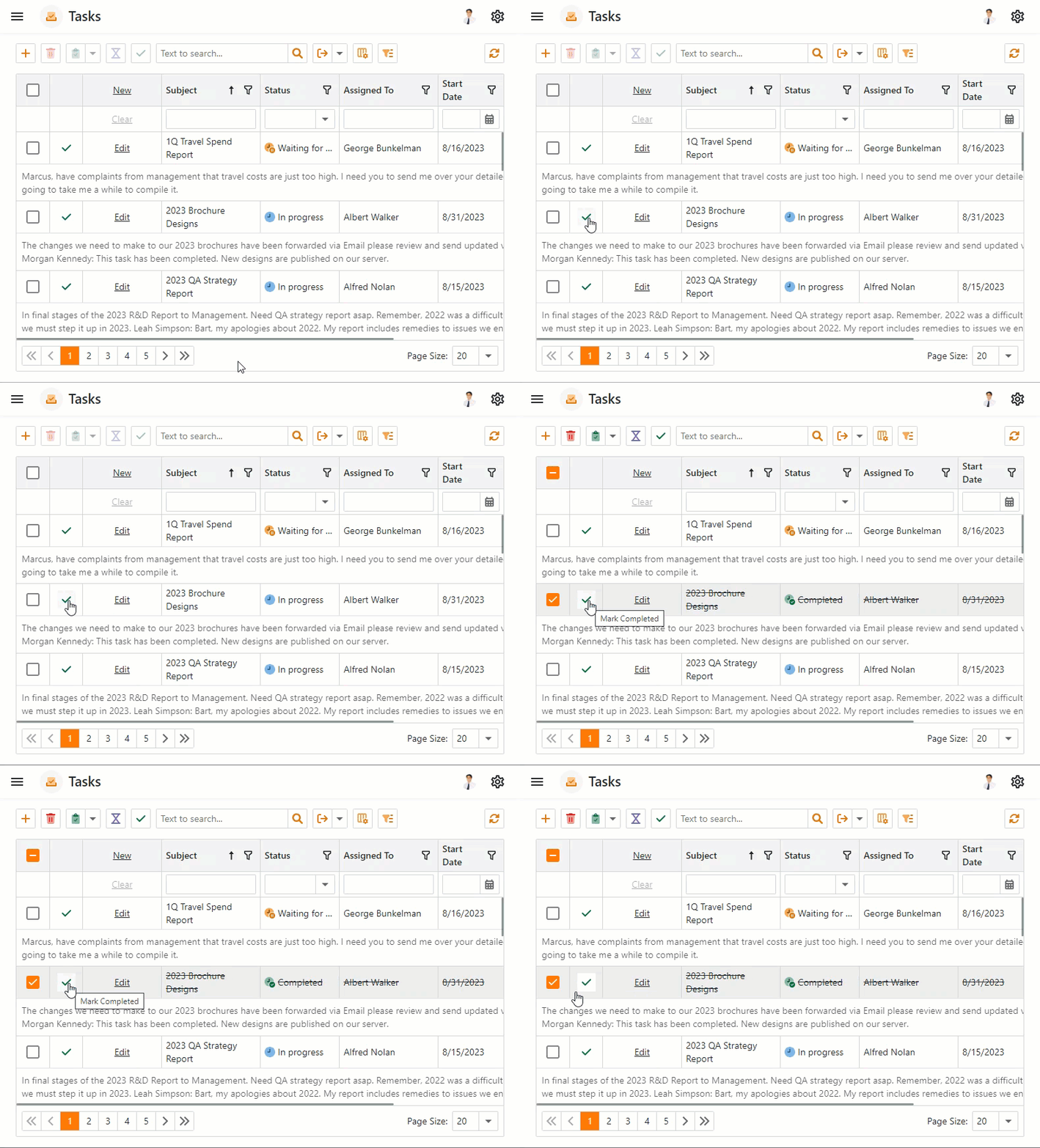
In ASP.NET Core Blazor application, when a user clicks the Action, the status of the selected Task object changes to Completed.
Navigate to the MainDemo.Module\BusinessObjects folder and open the Task.cs file.
Add the
MarkCompletedmethod to the class:// ... using System.ComponentModel; using DevExpress.Persistent.Base; using DevExpress.Persistent.BaseImpl.EF; using System.Text.Json.Serialization; namespace MainDemo.Module.BusinessObjects; [DefaultProperty(nameof(Subject))] public class Task : BaseObject { // ... [Action(ImageName = "State_Task_Completed", SelectionDependencyType = MethodActionSelectionDependencyType.RequireSingleObject)] public void MarkCompleted() { Status = TaskStatus.Completed; } // ... } //...ActionAttribute maps the Action to the
RecordEditAction Container category.Rebuild the project and run the application. Navigate to the
TaskList View and click the Action’s icon in a grid row.
- ASP.NET Core Blazor
Customize Inline Action Control
The code sample below demonstrates how to change the tooltip message of inline Actions. Actions are embedded in a List View (grid control) that displays Task objects.
Cast the CustomizeControlEventsArgs.Control object to ListEditorInlineActionControl and handle its CustomizeInlineActionButton event:
using DevExpress.ExpressApp;
using DevExpress.ExpressApp.Blazor.Editors.ActionControls;
using DevExpress.ExpressApp.SystemModule;
using MainDemo.Module.BusinessObjects;

namespace MainDemo.Blazor.Server.Controllers {
    public class CustomizeInlineActionController : ObjectViewController<ListView, DemoTask> {
        private void Action_CustomizeControl(object sender, DevExpress.ExpressApp.Actions.CustomizeControlEventArgs e) {
            if (e.Control is ListEditorInlineActionControl control) {
                control.CustomizeInlineActionButton += Control_CustomizeInlineActionButton;
            }
        }
        private void Control_CustomizeInlineActionButton(object sender, DevExpress.ExpressApp.Blazor.Components.CustomizeInlineActionButtonEventArgs e) {
            if (e.DataItem is DemoTask task) {
                e.Tooltip = $"Change the status '{task.Status}' to 'Completed'";
            }
        }
        protected override void OnFrameAssigned() {
            base.OnFrameAssigned();
            var objectMethodController = Frame.GetController<ObjectMethodActionsViewController>();
            if (objectMethodController != null) {
                var action = objectMethodController.Actions.FirstOrDefault(s => s.Id == "Task.MarkCompleted");
                if (action != null) {
                    action.CustomizeControl += Action_CustomizeControl;
                }
            }
        }
    }
}