Register a Built-in XAF Module
- 3 minutes to read
XAF includes a number of ready-to-use built-in modules. This topic describes how to register a built-in module in a new or existing XAF application.
Register a Built-in XAF Module in an Existing .NET Application
- Install the NuGet package that contains the module.
- Navigate to the MyApplication.Blazor.Server\Startup.cs (Blazor) or MyApplication.Win\Startup.cs (WinForms) file and call the module-related
Add*method to register the module.
The following code samples register Reports, Dashboards, and Office modules in the application.
public class Startup {
   // ...
   public void ConfigureServices(IServiceCollection services) {
         // ...
         services.AddXaf(Configuration, builder => {
            // ...
            builder.Modules
               .AddReports(/*...*/)
               .AddDashboards(/*...*/)
               .AddOffice(/*...*/)
            // ...
         });
   }
}
Display the list of module NuGet packages and AddModule methods
Register a Module in the Module Project
You can use the ModuleBase.RequiredModuleTypes property to specify required dependencies for your module. XAF loads these dependent modules with the current module. Follow the steps below to register additional modules in the Module project:
- Install the NuGet package that contains the module to register.
- Add additional modules to the RequiredModuleTypes list in the MyApplication.Module\Module.cs file.
public sealed class _MyApplicationModule : ModuleBase {
   //...
   public _MyApplicationModule() {
      InitializeComponent();
      this.RequiredModuleTypes.Add(typeof(DevExpress.ExpressApp.SystemModule.SystemModule));
      this.RequiredModuleTypes.Add(typeof(DevExpress.ExpressApp.ReportsV2.ReportsModuleV2));
      this.RequiredModuleTypes.Add(typeof(DevExpress.ExpressApp.Dashboards.DashboardsModule));
      this.RequiredModuleTypes.Add(typeof(DevExpress.ExpressApp.Office.OfficeModule));
      // ...
   }
}
Display the list of module types and NuGet packages
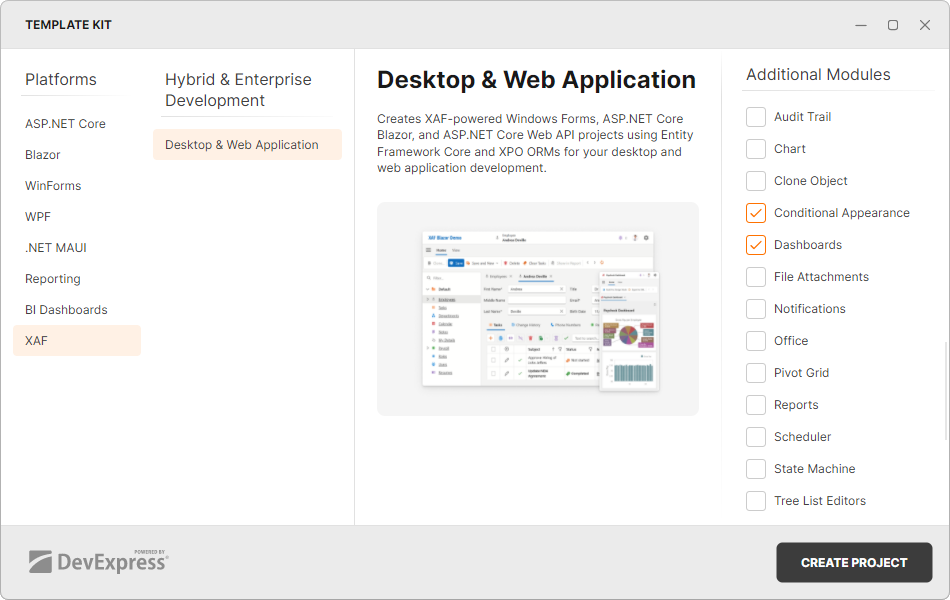
Add a Built-in XAF Module in a New .NET Application
You can add modules to your application when you use the Template Kit to create a new XAF solution. Select modules in the Additional Modules section.
See Also