Dashboards Module
- 3 minutes to read
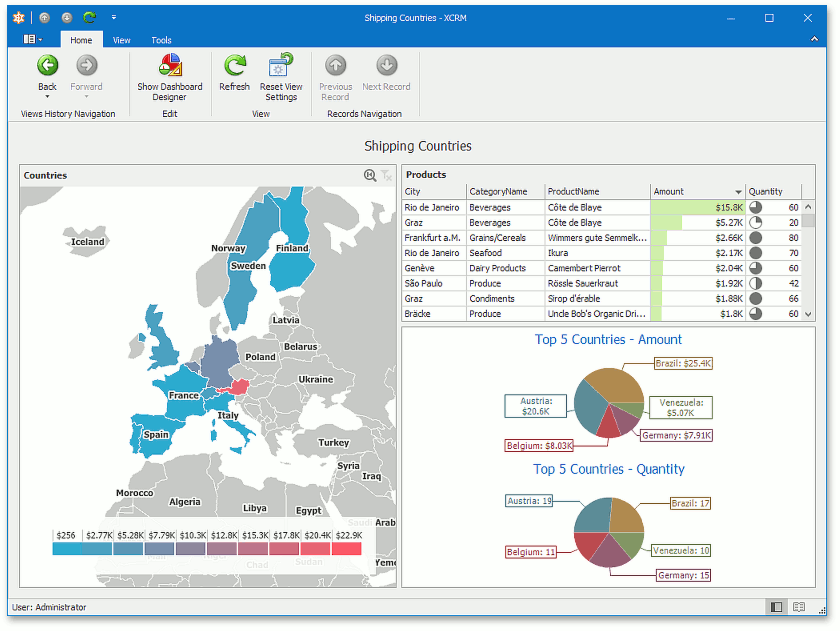
The Dashboards Module integrates DevExpress Dashboard controls into ASP.NET Core Blazor and Windows Forms XAF applications.
Tip
You can find examples of this functionality in the Employee Management Demo. The demo illustrates various XAF features (including Dashboards Module) and is located in the %PUBLIC%\Documents\DevExpress Demos 26.1\Components\XAF\MainDemo.NET.EFCore folder.
Dashboards Module Capabilities
For users | For developers |
|---|---|
|
|
Note
The DashboardView and Dashboard Module are different XAF concepts. Dashboard Views display multiple XAF Views in a single Frame - they do not use DevExpress Dashboard controls.
Dashboards Module Components
Modules
| Platform | Module | NuGet package |
|---|---|---|
| Platform-agnostic | DashboardsModule | DevExpress.ExpressApp.Dashboards |
| WinForms | DashboardsWindowsFormsModule | DevExpress.ExpressApp.Dashboards.Win |
| ASP.NET Core Blazor | DashboardsBlazorModule | DevExpress.ExpressApp.Dashboards.Blazor |
Integrated DevExpress Controls
- ASP.NET Core Blazor
- DxDashboard
- Windows Forms
- DashboardDesigner
DashboardViewer
View Items
The Dashboards Module uses the following View Items to host dashboard controls in ASP.NET Core Blazor and Windows Forms XAF applications:
Application Model Extensions
The Dashboards Module extends the Application Model with the IModelDashboardNavigationItem node and adds the IModelClassDashboardsVisibility.IsVisibleInDashboards property to the IModelClass node.
Dashboard Data Type
The Module uses the following built-in business objects (entities) that implement the IDashboardData interface to store dashboards:
- DevExpress.Persistent.BaseImpl.DashboardData (in XPO-based applications)
- DevExpress.Persistent.BaseImpl.EF.DashboardData (in EF Core-based applications)
You can also use a custom dashboard data type. To do this, follow these steps:
- Inherit from
DashboardDataor implement theIDashboardDatainterface. - Add the required properties and register the custom type in DbContext.
Specify the custom type in the following properties:
- Dashboards.Blazor.DashboardsOptions.DashboardDataType property in the YourSolutionName\Blazor.Server\Startup.cs file
- Dashboards.Win.DashboardsOptions.DashboardDataType property in the YourSolutionName\Win\Startup.cs file
Tip
To display the DashboardData object’s Detail View, use the technique listed in the following help topic: Ways to Show a View.
Add the Dashboards Module to Your Application
Use either of the following techniques to add the Dashboards Module:
You can add modules to your application when you use the Template Kit to create a new XAF solution. Select modules in the Additional Modules section.
In XAF applications, you can call the AddDashboards(IModuleBuilder<IWinApplicationBuilder>, Action<DashboardsOptions>) / AddDashboards(IModuleBuilder<IBlazorApplicationBuilder>, Action<DashboardsOptions>) method in your WinForms / ASP.NET Core Blazor application builder.
- If you do not use an application builder, you can add these Modules to the ModuleBase.RequiredModuleTypes collection of the platform-specific Module.
Tip
Make sure that you installed the appropriate platform-specific NuGet package.
The following additional steps may be required:
Entity Framework Core-Based Application
Navigate to the MySolution.Module\BusinessObjects\MySolutionDbContext.cs file and include the DashboardData entity in the data model:
using DevExpress.Persistent.BaseImpl.EF;
// ...
public class MySolutionEFCoreDbContext : DbContext {
    // ...
    public DbSet<DashboardData> DashboardData { get; set; }
    // ...
}
Navigate to the MySolution.Blazor.Server\Startup.cs file (ASP.NET Core Blazor) or the MySolution.Win\Startup.cs file (Windows Forms) and specify the
DashboardDataTypeexplicitly:// ... builder.Modules .AddDashboards(options => { options.DashboardDataType = typeof(DevExpress.Persistent.BaseImpl.EF.DashboardData); })
Troubleshooting
For more information on how to resolve problems that can occur when you use the Dashboards Module, refer to the following topic: Dashboards Module Troubleshooting Guide.