Pivot Grid Module
- 4 minutes to read
The Pivot Grid module is a comprehensive data analysis, data mining, and visual reporting solution for XAF ASP.NET Core Blazor and Windows Forms applications. The module includes List Editors that adapt DevExpress Pivot Grid controls to XAF.
The module allows you to summarize large amounts of data in a multidimensional pivot table where users can sort, group, and filter the data.
Important
The Pivot Grid List Editor for Blazor is currently available as a Community Technology Preview (CTP).
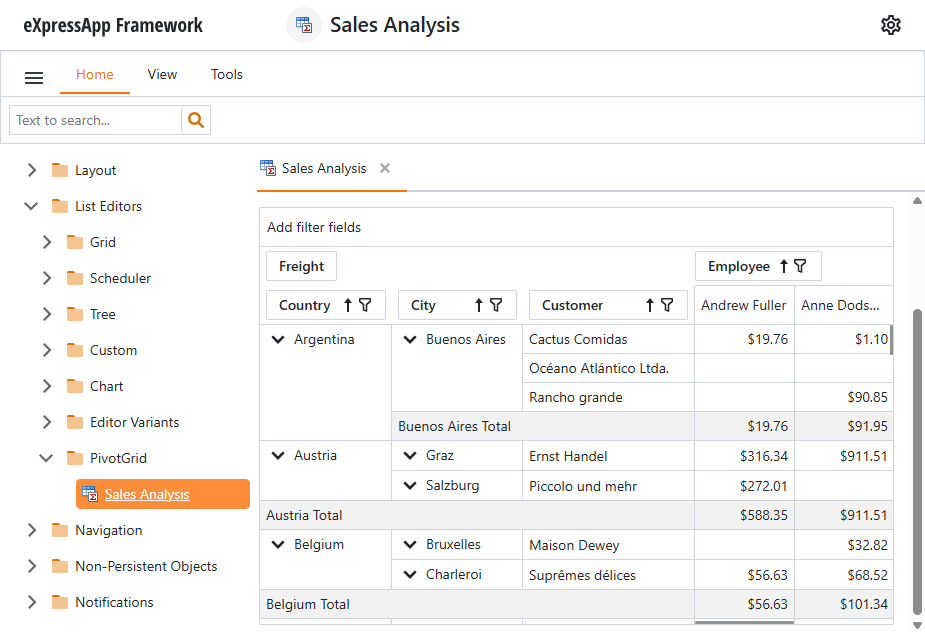
Blazor Pivot Grid List Editor
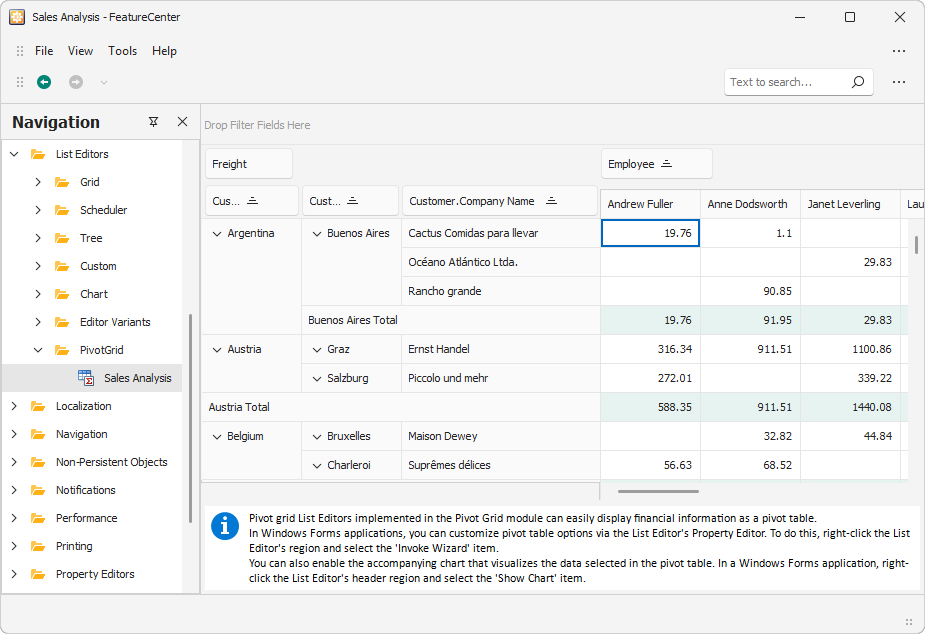
Windows Forms Pivot Grid List Editor
DevExpress Controls Used by the Pivot Grid Module
The Pivot Grid module uses the following DevExpress controls:
| Platform | XAF List Editor | Underlying Control |
|---|---|---|
| ASP.NET Core Blazor (CTP) | DxPivotGridListEditor | DxPivotTable |
| Windows Forms | PivotGridListEditor | PivotGridControl |
You can access these controls and change their behavior in code. For additional details, refer to the How to: Access the Grid Component in a List View topic.
Add the Pivot Grid Module to Your Application
The Pivot Grid module for Blazor is included in the main Blazor module (DevExpress.ExpressApp.Blazor), making it readily available without any additional configuration.
To enable the Pivot Grid module in your Windows Forms application, follow the steps below:
- Install the NuGet package that contains the Office module: DevExpress.ExpressApp.PivotGrid.Win.
Navigate to the SolutionName.Win\Startup.cs file and call the AddPivotGrid method:
using DevExpress.ExpressApp;
using DevExpress.ExpressApp.Design;
using DevExpress.ExpressApp.Win;
using DevExpress.ExpressApp.Win.ApplicationBuilder;
// ...
public class ApplicationBuilder : IDesignTimeApplicationFactory {
    public static WinApplication BuildApplication(string connectionString) {
        var builder = WinApplication.CreateBuilder();
        builder.UseApplication<SolutionNameWindowsFormsApplication>();
        builder.Modules
            .AddPivotGrid()
            // ...
XAF offers other methods to integrate the Pivot Module into a newly created or existing application. For additional information, refer to the following topic: Register a Built-in XAF Module.
Display Pivot Grid List Editors in a List View
To display a List View as a Pivot Grid, follow these steps:
- Open the Model Editor for the following files:
- Blazor: SolutionName.Blazor.Server\Model.xafml
- WinForms: SolutionName.Win\Model.xafml
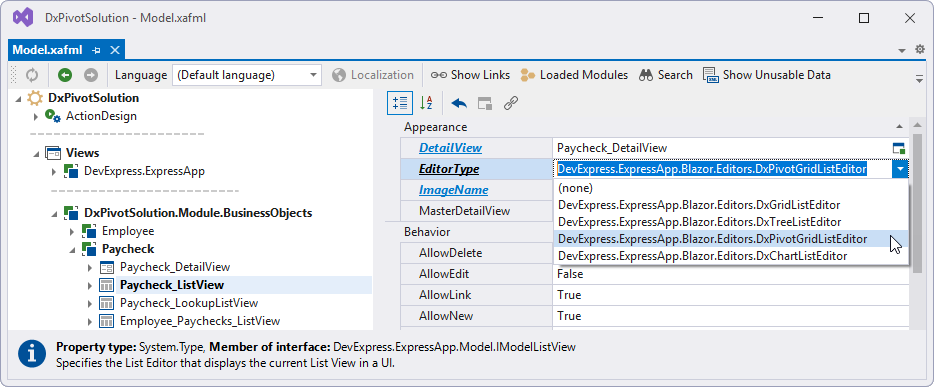
- Navigate to the required List View node: SolutionName | Views | SolutionName.Module.BusinessObjects | ClassName | ClassName_ListView.
- Set the EditorType property to the following values:
- Blazor:
DevExpress.ExpressApp.Blazor.Editors.DxPivotGridListEditor - WinForms:
DevExpress.ExpressApp.PivotGrid.Win.PivotGridListEditor
- Blazor:
Customize Pivot Grid Settings (Blazor)
You can customize the Pivot Grid settings in the following ways:
- Specify Column Model Settings
- Use the Model Editor to configure the following Pivot Grid column settings: PivotFieldArea, PivotGroupInterval, and PivotSummaryType.
- Customize the Pivot Grid Model
- The PivotGridModel replicates parameters of the underlying DxPivotTable component. Use these parameters to configure the Pivot Grid before it is created.
- Handle the ComponentCaptured Event
- The PivotGridModel does not allow direct access to the current component state or its methods. Handle the ComponentCaptured event to access the underlying component instance and its full API.
Customize Pivot Grid Settings (WinForms)
The entities below allow you to adjust the Pivot Grid module’s settings in the Application Model:
| Interface | Description |
|---|---|
| IModelPivotListView | Extends the Application Model with the PivotSettings node. |
| IModelPivotSettings | Includes settings for the pivot grid List Editor that a List View displays. |
| IPivotSettings | Declares members of classes that specify settings of the pivot grid List Editor that a List View displays. |
These settings are available in the Application Model‘s Views | <ListView> | PivotSettings node.

The IPivotSettings.CustomizationEnabled property is set to true (default) and allows end users to modify their pivot table settings.
Important
Set the IPivotSettings.CustomizationEnabled property value depending on your application’s prevailing usage scenario.
- Choose
falseif you want to present data to end users in a specific layout. Thefalsesetting gives you full control over the pivot table’s behavior and prevents users from changing it. - Choose
trueif end users need to frequently modify the pivot table’s data layout. Note that once the user changes the pivot table’s settings, they are recorded to the Application Model‘s top-layer .xafml file and you cannot overwrite them. In some cases, an end user’s settings may merge with the modifications the developer specified in lower-level *.xafml files, and cause unpredictable behavior. The end user can get your default settings by right-clicking the pivot table and selecting **Reset View Settings* in the context menu.
The IPivotSettings.Settings property value is a complex XML-formatted string. To manage these settings, click the Settings ellipsis button ( ).
).

The button invokes the PivotGrid designer that allows you to modify the pivot table’s layout and other preferences.

Examples
You can find examples of the Pivot Grid List Editor implementation in the following demos:
- In the Employee Management Demo (Blazor), navigate to Payroll > Views > Pivot View (see the online demo).
- In the Feature Center Demo (XPO), navigate to List Editors > Pivot Grid (see the online demo).